Basic tags and their usage
Podstawowe znaczniki i ich zastosowanie
the basic HTML commands and using them to create a website,
the principles of creating websites,
how to explain it in English.
Answer introductory questions:
How to make text bold on the webpage using HTML?
How to tilt text on a webpage using HTML?
How to enlarge text on a webpage using HTML?
How to make text centred on a webpage using HTML?
Read the text, write all tags used in the HTML language appearing in the text and on the slides.
You already know the basic structure of the HTML code of a webpage. It's time to get to know the next tags that will allow you to place other, more complex elements on the page. Here are the most important ones.
In the page header section, we place <META> tags that define the basic parameters of the page. These are tags for which we do not use a closing tagtag.
It is a tag that informs the browser about the encodingencoding of Polish characters we chose. The most frequently used ones are windows‑1250, iso‑8859‑2 and UTF‑8. This is an important tag, because if the page source code is written using a different set of characters than indicated in the tag, the Polish diacritics will be displayed incorrectly.
<META http‑equiv=”content‑type” content=”text/html; charset=iso‑8859‑2”/><META NAME=”Keywords” CONTENT=”keyword‑1, keyword‑2, key‑3”/>TagTag indicating keywords that determine the basic content of our website and helping to find our site in the browser. This is a significant tag if we want our site to be properly searched.
A tag that displays a „description” of a page after it has been found by the search engine. Internet search engines also analyse it in order to catalogue it better.
<META NAME=”Description” CONTENT=”description clarifying what is the content of our website”><META> tag can also:
indicate who is the author of the page,
inform what editor we used to create our page,
inform in what language the page was created.
<META NAME="Author" CONTENT="Site author data">
<META NAME="Generator" CONTENT="the name of the HTML editor used">
<META NAME="Language" CONTENT="en">In the content section of the page, we can use the following tags
TEXT
<P> </P> - a paragraphparagraph that is a text fragment beginning with a new line.
<BR/> - go to the next row. This tagtag occurs individually. Browser interpreting the html code omits characters such as enter, tabulator and more than one space - so‑called white spacewhite space.
Probably you will ask what if you want to separate words with more than one space? In such cases, we use the without the use of less than and greater than symbols.
<B> </B> - bold text.
<I> </I> - lean text (so‑called italic).
<U> </U> - underlined text.
<FONT> </FONT> - defining the font style of the text, wherein the style is determined by an additional parameter inside the tag.
<FONT color=”colour”> </FONT> - as colour we use English‑language names such as white, black, etc. But it is better to use the colour code in the hexadecimal notation (colour code tables you will find without problems on the Internet under the phrase „HTML colour codes”).
<FONT size=”size”> </FONT> - where the size is given in the so‑called „points” and it takes numerical values 2, 3, 4, 5, etc.
Displaying text in red and font size 3 pts.
<FONT color=”red” size=”3”>text</FONT>GRAPHIC
To insert a picture in the body of the page, use the tagtag:
<IMG SRC=”image filename with extension”/> - this tag also does not have a closing tag. From a practical point of view (smaller size = faster page loading), it is appropriate that these are JPEG or PNG files.
LINKS
Links expertly called hypertext links. Link, it is a text or drawing highlighted in a way, that after clicking on it we will be transferred to another webpage. The following tag serves this purpose:
<A HREF=”link_address „> link_test </A>
The page will display the text „Go to Google”, and when you click on this text, the Google page will be loaded to your browser window.
<A HREF=http://google.pl> Go to Google </A>TABLES
We can also put tables on the page, and with proper skill, use these tags to divide the entire page into the required layout.
We use tables to properly separate individual parts of the page.
The table definition consists of three basic tags: <TABLE> </TABLE> denoting the beginning and end of the page, <TR> </TR> defining the beginning and end of the line, and <TD> </TD> defining the beginning and end of the column in the row.
So a table consisting of only one cell will be encoded like this:
<TABLE>
	<TR>
    	<TD>the contents of one cell</TD>
    </TR>
</TABLE>
However, a table consisting of two lines and two columns:
<TABLE>
	<TR>
		<TD>row 1 column 1</TD>
		<TD>row 1 column 2</TD>
	</TR>
	<TR>
		<TD>row 2 column 1</TD>
		<TD>row 2 column 2</TD>
	</TR>
</TABLE>Of course, there are many many more tags than described here. You can get to know them through HTML tags tables, HTML language courses that you can find on the Internet or in an IT bookstore.
And now, in addition, you'll find information about a few of them in the slideshow:
Zasób interaktywny dostępny pod adresem https://zpe.gov.pl/a/DTHsy13tj
Combine in pairs.
<FONT color=”colour”> | table |
<FONT size=”size”> | inserting a picture |
<H1> | bold text |
<P> | text highlighting |
<BR> | font size |
| column in the table |
<HR> | heading |
<I> | new line |
<U> | special character for non‑breaking space |
<MARK> | font colour |
<LI> | horizontal line separating the text |
<B> | link |
<SMALL> | list item |
<TABLE> | paragraph |
<TD> | underlining the text |
<TR> | italic (lean) text |
<A HREF=”hyperlink_address”> | reduction of the text size as many times as the tag is used |
<IMG SRC=” image filename with extension”> | row in the table |
Take a newspaper and rewrite the text of one of articles to create a separate webpage. Use html language and known tags.
A few HTML code tags worth remembering:
tag FONT with the definition of colours,
tag FONT with the definition of the size,
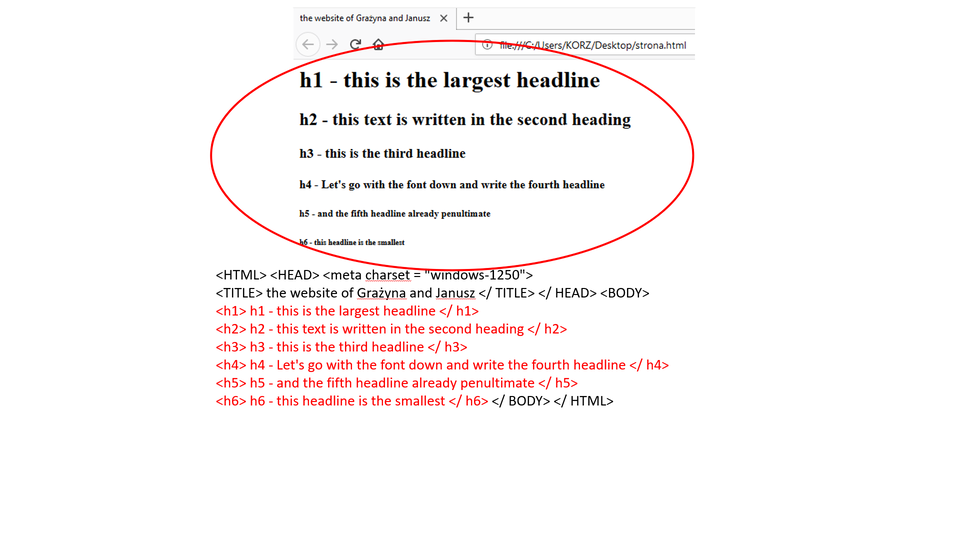
tags from H1 to H6 - headings,
tag P - paragraph,
tag BR - new line,
special character for non‑breakable space,
tag HR - horizontal line separating the text,
tag I - italic text,
tag B - bold text,
tag U - underline text,
tag MARK - highlighted text,
tag SMALL reduction of the text size as many times as the tag is used,
tag TABLE creates table,
tag TD - column in the table,
tag TR - row in the table,
tag A with hyperlink address
tag IMG with image filename with extension
Exercises
Determine which sentence is true.
- The <b> tag is information about italic text.
- To insert an image, use the <photo> tag.
- To write a text in the next line, use the <br> tag.
- It is not possible to insert a link to another page in the html language.
- To set font colour to blue, use the <font color ='blue'> tag.
Create a page about an imaginary person using the tags you know.
Please write your name and surname in large, clear blue letters.
Highlight your date of birth.
Write the address in italicsitalics.
To what school he/she goes, write in bold font.
Separate the above information from the hobby with a horizontal line
Describe his/her hobby using other tags.
Remember to insert a photo and state who is the author of the page.
Describe in English the role of tags in creating webpagescreating webpages using HTML.
Indicate which pairs of expressions or words are translated correctly.
- tworzenie stron - creating web pages
- przeglądarka - web browser
- znacznik - tag
- spacja niełamliwa - non-breaking space
- nagłówek - white space
- tabulator - encoding
- tag
- białe znaki
- znacznik
- spacja niełamliwa
- linia pozioma
- tworzenie stron
- creating web pages
- non-breaking space
- white space
- horizontal rule
Glossary
tworzenie stron
Nagranie dostępne na portalu epodreczniki.pl
wymowa w języku angielskim: creating webpages
kodowanie
Nagranie dostępne na portalu epodreczniki.pl
wymowa w języku angielskim: encoding
nagłówek
Nagranie dostępne na portalu epodreczniki.pl
wymowa w języku angielskim: heading
kursywa
Nagranie dostępne na portalu epodreczniki.pl
wymowa w języku angielskim: italics
spacja niełamliwa
Nagranie dostępne na portalu epodreczniki.pl
wymowa w języku angielskim: non‑breaking space
akapit, paragraf
Nagranie dostępne na portalu epodreczniki.pl
wymowa w języku angielskim: paragraph
tabulator
Nagranie dostępne na portalu epodreczniki.pl
wymowa w języku angielskim: tab
znacznik
Nagranie dostępne na portalu epodreczniki.pl
wymowa w języku angielskim: tag
przeglądarka
Nagranie dostępne na portalu epodreczniki.pl
wymowa w języku angielskim: web browser
białe znaki
Nagranie dostępne na portalu epodreczniki.pl
wymowa w języku angielskim: white space
Keywords
creating webpagescreating webpages
non‑breaking spacenon‑breaking space
tagtag
white spacewhite space