A web browserweb browserweb browser is a software which is installed on almost every computer, tablet or smartphone. None of web browsers is completely securesecuresecure. Each of them has security vulnerabilities, which can be eagerly detected by hackers and used to breach the security of your computer. It is crucial to make every effort to ensure that your “favourite” web browser is as secure as possible.
Phishing is an internet fraudInternet fraudinternet fraud, the form of data theft, that is committed by displaying a „malicious website” in order to obtain sensitive information such as passwords, account details or credit card numbers. Phishing attacks are carried out most often with the use of fake email messages which encourage the recipients to update their personal data at fake websites, which usually look identical to the legitimate sites.
Malware is a malicious software. It can be also placed on websites.
The anti‑phishing and anti‑malware security of web browsers checks every visited website and compares it with the lists of known malicious websites. This feature should be obligatorily enabled. Anti‑phishing security that blocks fake websites is one of the features of the majority of available antivirus software. When you use the Internet, make sure that this feature is enabled in your antivirus programme.
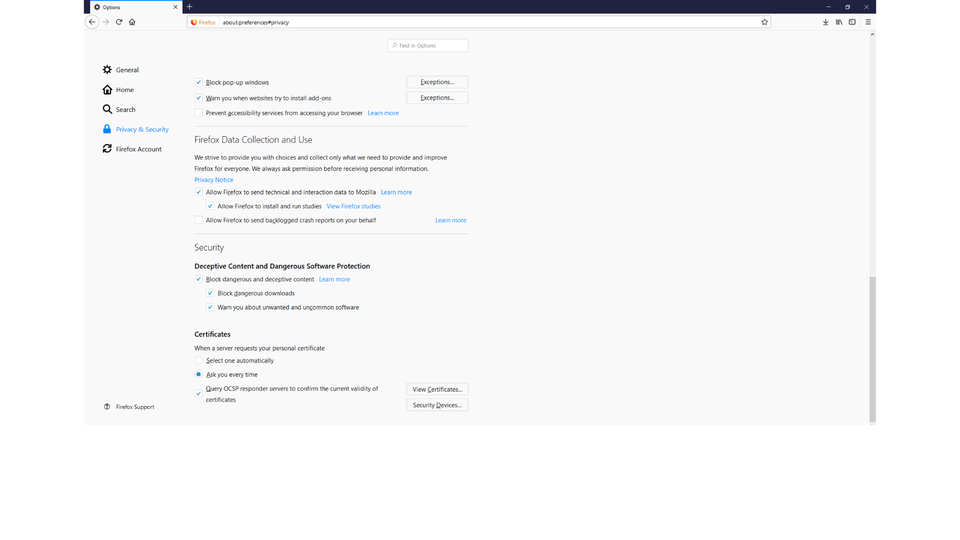
Pokaz multimedialny - sekcje ustawień przeglądarek dotyczące bezpieczeństwa i prywatności. Instrukcja obsługi z poziomu klawiatury: 1. Uruchomienie aplikacji - ENTER, 2. Na każdym ze slajdów czytany jest automatycznie tekst alternatywny po polsku, 3. Przy pierwszym uruchomieniu na pierwszym slajdzie, czytanie tekstu po angielsku - TAB, 4. Przejście między slajdami: do następnego slajdu - TAB, do poprzedniego slajdu - TAB + SHIFT, 5. Przejście do czytania napisu po angielsku - strzałka w górę + strzałka w dół (czyta tekst po angielsku widoczny na slajdzie).
Pokaz multimedialny - sekcje ustawień przeglądarek dotyczące bezpieczeństwa i prywatności. Instrukcja obsługi z poziomu klawiatury: 1. Uruchomienie aplikacji - ENTER, 2. Na każdym ze slajdów czytany jest automatycznie tekst alternatywny po polsku, 3. Przy pierwszym uruchomieniu na pierwszym slajdzie, czytanie tekstu po angielsku - TAB, 4. Przejście między slajdami: do następnego slajdu - TAB, do poprzedniego slajdu - TAB + SHIFT, 5. Przejście do czytania napisu po angielsku - strzałka w górę + strzałka w dół (czyta tekst po angielsku widoczny na slajdzie).
Check in the web browserweb browserweb browser installed on your computer in what location temporary filestemporary filestemporary files and files downloaded from the Internet are stored.
SSL is a protocol used to provide securesecuresecure data transmission over computer networks by encrypting the data transmitted. It uses certificatescertificatescertificates issued by trusted certificate authorities. Due to its application, more secure services have been developed, e.g. HTTPS, which is the encrypted version of HTTP.
Most web browsers display information about the type of communication and certificatescertificatescertificates of websites in their address baraddress baraddress bar.
RZJbQr86h306f
Zrzut ekranu przedstawia fragment paska przeglądarki w połączeniem zabezpieczonym, czyli szyfrowanym (zielona kłódka przy adresie internetowym). W przykładzie strona banku PKO BP.
Encryped connection.
Source: GroMar, licencja: CC BY 3.0.
R1AhnA8QExnwh
Zrzut ekranu przedstawia fragment paska przeglądarki w połączeniem nieszyfrowanym, informacja pod adresem Connection is not Secure.
Unencrypted connection.
Source: GroMar, licencja: CC BY 3.0.
ReQJxgCxhksB5
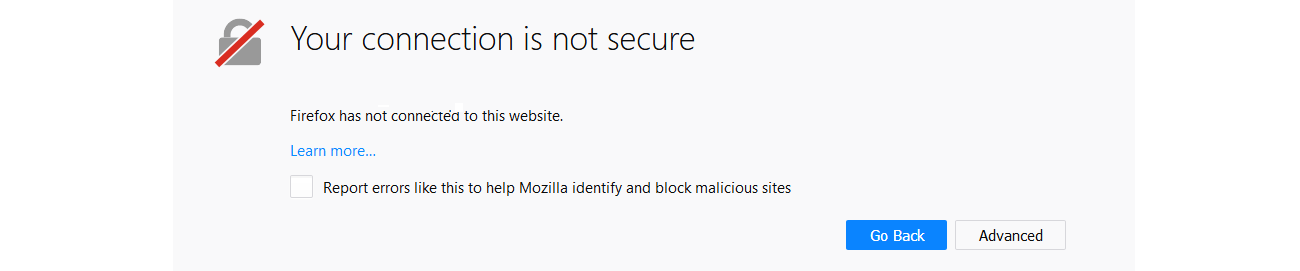
Zrzut z ekranu przedstawia formatkę Firefox z informującą o błędnym certyfikacie lub jego braku. Rysunek przekreślonej kłódki, obok informacja napisana dużymi Your connection is not secure. Poniżej mniejszymi literami zapisany teks: Firefox has not connected to this website. Learn more ... niżej Checkbox Report errors like this to help Mozilla identify and block malicious sites. Na dole dwa przyciski Go Back oraz Advanced.
When the computer you are using is not your own, do not perform operations that require transmitting sensitive data. If you have to use this computer, enable private browsingprivate browsingprivate browsing. Using private browsing disables collecting and storing information about the operations of a user. When you leave the privacy mode of your browser, none of the following information should be saved:
protects data during their transfer by encrypting them.
Exercises
Exercise 1
RTya4aOT8S90k
Wersja alternatywna ćwiczenia: Determine which sentences are true. Możliwe odpowiedzi: 1. configure the security and privacy settings of your browser, 2. do not keep your browser updated , 3. use encrypted connections (HTTPS protocol), 4. be cautious when you install add-ons , 5. check short links, 6. regularly empty the temporary files folder of your browser, 7. do not save your passwords in web browsers, 8. use an administrator account while browsing the Internet , 9. do not block pop-up ads
Wersja alternatywna ćwiczenia: Determine which sentences are true. Możliwe odpowiedzi: 1. configure the security and privacy settings of your browser, 2. do not keep your browser updated , 3. use encrypted connections (HTTPS protocol), 4. be cautious when you install add-ons , 5. check short links, 6. regularly empty the temporary files folder of your browser, 7. do not save your passwords in web browsers, 8. use an administrator account while browsing the Internet , 9. do not block pop-up ads
Determine which sentences are true.
configure the security and privacy settings of your browser
do not keep your browser updated
use encrypted connections (HTTPS protocol)
be cautious when you install add-ons
check short links
regularly empty the temporary files folder of your browser
do not save your passwords in web browsers
use an administrator account while browsing the Internet
do not block pop-up ads
zadanie
Source: GroMar, licencja: CC BY 3.0.
Exercise 2
Create a multimedia presentation about browser security. Find the needed information and the comparisons of the features of web browsers on the Internet.
Exercise 3
Visit the Web of Trust (WOT) website. Describe in English its idea.
Exercise 4
R1GMOQCDTZcqI
Wersja alternatywna ćwiczenia: Indicate which pairs of expressions or words are translated correctly. Możliwe odpowiedzi: 1. pasek adresu - address bar, 2. certyfikaty - certificates, 3. ciasteczka - cookies, 4. oszustwo internetowe - Internet fraud, 5. pliki tymczasowe - pop-up ads, 6. wyskakujące okna - temporary files
Wersja alternatywna ćwiczenia: Indicate which pairs of expressions or words are translated correctly. Możliwe odpowiedzi: 1. pasek adresu - address bar, 2. certyfikaty - certificates, 3. ciasteczka - cookies, 4. oszustwo internetowe - Internet fraud, 5. pliki tymczasowe - pop-up ads, 6. wyskakujące okna - temporary files
Indicate which pairs of expressions or words are translated correctly.
pasek adresu - address bar
certyfikaty - certificates
ciasteczka - cookies
oszustwo internetowe - Internet fraud
pliki tymczasowe - pop-up ads
wyskakujące okna - temporary files
zadanie
Source: GroMar, licencja: CC BY 3.0.
RmPQ9vZ64LGkr1
Interaktywna gra, polegająca na łączeniu wyrazów w pary w ciągu jednej minuty. Czas zaczyna upływać wraz z rozpoczęciem gry. Jeden ruch to odkrywanie najpierw jednej potem drugiej karty z wyrazem. Każdy wyraz jest odczytywany. Kolejny ruch to odkrywanie trzeciej i czwartej karty. W ten sposób odsłuchasz wszystkie wyrazy. Nawigacja z poziomu klawiatury za pomocą strzałek, odsłuchiwanie wyrazów enterem lub spacją. Znajdź wszystkie pary wyrazów.
Interaktywna gra, polegająca na łączeniu wyrazów w pary w ciągu jednej minuty. Czas zaczyna upływać wraz z rozpoczęciem gry. Jeden ruch to odkrywanie najpierw jednej potem drugiej karty z wyrazem. Każdy wyraz jest odczytywany. Kolejny ruch to odkrywanie trzeciej i czwartej karty. W ten sposób odsłuchasz wszystkie wyrazy. Nawigacja z poziomu klawiatury za pomocą strzałek, odsłuchiwanie wyrazów enterem lub spacją. Znajdź wszystkie pary wyrazów.
Match Polish terms with their English equivalents.
cookies
wyskakujące okna
address bar
pop-up ads
odwiedzane witryny
pasek adresu
ciasteczka
certificates
certyfikaty
visited websites
Source: Zespół autorski Politechniki Łódzkiej, licencja: CC BY 3.0.