Look at the picture and try to name the devices on it. Check your answers by clicking on the numbers in the picture.
REDdkvbJFw1Pj
Ilustracja interaktywna przedstawia zestaw komputerowy: monitor LCD, jednostka centralna, klawiatura, mysz komputerowa. Na ilustracji widoczne są numery, a na nich podpisy. 1. LCD monitor {audio}, 2. central unit {audio}, 3. keyboard {audio}, 4. mouse {audio}
Ilustracja interaktywna przedstawia zestaw komputerowy: monitor LCD, jednostka centralna, klawiatura, mysz komputerowa. Na ilustracji widoczne są numery, a na nich podpisy. 1. LCD monitor {audio}, 2. central unit {audio}, 3. keyboard {audio}, 4. mouse {audio}
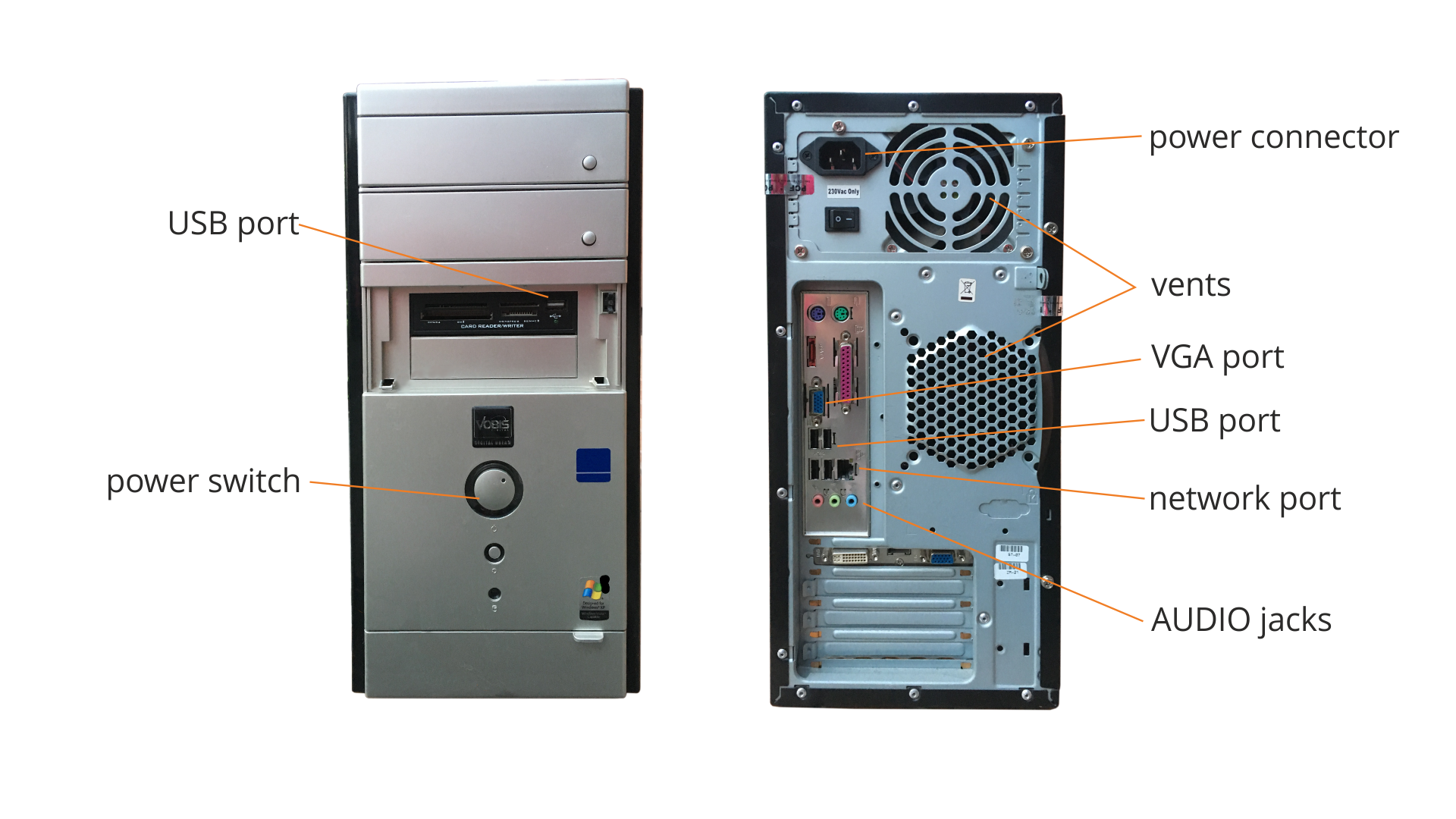
The computer casecasecase includes buttons, slots and ports. Below is their location.
RAzloKInETUhB
Obudowa komputera zawiera przyciski, gniazda i porty. Poniżej pokazane jest ich przykładowe rozmieszczenie oraz angielskie nazwy. Od przodu port - USB port i przycisk power switch. Na tylnej części obudowy można znaleźć przycisk - power connector, wiatraki - vens, porty - VGA port, USB port, network port oraz gniazdo AUDIO jack.
We can connect other devices to the basic computer set. Some of them do not have to be connected directly with a cable. We say then that these are wireless devices.
Examples of devices that we can connect:
printer - a devicedevicedevice used to make a persistent text or image representation on various media, which include paper, foil, etc.,
loudspeakers - a device for sound reproduction,
headphones - a device used to reproduce sound, worn on or around the head,
microphone (often integrated with headphones) - device for transmitting sound,
scanner - a device used for converting text or image on a persistent carrier (paper, photographic paper) to a digital form.
camera - a device used to transfer images,
USB memorymemorymemory device - a portable device that allows data transfer,
gamepad - a device used to control computer games.
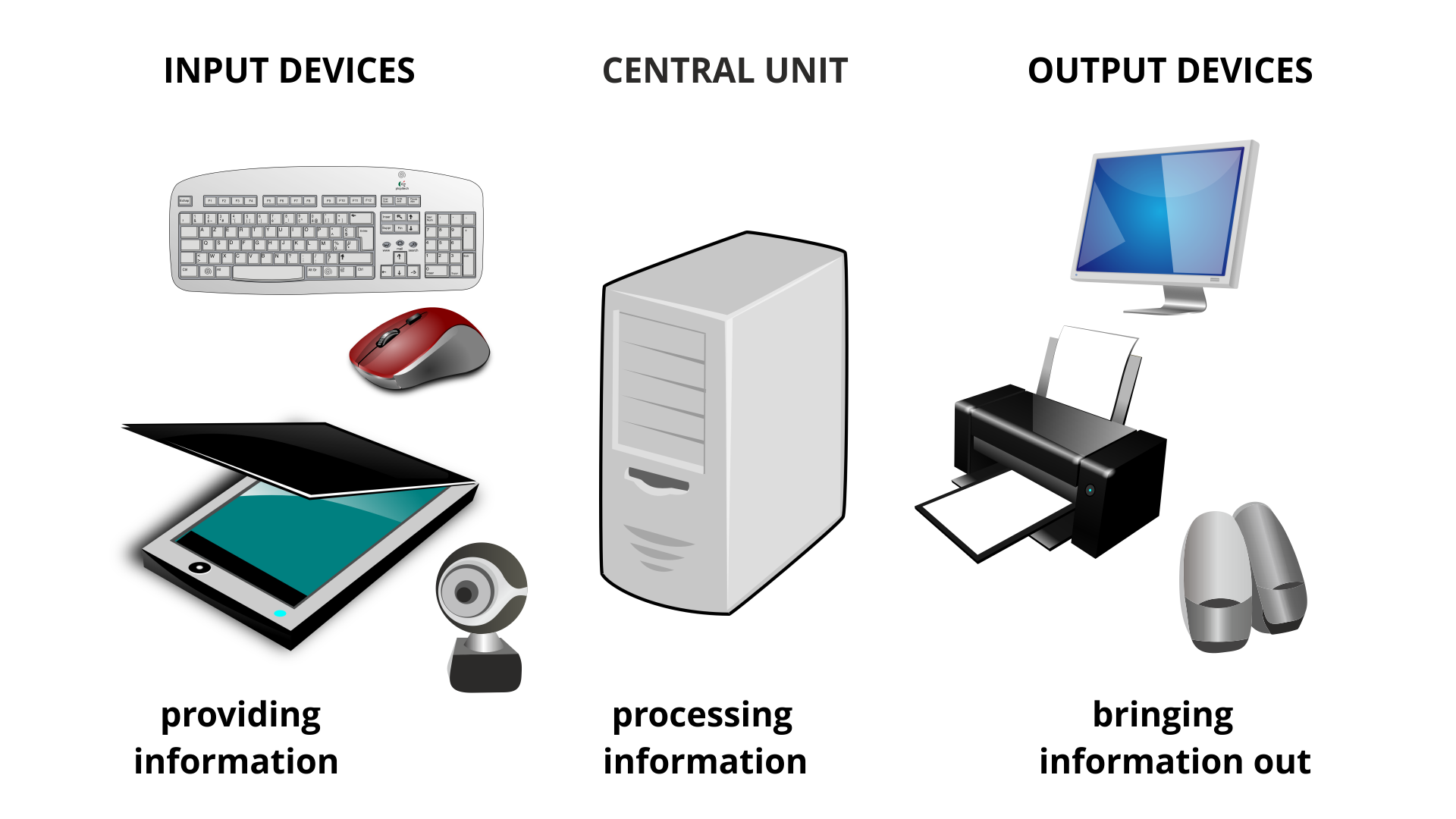
Devices connected to the central unitcentral unitcentral unit are called peripheral devices. We divide them into input and output devices. The task of input devices is to provide information to the central unit, and the task of output devices is to bring information outside.
R5FZsLkMeheHZ1
Ilustracja przedstawia urządzenia podłączane do jednostki centralnej oraz samą jednostkę. Po lewej stronie znajdują się urządzenia wyjściowej: klawiatura, mysz komputerowa, kamerka, tablet. Nad nimi napis: INPUT DEVICES, a pod nimi providing information. W centralnej części ilustracji znajduje się rysunek jednostki centralnej. Nad nim napis: CENTRAL UNIT, a pod nim processing information. Po prawej stronie zładują się przykłady urządzeń wyjściowych: monitor, drukarka, głośniki. Nad nimi napis: OUTPUT DEVICES, a pod nimi bringing information out.
The basic computer set includes: central unitcentral unitcentral unit, monitor, keyboardkeyboardkeyboard and mouse.
Exercises
Exercise 1
R1KEHz81etoyM
Wersja alternatywna ćwiczenia: Consolidate the knowledge about components of a computer set which of the following are not in the central unit? Możliwe odpowiedzi: 1. processor, 2. RAM, 3. mouse, 4. graphics card, 5. USB memory, 6. sound card, 7. hard drive, 8. camera, 9. motherboard, 10. CD/DVD drive, 11. case
Wersja alternatywna ćwiczenia: Consolidate the knowledge about components of a computer set which of the following are not in the central unit? Możliwe odpowiedzi: 1. processor, 2. RAM, 3. mouse, 4. graphics card, 5. USB memory, 6. sound card, 7. hard drive, 8. camera, 9. motherboard, 10. CD/DVD drive, 11. case
Consolidate the knowledge about components of a computer set which of the following are not in the central unit?
processor
RAM
mouse
graphics card
USB memory
sound card
hard drive
camera
motherboard
CD/DVD drive
case
zadanie
Source: GroMar, licencja: CC BY 3.0.
Exercise 2
Which of the devices mentioned above in the text belong to the input devices and which to output devices? Some devices, depending on the situation, can play a double role.
Wersja alternatywna ćwiczenia: Indicate which pairs of expressions or words are translated correctly. Możliwe odpowiedzi: 1. jednostka centralna - central unit, 2. klawiatura - keyboard, 3. obudowa - case, 4. płyta główna - motherboard, 5. dysk twardy - graphic card, 6. karta graficzna - keyboard
Wersja alternatywna ćwiczenia: Indicate which pairs of expressions or words are translated correctly. Możliwe odpowiedzi: 1. jednostka centralna - central unit, 2. klawiatura - keyboard, 3. obudowa - case, 4. płyta główna - motherboard, 5. dysk twardy - graphic card, 6. karta graficzna - keyboard
Indicate which pairs of expressions or words are translated correctly.
jednostka centralna - central unit
klawiatura - keyboard
obudowa - case
płyta główna - motherboard
dysk twardy - graphic card
karta graficzna - keyboard
zadanie
Source: GroMar, licencja: CC BY 3.0.
RLWVICumRMfns1
Interaktywna gra, polegająca na łączeniu wyrazów w pary w ciągu jednej minuty. Czas zaczyna upływać wraz z rozpoczęciem gry. Jeden ruch to odkrywanie najpierw jednej potem drugiej karty z wyrazem. Każdy wyraz jest odczytywany. Kolejny ruch to odkrywanie trzeciej i czwartej karty. W ten sposób odsłuchasz wszystkie wyrazy. Nawigacja z poziomu klawiatury za pomocą strzałek, odsłuchiwanie wyrazów enterem lub spacją. Znajdź wszystkie pary wyrazów.
Interaktywna gra, polegająca na łączeniu wyrazów w pary w ciągu jednej minuty. Czas zaczyna upływać wraz z rozpoczęciem gry. Jeden ruch to odkrywanie najpierw jednej potem drugiej karty z wyrazem. Każdy wyraz jest odczytywany. Kolejny ruch to odkrywanie trzeciej i czwartej karty. W ten sposób odsłuchasz wszystkie wyrazy. Nawigacja z poziomu klawiatury za pomocą strzałek, odsłuchiwanie wyrazów enterem lub spacją. Znajdź wszystkie pary wyrazów.
Match Polish terms with their English equivalents.
monitor
device
mysz
klawiatura
central unit
mouse
jednostka centralna
keyboard
urządzenie
monitor
Source: Zespół autorski Politechniki Łódzkiej, licencja: CC BY 3.0.