Choose any place you would like to invite friends to. Prepare its descriptiondescriptiondescription and photo. Think about whether you want your friends to get there on foot or your chosen means of transportation.
Online maps provide a huge amount of information. They allow you not only to use road maps, but also allow you to route between selected points, measure the distance between them, and provide communication solutions. We are informed about traffic, road accidents, and possible detours. Maps provide satellite and aerial images, as well as a three‑dimensional view of most places on Earth.
Users can create their own maps, add information to them, and share them or their location with others. Using the right applications on smartphones allows you to save and view the places and routes that you have travelled.
The data needed to display maps is stored in the network search engine resources, i.e. in so‑called cloud.
In order to create your own map and share it with others, do the following:
Log in to Google and open the map in your browser.
On the map, find the point that interests you.
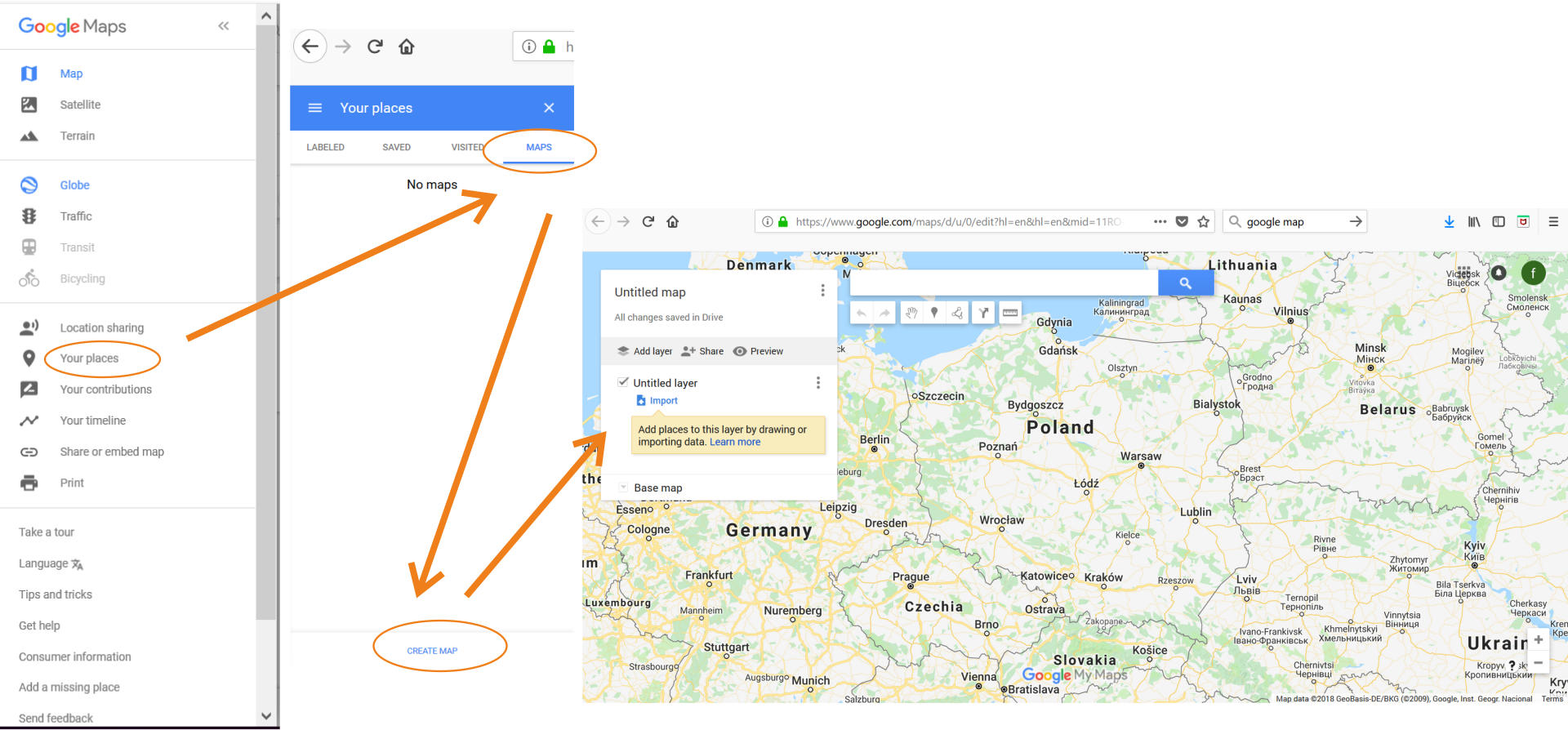
Click the My Places button, and then in the new window that opens, click the Map button.
The next dialog window will open, in the lower part, click the Create map button.
REDycx6cRS7Fv1
Na ilustracji przedstawiona jest sekwencja zrzutów ekranu z wyszukiwarki Google przedstawiająca kolejność wyświetlania się paneli prowadząca do stworzenia własnej mapy. W pierwszej kolejności należy wybrać polecenie Your place, następnie w otworzonym menu wybrać Maps i polecenie Create maps. Otworzy ono nowe okno z mapą, w którym można tworzyć własną mapę dodając warstwy (Add Layer) importując miejsca, dane, zdjęcia (Import).
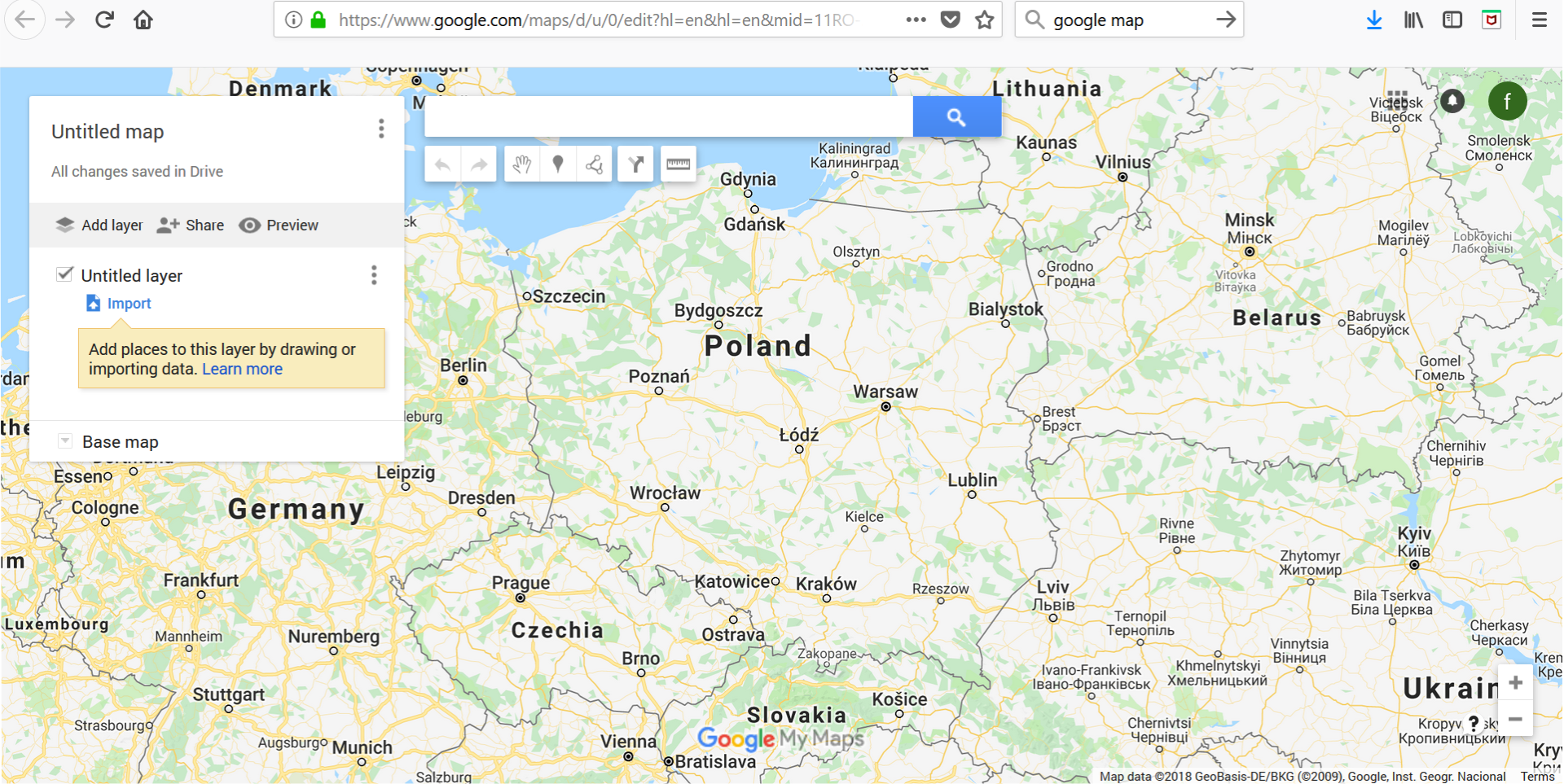
In this way, you have reached a place where you can create your maps, add items, photos, etc.
Click in the upper right corner on the Map without name field. Another window will open, in which you can give your map a title and add a descriptiondescriptiondescription.
Rk6u3YdTFPeXl1
Zrzut ekranu przedstawia okno wyszukiwarki Google, w którym można modyfikować i tworzyć własne mapy. Tło okna stanowi fragment mapy Europy z widoczną Polską (Poland) Po lewej stronie okna znajduje się formatka zatytułowana Untitled map, poniżej napis All changes saved in Drive. Niżej znajduje się menu z poleceniami Add layer, Share, Preview. Pod nim zaznaczony checkbox Untitled layer. Niżej polecenie Import z wyjaśnieniem: Add places to this layer by drawing or importing data oraz link do pomocy: Learn more. Na dole formatki lista rozwijana z wybraną opcję Base map.
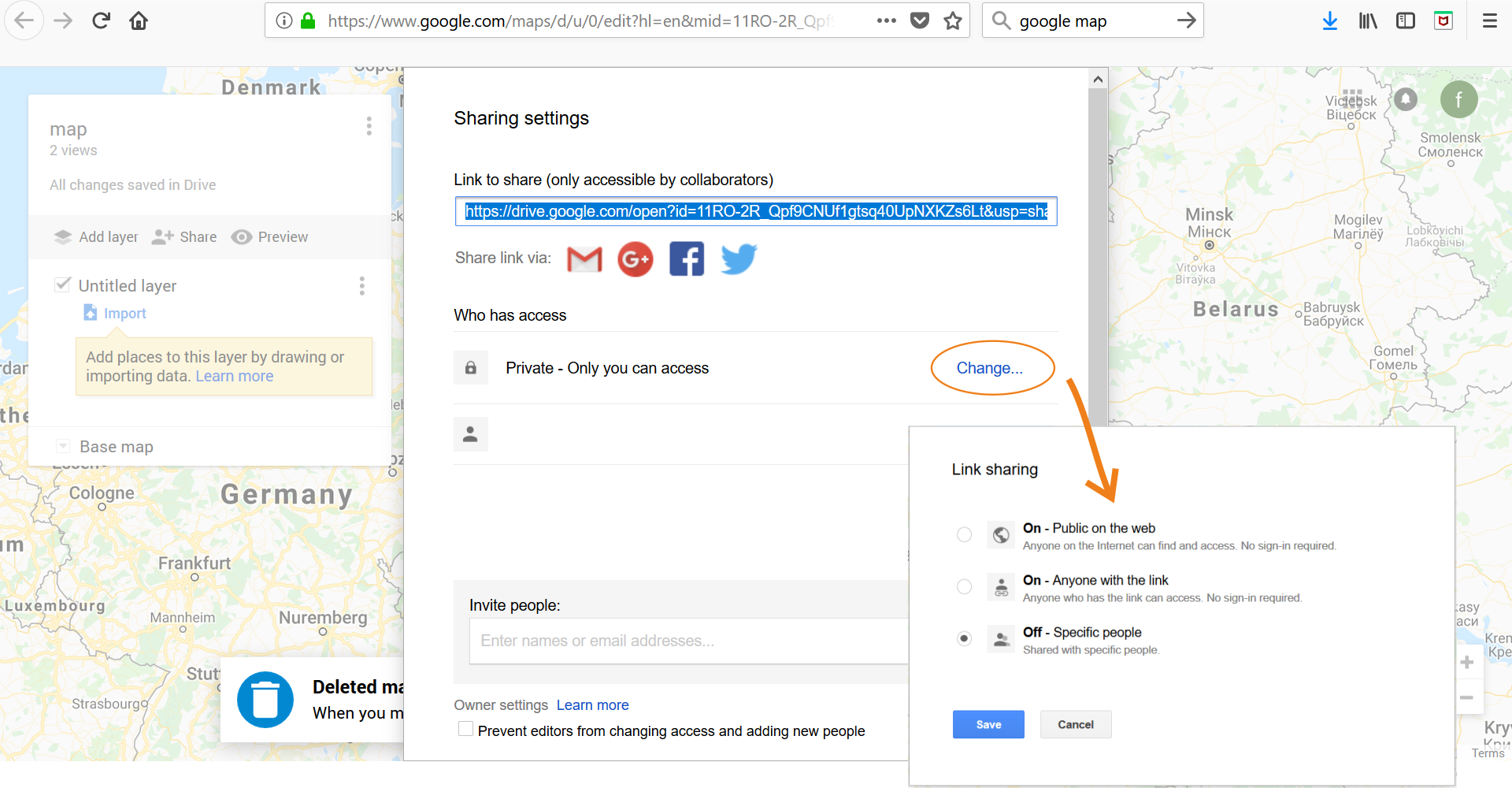
To send the map to other users, click the Share button. If you want the map to be visible only to selected people, you must specify it accordingly.
RVHMOkJzjv0Wa1
Na ilustracji przedstawiona jest sekwencja zrzutów ekranu z wyszukiwarki Google przedstawiająca kolejność wyświetlania się paneli prowadząca do podzielenia się stworzoną przez siebie mapą z innymi użytkownikami. Tło okna stanowi fragment mapy Europy. Po lewej stronie okna znajduje się formatka zrestytuowana Map (został nadany tytuł). Po wybraniu z menu przycisku Sharing pojawia się formularz zatytułowany Sharing settings. Pod tytułem okno tekstowe z linkiem do mapy zatytułowane Lik to share (only accessible by collaborators). Pod nim napis Share via i ikony programów Gmail. Google+, Facebook, Twitter. Poniżej napis Who has access, pod nim ikona z kłódką oraz napis Private - Only you can access. Dalej po prawej stronie link Changes... Niżej ikona przedstawiająca w sposób uproszczony głowę i ramiona człowieka. Na dole formatki pole tekstowe Invite people. Pod nim Owner setting z linkiem do pomocy Learn more oraz checkbox Prevent editors from changing access and adding new people. Po wybraniu linku Change pojawia się formatka, na której można zmienić prawa dostępu do mapy. Widoczne są trzy radiobuttony: On - Public on the web (Anyone on the Internet can find and access. No sign-in required.); On - Anyone with the link (Anyone who has link can access. No sign-in required.); Off - Specific people (Shared with specific people). Na dole dwa przyciski Save oraz Cancel.
Before you send a map, you can modify it accordingly. Zoom in, highlight the fragment, and add the route or distance. You can describe each point on the map, add photos, and name them. There are many possibilities.
RkBzzTAGDhiBN
Ilustracja interaktywna przedstawia sekwencję zrzutów ekranu z wyszukiwarki Google prezentującą proces uzupełniania mapy o własne dane. Wybrane elementu zostały oznaczone ponumerowanymi numerami. 1 - miejsce startu, 3 - miejsce docelowe, 2 - ślad (trasa oznaczona linią przerywaną) według, którego liczona jest odległość. Na ilustracji widoczne są numery, a na nich podpisy. 1. starting point {audio}, 2. the distance to be measured {audio}, 3. destination place {audio}.
Ilustracja interaktywna przedstawia sekwencję zrzutów ekranu z wyszukiwarki Google prezentującą proces uzupełniania mapy o własne dane. Wybrane elementu zostały oznaczone ponumerowanymi numerami. 1 - miejsce startu, 3 - miejsce docelowe, 2 - ślad (trasa oznaczona linią przerywaną) według, którego liczona jest odległość. Na ilustracji widoczne są numery, a na nich podpisy. 1. starting point {audio}, 2. the distance to be measured {audio}, 3. destination place {audio}.
The map's appearance can be checked on a regular basis using the Preview function. The map is automatically saved in the cloud.
Once all the necessary elements have been placed on the map and its size matched, it can be sent to interested persons. Click on the Share button to do this. In the Invite people field, enter email addresses and specify the function - whether the recipientrecipientrecipient can only view or modify and share the map with others. Finally, press the send function (the function will appear when you start entering the address). You can also send a copy to yourself by marking it in this form.
Google tools (and other search engines) allow you to create your own maps, complement them with the information you need and send to different recipients.
Exercises
Exercise 1
R1OC5QX3i6B7V
Wersja alternatywna ćwiczenia: Determine which sentences are true. Możliwe odpowiedzi: 1. Google Maps allows you to analyse your travel time depending on distance and traffic., 2. By creating your own map, you can add layers containing a lot of information., 3. We cannot add videos to maps., 4. To share the map with other users, we need to give it a name.
Wersja alternatywna ćwiczenia: Determine which sentences are true. Możliwe odpowiedzi: 1. Google Maps allows you to analyse your travel time depending on distance and traffic., 2. By creating your own map, you can add layers containing a lot of information., 3. We cannot add videos to maps., 4. To share the map with other users, we need to give it a name.
Determine which sentences are true.
Google Maps allows you to analyse your travel time depending on distance and traffic.
By creating your own map, you can add layers containing a lot of information.
We cannot add videos to maps.
To share the map with other users, we need to give it a name.
zadanie
Source: GroMar, licencja: CC BY 3.0.
Exercise 2
Your friends want to visit the place where you live. Plan a route for them and mark it on the map. Place points on it that are worth their attention. Describe them and put pictures, use the Layers option. Share the map with your friends. Grant them the right to modify the map.
Exercise 3
Describe what you should do to create your own map on the Internet.
Exercise 4
R1MW3ipjM1RpN
Wersja alternatywna ćwiczenia: Indicate which pairs of expressions or words are translated correctly. Możliwe odpowiedzi: 1. udostępnianie - sharing, 2. opis - description, 3. wygląd mapy - map’s appereance, 4. zmienianie - modification, 5. odbiorca - describe, 6. wykonawca - recipient
Wersja alternatywna ćwiczenia: Indicate which pairs of expressions or words are translated correctly. Możliwe odpowiedzi: 1. udostępnianie - sharing, 2. opis - description, 3. wygląd mapy - map’s appereance, 4. zmienianie - modification, 5. odbiorca - describe, 6. wykonawca - recipient
Indicate which pairs of expressions or words are translated correctly.
udostępnianie - sharing
opis - description
wygląd mapy - map’s appereance
zmienianie - modification
odbiorca - describe
wykonawca - recipient
zadanie
Source: GroMar, licencja: CC BY 3.0.
R1ImFIa71kTT51
Interaktywna gra, polegająca na łączeniu wyrazów w pary w ciągu jednej minuty. Czas zaczyna upływać wraz z rozpoczęciem gry. Jeden ruch to odkrywanie najpierw jednej potem drugiej karty z wyrazem. Każdy wyraz jest odczytywany. Kolejny ruch to odkrywanie trzeciej i czwartej karty. W ten sposób odsłuchasz wszystkie wyrazy. Nawigacja z poziomu klawiatury za pomocą strzałek, odsłuchiwanie wyrazów enterem lub spacją. Znajdź wszystkie pary wyrazów.
Interaktywna gra, polegająca na łączeniu wyrazów w pary w ciągu jednej minuty. Czas zaczyna upływać wraz z rozpoczęciem gry. Jeden ruch to odkrywanie najpierw jednej potem drugiej karty z wyrazem. Każdy wyraz jest odczytywany. Kolejny ruch to odkrywanie trzeciej i czwartej karty. W ten sposób odsłuchasz wszystkie wyrazy. Nawigacja z poziomu klawiatury za pomocą strzałek, odsłuchiwanie wyrazów enterem lub spacją. Znajdź wszystkie pary wyrazów.
Match Polish terms with their English equivalents.
description
wygląd mapy
zmienianie
Google Maps
udostępnianie
sharing
modification
opis
map’s appereance
mapy Google
Source: Zespół autorski Politechniki Łódzkiej, licencja: CC BY 3.0.