When creating a presentation, you can use a ready template or presentation theme. In such cases, the background of the slide is strictly (pre)defined by the slide pattern. When creating a presentation from scratch, one of the first steps in creating a presentation is to design a slide background. In PowerPoint, to do this, go to the Design ribbon and choose Background Design.
R6wX9UaVv6BwY
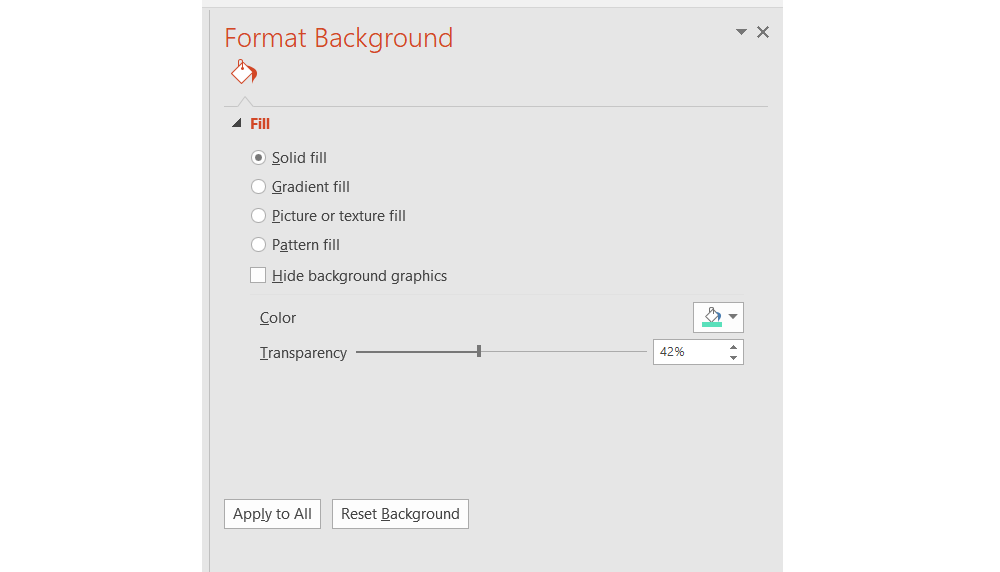
Zrzut z ekranu przedstawia formatkę zatytułowaną Format Background. Z prawej strony pod tytułem widoczna jest ikonografika przedstawiająca wiadro z farbą. Poniżej napis: Fill. Niżej ułożone jeden pod drugim radiobutony: Solid fil, Gradient fil, Picture or texture fill, Pattern fill. Jako ostatni umieszczony jest checkbox: Hide background graphics. Niżej z lewej strony napis Color, po przeciwnej stronie lista rozwijana menu oznaczona wiadrem z farbą. Niżej suwak Transparency, po prawej stronie okna tekstowe z wpisaną wartością 42%.
Dialog box: Designing the background
Source: GroMar, licencja: CC BY 3.0.
R13Q5HUygwzyg
Prezentacja multimedialna przedstawia różne typy tła w slajdach w programie PowerPoint. Przechodząc pomiędzy slajdami dowiesz się jak nazywają się one w języku angielskim. Obsługa elementu multimedialnego z poziomu klawiatury: 1. Uruchomienie aplikacji - ENTER. 2. Na każdym ze slajdów czytany jest automatycznie tekst alternatywny po polsku. 3. Przy pierwszym uruchomieniu na pierwszym slajdzie, czytanie tekstu po angielsku - TAB. 4. Przejście między slajdami: do następnego slajdu - TAB, do poprzedniego slajdu - TAB + SHIFT. 5. Przejście do czytania napisu po angielsku - strzałka w górę + strzałka w dół (czyta tekst po angielsku widoczny na slajdzie).
Prezentacja multimedialna przedstawia różne typy tła w slajdach w programie PowerPoint. Przechodząc pomiędzy slajdami dowiesz się jak nazywają się one w języku angielskim. Obsługa elementu multimedialnego z poziomu klawiatury: 1. Uruchomienie aplikacji - ENTER. 2. Na każdym ze slajdów czytany jest automatycznie tekst alternatywny po polsku. 3. Przy pierwszym uruchomieniu na pierwszym slajdzie, czytanie tekstu po angielsku - TAB. 4. Przejście między slajdami: do następnego slajdu - TAB, do poprzedniego slajdu - TAB + SHIFT. 5. Przejście do czytania napisu po angielsku - strzałka w górę + strzałka w dół (czyta tekst po angielsku widoczny na slajdzie).
The gradient is the filling of the area with a smooth tonal transition between at least two colours. The gradient fillgradient fillgradient fill in PowerPoint can be created with non‑standard colours and specific brightness, transparency, gradient directions and their positioning.
The texture is usually a small picturepicturepicture, which repeatedly appears on the background of the slide, gives the impression of a continuous surface with an interesting structure. The advantage of using textures is the small size of such graphics.
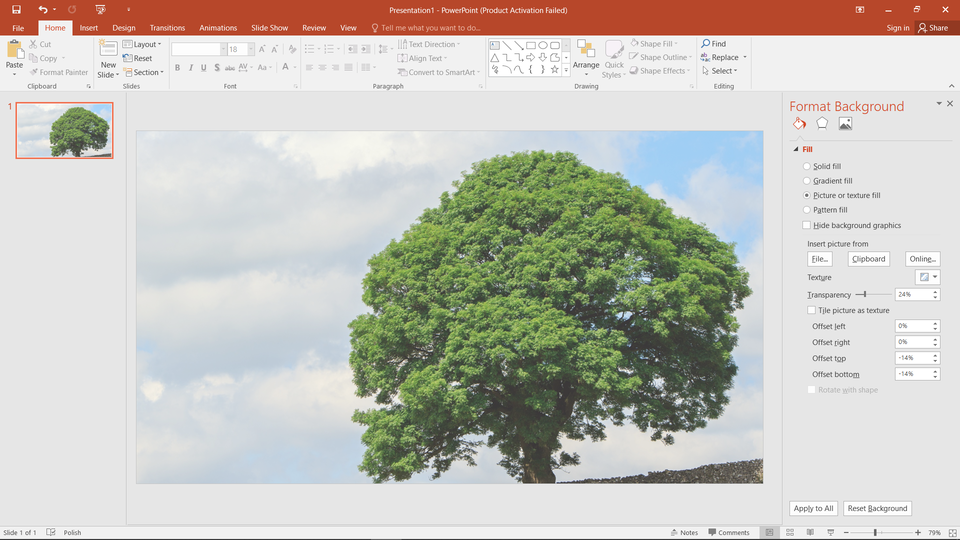
When using an image file as a background of the slide, the file should be prepared in a way which ensures the readability of the contents of individual elements of the presentation. The most common are files containing ornaments in places where no objects are displayed. Other methods to ensure the readability of the presentation when used, as background image files is to modify their basic properties such as brightness and transparency. The image will look better if its orientation (horizontal or vertical) matches the slide's orientation.
When designing a presentation, you must consistently use colours. However, the colours and background are to support the presentation and cannot dominate it.
Exercises
Exercise 1
RRsHIzhQnHE8m
Wersja alternatywna ćwiczenia: Determine which sentence is true. Możliwe odpowiedzi: 1. The gradient is the fill of the area with a smooth tonal transition between at least two colours., 2. You cannot use custom colours or change the brightness of colours in the gradient fill in PowerPoint., 3. The texture is usually a small picture, which repeatedly used on the background of the slide, gives the impression of a continuous surface with an interesting structure., 4. The disadvantage of using textures is the large size of used graphics., 5. The pattern is a separate, repeating pattern or a random arrangement of repeating elements that gives the impression of a pattern.
Wersja alternatywna ćwiczenia: Determine which sentence is true. Możliwe odpowiedzi: 1. The gradient is the fill of the area with a smooth tonal transition between at least two colours., 2. You cannot use custom colours or change the brightness of colours in the gradient fill in PowerPoint., 3. The texture is usually a small picture, which repeatedly used on the background of the slide, gives the impression of a continuous surface with an interesting structure., 4. The disadvantage of using textures is the large size of used graphics., 5. The pattern is a separate, repeating pattern or a random arrangement of repeating elements that gives the impression of a pattern.
Determine which sentence is true.
The gradient is the fill of the area with a smooth tonal transition between at least two colours.
You cannot use custom colours or change the brightness of colours in the gradient fill in PowerPoint.
The texture is usually a small picture, which repeatedly used on the background of the slide, gives the impression of a continuous surface with an interesting structure.
The disadvantage of using textures is the large size of used graphics.
The pattern is a separate, repeating pattern or a random arrangement of repeating elements that gives the impression of a pattern.
zadanie
Source: GroMar, licencja: CC BY 3.0.
Exercise 2
Design backgrounds that interact with each other using gradient and texture. Use them in one presentation.
Exercise 3
Describe in English what features should a well‑designed background have in a multimedia presentation.
Exercise 4
RHZ4S9igQqiq1
Wersja alternatywna ćwiczenia: Indicate which pairs of expressions or words are translated correctly. Możliwe odpowiedzi: 1. wypełnienie pełne - solid fill, 2. wypełnienie gradientowe - gradient fill, 3. wypełnienie teksturą - textured fill, 4. wypełnienie deseniem - pattern fill, 5. obraz - gradient, 6. gradient - pattern
Wersja alternatywna ćwiczenia: Indicate which pairs of expressions or words are translated correctly. Możliwe odpowiedzi: 1. wypełnienie pełne - solid fill, 2. wypełnienie gradientowe - gradient fill, 3. wypełnienie teksturą - textured fill, 4. wypełnienie deseniem - pattern fill, 5. obraz - gradient, 6. gradient - pattern
Indicate which pairs of expressions or words are translated correctly.
wypełnienie pełne - solid fill
wypełnienie gradientowe - gradient fill
wypełnienie teksturą - textured fill
wypełnienie deseniem - pattern fill
obraz - gradient
gradient - pattern
zadanie
Source: GroMar, licencja: CC BY 3.0.
R4rEwiKqh961L1
Interaktywna gra, polegająca na łączeniu wyrazów w pary w ciągu jednej minuty. Czas zaczyna upływać wraz z rozpoczęciem gry. Jeden ruch to odkrywanie najpierw jednej potem drugiej karty z wyrazem. Każdy wyraz jest odczytywany. Kolejny ruch to odkrywanie trzeciej i czwartej karty. W ten sposób odsłuchasz wszystkie wyrazy. Nawigacja z poziomu klawiatury za pomocą strzałek, odsłuchiwanie wyrazów enterem lub spacją. Znajdź wszystkie pary wyrazów.
Interaktywna gra, polegająca na łączeniu wyrazów w pary w ciągu jednej minuty. Czas zaczyna upływać wraz z rozpoczęciem gry. Jeden ruch to odkrywanie najpierw jednej potem drugiej karty z wyrazem. Każdy wyraz jest odczytywany. Kolejny ruch to odkrywanie trzeciej i czwartej karty. W ten sposób odsłuchasz wszystkie wyrazy. Nawigacja z poziomu klawiatury za pomocą strzałek, odsłuchiwanie wyrazów enterem lub spacją. Znajdź wszystkie pary wyrazów.
Match Polish terms with their English equivalents.
texture
slide background
tekstura
tło slajdu
gradient
deseń
pattern
gradient
Source: Zespół autorski Politechniki Łódzkiej, licencja: CC BY 3.0.