Power Point enables inserting into a presentationpresentationpresentation video files that are located at our local computer as well as linking files available on the internet. Inserting a video filevideo filevideo file directly into the presentation is called embedding, while adding a film from web resources is called linking to a video file. Embedding a video clip is convenient, however it increases the file size. Linking the presentation to a video file results in its low file size, however the linked video may not be available. It is recommended to store the presentations and the linked files in the same directory.
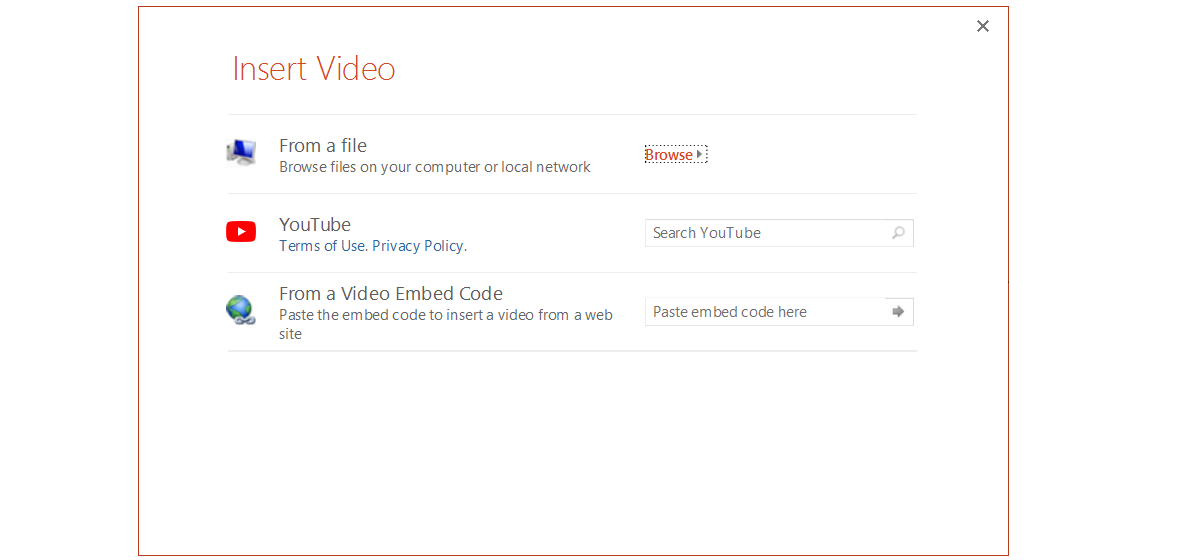
After clicking Video on the Insert tab, the Insert Video box will pop up where you select the location from which the video filevideo filevideo file will be inserted.
RmPyfzZiSHMeR
Zrzut ekranu przedstawia formatkę umożliwiającą wstawianie wideo z trzech źródeł do prezentacji Insert Video. Pod tytułem Ikona komputera, obok opis: From a file, Browse files on your computer or local network. Obok przycisk Browse. Poniżej ikona YouTube (zaokrąglony prostokąt, w środku trójkąt równoramienny skierowany w prawą stronę), obok opis YouTube, Terms of Use, Privacy Policy. Obok okno tekstowe wyszukiwarki: Search YouTube. Poniżej ikona z kulą ziemską, obok napis: From a Video Embed Code, Paste the embed code to insert a video form a web site. Obok pole tekstowe: Paste embed code here.
The additional tools available after selecting the video enable editing and formatting video files.
Ry1wRUrjhIP2f
Ilustracja interaktywna przedstawia kartę nawigacyjną z obszaru narzędzi wideo w programie PowerPoint. Zostały oznaczone wybrane funkcje odtwarzania pliku video w prezentacji PowerPoint. 1 - w sekcji Preview ikona w kształcie trójkąta z wierzchołkiem skierowanym w prawą stronę. 2 - w sekcji Editing ikona przedstawia pojedynczą klatkę filmową, nad nią linijka. 3 - w sekcji Video Options ikona głośnika. 4 oraz 5 - dwa checkboxy w sekcji Video Options, które odpowiadają za sposób odtwarzania. Na ilustracji widoczne są numery, a na nich podpisy. 1. Play {audio}, 2. trim video {audio}, 3. volume {audio}, 4. loop until stopped {audio}, 5. rewind after playing {audio}.
Ilustracja interaktywna przedstawia kartę nawigacyjną z obszaru narzędzi wideo w programie PowerPoint. Zostały oznaczone wybrane funkcje odtwarzania pliku video w prezentacji PowerPoint. 1 - w sekcji Preview ikona w kształcie trójkąta z wierzchołkiem skierowanym w prawą stronę. 2 - w sekcji Editing ikona przedstawia pojedynczą klatkę filmową, nad nią linijka. 3 - w sekcji Video Options ikona głośnika. 4 oraz 5 - dwa checkboxy w sekcji Video Options, które odpowiadają za sposób odtwarzania. Na ilustracji widoczne są numery, a na nich podpisy. 1. Play {audio}, 2. trim video {audio}, 3. volume {audio}, 4. loop until stopped {audio}, 5. rewind after playing {audio}.
The playbackplaybackplaybackoption is the most important and it is set the most commonly. There are two options of starting a film: start on click or automatically. The video can be played in its original size or in the full screen mode.
After selecting a video clip on the slideslideslide, below the film a tool bar will open which contains a PlayplayPlay/StopstopStop button, a progress bar, fast forward/rewind buttons, a timer and a volume control button.
RxXS4vleVnaYG
Ilustracja przedstawia pasek narzędzi odtwarzanego filmu. Od lewej strony trójkąt równoboczny skierowany w prawo. Obok pole tekstowe. Dalej mniejsze trójkąty równoboczne, pierwszy skierowany w lewo, drugi w prawo. Dalej licznik czasu wskazujący 00:00:00. Skrajnie po prawej strony ikona przedstawiająca głosik.
In the case of linked files, the interface provided by the operator of the service storing the films, i.e. YouTube, will be used to play them.
Note: In order to play films from some websites you must download on your computer an additional software, such as for example Adobe Flash Player or QuickTime.
Power Point supports the following video files: avi, mp4, mpg, swf, wmv. If additional coders‑decoders are installed on your computer, PowerPoint can also support other file formats.
If the playbackplaybackplayback is slow, there is a delay between the sound and the video, the frames are lost or the sound is interrupted, you must do some operations to enhance the capacity of playing multimedia files. You will find the information about it in the Help menu.
If a service with video files offers the option of sharing its resources, it is probably able to generate an HTML code that enables embedding the films in Power Point. The procedure of using the embed code in YouTube looks as follows:
find the film,
select the Share option, and then the Embed option,
select the displayed code and copy it into the clipboard,
Create a multimedia presentationpresentationpresentation “A day of my life” including the films which you have recorded earlier, for example during the weekend.
Unfortunately, in view of the constant changes introduced to the interface of YouTube, the most popular service with video files, the option of inserting films from this platform does not always work as it should. Therefore the best option is to use the manual method of inserting videos from YouTube.
When you insert films from social networks, you must conform to the copyright. You should respect the conditions of using a given video, which are detailed in the licence. When you share the films recorded by yourself, remember to ask people who appear in them for permission to publish the videos.
Exercises
Exercise 1
RwPZ6dMe5SD8U
Wersja alternatywna ćwiczenia: Identify the answer including the extensions of video files which are supported by Power Point. Determine which sentence is true. Możliwe odpowiedzi: 1. avi, dvd, mp3, mp4, 2. avi, dvd, mpg, wmv, 3. avi, mp4, mpg, wmv, 4. mp4, mpg, wmv, ts
Wersja alternatywna ćwiczenia: Identify the answer including the extensions of video files which are supported by Power Point. Determine which sentence is true. Możliwe odpowiedzi: 1. avi, dvd, mp3, mp4, 2. avi, dvd, mpg, wmv, 3. avi, mp4, mpg, wmv, 4. mp4, mpg, wmv, ts
Identify the answer including the extensions of video files which are supported by Power Point. Determine which sentence is true.
avi, dvd, mp3, mp4
avi, dvd, mpg, wmv
avi, mp4, mpg, wmv
mp4, mpg, wmv, ts
zadanie
Source: GroMar, licencja: CC BY 3.0.
Exercise 2
Create a short tutorial entitled “The rules of chess”. On separate slides present short films depicting the moves of the particular pieces. You can add description to the films.
Exercise 3
Describe in English inserting films from a local disc into a multimedia presentation.
Exercise 4
RGYS57eIiATQM
Wersja alternatywna ćwiczenia: Indicate which pairs of expressions or words are translated correctly. Możliwe odpowiedzi: 1. prezentacja - presentation, 2. plik wideo - video file, 3. hiperłącze - hyperlink, 4. odtwarzanie filmu - playback, 5. odtwórz - slide, 6. zatrzymaj - play
Wersja alternatywna ćwiczenia: Indicate which pairs of expressions or words are translated correctly. Możliwe odpowiedzi: 1. prezentacja - presentation, 2. plik wideo - video file, 3. hiperłącze - hyperlink, 4. odtwarzanie filmu - playback, 5. odtwórz - slide, 6. zatrzymaj - play
Indicate which pairs of expressions or words are translated correctly.
prezentacja - presentation
plik wideo - video file
hiperłącze - hyperlink
odtwarzanie filmu - playback
odtwórz - slide
zatrzymaj - play
zadanie
Source: GroMar, licencja: CC BY 3.0.
RbsIPIgSv45271
Interaktywna gra, polegająca na łączeniu wyrazów w pary w ciągu jednej minuty. Czas zaczyna upływać wraz z rozpoczęciem gry. Jeden ruch to odkrywanie najpierw jednej potem drugiej karty z wyrazem. Każdy wyraz jest odczytywany. Kolejny ruch to odkrywanie trzeciej i czwartej karty. W ten sposób odsłuchasz wszystkie wyrazy. Nawigacja z poziomu klawiatury za pomocą strzałek, odsłuchiwanie wyrazów enterem lub spacją. Znajdź wszystkie pary wyrazów.
Interaktywna gra, polegająca na łączeniu wyrazów w pary w ciągu jednej minuty. Czas zaczyna upływać wraz z rozpoczęciem gry. Jeden ruch to odkrywanie najpierw jednej potem drugiej karty z wyrazem. Każdy wyraz jest odczytywany. Kolejny ruch to odkrywanie trzeciej i czwartej karty. W ten sposób odsłuchasz wszystkie wyrazy. Nawigacja z poziomu klawiatury za pomocą strzałek, odsłuchiwanie wyrazów enterem lub spacją. Znajdź wszystkie pary wyrazów.
Match Polish terms with their English equivalents.
hiperłącze
hyperlink
presentation
prezentacja
plik wideo
video file
Source: Zespół autorski Politechniki Łódzkiej, licencja: CC BY 3.0.