Principles of Website design
the principles to be followed when designing websites.
Open several websites from a similar industry, and then write the similarities and differences between them. Take into account the geometric form of the pages, their layoutlayout, colours used, whether they are built based on available CMS systems or are written in HTML, etc.
Similarities | Differences | |
Website 1 | ||
Website 2 | ||
Website 1 | ||
Website 3 |
Read the text and then, based on the information it contains, make a multimedia presentation on the principles of website designwebsite design.
In the modern world, dominated by electronic communication, websites play a key role. In order to fulfill their tasks, they should be well designed and properly made. When creating a website (as well as a blog, fan page or online store) it is good to have a similar approach as you have when building a house or a machine - first define the expected functions and appearance, and then the design and mechanisms of operation.
When designing a website, the following recommendations should be taken into consideration:
Create a website to be responsive or adjusting its image and layout to the device on which it will be viewed (computer, tablet, smartphone).
Use modern generations of programming languages of websites without obsolete elements such as Flash.
Create a simple, light and legible image and page layoutlayout that allows the viewer to quickly find the required content.
Use a functional layout of a page similar to other websites of similar character, so that the viewer could use the site intuitively in a manner similar to other pages.
Do not hide your authorship data, because most people do not trust content with anonymous authors.
Use the full available width of the device so that the person viewing the website could read the information posted on it in the most convenient way.
Enable viewers to comment on and rate the content, although in this case it is worth taking care of eliminating anonymous slanderous comments by, for example, allowing comments only made by people logged in to the known social networks (e.g. Facebook).
Design a website preferably in the following layout:
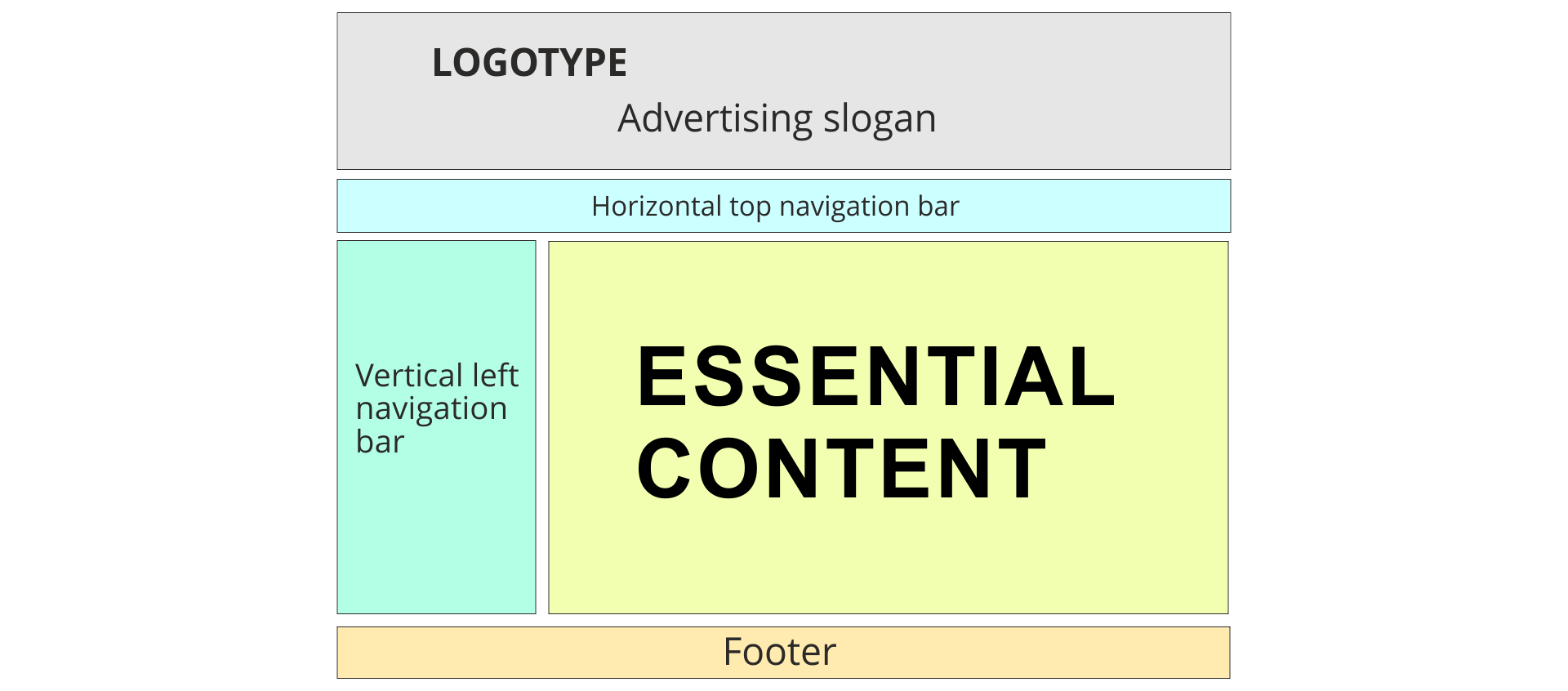
Remember to give the page a title, because it is the title, along with a short description, which appears in browsers. Thanks to it, we are able to find out which site we are on and switch between them when we have more browserbrowser windows open.
Rethink the domaindomain name under which we will place the page name.
Think how to divide the collected material into logical blocks.
Think about entering contact details on the website.
Remember about copyright.
In order to properly fulfill the above recommendations, it is good to make a decent, well‑considered project, including the website's functions, its graphics image, the layoutlayout of content prepared in the form of the so‑called site mapsite map (i.e. a graph including subpages and their relationships). After drafting a solid project, it is time to choose the tool / language in which our site will be made. Here we have two basic methods enforced by the page type.
If the content of our site is going to be modified only by us and at the same time it will not happen too often - it is worth using HTML to create the page. Creating the code of such a page requires programming skills in HTML language and it is time‑consuming, however, such websites are characterized by a short open time (load fast) which is good both from the viewer's point of view and well‑rated by search engines.
If, however, the content of our site requires frequent updates, you will need the ability to evaluate and comment or other interactivity mechanisms - we must reach for other programming languages (e.g. PHP) preferably in the form of ready‑made content managementcontent management systems (so‑called CMS).
After installing such a system on the server to operate our site, high technical qualifications are not required, because content management is quite simple, and writing articles is similar to writing in word processors. You can use a wide commercial offer to write such a system, but you can also reach for widely used free CMS systems such as Wordpress, Drupal or Joomla. The same applies to online stores, photo galleries, blogger or information portals.
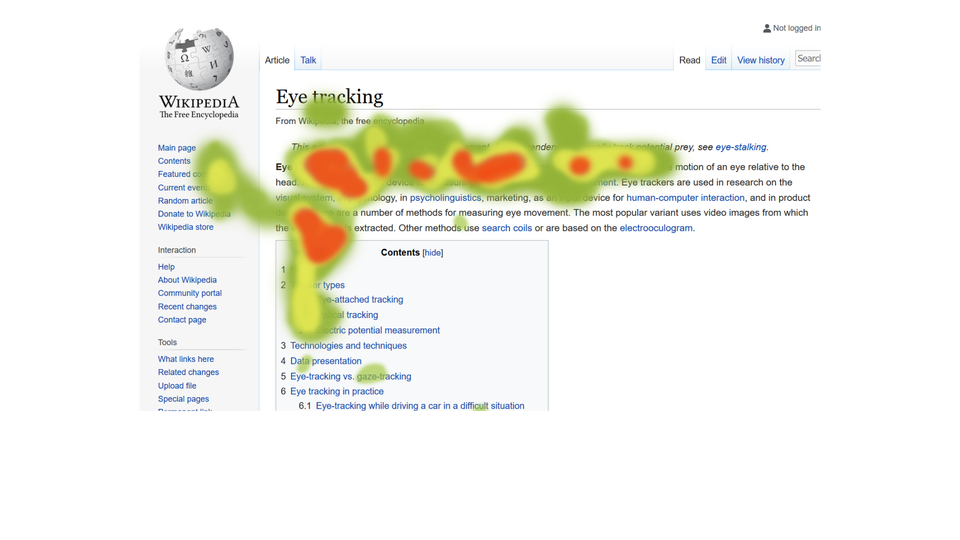
Zasób interaktywny dostępny pod adresem https://zpe.gov.pl/a/DjPbWm0Gb
Anyone who would like to create a valuable website should:
plan its tasks, functions and graphical layout
draw up a solid detailed design;
choose the right technology of execution;
get down to work.
Exercises
Determine which sentences are true.
- Users browsing websites concentrate on every place on the screen for the same amount of time
- Websites can be designed based on ready-made systems and templates
- Pages written in HTML open faster
- You must remember about copyrights when designing websites
- At the design stage of websites, you should also think about the title of the page
Design your own website. Draw its scheme, write down what should be on the menu, what you put in the content of the page. Also think about the graphics layout.
Describe the principles of website design in English.
Indicate which pairs of expressions or words are translated correctly.
- wizerunek graficzny - website design
- przeglądarka - browser
- domena - domain
- układ graficzny - layout
- projektowanie stron - graphics image
- wizerunek graficzny
- graphics image
- układ graficzny
- website design
- domain
- browser
- projektowanie stron
- domena
- przeglądarka
- layout
Glossary
przeglądarka
Nagranie dostępne na portalu epodreczniki.pl
wymowa w języku angielskim: browser
zarządzanie treścią
Nagranie dostępne na portalu epodreczniki.pl
wymowa w języku angielskim: content management
domena
Nagranie dostępne na portalu epodreczniki.pl
wymowa w języku angielskim: domain
komunikacja elektroniczna
Nagranie dostępne na portalu epodreczniki.pl
wymowa w języku angielskim: electronic commuication
wizerunek graficzny
Nagranie dostępne na portalu epodreczniki.pl
wymowa w języku angielskim: graphics appearance
układ graficzny
Nagranie dostępne na portalu epodreczniki.pl
wymowa w języku angielskim: layout
mechanizm działania
Nagranie dostępne na portalu epodreczniki.pl
wymowa w języku angielskim: mechanism of operation
responsywność
Nagranie dostępne na portalu epodreczniki.pl
wymowa w języku angielskim: responsiveness
mapa strony
Nagranie dostępne na portalu epodreczniki.pl
wymowa w języku angielskim: site map
projektowanie stron
Nagranie dostępne na portalu epodreczniki.pl
wymowa w języku angielskim: website design
Keywords
browserbrowser
domaindomain
layoutlayout
website designwebsite design