When you want to save a presentationpresentationpresentation, you must select the appropriate file formatfile formatfile format. Consider the factors that influence your choice:
Does the recipient of your presentationpresentationpresentation have the same version of the programme for creating multimedia presentation installed on their computer?
Do you want to allow other people to make changes in your presentationpresentationpresentation?
What can you do if you do not know what software or system the recipient of your presentationpresentationpresentation has on their computer?
Does the file size have to be as smallest as possible?
Is it necessary to play the created animations?
Do you want to show only one slide?
RfvwHpZBhNddV
Ikona przedstawia dyskietkę w środku koła.
Save ...
The most popular file formats for savingsavingsaving presentations are:
a presentationpresentationpresentation – a default file formatfile formatfile formata file saved in this format can be freely edited and changes can be saved,
a slide showslide showslide show – a format that enables the presentationpresentationpresentation of a slide showslide showslide show without the possibility of changing the presentation content - after the file is opened, the presentationpresentationpresentation will run automatically.
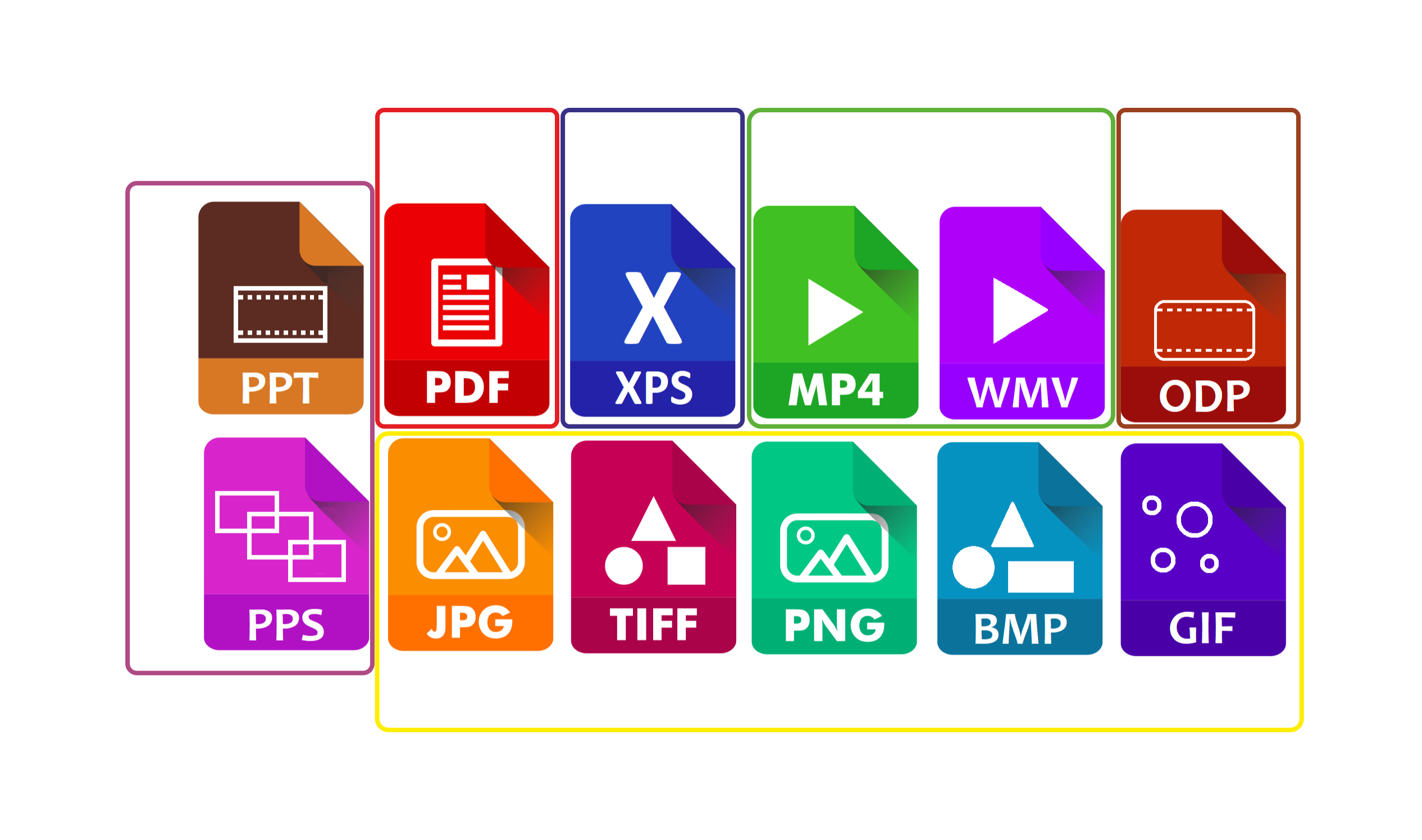
Programmes for creating presentations usually enable savingsavingsaving them in several alternative savingsavingsaving formats. For example PowerPoint, apart from .pptx files (a presentationpresentationpresentation) and .ppsx files (a slide showslide showslide show) offers the following file formats:
ReyaEL2vLEFhh
Ilustracja interaktywna przedstawia w sposób symboliczny ikony dwunastu formatów zapisu prezentacji. Każda ikona przypomina kartkę papieru, ma zgięty prawy górny róg, schematyczny obrazek oraz nazwę rozszerzenia pliku. Ikony ułożone są w dwóch rzędach. Ikony zostały oznaczone numerami od 1 do 6. 1 - PDF (na obrazku kartka papieru z kreskami imitującymi tekst). 2 - XPS (na obrazku wielka litera X). 3 - dwa formaty: PM4 (na obrazku trójkąt wierzchołkiem skierowany w prawą stronę), WMV (na obrazku trójkąt wierzchołkiem skierowany w prawą stronę). 4 - ODP (na obrazku prostokąt z zaokrąglonymi rogami, przy dolnej i górnej krawędzi narysowana kropkowana linia). 5 - dwa formaty: PPT (na obrazku prostokąt, przy dolnej i górnej krawędzi narysowana kropkowana linia) oraz PPS (na obrazku trzy prostokąty zachodzące na siebie). 6 - pięć formatów: JPG (na obrazku prostokąt z zaokrąglonymi rogami, w nim dwa trójkąty i okrąg), TIFF (na obrazku trójkąt, koło i kwadrat), PNG (na obrazku prostokąt z zaokrąglonymi rogami, w nim dwa trójkąty i okrąg), BMB (na obrazku trójkąt, koło i prostokąt), GIF (na obrazku cztery okręgu różnej wielkości). Na ilustracji widoczne są numery, a na nich podpisy. 1. PDF – useful for printing presentations. {audio}, 2. XPS – a file format alternative to PDF used for storing and viewing a document. {audio}, 3. A film in the MP4 and WMV file formats. {audio}, 4. The Open Document format, which enables moving documents between the programmes of different producers. {audio}, 5. The file formats supported by the older versions of PowerPoint: PPT and PPS. {audio}, 6. More over, the slides of a presentation can be saved as graphics: many file formats are available: GIF, JPG, PNG, TIFF, BMP. {audio}
Ilustracja interaktywna przedstawia w sposób symboliczny ikony dwunastu formatów zapisu prezentacji. Każda ikona przypomina kartkę papieru, ma zgięty prawy górny róg, schematyczny obrazek oraz nazwę rozszerzenia pliku. Ikony ułożone są w dwóch rzędach. Ikony zostały oznaczone numerami od 1 do 6. 1 - PDF (na obrazku kartka papieru z kreskami imitującymi tekst). 2 - XPS (na obrazku wielka litera X). 3 - dwa formaty: PM4 (na obrazku trójkąt wierzchołkiem skierowany w prawą stronę), WMV (na obrazku trójkąt wierzchołkiem skierowany w prawą stronę). 4 - ODP (na obrazku prostokąt z zaokrąglonymi rogami, przy dolnej i górnej krawędzi narysowana kropkowana linia). 5 - dwa formaty: PPT (na obrazku prostokąt, przy dolnej i górnej krawędzi narysowana kropkowana linia) oraz PPS (na obrazku trzy prostokąty zachodzące na siebie). 6 - pięć formatów: JPG (na obrazku prostokąt z zaokrąglonymi rogami, w nim dwa trójkąty i okrąg), TIFF (na obrazku trójkąt, koło i kwadrat), PNG (na obrazku prostokąt z zaokrąglonymi rogami, w nim dwa trójkąty i okrąg), BMB (na obrazku trójkąt, koło i prostokąt), GIF (na obrazku cztery okręgu różnej wielkości). Na ilustracji widoczne są numery, a na nich podpisy. 1. PDF – useful for printing presentations. {audio}, 2. XPS – a file format alternative to PDF used for storing and viewing a document. {audio}, 3. A film in the MP4 and WMV file formats. {audio}, 4. The Open Document format, which enables moving documents between the programmes of different producers. {audio}, 5. The file formats supported by the older versions of PowerPoint: PPT and PPS. {audio}, 6. More over, the slides of a presentation can be saved as graphics: many file formats are available: GIF, JPG, PNG, TIFF, BMP. {audio}
1
2
3
4
5
6
1. PDF – useful for printing presentations. {audio}
2. XPS – a file format alternative to PDF used for storing and viewing a document. {audio}
3. A film in the MP4 and WMV file formats. {audio}
4. The Open Document format, which enables moving documents between the programmes of different producers. {audio}
5. The file formats supported by the older versions of PowerPoint: PPT and PPS. {audio}
6. More over, the slides of a presentation can be saved as graphics: many file formats are available: GIF, JPG, PNG, TIFF, BMP. {audio}
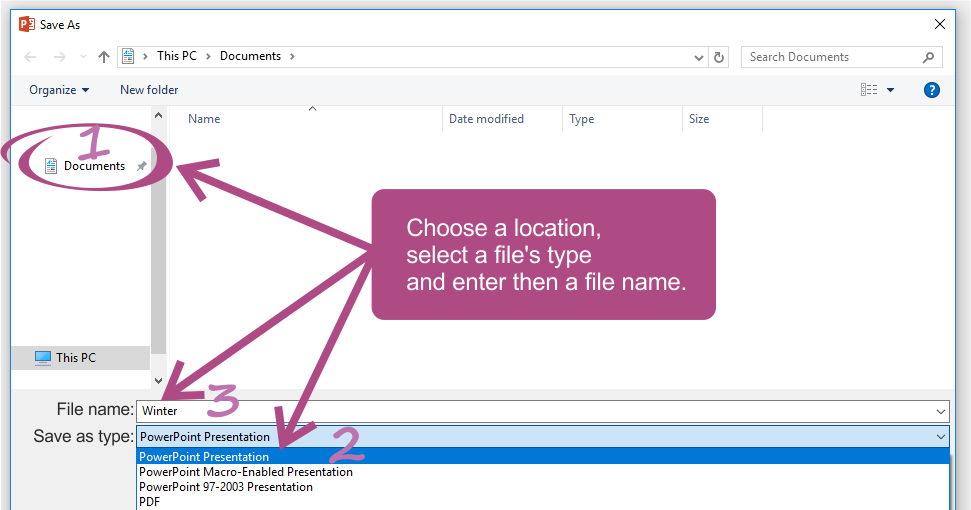
In order to save a presentationpresentationpresentation in one of the file formats described above, after selecting the option Save/Save as in the save tool window, on a drop‑down list just below the File name box, in the Save as type box you must click the file formatfile formatfile format in which you want to save your file.
R1YRbvbG8ixM6
Ilustracja przedstawia formatkę umożliwiającą zapisywanie prezentacji w programie Power Point. Na środku znajduje się prostokąt z napisem: Choose a location, select a file's type and enter then a file name. Od prostokąta poprowadzone są ponumerowane strzałki do elementów formatki. 1 - W oknie po lewej stronie można wybrać miejsce zapisu, w przykładzie zaznaczony jest folder Documents. Środkowe pole zajmuje zawartość folderu Documents, w przykładzie folder jest pusty. 3 - Poniżej znajdują się pola File name: w przykładzie wpisane jest: Winter. 2 - Poniżej lista rozwijana Save as: umożliwia wybrać format pliku zapisu, widoczne są niektóre formaty zapisu: PowerPoint Presentation (domyślny), PowerPoint Macro-Enabled Presentation, PowerPoint 97-2003 Presentation, PDF.
Find the information about the proper nutrition of teenagers. Learn what a food pyramid is. Create a presentationpresentationpresentation and then save it as a presentationpresentationpresentation and as a slide showslide showslide show. Find the differences between these two files. Save your presentation also as PDF. In what programme will you be able to open your presentation saved in such a file formatfile formatfile format?
Presentations can be saved in various file formats depending on their purpose and the programme in which they are created. The effect of your work is usually saved as a presentationpresentationpresentation or a slide showslide showslide show.
Exercises
Exercise 1
RrYqoBXkmPydS
Wersja alternatywna ćwiczenia: Identify true sentences about the file formats for saving presentations: Możliwe odpowiedzi: 1. The PDF file format is useful for printing presentations., 2. A presentation can be saved as a film in the MP4 and WMV file formats., 3. The slides of a presentation can be saved as graphics., 4. The XPS file format is an alternative to the PPS file format., 5. A presentation can be saved in the Open Document format, which disables moving documents between the programmes of different producers.
Wersja alternatywna ćwiczenia: Identify true sentences about the file formats for saving presentations: Możliwe odpowiedzi: 1. The PDF file format is useful for printing presentations., 2. A presentation can be saved as a film in the MP4 and WMV file formats., 3. The slides of a presentation can be saved as graphics., 4. The XPS file format is an alternative to the PPS file format., 5. A presentation can be saved in the Open Document format, which disables moving documents between the programmes of different producers.
Identify true sentences about the file formats for saving presentations:
The PDF file format is useful for printing presentations.
A presentation can be saved as a film in the MP4 and WMV file formats.
The slides of a presentation can be saved as graphics.
The XPS file format is an alternative to the PPS file format.
A presentation can be saved in the Open Document format, which disables moving documents between the programmes of different producers.
zadanie
Source: GroMar, licencja: CC BY 3.0.
Exercise 2
Create a presentation about the tree species in your area. Save your presentation in various file formats. Compare the sizes of the resulting files.
Exercise 3
Describe in English what file format you would choose for your presentation if you would like to place it on a web site.
Exercise 4
RE84EzkpZbuim
Wersja alternatywna ćwiczenia: Indicate which pairs of expressions or words are translated correctly. Możliwe odpowiedzi: 1. prezentacja - presentation, 2. pokaz - slide show, 3. format pliku - file format, 4. zapis - saving, 5. format zapisu - slides, 6. slajdy - saving format
Wersja alternatywna ćwiczenia: Indicate which pairs of expressions or words are translated correctly. Możliwe odpowiedzi: 1. prezentacja - presentation, 2. pokaz - slide show, 3. format pliku - file format, 4. zapis - saving, 5. format zapisu - slides, 6. slajdy - saving format
Indicate which pairs of expressions or words are translated correctly.
prezentacja - presentation
pokaz - slide show
format pliku - file format
zapis - saving
format zapisu - slides
slajdy - saving format
zadanie
Source: GroMar, licencja: CC BY 3.0.
R1A9yIe3LdsIW1
Interaktywna gra, polegająca na łączeniu wyrazów w pary w ciągu jednej minuty. Czas zaczyna upływać wraz z rozpoczęciem gry. Jeden ruch to odkrywanie najpierw jednej potem drugiej karty z wyrazem. Każdy wyraz jest odczytywany. Kolejny ruch to odkrywanie trzeciej i czwartej karty. W ten sposób odsłuchasz wszystkie wyrazy. Nawigacja z poziomu klawiatury za pomocą strzałek, odsłuchiwanie wyrazów enterem lub spacją. Znajdź wszystkie pary wyrazów.
Interaktywna gra, polegająca na łączeniu wyrazów w pary w ciągu jednej minuty. Czas zaczyna upływać wraz z rozpoczęciem gry. Jeden ruch to odkrywanie najpierw jednej potem drugiej karty z wyrazem. Każdy wyraz jest odczytywany. Kolejny ruch to odkrywanie trzeciej i czwartej karty. W ten sposób odsłuchasz wszystkie wyrazy. Nawigacja z poziomu klawiatury za pomocą strzałek, odsłuchiwanie wyrazów enterem lub spacją. Znajdź wszystkie pary wyrazów.
Match Polish terms with their English equivalents.
file format
format zapisu
slajdy
pokaz
prezentacja
presentation
slide show
slides
saving format
format pliku
Source: Zespół autorski Politechniki Łódzkiej, licencja: CC BY 3.0.