SharingsharingSharing a file or a folder in OneDrive
You can share documents:
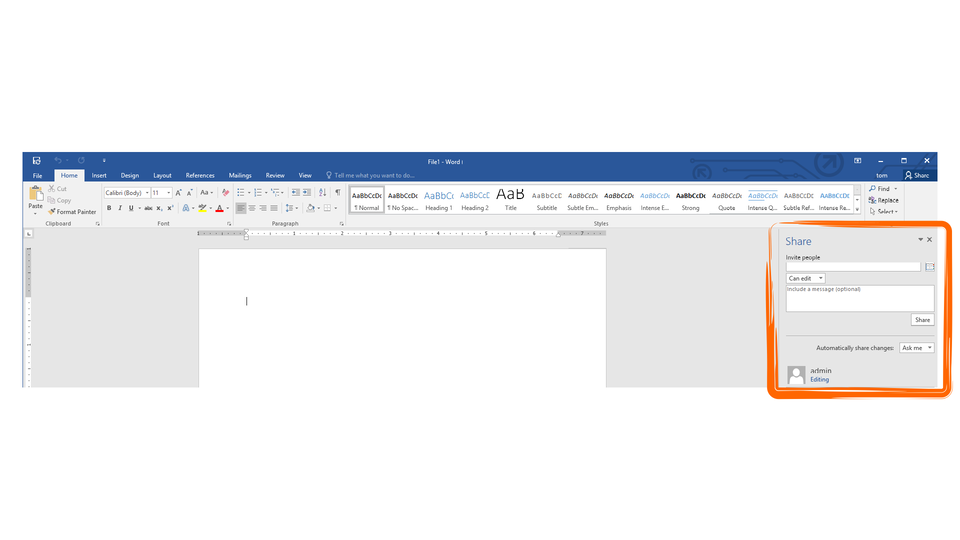
directly from within an Office365 application installed on the computer provided that the document is saved on a virtual disc drivevirtual disc drivevirtual disc drive,
directly from within an online application of Office365,
You can give specified people permission to editeditedit a document (the option is enabled by default). Moreover, you can add a text message to a linklinklink sharing a document and set expiration date. The other method of sharing resourcesresourcesresources is to get a link to a file or folder, which can be copied or pasted into e.g. a text message or posted to a web site. All folders and files sharedsharedshared by you are displayed on the list of shared resourcesresourcesresources. The simplest method of ceasing sharingsharingsharing a resource is to delete the linklinklink.
R1MFuYVRK2HLr1
Aplikacja pokazuje możliwe sposoby na udostępniania plików online. Instrukcja obsługi z poziomu klawiatury: 1. Uruchomienie aplikacji - ENTER, 2. Na każdym ze slajdów czytany jest automatycznie tekst alternatywny po polsku, 3. Przy pierwszym uruchomieniu na pierwszym slajdzie, czytanie tekstu po angielsku - TAB, 4. Przejście między slajdami: do następnego slajdu - TAB, do poprzedniego slajdu - TAB + SHIFT, 5. Przejście do czytania napisu po angielsku - strzałka w górę + strzałka w dół (czyta tekst po angielsku widoczny na slajdzie).
Aplikacja pokazuje możliwe sposoby na udostępniania plików online. Instrukcja obsługi z poziomu klawiatury: 1. Uruchomienie aplikacji - ENTER, 2. Na każdym ze slajdów czytany jest automatycznie tekst alternatywny po polsku, 3. Przy pierwszym uruchomieniu na pierwszym slajdzie, czytanie tekstu po angielsku - TAB, 4. Przejście między slajdami: do następnego slajdu - TAB, do poprzedniego slajdu - TAB + SHIFT, 5. Przejście do czytania napisu po angielsku - strzałka w górę + strzałka w dół (czyta tekst po angielsku widoczny na slajdzie).
On OneDrive, create the folders Documents and Images. In the Documents folder create a text file. Download any image from the internet to the Images folder. Share the files and folders with any people.
Check if you can access the files which have been sharedsharedshared with you by other people.
RNnkrV56OeFZQ
Ilustracja przedstawia w sposób symboliczny dzielenie plików. Ludzik trzyma w ręku kartkę. Od kartki cztery strzałki prowadzą do kolejnych kartek trzymanych w rękach (widać tylko pojedyncze cztery ręce).
All people having the permission to a given resource can collaborate on it. To ensure efficient collaboration, it is useful to implement the Microsoft Teams service. It enables creating teams which not only can share data but also chat with the use of instant messengers, chats, voice and video conferences within created channels. The basic elements of Microsoft Teams are:
Activities – a tab that enables browsing all your activities and activities of all members of teams you are assigned to,
Chat – enables making a conversations and archiving all conversations carried out within the service,
Teams – the main tab of the service, which assigns users to particular groups. You can use channels to talk about particular problems within a group. The channels enable carrying out conversations, sharingsharingsharing documents and collaborating on them.
Meetings – a tab that enables scheduling and organizing online meetings.
Files – a tab that contains user files and enables easy access to resourcesresourcesresources shared within teams.
While working online, try to protect your privacy. When you share files, select a group of recipients depending on your needs, you can select specific people, a group of users or all people who have got the linklinklink to a resource.
Exercises
Exercise 1
R1WZGK4tmpGm1
Wersja alternatywna ćwiczenia: The basic elements of Microsoft Teams are: Możliwe odpowiedzi: 1. Activities, 2. Chat, 3. Teams, 4. Meetings, 5. Files, 6. online TV
Wersja alternatywna ćwiczenia: The basic elements of Microsoft Teams are: Możliwe odpowiedzi: 1. Activities, 2. Chat, 3. Teams, 4. Meetings, 5. Files, 6. online TV
The basic elements of Microsoft Teams are:
Activities
Chat
Teams
Meetings
Files
online TV
zadanie
Source: GroMar, licencja: CC BY 3.0.
Exercise 2
Create a multimedia presentation comparing services offered by OneDrive and Google Drive.
Exercise 3
Describe in English the advantages and disadvantages of sharing resources in a digital cloud.
Exercise 4
R1BFBrYeokanb
Wersja alternatywna ćwiczenia: Indicate which pairs of expressions or words are translated correctly. Możliwe odpowiedzi: 1. udostępnianie - sharing, 2. dysk wirtualny - virtual disc drive, 3. edytować - edit, 4. link - link, 5. udostępnione - permissions, 6. uprawnienia - shared
Wersja alternatywna ćwiczenia: Indicate which pairs of expressions or words are translated correctly. Możliwe odpowiedzi: 1. udostępnianie - sharing, 2. dysk wirtualny - virtual disc drive, 3. edytować - edit, 4. link - link, 5. udostępnione - permissions, 6. uprawnienia - shared
Indicate which pairs of expressions or words are translated correctly.
udostępnianie - sharing
dysk wirtualny - virtual disc drive
edytować - edit
link - link
udostępnione - permissions
uprawnienia - shared
zadanie
Source: GroMar, licencja: CC BY 3.0.
RcvZk2v4A5EtW1
Interaktywna gra, polegająca na łączeniu wyrazów w pary w ciągu jednej minuty. Czas zaczyna upływać wraz z rozpoczęciem gry. Jeden ruch to odkrywanie najpierw jednej potem drugiej karty z wyrazem. Każdy wyraz jest odczytywany. Kolejny ruch to odkrywanie trzeciej i czwartej karty. W ten sposób odsłuchasz wszystkie wyrazy. Nawigacja z poziomu klawiatury za pomocą strzałek, odsłuchiwanie wyrazów enterem lub spacją. Znajdź wszystkie pary wyrazów.
Interaktywna gra, polegająca na łączeniu wyrazów w pary w ciągu jednej minuty. Czas zaczyna upływać wraz z rozpoczęciem gry. Jeden ruch to odkrywanie najpierw jednej potem drugiej karty z wyrazem. Każdy wyraz jest odczytywany. Kolejny ruch to odkrywanie trzeciej i czwartej karty. W ten sposób odsłuchasz wszystkie wyrazy. Nawigacja z poziomu klawiatury za pomocą strzałek, odsłuchiwanie wyrazów enterem lub spacją. Znajdź wszystkie pary wyrazów.
Match Polish terms with their English equivalents.
link
udostępnianie
permissions
virtual disc drive
link
uprawnienia
udostępnione
sharing
shared
dysk wirtualny
Source: Zespół autorski Politechniki Łódzkiej, licencja: CC BY 3.0.