The basic parameter of a page is its sizesizesize. The size of a document in a text editor should be set in accordance with the size of paper on which you will print it. Have in mind the maximum features of your printer. Decide if your document will be printed in the landscape (horizontal) or portrait (vertical) layout and respectively set its orientationorientationorientation in a text editor. Another parameter of a page are marginsmarginsmargins. For the time being let’s focus on the four most important margins: left, right, top and bottom. Margins are spaces between the column of text and the edges of a document. Using them makes the text more readable.
A new document opened in Word is created based on a template (Normal.dotx), which specifies its basic format. The template predefines the A4 paper sizesizesize, portrait orientationorientationorientation, 2.5 cm margins and a default font of a new document.
On the Layout tab, you can find the options: MarginsmarginsMargins, Orientation and Size, which enable setting the parameters of a page. You can access all the otions of the Page Setup group on the Layout tab by clicking the arrow in the bottom right corner of this group.
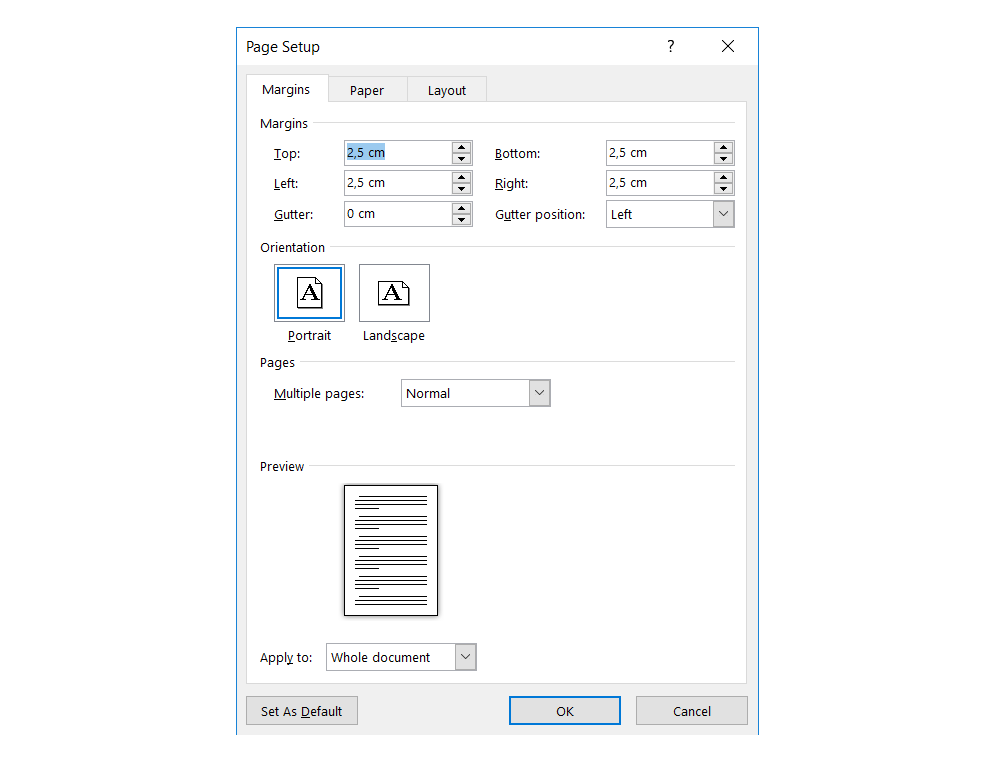
On the Margins tab in the Page Setup box you can set the orientationorientationorientation of a page and the margins of an edited document.
R1N3I8KEgVvUi
Zrzut z ekranu przedstawia właściwości strony (page setup) z aktywną kartą Margins. Od góry można zefiniować Margins: Top, Bottom, Left, Right, Gutter, Gutter position. Następnia Orintation: Postrait lub Lanscape. Dalej Pages - Multiple pages. Ostatnim elementem do ustawienia jest Preview oraz Apply to. Na dole formatki znajdują się przyciski: Set As Default, OK Cancel.
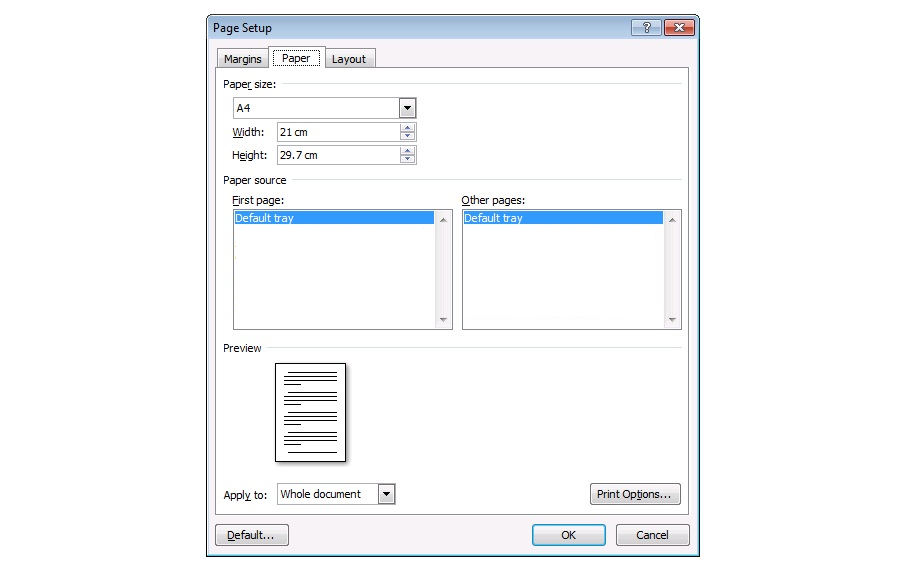
The Paper tab enables setting the paper sizesizesize.
RilIdPk4ds8s4
Zrzut z ekranu przedstawia właściwości strony (page setup) z aktywną kartą Paper. Od góry można zefiniować Paper size, Width, Height. Następnie Paper source: first page oraz other pages. Ostatnim elementem do ustawienia jest Preview oraz Apply to. Na dole formatki znajdują się przyciski: Set As Default, OK Cancel.
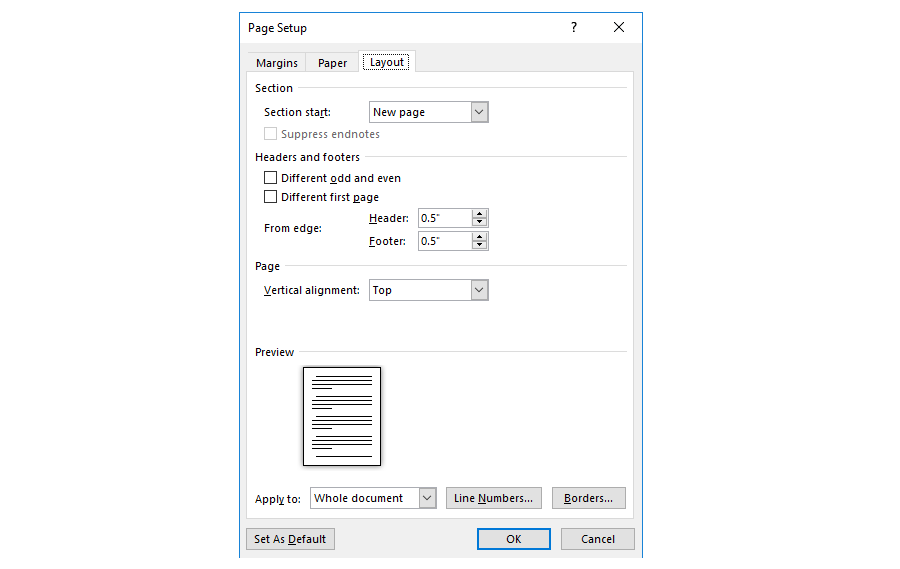
The Layout tab enables setting the marginsmarginsmargins of the footerfooterfooter and headerheaderheader of a document.
R1co8FNHdZb2d
Zrzut z ekranu przedstawia właściwości strony (page setup) z aktywną kartą Layout. Od góry Section, niżej Headers and footers (different odd and even, different first oage). Kolejny From edge: Headre, Footer. Niżej Page - vertical aligment. Ostatnim elementem do ustawienia jest Preview oraz Apply to. Na dole formatki znajdują się przyciski: Set As Default, OK Cancel.
Paper sizespaper sizesPaper sizes, i.e. the sizes of paper sheets, are standardized. Several different standards apply. In Poland the ISO standard is used, which defines three series: A, B and C (envelopes). In the main series (A), the ratio of the longer side of a sheet to the shorter side is . When the sheet of paper is folded in half parallel to its shortest sides, then the resulting two halves are the sheets of the successive smaller sizesizesize. The base A0 size of paper has an area of 1 mIndeks górny 22. The most frequently used paper size is A4, measuring 210 by 297 mm.
RoZspEsreCosC
Ilustracja interaktywna przedstawia arkusz papieru w formacie A0, oznaczone są jego wymiary: szerokość 1189 mm oraz wysokość 841 mm. Arkusz podzielony jest na mniejsze. Dzieląc arkusz A0 na pół otrzymujemy format A1. Dzieląc arkusz A1 na pół otrzymujemy format A2. Dzieląc arkusz A2 na pół otrzymujemy format A3. Dzieląc arkusz A3 na pół otrzymujemy format A4. Dzieląc arkusz A4 na pół otrzymujemy format A5, itd. Aby poznać zależności pomiędzy arkuszami wybierz przyciski oznaczone cyframi od 1 do 5. Na ilustracji widoczne są numery, a na nich podpisy. 1. A1 – a half of the A0 paper size. {audio}, 2. A2 – a half of the A1 paper size, ¼ of the A0 paper size. {audio}, 3. A3 – a half of the A2 paper size, 1/8 of the A0 paper size. {audio}, 4. A4 – a half of the A3 paper size, 1/16 of the A0 paper size. {audio}, 5. A5 – a half of the A4 paper size. {audio}
Ilustracja interaktywna przedstawia arkusz papieru w formacie A0, oznaczone są jego wymiary: szerokość 1189 mm oraz wysokość 841 mm. Arkusz podzielony jest na mniejsze. Dzieląc arkusz A0 na pół otrzymujemy format A1. Dzieląc arkusz A1 na pół otrzymujemy format A2. Dzieląc arkusz A2 na pół otrzymujemy format A3. Dzieląc arkusz A3 na pół otrzymujemy format A4. Dzieląc arkusz A4 na pół otrzymujemy format A5, itd. Aby poznać zależności pomiędzy arkuszami wybierz przyciski oznaczone cyframi od 1 do 5. Na ilustracji widoczne są numery, a na nich podpisy. 1. A1 – a half of the A0 paper size. {audio}, 2. A2 – a half of the A1 paper size, ¼ of the A0 paper size. {audio}, 3. A3 – a half of the A2 paper size, 1/8 of the A0 paper size. {audio}, 4. A4 – a half of the A3 paper size, 1/16 of the A0 paper size. {audio}, 5. A5 – a half of the A4 paper size. {audio}
In the North American system paper sizespaper sizespaper sizes called: letter, legal and executive are used. The ISO paper sizes combined with the North American standard paper sizes are the most common paper sizesizesize options available in text editors.
Particular attention must be paid to setting the parameters of a page for documents like booklets or brochures or documents which you plan to bind. Then you should learn the options: Book fold, Gutter (to set a gutter margingutter margingutter margin) or Mirrored in the MarginsmarginsMargins box (to set mirror marginsmirror marginsmirror margins).
When you design various text documents, such as: posters, invitations, leaflets or diplomas, you can use decorative elements of a page such as bordersbordersborders and background colours.
R1FfFZmwcgDdJ
Zrzut z ekranu przedstawia fragment paska narzędzi w MS Word z poleceniami dotyczącymi zmiany tła strony (page background): Watermark, Page Color, Page Borders.
The Page Borders and Page Color tools on the Design tab.
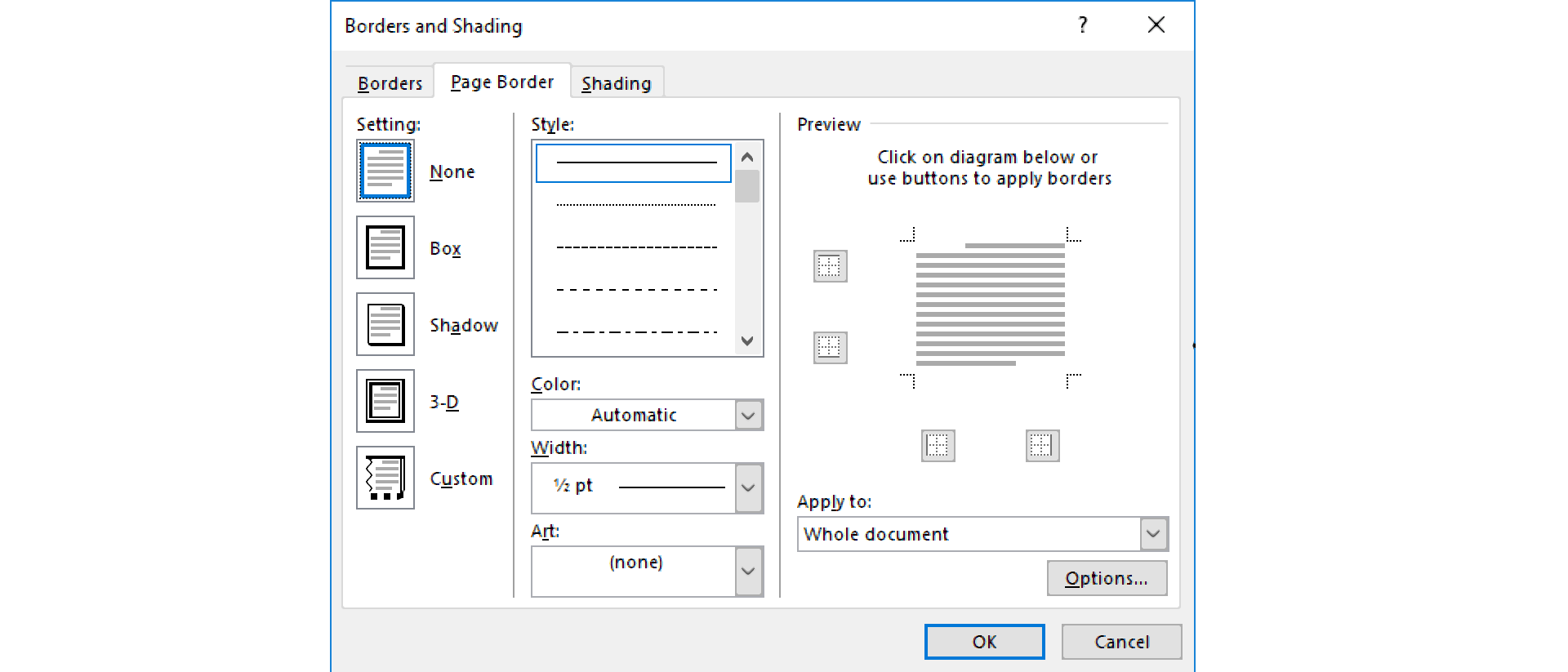
The BordersbordersBorders and ShadingshadingShading dialogue box contains all options for setting border parameters: Style, Colour and Width.
RGCVyIVp3Nten1
Zrzut z ekranu przedstawia formatkę Border and Shading z aktywną kartą Page Border. Można ustawić tutaj Setting (none, box, shadow, 3-d, custom) oraz Style, Color, Width, Art lub skorzystać z Preview. Można zastosować zmiany korzystając z Apply to. Skorzystać z Options. Na dole formatki dwa przyciski: OK i Cancel.
When you plan to print your document on a printer, you must set its page sizesizesize in a text editor in accordance with the size of paper on which you will print it. Have in mind the features of your printer, e.g. minimum marginsmarginsmargins.
Though you can change the backgroud colour of a page, you must know that printing full‑colour pages is uneconomical and increases the costs of printing.
Exercises
Exercise 1
R8dbR9qGdAiIE
Wersja alternatywna ćwiczenia: Determine which sentence is true. Możliwe odpowiedzi: 1. The basic parameter of a page is its size., 2. A new document opened in Word is created based on a template., 3. The base A0 size of paper has an area of 10 m2. , 4. The most frequently used paper size is A4, measuring 210 by 297 mm.
Wersja alternatywna ćwiczenia: Determine which sentence is true. Możliwe odpowiedzi: 1. The basic parameter of a page is its size., 2. A new document opened in Word is created based on a template., 3. The base A0 size of paper has an area of 10 m2. , 4. The most frequently used paper size is A4, measuring 210 by 297 mm.
Determine which sentence is true.
The basic parameter of a page is its size.
A new document opened in Word is created based on a template.
The base A0 size of paper has an area of 10 m2.
The most frequently used paper size is A4, measuring 210 by 297 mm.
zadanie
Source: GroMar, licencja: CC BY 3.0.
Exercise 2
Design your own business card measuring 90 x 50 mm. You need to:
enter your first name, surname, email address and telephone number,
plan the layout of the text.
Exercise 3
Discuss the parameters of a page in English.
Exercise 4
R1dWt0cMzCq5X
Wersja alternatywna ćwiczenia: Indicate which pairs of expressions or words are translated correctly. Możliwe odpowiedzi: 1. marginesy - margins, 2. orientacja - orientation, 3. rozmiar - size, 4. margines na oprawę - gutter margin, 5. stopka - header, 6. nagłówek - footer
Wersja alternatywna ćwiczenia: Indicate which pairs of expressions or words are translated correctly. Możliwe odpowiedzi: 1. marginesy - margins, 2. orientacja - orientation, 3. rozmiar - size, 4. margines na oprawę - gutter margin, 5. stopka - header, 6. nagłówek - footer
Indicate which pairs of expressions or words are translated correctly.
marginesy - margins
orientacja - orientation
rozmiar - size
margines na oprawę - gutter margin
stopka - header
nagłówek - footer
zadanie
Source: GroMar, licencja: CC BY 3.0.
R1ZZXbHpNUuUG1
Interaktywna gra, polegająca na łączeniu wyrazów w pary w ciągu jednej minuty. Czas zaczyna upływać wraz z rozpoczęciem gry. Jeden ruch to odkrywanie najpierw jednej potem drugiej karty z wyrazem. Każdy wyraz jest odczytywany. Kolejny ruch to odkrywanie trzeciej i czwartej karty. W ten sposób odsłuchasz wszystkie wyrazy. Nawigacja z poziomu klawiatury za pomocą strzałek, odsłuchiwanie wyrazów enterem lub spacją. Znajdź wszystkie pary wyrazów.
Interaktywna gra, polegająca na łączeniu wyrazów w pary w ciągu jednej minuty. Czas zaczyna upływać wraz z rozpoczęciem gry. Jeden ruch to odkrywanie najpierw jednej potem drugiej karty z wyrazem. Każdy wyraz jest odczytywany. Kolejny ruch to odkrywanie trzeciej i czwartej karty. W ten sposób odsłuchasz wszystkie wyrazy. Nawigacja z poziomu klawiatury za pomocą strzałek, odsłuchiwanie wyrazów enterem lub spacją. Znajdź wszystkie pary wyrazów.
Match Polish terms with their English equivalents.
orientation
margins
orientacja
rozmiar
size
marginesy
Source: Zespół autorski Politechniki Łódzkiej, licencja: CC BY 3.0.