Creating a presentation with prezi.com application
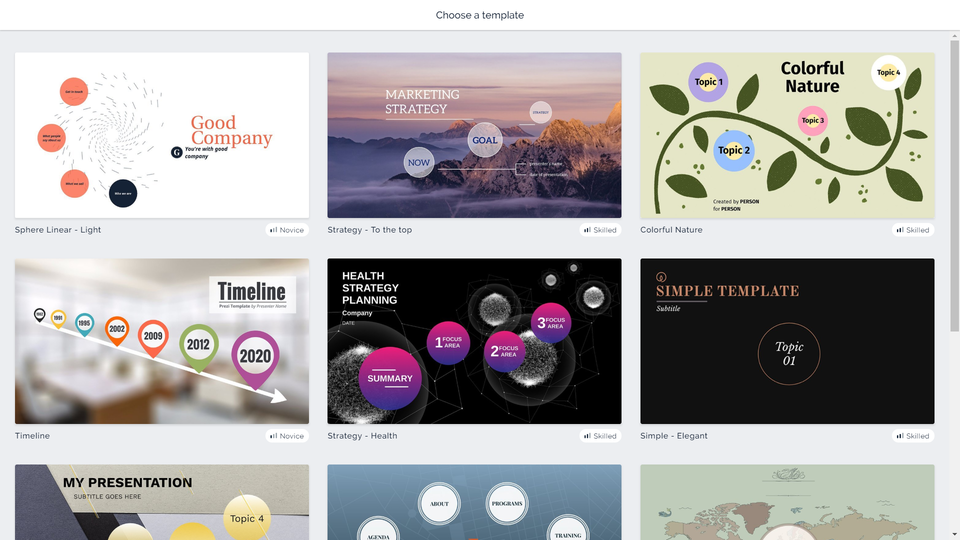
In order to create a presentation, having logged onto the service, you need to select option „New presentation”. You can use the available templates. They can be filtered by categories or by colour. A templateTemplatetemplate is a ready‑made pattern with a matching background and themethemetheme that can be used in your presentation. Having chosen General category and white colour, you also get access to Blank templateTemplatetemplate, which can be modified at choice. Once you have chosen your template, you need to give the title of your presentation. In case of a free account, it is required to select “Anyone on the web” in the “Who can see this presentation?” window. In order to go on, you need to press “Continue”.
R1HAufCffvKbU1
Prezentacja multimedialna pokazuje jak zacząć pracę z programem Prezi. Instrukcja obsługi z poziomu klawiatury: 1. Uruchomienie aplikacji - ENTER, 2. Na każdym ze slajdów czytany jest automatycznie tekst alternatywny po polsku, 3. Przy pierwszym uruchomieniu na pierwszym slajdzie, czytanie tekstu po angielsku - TAB, 4. Przejście między slajdami: do następnego slajdu - TAB, do poprzedniego slajdu - TAB + SHIFT, 5. Przejście do czytania napisu po angielsku - strzałka w górę + strzałka w dół (czyta tekst po angielsku widoczny na slajdzie).
Prezentacja multimedialna pokazuje jak zacząć pracę z programem Prezi. Instrukcja obsługi z poziomu klawiatury: 1. Uruchomienie aplikacji - ENTER, 2. Na każdym ze slajdów czytany jest automatycznie tekst alternatywny po polsku, 3. Przy pierwszym uruchomieniu na pierwszym slajdzie, czytanie tekstu po angielsku - TAB, 4. Przejście między slajdami: do następnego slajdu - TAB, do poprzedniego slajdu - TAB + SHIFT, 5. Przejście do czytania napisu po angielsku - strzałka w górę + strzałka w dół (czyta tekst po angielsku widoczny na slajdzie).
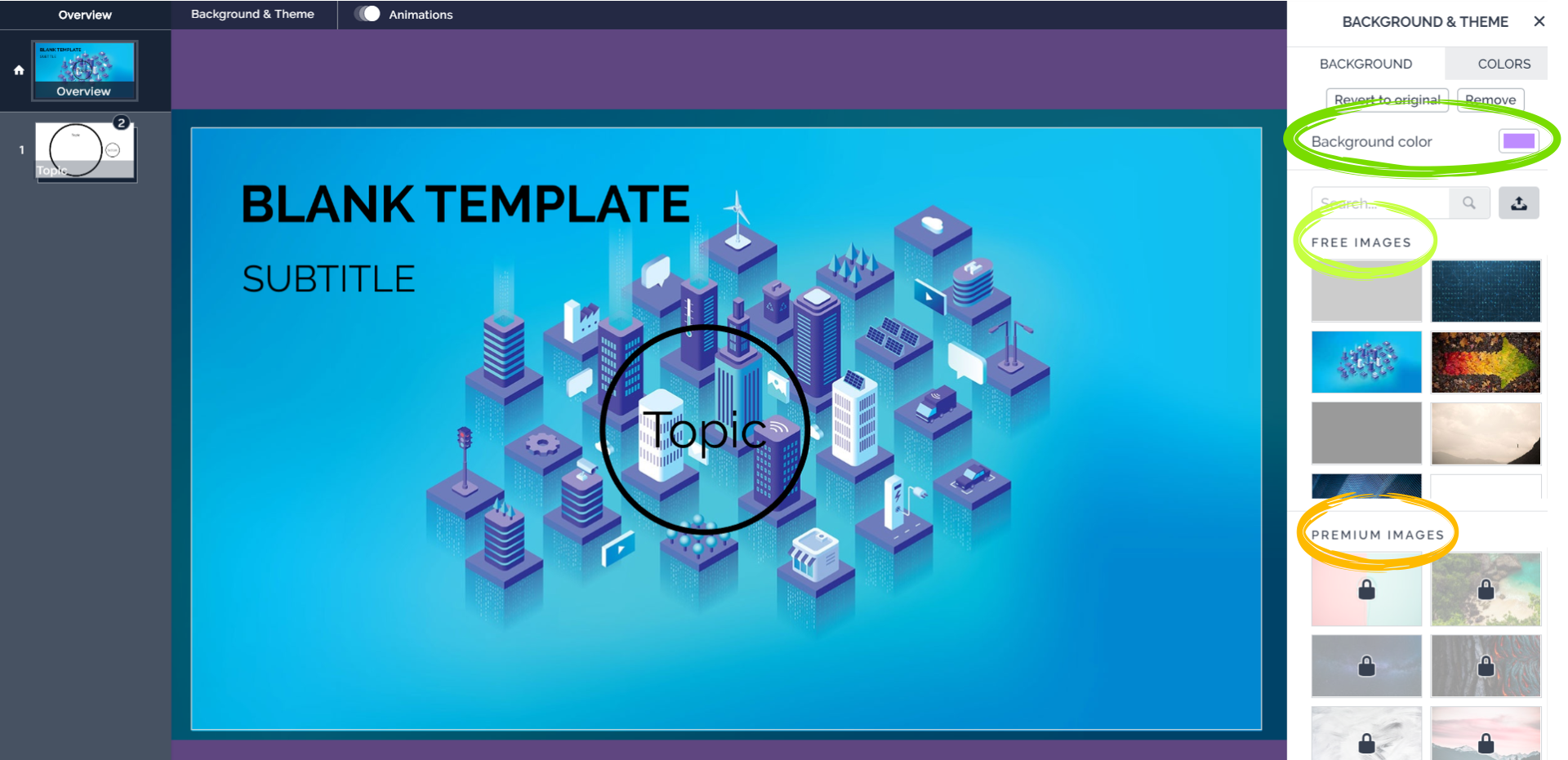
To personalize your presentation, you need to use the option “Background & ThemethemeTheme” in the top bar. Clicking on it shows a sidebar, in which you can:
There is a drop‑down menu, where you can select the colour of the background and the themethemetheme.
R1JngxXZVDqKo1
Zrzut z ekranu przedstawia edytor online prezi.com. Po prawej stronie znajduje się menu umożliwiające zmianę tła i wybór szablonu - Background & Theme. Zaznaczone są trzy opcje. Od góry opcja zmiany tła w prezentacji Background color wraz z rozsuwaną paletą barw. Niżej opcja Free images z bezpłatnymi tłami szablonów do wykorzystania. Najniżej opcja Premium images z płatnymi tłami szablonów do wykorzystania, są one oznaczone kłódkami.
Create a new presentation and give it a title. You can choose a blank templateTemplatetemplate or one of the available templates in the collection. Customize it to your needs – change the colour or the background image and the themethemetheme.
Creating topics and subtopics is the basis of the presentation made with prezi.com and filled with text. Except for that, there is also the option of uploading graphics and films, which are supposed to make the presentation more attractive.
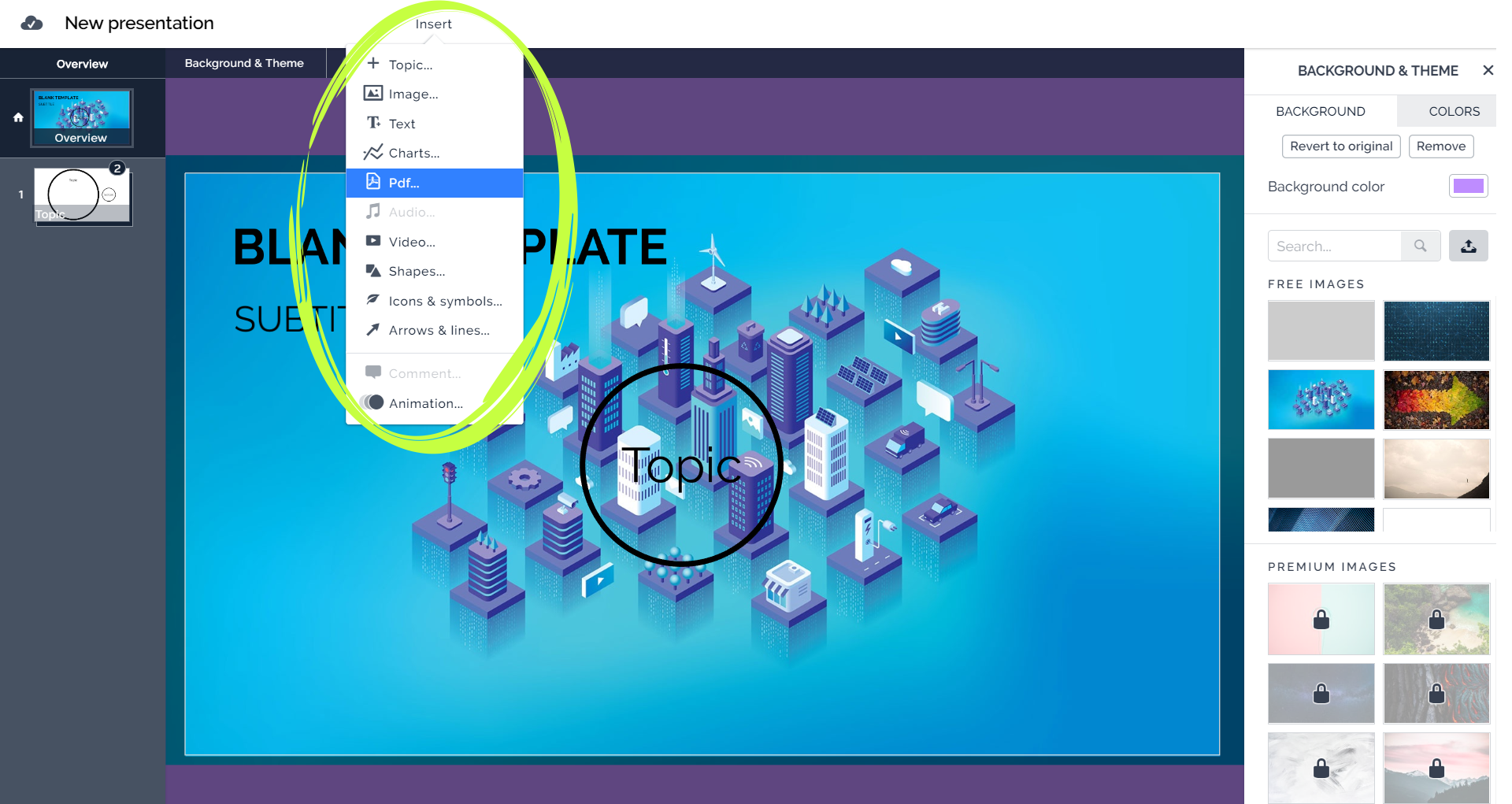
In order to upload graphics, you need to select Insert option form the main menu and then, depending on the objectobjectobject, you need to select one of the following options from the drop‑down menu
Image… (a picture),
Audio… (an audio file),
Video… (a video file),
and then find the file on your computer.
Rn9gAZq5V9beK1
Zrzut z ekranu przedstawia edytor online prezi.com. Rozwinięte jest menu Insert, widoczne są jego opcje. Topic, Image, Text, Charts, Pdf, Audio, Video, Shapes, Icons and symbols, Arrows and lines, Comment, Animation.
Every image, shape, textbox or box is called an objectobjectobject. All objects can be grouped in the box (which enables to move them while designing without changing their position), scaled or rotated.
Sharing and group workGroup workgroup work on Prezi
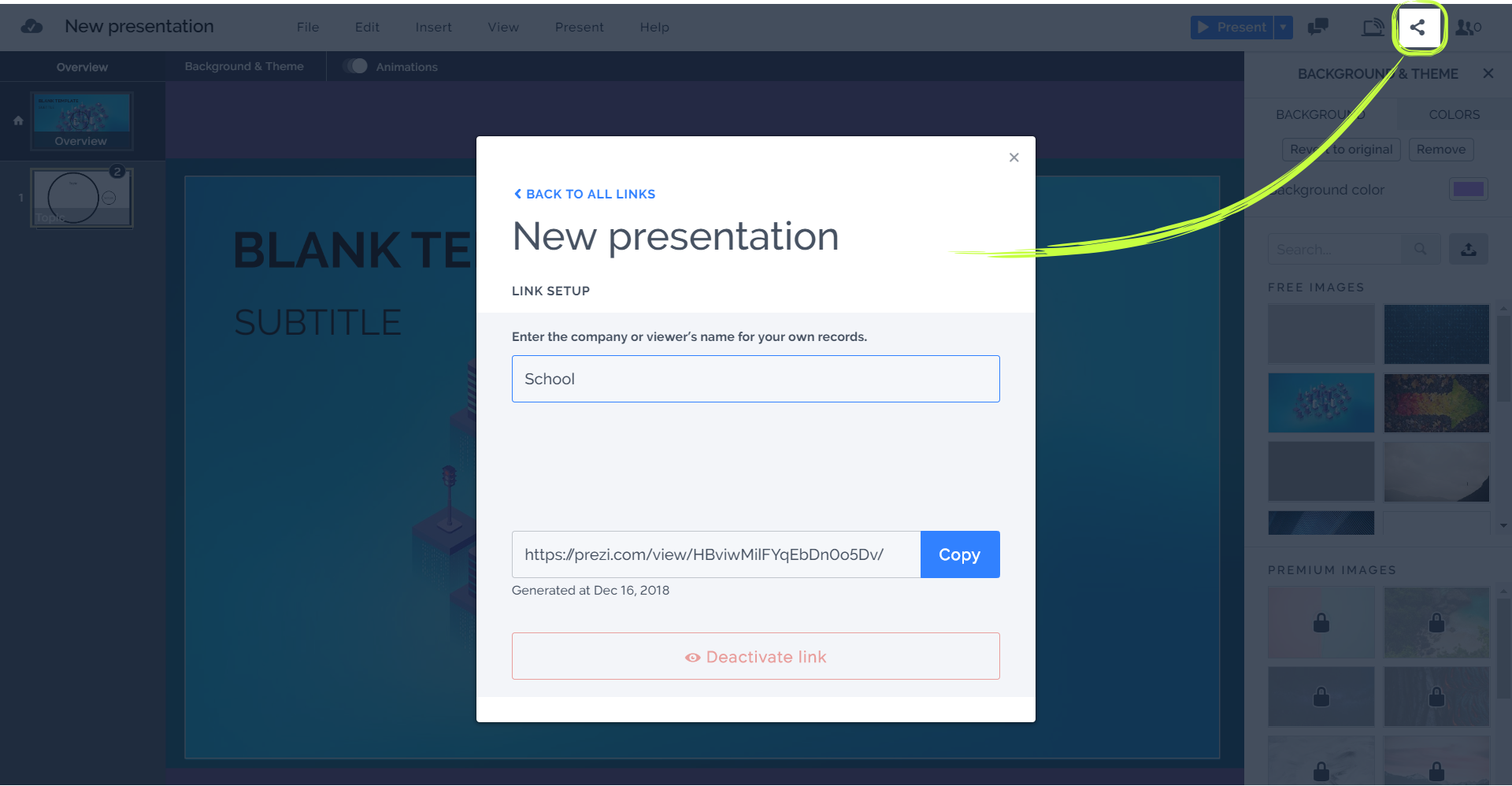
In order to share a presentation, you need to select “Show collaborators” and then “Total collaborators” from the main menu. Choosing this option makes a window pop up, where you can add collaborators. In order to invite a person, it is enough to give the person’s email address and select if they will be able to:
edit (Can edit),
comment (Can comment),
present (Can present).
In this way you can work with a group on one presentation at the same time or share the results of your work with other people.
RaEzigufKrOR41
Zrzut z ekranu przedstawia edytor online prezi.com. Zaznaczona jest przycisk udostępniania prezentacji (kąt ostry, na końcach obu ramion i wierzchołku punkty). W centralnej części znajduje się formatka. Na na niej od góry: link 'BACK TO ALL LINK', niżej napis New presentation (tytuł udostępnianej prezentacji). Sekcja lin setup: Enter the company or viewer's name for your own records, poniżej okno tekstowe z wpisanym użytkownikiem School. Niżej okno tekstowe, w którym znajduje się link do udostępnienia i przycisk Copy. Pod spodem data wygenerowania: Generated at Dec 16,2018. Na samym dole przycisk Deactivate link
To make your presentation more attractive for the viewer, you can add an interesting background or themethemetheme, but also images, audio files, films, graphs and many more. If you make a presentation in a group via prezi.com, you can add the elements at the same time, which shortens the time spent on creating the presentation. What’s more, all of you are constantly updated on any changes introduced to the presentation.
Exercises
Exercise 1
R19s1FwcvQ2AI
Wersja alternatywna ćwiczenia: Prezi.com application allows to create: Możliwe odpowiedzi: 1. a multimedia presentation, 2. mini game, 3. text document, 4. a spreadsheet, 5. graphics
Wersja alternatywna ćwiczenia: Prezi.com application allows to create: Możliwe odpowiedzi: 1. a multimedia presentation, 2. mini game, 3. text document, 4. a spreadsheet, 5. graphics
Prezi.com application allows to create:
a multimedia presentation
mini game
text document
a spreadsheet
graphics
zadanie
Source: GroMar, licencja: CC BY 3.0.
Exercise 2
Use a search engine to find a recipe for your favourite dish. Create a short presentation about it.
Exercise 3
Describe in English how to create a New presentation on prezi.com
RzF8QhFhPWJMp
Exercise 4
Wybierz jedno nowe słowo poznane podczas dzisiejszej lekcji i ułóż z nim zdanie.
Wybierz jedno nowe słowo poznane podczas dzisiejszej lekcji i ułóż z nim zdanie.
Indicate which pairs of expressions or words are translated correctly.
konto pocztowe - email account
praca grupowa - group work
obiekt - object
udostępnianie - sharing
motyw - template
szablon - theme
RVWLfpkBaZp1E1
Interaktywna gra, polegająca na łączeniu wyrazów w pary w ciągu jednej minuty. Czas zaczyna upływać wraz z rozpoczęciem gry. Jeden ruch to odkrywanie najpierw jednej potem drugiej karty z wyrazem. Każdy wyraz jest odczytywany. Kolejny ruch to odkrywanie trzeciej i czwartej karty. W ten sposób odsłuchasz wszystkie wyrazy. Nawigacja z poziomu klawiatury za pomocą strzałek, odsłuchiwanie wyrazów enterem lub spacją. Znajdź wszystkie pary wyrazów.
Interaktywna gra, polegająca na łączeniu wyrazów w pary w ciągu jednej minuty. Czas zaczyna upływać wraz z rozpoczęciem gry. Jeden ruch to odkrywanie najpierw jednej potem drugiej karty z wyrazem. Każdy wyraz jest odczytywany. Kolejny ruch to odkrywanie trzeciej i czwartej karty. W ten sposób odsłuchasz wszystkie wyrazy. Nawigacja z poziomu klawiatury za pomocą strzałek, odsłuchiwanie wyrazów enterem lub spacją. Znajdź wszystkie pary wyrazów.
Match Polish terms with their English equivalents.
szablon
udostęnianie
remote work
template
prezentacja zdalna
theme
obiekt
object
sparing
motyw
Source: Zespół autorski Politechniki Łódzkiej, licencja: CC BY 3.0.