AnimationanimationAnimation is an excellent way to emphasize an element of a presentation and to control the flow of information. Well chosen and prepared animations will increase the attention paid by the audience to highlighted components of a slide show.
In PowerPoint presentations, you can animate texts, images, shapes, tables, SmartArt graphics and other objects. AnimationanimationAnimation gives them visual effects including: entrances, exits, change in sizechange in sizechange in size or colour, change of transparencytransparencytransparency and movement.
In order to add an animation to an object, follow these steps:
select an object,
choose an animation effect,
set the properties of the effect.
There are four types of animationanimationanimation effects.
RMwrRvPj9WfBy
Ilustracja interaktywna przedstawia efekty animacji podstępne w programie PowerPoint oznaczone ponumerowanymi przyciskami. W każdej grupie efektów wymienione są dostępne opcje. 1 - Entrance (wejście): Appear, Fade, Fly In Float, Split, Wipe, Shape, Wheel, Random Bars, Grow & Turn, Zoom, Swivel, Bounce. 2 - Emphasis (wyróżnienie): Pulse, Color Pulse, Teeter, Spis, Grow/Shrink, Desaturate, Darken, Lighten, Transparency, Object Color, Complementation, Line color, Fill Color, Brush Color, Font Color, Underline, Bold Flash, Bold Reveal Wave. 3 - Exit (wyjście): Disappear, Fade, Fly Out, Float Out, Split, Wipe, Shape, Wheel, Random, Shrink & Turn, Zoom, Swivel, Bounce. 4 - Motion Paths (ścieżki ruchu): ones, Arcs, Turns, Shapes, Loops, Custom Path. Wybierz przycisk od 1 do 4, aby dowiedzieć się więcej. Na ilustracji widoczne są numery, a na nich podpisy. 1. Entrance effects make an object gradually fade, zoom, fly in from the edge or appear in the slide area. {audio}, 2. Emphasis effects make an object grow or shrink, change its colour or spin. {audio}, 3. Exit effects make an object fly out or disappear from the slide area. {audio}, 4. Motion path effects animate an object so that it moves in the specified direction and follows a set path. You can also define your own custom path. {audio}
Ilustracja interaktywna przedstawia efekty animacji podstępne w programie PowerPoint oznaczone ponumerowanymi przyciskami. W każdej grupie efektów wymienione są dostępne opcje. 1 - Entrance (wejście): Appear, Fade, Fly In Float, Split, Wipe, Shape, Wheel, Random Bars, Grow & Turn, Zoom, Swivel, Bounce. 2 - Emphasis (wyróżnienie): Pulse, Color Pulse, Teeter, Spis, Grow/Shrink, Desaturate, Darken, Lighten, Transparency, Object Color, Complementation, Line color, Fill Color, Brush Color, Font Color, Underline, Bold Flash, Bold Reveal Wave. 3 - Exit (wyjście): Disappear, Fade, Fly Out, Float Out, Split, Wipe, Shape, Wheel, Random, Shrink & Turn, Zoom, Swivel, Bounce. 4 - Motion Paths (ścieżki ruchu): ones, Arcs, Turns, Shapes, Loops, Custom Path. Wybierz przycisk od 1 do 4, aby dowiedzieć się więcej. Na ilustracji widoczne są numery, a na nich podpisy. 1. Entrance effects make an object gradually fade, zoom, fly in from the edge or appear in the slide area. {audio}, 2. Emphasis effects make an object grow or shrink, change its colour or spin. {audio}, 3. Exit effects make an object fly out or disappear from the slide area. {audio}, 4. Motion path effects animate an object so that it moves in the specified direction and follows a set path. You can also define your own custom path. {audio}
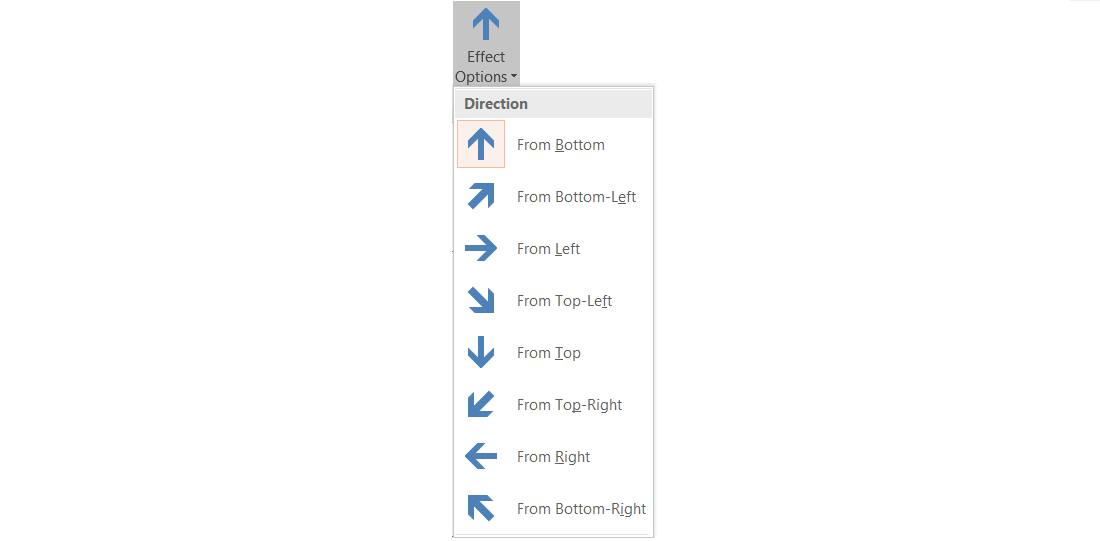
Most of the effects require to set additional effect parameters. For example for the Fly In effect you can set the direction from which an object will appear.
RX7sGroEPr3HA
Grafika przedstawia właściwości efektu Fly: From Bottom, From Bottom-Left, From left, From Top-Left, From Top, From Top-Right, From Right, From Bottom-Right.
The gallery of the animationanimationanimation effects on the Animations tab shows only the most popular effects. In order to apply more, click Add Animation, then scroll down and click More entrance effectsentrance effectsentrance effects, More emphasis effectsemphasis effectsemphasis effects, More exit effectsexit effectsexit effects or More motion pathsmotion pathsmotion paths.
Open the programme for creating animations. Add the text and graphical elements to the slides. Try various animation effects. Check the result of the animationanimationanimation of a table and a SmartArt graphic.
RHe2wUYSC83C5
Zrzut ekranu przedstawia wygląd sekcji Timing. Od gory ikona w kształcie trójkąta równoramiennego z wierzchołkiem skierowanym w prawą stronę - obok napis Start oraz na liście rozwijanej wartość domyślna On Click. Obok napis Recorder Animation. Poniżej ikona przedstawiająca zegarek wskazówkowy, obok napis Duration: oraz na liście rozwijanej ustawiona wartość 00,50. Obok ikona w kształcie trójkąta równobocznego z wierzchołkiem skierowanym do góry i napis Move Earlier. Poniżej ikona przedstawiająca zegarek wskazówkowy - pierwszy kwadrans na tarczy jest zamalowany, obok napis Delay: oraz na liście rozwijanej ustawiona wartość 00,00. Obok ikona w kształcie trójkąta równobocznego z wierzchołkiem skierowanym do góry i napis Move Later. Na samym dole formatki napis Timing.
In order to change the speed of your animationanimationanimation effect, on the Animations tab, under Timing, in the Duration box, modify the number of seconds that you want the effect to run. If you want to delay the start time of the animation or pause in between animation effects on the slide, you can set a delay on one or more effects.
Create a multimedia presentation entitled „Ocean currents”. Find the information and graphics you need on the Internet. Use animation to present the movement of the ocean currents.
In order to ensure that animations are run during a slide show, on the Slide Show tab, select Set Up Slide Show and make sure that the Show without animationanimationanimation check box is not selected. If it is selected, then the animations will be run during the preview of the slide show, but not during the presentation. Some entrance and exit effectsexit effectsexit effects (e.g. Flip, Drop and Whip) and some emphasis effectsemphasis effectsemphasis effects (e.g. Brush Color and Wave) work only with text.
Exercises
Exercise 1
R1FOQlyhy40Zm
Wersja alternatywna ćwiczenia: Decide which of the following statements are true. Animation is an excellent way to: Możliwe odpowiedzi: 1. emphasize an element of a presentation, 2. control the flow of information, 3. increase the attention of the audience, 4. insert graphics into a presentation
Wersja alternatywna ćwiczenia: Decide which of the following statements are true. Animation is an excellent way to: Możliwe odpowiedzi: 1. emphasize an element of a presentation, 2. control the flow of information, 3. increase the attention of the audience, 4. insert graphics into a presentation
Decide which of the following statements are true. Animation is an excellent way to:
emphasize an element of a presentation
control the flow of information
increase the attention of the audience
insert graphics into a presentation
zadanie
Source: GroMar, licencja: CC BY 3.0.
Exercise 2
Create a multimedia presentation entitled „The Solar System”. Find the information about the planets and their pictures on the internet, or create the graphics of the planet in any graphics software. Try to add the appropriate animations to the elements of the presentation in order to simulate the movement of the planets.
Exercise 3
Describe in English a selected animation effect.
Exercise 4
RuYdQEGN1GLRp
Wersja alternatywna ćwiczenia: Indicate which pairs of expressions or words are translated correctly. Możliwe odpowiedzi: 1. animacja - animation, 2. efekty wejścia - entrance effects, 3. efekty wyjścia - exit effects, 4. efekty wyróżnienia - emphasis effects, 5. ścieżki ruchu - movement effect, 6. efekt ruchu - change in size
Wersja alternatywna ćwiczenia: Indicate which pairs of expressions or words are translated correctly. Możliwe odpowiedzi: 1. animacja - animation, 2. efekty wejścia - entrance effects, 3. efekty wyjścia - exit effects, 4. efekty wyróżnienia - emphasis effects, 5. ścieżki ruchu - movement effect, 6. efekt ruchu - change in size
Indicate which pairs of expressions or words are translated correctly.
animacja - animation
efekty wejścia - entrance effects
efekty wyjścia - exit effects
efekty wyróżnienia - emphasis effects
ścieżki ruchu - movement effect
efekt ruchu - change in size
zadanie
Source: GroMar, licencja: CC BY 3.0.
RF0W54PPEibEW1
Interaktywna gra, polegająca na łączeniu wyrazów w pary w ciągu jednej minuty. Czas zaczyna upływać wraz z rozpoczęciem gry. Jeden ruch to odkrywanie najpierw jednej potem drugiej karty z wyrazem. Każdy wyraz jest odczytywany. Kolejny ruch to odkrywanie trzeciej i czwartej karty. W ten sposób odsłuchasz wszystkie wyrazy. Nawigacja z poziomu klawiatury za pomocą strzałek, odsłuchiwanie wyrazów enterem lub spacją. Znajdź wszystkie pary wyrazów.
Interaktywna gra, polegająca na łączeniu wyrazów w pary w ciągu jednej minuty. Czas zaczyna upływać wraz z rozpoczęciem gry. Jeden ruch to odkrywanie najpierw jednej potem drugiej karty z wyrazem. Każdy wyraz jest odczytywany. Kolejny ruch to odkrywanie trzeciej i czwartej karty. W ten sposób odsłuchasz wszystkie wyrazy. Nawigacja z poziomu klawiatury za pomocą strzałek, odsłuchiwanie wyrazów enterem lub spacją. Znajdź wszystkie pary wyrazów.
Match Polish terms with their English equivalents.
efekty wejścia
ścieżki ruchu
efekty wyjścia
efekty wyróżnienia
emphasis effects
exit effects
animacja
animation
motion paths
entrance effects
Source: Zespół autorski Politechniki Łódzkiej, licencja: CC BY 3.0.