Colour is a sense impression of a human when the mixture of elecromagnetic waves in the visible spectrum strikes his or her eye. People do not necessarily see colours the same. The cells of the retina in the eyes responsible for the perception of colours are sensitive to light due to specific proteins which they are composed of. These proteins are not identical in all people and therefore we see the world in different shades. For example one person may recognise a colour as purple, while the other as pink. Gender differences in the reception of colours also occur; men usually see less shades than women. Moreover, there are visual impairments related to the recognition of the colour.
We come across the computer analysis of the image on na everyday basis. An example can be satelite pictures commonly available on the Internet. The computer processing of the image has been widely used in medicine – diagnostic imaging (e.g. ultrasonography), in films and computer games – special effects. An information system must reproduce the full colour palettecolour palettecolour palette of the surrounding world, adjust the method of displaying an image and the saturationsaturationsaturation, contrastcontrastcontrast, brightnessbrightnessbrightness and transparencytransparencytransparency of colours so that the image is as clear and understandable as possible.
Think about the areas of life in which colours are applied. For example in physics – the dispersion of white light in a prism. Find examples on the Internet.
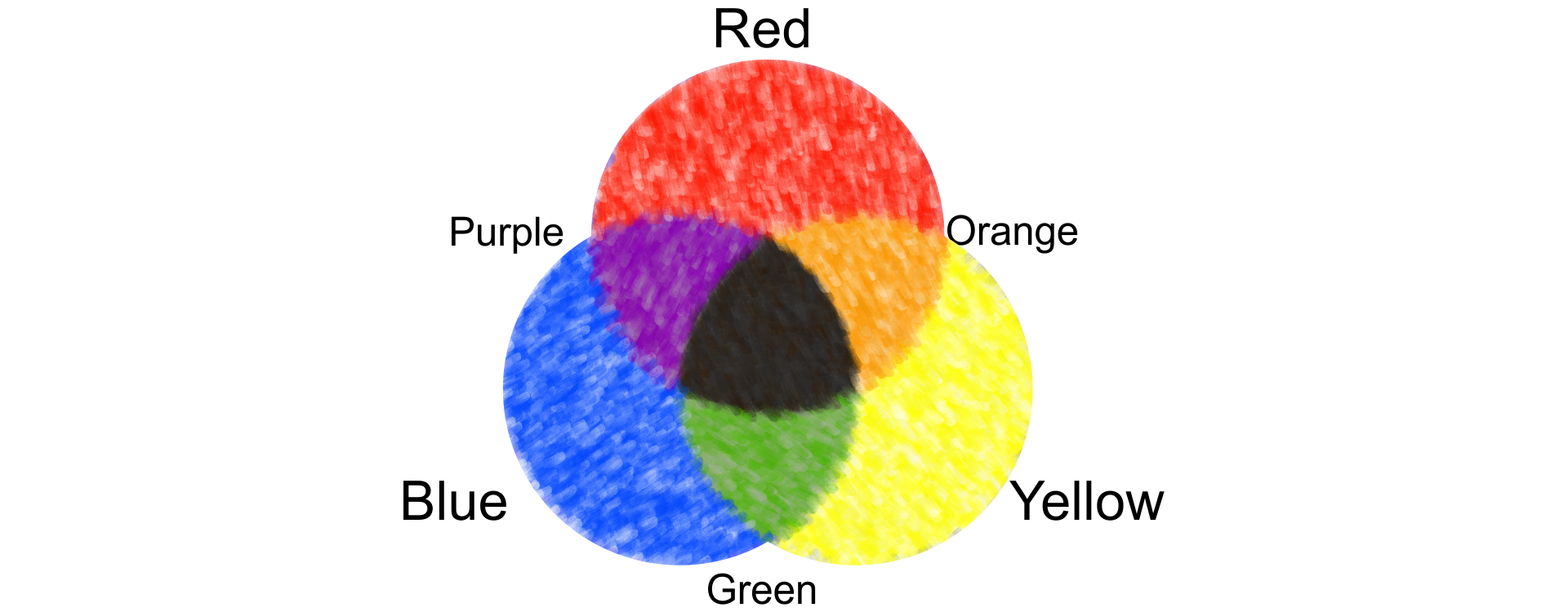
Probably each of you has played with the mixing of paints. Therefore you know that the primary colours are yellow, red and blue. This is one of the first models of the colourcolourcolour space, composed of R – red, Y – yellow and B – blue. It was described by Isaac Newton in optics.
R1KDmfKt8REl81
Model RYB składa się z kolorów podstawowych R-red, Y-yellow, B-blue. Z niebieskiego i czerwonego można uzyskać Purple, z czerwonego i żółtego Orange, a z niebieskiego i żółtego Green. Nałożenie wszystkich trzech kolorów podstawowych daje kolor czarny.
Source: GroMar, licencja: CC BY 3.0.
In information technology there are also sets of primary colours, they are called colour models. On the one hand, they are used to reproduce natural colours, but on the other hand, they can be easily applied to specific purposes and converted into one another. Alternative and very simplified solutions are created, which are used for image displaying and processing.
The most common processes that you come across are displaying images on electronic devices and printing.
How many devices displaying images have you used today?
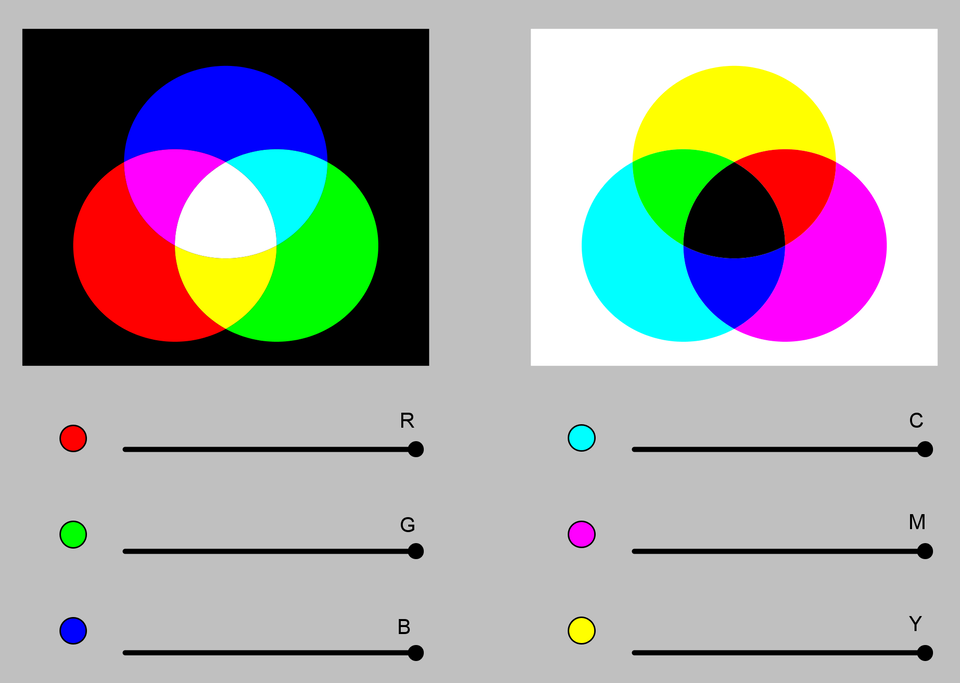
The RGB colour modelcolour modelcolour model is used to reproduce colour image on telephones, smartphones, tablets, computers, TV sets etc. The theory of trichromatic colour vision (three component colours) was the basis for the creation of the RGB colour modelcolour modelcolour model. The theory assumes that every colour can be obtained by mixing the component colours: R – red, G – green and B – blue. Note that this model applies to emitted light.
R1DPgSaKXGvAT1
Ilustracja przedstawia model RGB. red, green, blue. Red + Green daje żółty, Red + Blue daje fiolet, Green + Blue daje cyjan. Wszystkie kolory nałożone na siebie dają biel.
Source: GroMar, licencja: CC BY 3.0.
Every of the three component colours can be expressed as 256 values (from 0 to 255) in 1 B (byte) of the computer memory. When you multipy these numbers, you will obtain 16,777,216 possible colours in the colour palettecolour palettecolour palette. In order to store a colour of the palette, you need 3 bytes of the computer memory. If all the component colours are expressed as zero [0, 0, 0], the resulting colour is black. When every component colour is at its maximum [255,255,255], then the resulting colour is white.
The CMY colour modelcolour modelcolour model, like the RGB colour model, was created with the use of the theory of trichromatic colour vision, according to which you can obtain any colour by mixing three colours: C – cyan, M – magenta and Y – yellow.
RU5SLWTJICAju1
Model CMY to C-cyjan, M-magenta, Y-yellow. Kolory Magenta + Cyjan dają niebieski, Cyjan + Yellow dają zielony, Magenta + Yellow dają czerwony. Wszystkie kolory nałożone na siebie dają czerń.
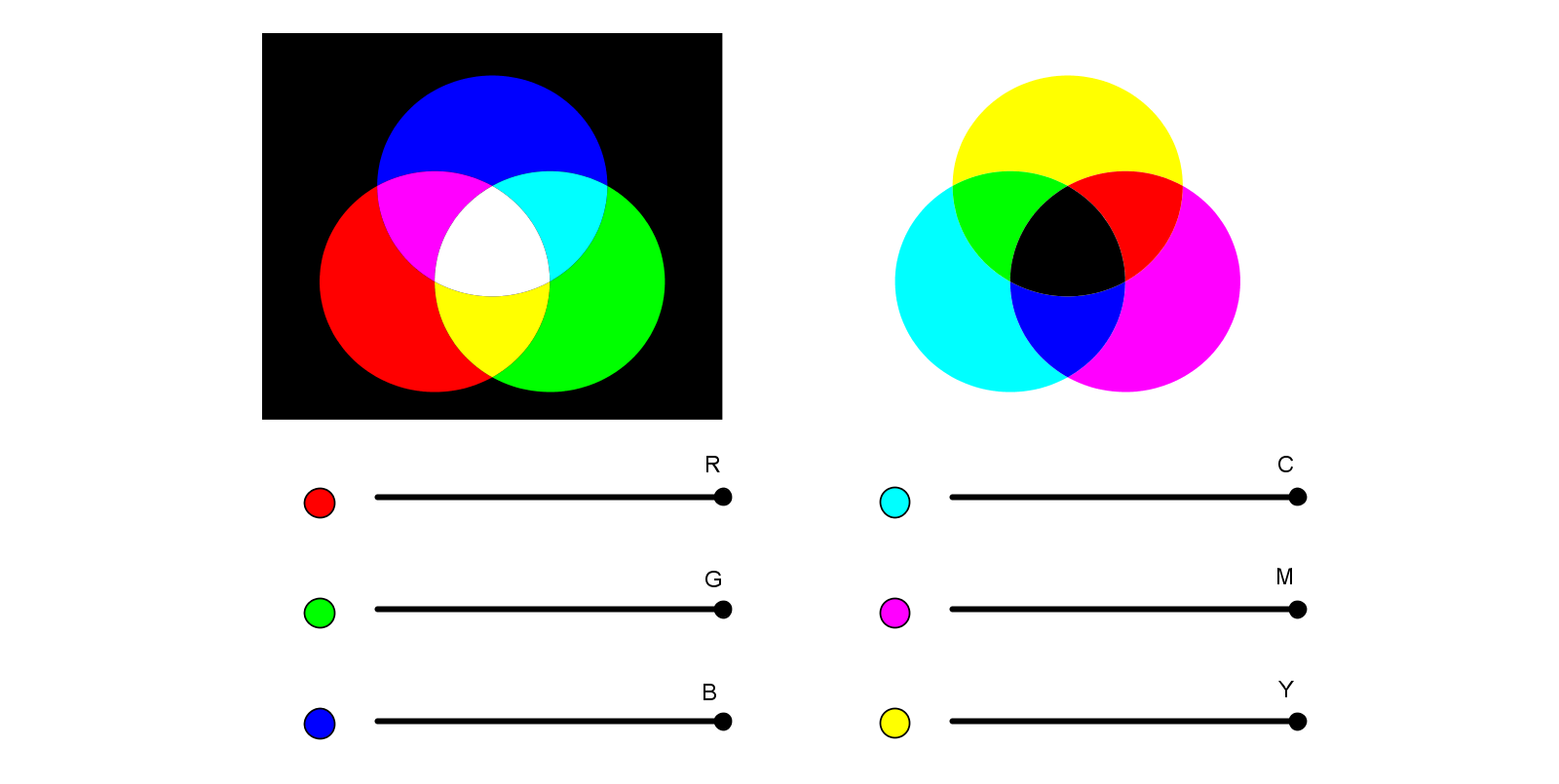
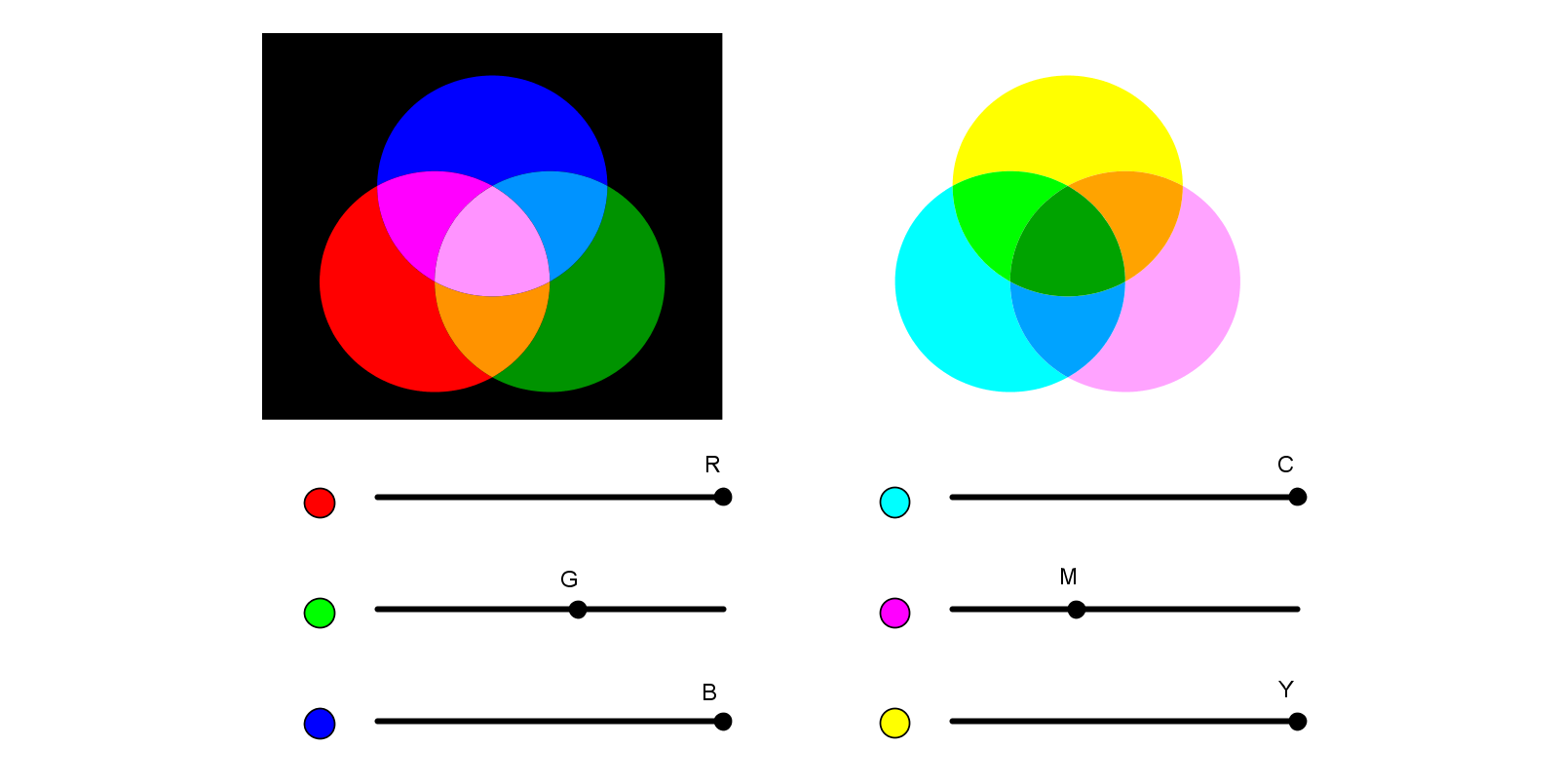
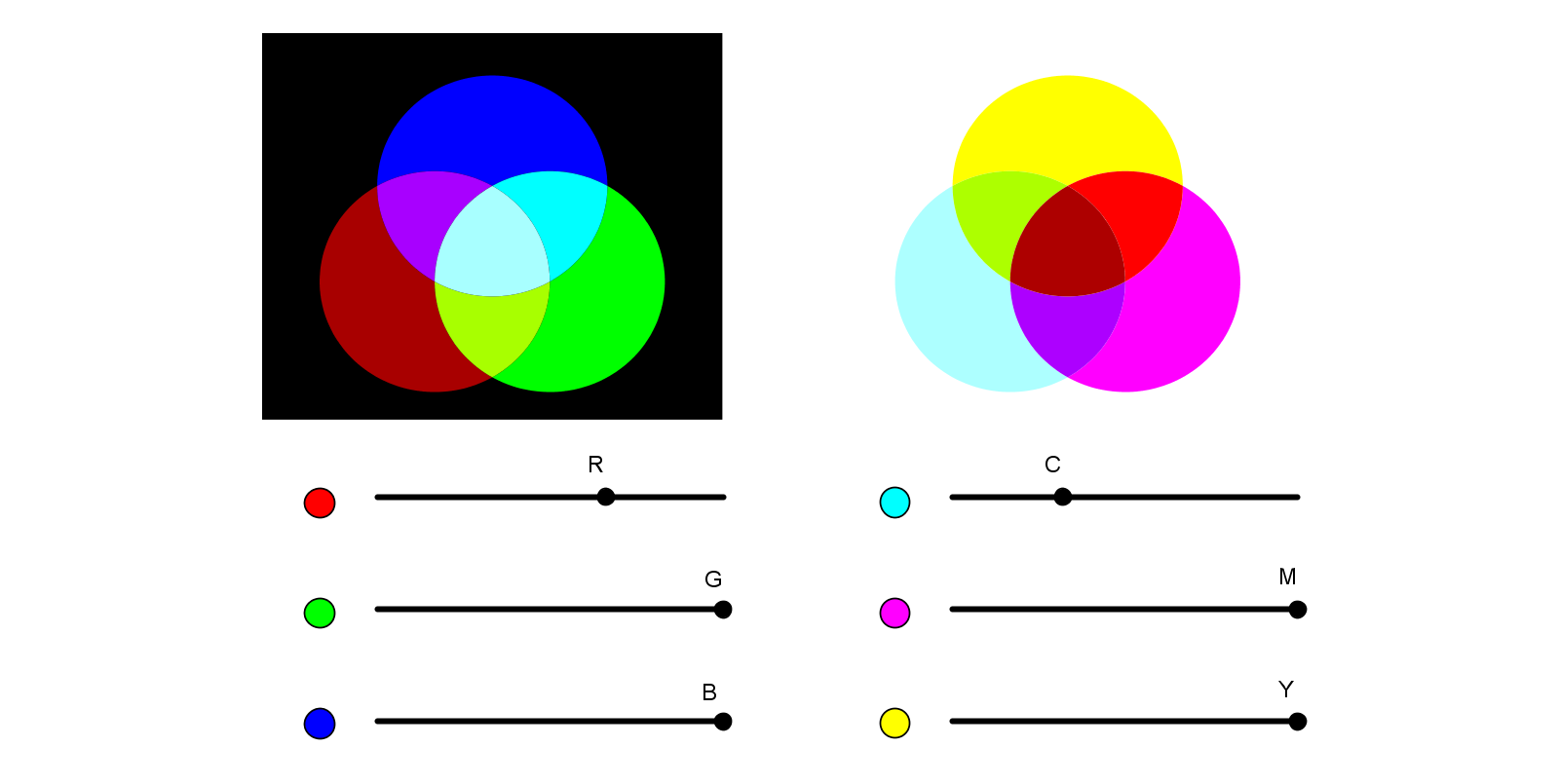
Open the geogebra applet. In the simulation you can try to obtain a new colour in the RGB and CMY colour models. Try to obtain exactly the same shade of orange and purple in both models.
RlXdUGSOqoH3y1
Aplet geogebry: Tworzenie kolorów w modelach RGB I CMY. Poniżej znajduje się galeria będąca wersją alternatywną dla aplikacji.
Aplet geogebry: Tworzenie kolorów w modelach RGB I CMY. Poniżej znajduje się galeria będąca wersją alternatywną dla aplikacji.
Ilustracja przedstawia dwa modele barw. Po lewej stronie znajduje się model RGB zaprezentowany za pomocą trzech kół zachodzących na siebie: czerwonego (Red), zielonego (Green) i niebieskiego (Blue). Czerwony plus Zielony daje żółty, Czerwony plus Niebieski daje fiolet, Zielony plus Niebieski daje cyjan. Wszystkie kolory nałożone na siebie dają biel. Pod kołami znajdują się trzy suwaki odpowiadające podstawowym kolorom w modelu RGB. Po lewej stronie znajduje się model CMY zaprezentowany za pomocą trzech kół zachodzących na siebie: cyjan (C), magenta (M) i żółty (Yellow). Kolory Magenta plus Cyjan dają niebieski, Cyjan plus Żółty dają zielony, Magenta plus Żółty dają czerwony. Wszystkie kolory nałożone na siebie dają czerń. Pod kołami znajdują się trzy suwaki odpowiadające podstawowym kolorom w modelu CMY.
Creating colours in the RGB and CMY colour models
RJtXSLWh1OK4Y
Ilustracja przedstawia dwa modele barw. Po lewej stronie znajduje się model RGB zaprezentowany za pomocą trzech kół zachodzących na siebie: czerwonego (Red), zielonego (Green) i niebieskiego (Blue). Pod kołami znajdują się trzy suwaki odpowiadające podstawowym kolorom w modelu RGB. Po lewej stronie znajduje się model CMY zaprezentowany za pomocą trzech kół zachodzących na siebie: cyjan (C), magenta (M) i żółty (Yellow). Pod kołami znajdują się trzy suwaki odpowiadające podstawowym kolorom w modelu CMY. W obu modelach za pomocą suwaków uzyskano zbliżony do siebie kolor pomarańczowy. W modelu RGB na przecięciu kolorów czerwonego i zielonego ze zmniejszonym nasyceniem. W modelu CMY na przecięciu kolorów żółtego i magenty ze zmniejszonym nasyceniem.
Creating an orange colour in the RGB and CMY colour models
RBSuyST2P5bT2
Ilustracja przedstawia dwa modele barw. Po lewej stronie znajduje się model RGB zaprezentowany za pomocą trzech kół zachodzących na siebie: czerwonego (Red), zielonego (Green) i niebieskiego (Blue). Pod kołami znajdują się trzy suwaki odpowiadające podstawowym kolorom w modelu RGB. Po lewej stronie znajduje się model CMY zaprezentowany za pomocą trzech kół zachodzących na siebie: cyjan (C), magenta (M) i żółty (Yellow). Pod kołami znajdują się trzy suwaki odpowiadające podstawowym kolorom w modelu CMY. W obu modelach za pomocą suwaków uzyskano zbliżony do siebie kolor fioletowy. W modelu RGB na przecięciu kolorów niebieskiego i czerwonego ze zmniejszonym nasyceniem. W modelu CMY na przecięciu kolorów magenta i cyjan ze zmniejszonym nasyceniem.
Creating a purple colour in the RGB and CMY colour models
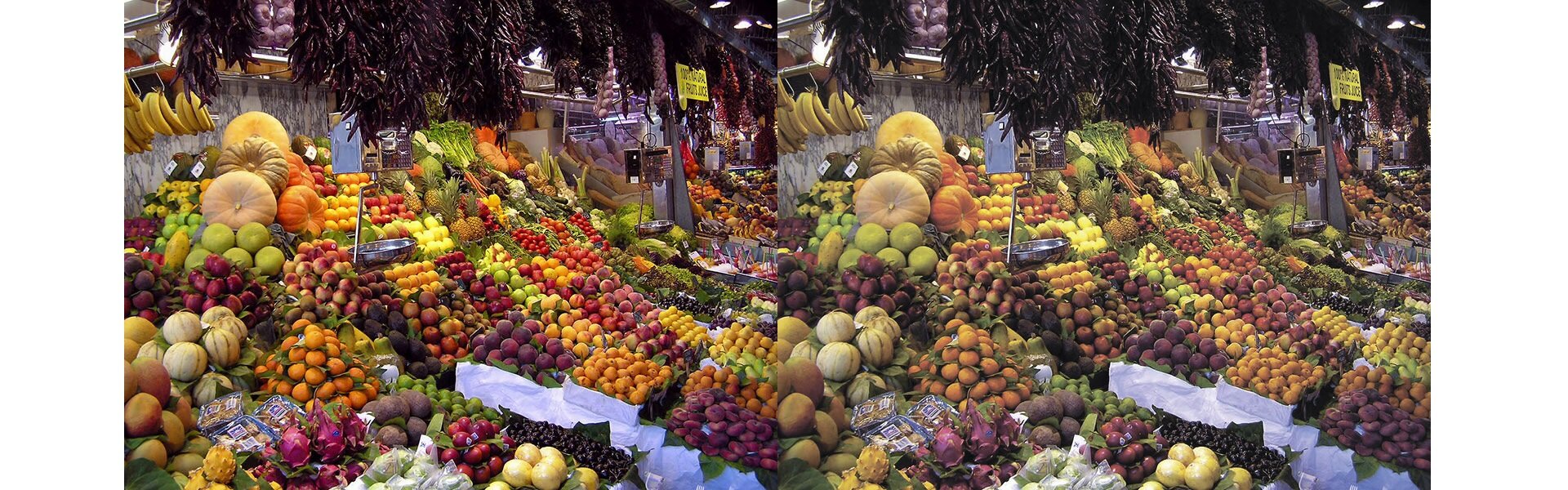
The CMYK colour model is commonly used in printing. The three colours of the CMY colour model are completed with black (K). The last letter of the word, not the first, was chosen so that B is not confused with Blue in the RGB colour model. The CMY and CMYK colour models reproduce reflected light, as opposed to the RGB colour model. In the picture below you can see the differences between the image displayed on the screen in the RGB colour model (left) and in the CMYK colour model (right).
R1J7pwUooq07J1
Różnice w wyświetlaniu na monitorze obrazu w RGB i CMYK. Można zauważyć, że obraz w RGB jest w barwach bardziej wyraźnych, natomiast w CMYK wygląda jakby za mgłą.
Open the graphics application which is installed on your computer. Find the option in settings which enables changing the colour modelcolour modelcolour model of displaying images. Check how many such models are at your disposal.
GIF files offer limited possibilities of reproducing the colour palettecolour palettecolour palette. Every pixel of an image can be described only by one of 256 of the palette colours. That is why they are less suitable for colour gradients.
JPG files are intended primarily for reproducing photographs and support the full colour palette. The JPG file format enables reproducing the full RGB and CMYK colour palettes.
PNG files support the full colour palettecolour palettecolour palette and transparencytransparencytransparency. The PNG file format supports the RGB colour modelcolour modelcolour model and is recommended for reproducing web graphics.
In a raster graphics programme, open a picture taken by you. Check if you can change the colours of the photograph, and modify brightnessbrightnessbrightness and contrastcontrastcontrast. Save the effect of your work in the JPG, PNG and GIF formats. Compare the quality of the images.
The RGB colour model applies to images which are displayed on the screen, while the CMYK colour model applies to images which are printed.
Exercises
Exercise 1
R1TXoplzAeKPJ
Wersja alternatywna ćwiczenia: Identify which of the following sentences about colour models are true: Możliwe odpowiedzi: 1. The RYB colour model was described by Isaac Newton in mathematics., 2. The HSV colour model defines colours as similar to the colours perceived by humans as possible., 3. The RGB colour model applies to images which are displayed on the screen., 4. The CMYK colour model applies to images which are printed.
Wersja alternatywna ćwiczenia: Identify which of the following sentences about colour models are true: Możliwe odpowiedzi: 1. The RYB colour model was described by Isaac Newton in mathematics., 2. The HSV colour model defines colours as similar to the colours perceived by humans as possible., 3. The RGB colour model applies to images which are displayed on the screen., 4. The CMYK colour model applies to images which are printed.
Identify which of the following sentences about colour models are true:
The RYB colour model was described by Isaac Newton in mathematics.
The HSV colour model defines colours as similar to the colours perceived by humans as possible.
The RGB colour model applies to images which are displayed on the screen.
The CMYK colour model applies to images which are printed.
zadanie
Source: GroMar, licencja: CC BY 3.0.
Exercise 2
RdNtb1uhPWoOw
Wersja alternatywna ćwiczenia: Identify which of the following sentences about graphical file formats are true. Możliwe odpowiedzi: 1. GIF files support only 256 colours., 2. GIF files are suitable for colour gradients., 3. JPG files are intended primarily for reproducing photographs., 4. The JPG file format enables reproducing the full RGB and CMYK colour palettes., 5. PNG files support transparency., 6. The PNG file format is not recommended for reproducing web graphics.
Wersja alternatywna ćwiczenia: Identify which of the following sentences about graphical file formats are true. Możliwe odpowiedzi: 1. GIF files support only 256 colours., 2. GIF files are suitable for colour gradients., 3. JPG files are intended primarily for reproducing photographs., 4. The JPG file format enables reproducing the full RGB and CMYK colour palettes., 5. PNG files support transparency., 6. The PNG file format is not recommended for reproducing web graphics.
Identify which of the following sentences about graphical file formats are true.
GIF files support only 256 colours.
GIF files are suitable for colour gradients.
JPG files are intended primarily for reproducing photographs.
The JPG file format enables reproducing the full RGB and CMYK colour palettes.
PNG files support transparency.
The PNG file format is not recommended for reproducing web graphics.
zadanie
Source: GroMar, licencja: CC BY 3.0.
Exercise 3
Describe in English the differences between the RGB and CMY colour models.
Exercise 4
R99nMALhDWLJB
Wersja alternatywna ćwiczenia: Indicate which pairs of expressions or words are translated correctly. Możliwe odpowiedzi: 1. barwa - colour, 2. model barw - colour model, 3. paleta kolorów - colour palette, 4. nasycenie - saturation, 5. przeźroczystość - brightness, 6. gradient - contrast
Wersja alternatywna ćwiczenia: Indicate which pairs of expressions or words are translated correctly. Możliwe odpowiedzi: 1. barwa - colour, 2. model barw - colour model, 3. paleta kolorów - colour palette, 4. nasycenie - saturation, 5. przeźroczystość - brightness, 6. gradient - contrast
Indicate which pairs of expressions or words are translated correctly.
barwa - colour
model barw - colour model
paleta kolorów - colour palette
nasycenie - saturation
przeźroczystość - brightness
gradient - contrast
zadanie
Source: GroMar, licencja: CC BY 3.0.
RoOkIWD3LXdQP1
Interaktywna gra, polegająca na łączeniu wyrazów w pary w ciągu jednej minuty. Czas zaczyna upływać wraz z rozpoczęciem gry. Jeden ruch to odkrywanie najpierw jednej potem drugiej karty z wyrazem. Każdy wyraz jest odczytywany. Kolejny ruch to odkrywanie trzeciej i czwartej karty. W ten sposób odsłuchasz wszystkie wyrazy. Nawigacja z poziomu klawiatury za pomocą strzałek, odsłuchiwanie wyrazów enterem lub spacją. Znajdź wszystkie pary wyrazów.
Interaktywna gra, polegająca na łączeniu wyrazów w pary w ciągu jednej minuty. Czas zaczyna upływać wraz z rozpoczęciem gry. Jeden ruch to odkrywanie najpierw jednej potem drugiej karty z wyrazem. Każdy wyraz jest odczytywany. Kolejny ruch to odkrywanie trzeciej i czwartej karty. W ten sposób odsłuchasz wszystkie wyrazy. Nawigacja z poziomu klawiatury za pomocą strzałek, odsłuchiwanie wyrazów enterem lub spacją. Znajdź wszystkie pary wyrazów.
Match Polish terms with their English equivalents.
colour model
barwa
colour palette
model barw
paleta kolorów
colour
Source: Zespół autorski Politechniki Łódzkiej, licencja: CC BY 3.0.