You can add a tabletabletable to the slide by creating it directly in PowerPoint. You can also paste data copied from the text editor or spreadsheet cells. Table insertinsertinsert is very similar to the table insertion operation in a Word processor.
R11v1Wecz9IDh1
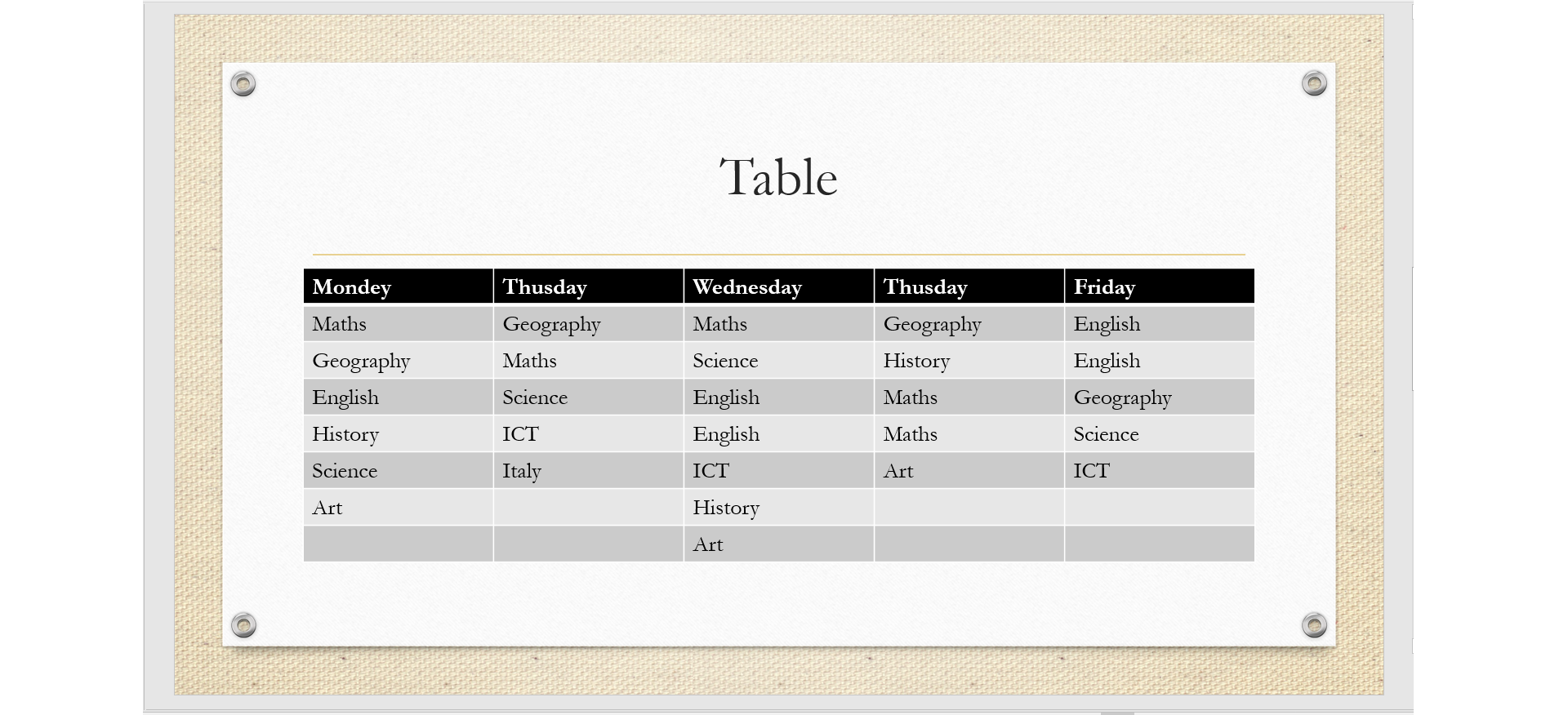
Zrzut z ekranu przedstawia przykładową tabelę pokazaną na slajdzie prezentacji multimedialnej. Tabela pokazuje plan lekcji.
To insertinsertinsert a table into a slide, use the Insert table option on the Insert ribbon. After selecting this option, specify the number of rowsrowrows and columnscolumncolumns in the table in the Insert Table dialog box.
R13toP656Y0ho1
Zrzut z ekranu przedstawia formatkę Insert Table w programie PowerPoint. Napis Number of columns: obok lista wyboru z wartością 5. Poniżej napis Number of rows: obok lista wyboru z wartością 2. Na dole dwa przyciski OK oraz Cancel.
To add text to table cells, click the cell and enter the text into it. After inserting the cursor into the table, two additional ribbons are activated: Design and Layout. They contain all available tools that allow you to edit and formatformatformat the table.
REwgqUEzQea7H
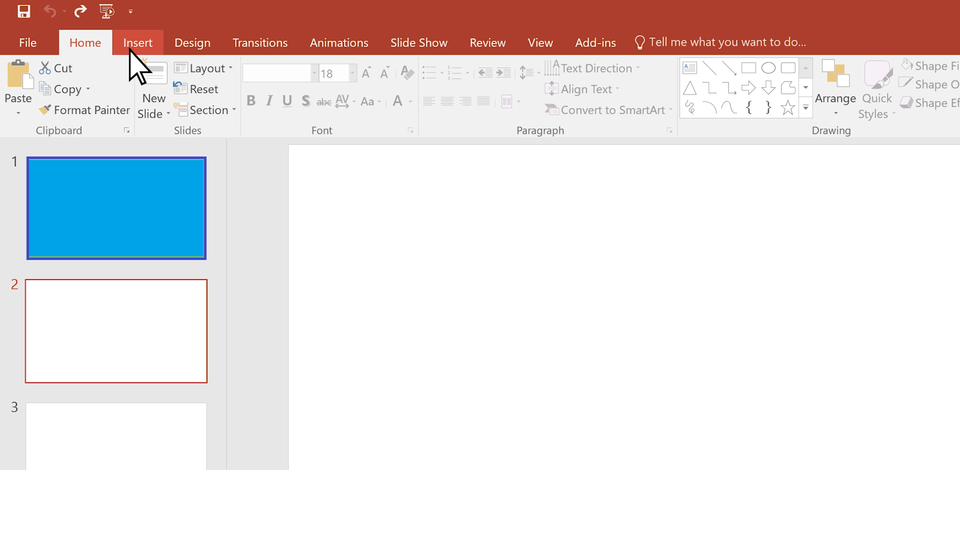
Prezentacja przedstawia wstawianie tabeli do prezentacji. Instrukcja obsługi z poziomu klawiatury: 1. Uruchomienie aplikacji - ENTER, 2. Na każdym ze slajdów czytany jest automatycznie tekst alternatywny po polsku, 3. Przy pierwszym uruchomieniu na pierwszym slajdzie, czytanie tekstu po angielsku - TAB, 4. Przejście między slajdami: do następnego slajdu - TAB, do poprzedniego slajdu - TAB + SHIFT, 5. Przejście do czytania napisu po angielsku - strzałka w górę + strzałka w dół (czyta tekst po angielsku widoczny na slajdzie).
Prezentacja przedstawia wstawianie tabeli do prezentacji. Instrukcja obsługi z poziomu klawiatury: 1. Uruchomienie aplikacji - ENTER, 2. Na każdym ze slajdów czytany jest automatycznie tekst alternatywny po polsku, 3. Przy pierwszym uruchomieniu na pierwszym slajdzie, czytanie tekstu po angielsku - TAB, 4. Przejście między slajdami: do następnego slajdu - TAB, do poprzedniego slajdu - TAB + SHIFT, 5. Przejście do czytania napisu po angielsku - strzałka w górę + strzałka w dół (czyta tekst po angielsku widoczny na slajdzie).
The simplest way to format the table is to give it one of the predefined styles (Table Tools - Design - Styles). To format the table yourself, you can use options to modifymodifymodify fills and cell edgesedgesedges, and effects available in the program.
You can freely determine the height of each rowrowrow and the width of each columncolumncolumn. Text formatting options include tools for font modification, vertical and horizontal text alignment, and text direction.
Standard tools for editing tables include options for adding and deleting rows and columns. If you want to create tables with irregular shapes, you will definitely use the tools for splitting and connecting cells. To quickly insert a new row at the end of the table, click inside the last cell in the last row and press TAB.
Find information on the continents in the world. Present data in the table in three columnscolumncolumns: continent, area in thousands kmIndeks górny 22, area in %.
Format the table so that the data it contains is readable to the audience.
Copying data from Word tables and Excel spreadsheets
In the selected program, select a fragment of the table (Word) or a range of cells (Excel), use the Copy option to transfer this data to the clipboardclipboardclipboard. Switch to PowerPoint, select the appropriate slide and paste using the option Paste data from the clipboard to the current slide.
It is possible to combine data in a table in a presentation with source data in other programs. Use the Insert Object option. An inserted object from another program cannot be edited in the presentation. All changes to the source document will be reflected in the presentation.
RMVN6WxRO0GPy
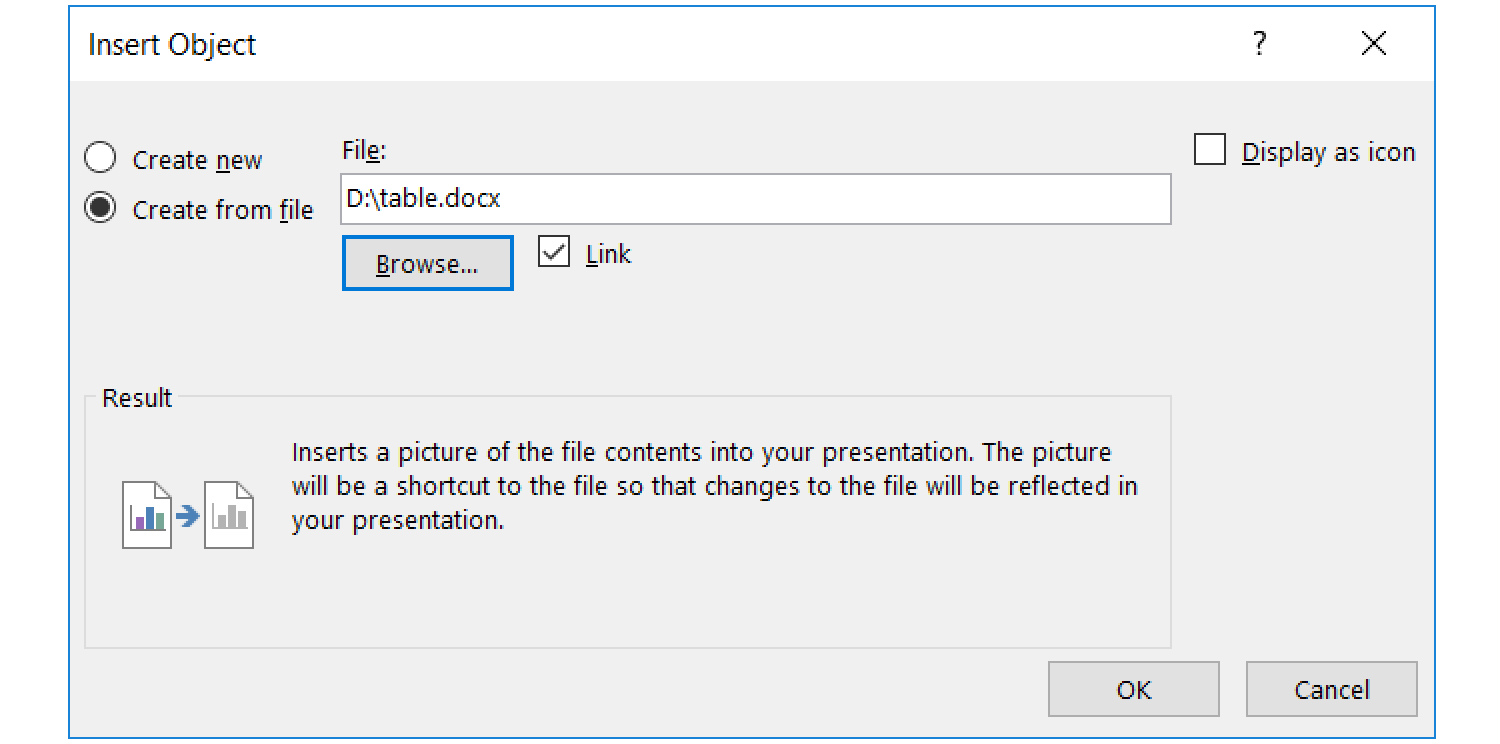
Zrzut z ekranu przedstawia formatkę Insert Object w programie PowerPoint. Na górze po prawej stronie jeden pod drugim dwa radiobutony Create new oraz Create from file. Obok pole tekstowe File z pisaną przykładową ścieżką dostępu do pliku. W prawym górnym rogu checkbox Display as icon. Niżej napis Result, pod nim ikonografika przedstawiająca dwie kartki, po między nimi strzałka skierowana w prawo. obok napis: Insert a picture of the fil contents into your presentation. The picture will be a shortcut to the file so tthat changes to the file will be reflected in your presentation. Na dole po prawej stronie dwa przyciski OK oraz Cancel.
Create a table in the text editor containing information about the stages of the last Tour de Pologne race.
In the table, place two columns: stage number and distance.
Save the document in your working directory. Open the presentation and insert the table from the text document as an object (do not forget to check the Link option.)
Then, open the document with the table and add two columns to it: start of the stage and end of the stage.
After saving the document all the changes appear in the presentation.
You can insert and modify tables created directly in the presentation program. You can also insert tables made in another program. It is possible to combine the data in the table with the source data.
Exercises
Exercise 1
RwYt4mNBnyRjG
Wersja alternatywna ćwiczenia: Determine which sentences are true. Możliwe odpowiedzi: 1. The column is the fields placed at the same level., 2. A row is fields placed in the same vertical., 3. The edges are horizontal and vertical lines separating the fields., 4. Edges cannot be made invisible., 5. When formatting the table, you can change the color of the edges and individual fields, 6. The first row or column is the table header.
Wersja alternatywna ćwiczenia: Determine which sentences are true. Możliwe odpowiedzi: 1. The column is the fields placed at the same level., 2. A row is fields placed in the same vertical., 3. The edges are horizontal and vertical lines separating the fields., 4. Edges cannot be made invisible., 5. When formatting the table, you can change the color of the edges and individual fields, 6. The first row or column is the table header.
Determine which sentences are true.
The column is the fields placed at the same level.
A row is fields placed in the same vertical.
The edges are horizontal and vertical lines separating the fields.
Edges cannot be made invisible.
When formatting the table, you can change the color of the edges and individual fields
The first row or column is the table header.
zadanie
Source: GroMar, licencja: CC BY 3.0.
RLNre6ns4cnNe
Exercise 2
Wersja alternatywna ćwiczenia: Decide which sentences are true. Możliwe odpowiedzi: 1. It is possible to combine data in a table in a presentation with source data in other programs., 2. You cannot add columns or rows to the inserted table., 3. You can copy tables from a text document to the presentation, but you cannot use the spreadsheet., 4. In the table you can freely determine the height of each row and the width of each column., 5. The simplest way to format a table is to give it one of the pre‑defined styles., 6. When inserting a table in the Insert Table dialog box, enter the number of rows and columns., 7. You can add a table to the slide by creating it directly in PowerPoint.
Wersja alternatywna ćwiczenia: Decide which sentences are true. Możliwe odpowiedzi: 1. It is possible to combine data in a table in a presentation with source data in other programs., 2. You cannot add columns or rows to the inserted table., 3. You can copy tables from a text document to the presentation, but you cannot use the spreadsheet., 4. In the table you can freely determine the height of each row and the width of each column., 5. The simplest way to format a table is to give it one of the pre‑defined styles., 6. When inserting a table in the Insert Table dialog box, enter the number of rows and columns., 7. You can add a table to the slide by creating it directly in PowerPoint.
Decide which sentences are true.
It is possible to combine data in a table in a presentation with source data in other programs.
You cannot add columns or rows to the inserted table.
You can copy tables from a text document to the presentation, but you cannot use the spreadsheet.
In the table you can freely determine the height of each row and the width of each column.
The simplest way to format a table is to give it one of the pre‑defined styles.
When inserting a table in the Insert Table dialog box, enter the number of rows and columns.
You can add a table to the slide by creating it directly in PowerPoint.
Exercise 3
Explain in English the difference between copying a table from a text document and inserting the table as an Object.
Exercise 4
RtykLbG7MdE4r
Wersja alternatywna ćwiczenia: Indicate which pairs of expressions or words are translated correctly. Możliwe odpowiedzi: 1. tabela - table, 2. wiersz - row, 3. kolumna - column, 4. krawędzie - edges, 5. wstawić - clipboard, 6. schowek - modify
Wersja alternatywna ćwiczenia: Indicate which pairs of expressions or words are translated correctly. Możliwe odpowiedzi: 1. tabela - table, 2. wiersz - row, 3. kolumna - column, 4. krawędzie - edges, 5. wstawić - clipboard, 6. schowek - modify
Indicate which pairs of expressions or words are translated correctly.
tabela - table
wiersz - row
kolumna - column
krawędzie - edges
wstawić - clipboard
schowek - modify
zadanie
Source: GroMar, licencja: CC BY 3.0.
RRN2W4EIYXnTz1
Interaktywna gra, polegająca na łączeniu wyrazów w pary w ciągu jednej minuty. Czas zaczyna upływać wraz z rozpoczęciem gry. Jeden ruch to odkrywanie najpierw jednej potem drugiej karty z wyrazem. Każdy wyraz jest odczytywany. Kolejny ruch to odkrywanie trzeciej i czwartej karty. W ten sposób odsłuchasz wszystkie wyrazy. Nawigacja z poziomu klawiatury za pomocą strzałek, odsłuchiwanie wyrazów enterem lub spacją. Znajdź wszystkie pary wyrazów.
Interaktywna gra, polegająca na łączeniu wyrazów w pary w ciągu jednej minuty. Czas zaczyna upływać wraz z rozpoczęciem gry. Jeden ruch to odkrywanie najpierw jednej potem drugiej karty z wyrazem. Każdy wyraz jest odczytywany. Kolejny ruch to odkrywanie trzeciej i czwartej karty. W ten sposób odsłuchasz wszystkie wyrazy. Nawigacja z poziomu klawiatury za pomocą strzałek, odsłuchiwanie wyrazów enterem lub spacją. Znajdź wszystkie pary wyrazów.
Match Polish terms with their English equivalents.
column
tabela
wiersz
kolumna
table
row
Source: Zespół autorski Politechniki Łódzkiej, licencja: CC BY 3.0.