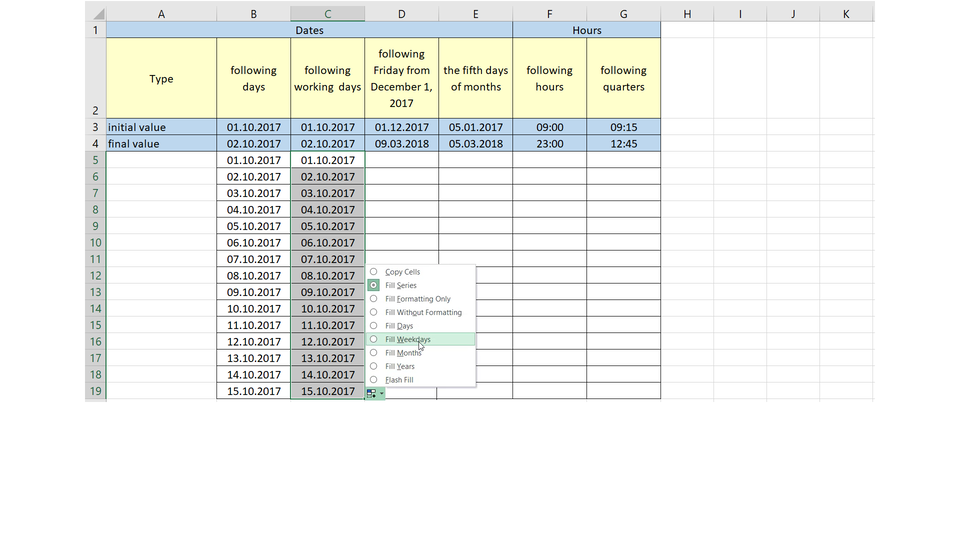
Watch the slideshow which presents filling a worksheet with a and then create your own examples of in the worksheet.
R132zZwxylGWp
Pokaz multimedialny przedstawia możliwości wypełniania seriami danych tabel w programie Excel. Instrukcja obsługi z poziomu klawiatury: 1. Uruchomienie aplikacji - ENTER, 2. Na każdym ze slajdów czytany jest automatycznie tekst alternatywny po polsku, 3. Przy pierwszym uruchomieniu na pierwszym slajdzie, czytanie tekstu po angielsku - TAB, 4. Przejście między slajdami: do następnego slajdu - TAB, do poprzedniego slajdu - TAB + SHIFT, 5. Przejście do czytania napisu po angielsku - strzałka w górę + strzałka w dół (czyta tekst po angielsku widoczny na slajdzie). Aplikacja prezentuje formułę =PI()*A2^2. Poszczególne elementy zostały oznaczone ponumerowanymi przyciskam od 1 do 4. Przycisk 1 - PI(). Przycisk 2 - A2. Przycisk 3 - liczba 2. Przycisk 4 - znaki * oraz ^. Aby dowiedzieć się jak nazywają się elementy formuły wybierz odpowiedni przycisk.
Pokaz multimedialny przedstawia możliwości wypełniania seriami danych tabel w programie Excel. Instrukcja obsługi z poziomu klawiatury: 1. Uruchomienie aplikacji - ENTER, 2. Na każdym ze slajdów czytany jest automatycznie tekst alternatywny po polsku, 3. Przy pierwszym uruchomieniu na pierwszym slajdzie, czytanie tekstu po angielsku - TAB, 4. Przejście między slajdami: do następnego slajdu - TAB, do poprzedniego slajdu - TAB + SHIFT, 5. Przejście do czytania napisu po angielsku - strzałka w górę + strzałka w dół (czyta tekst po angielsku widoczny na slajdzie). Aplikacja prezentuje formułę =PI()*A2^2. Poszczególne elementy zostały oznaczone ponumerowanymi przyciskam od 1 do 4. Przycisk 1 - PI(). Przycisk 2 - A2. Przycisk 3 - liczba 2. Przycisk 4 - znaki * oraz ^. Aby dowiedzieć się jak nazywają się elementy formuły wybierz odpowiedni przycisk.
If the number of the cells containing a series is high, it is convenient to adjust the length of the series to the data in adjacent cells. The lists of the names of the days and the months are built in Excel. If the standard build‑in list does not meet our needs, we can define our own.
Analyse the interactive picture and create a worksheet in which you will define your own containing the days of the week in English.
RMgT8LTFANIrp1
Aplikacja przedstawia formatkę Custom lists, w której mommy tworzyć własne listy niestandardowe. Po lewej stronie wymienione listy zdefiniowane, np. pon., wt., śr., czw., pt., sob., niedz. W linijce niżej poniedziałek, wtorek, środa, czwartek, ... Po prawej stronie w oknie tekstowym List entries: wypisane są liczby w systemie rzymskim od I do X. Lista ta jest zaznaczona elipsą. Od elipsy prowadzi strzałka do utworzonej listy niestandardowej w okienku Custom lista. Skrajnie po prawej stronie przyciski Add, Delete. Wybierz przycisk 1, aby dowiedzieć się więcej o tworzeniu list niestandardowych
Aplikacja przedstawia formatkę Custom lists, w której mommy tworzyć własne listy niestandardowe. Po lewej stronie wymienione listy zdefiniowane, np. pon., wt., śr., czw., pt., sob., niedz. W linijce niżej poniedziałek, wtorek, środa, czwartek, ... Po prawej stronie w oknie tekstowym List entries: wypisane są liczby w systemie rzymskim od I do X. Lista ta jest zaznaczona elipsą. Od elipsy prowadzi strzałka do utworzonej listy niestandardowej w okienku Custom lista. Skrajnie po prawej stronie przyciski Add, Delete. Wybierz przycisk 1, aby dowiedzieć się więcej o tworzeniu list niestandardowych
Analyse the interactive picture presenting. Suggest in which it can be used.
RxEHOboG4uXl9
Ilustracja interaktywna przedstawia dwie tabele wypełnione przykładowymi imionami i nazwiskami. W pierwszej tabeli w kolumnach First name, Last Name, First name and last name odpowiednio w kolumnach znajdują się imiona, nazwiska i w trzeciej imiona i nazwiska razem. Zaznaczona jest kolumna trzecia oraz widoczne jest menu podręczne zawierające polecenia: Copy Cells, Fill Formatting Only, Fill Without Formatting oraz Flash Fill - oznaczone przyciskiem 1. Druga Tabela zaprojektowana jest odwrotnie. W pierwszej kolumnie First name and last name, w drugiej First name oraz w trzeciej Last name. W kolumnach znajdują się odpowiednio przykładowe dane: imiona i nazwiska, imiona oraz nazwiska. Zaznaczona jest kolumna trzecia oraz widoczne jest menu podręczne zawierające te same polecenia. Polecenie Flash Fill oznaczone jest przyciskiem 2. Na ilustracji widoczne są numery, a na nich podpisy. 1. When our worksheets are deliberately planned and the data are integrated, we can use flash fill. {audio}, 2. By entering into any cell an example of processing the data from other cells, we can expect that in adjacent cells Excel will perform operations which we planned. {audio}
Ilustracja interaktywna przedstawia dwie tabele wypełnione przykładowymi imionami i nazwiskami. W pierwszej tabeli w kolumnach First name, Last Name, First name and last name odpowiednio w kolumnach znajdują się imiona, nazwiska i w trzeciej imiona i nazwiska razem. Zaznaczona jest kolumna trzecia oraz widoczne jest menu podręczne zawierające polecenia: Copy Cells, Fill Formatting Only, Fill Without Formatting oraz Flash Fill - oznaczone przyciskiem 1. Druga Tabela zaprojektowana jest odwrotnie. W pierwszej kolumnie First name and last name, w drugiej First name oraz w trzeciej Last name. W kolumnach znajdują się odpowiednio przykładowe dane: imiona i nazwiska, imiona oraz nazwiska. Zaznaczona jest kolumna trzecia oraz widoczne jest menu podręczne zawierające te same polecenia. Polecenie Flash Fill oznaczone jest przyciskiem 2. Na ilustracji widoczne są numery, a na nich podpisy. 1. When our worksheets are deliberately planned and the data are integrated, we can use flash fill. {audio}, 2. By entering into any cell an example of processing the data from other cells, we can expect that in adjacent cells Excel will perform operations which we planned. {audio}
It is worth to remember that using reduces the time of creating a worksheet.
Exercises
R1L7rhmkX9urX
Exercise 1
Wersja alternatywna ćwiczenia: To enter a data series. If you want to fill in the cells with a 1. data series, 2. right mouse button, 3. automatically filled, 4. step value, 5. row or column, 6. mouse button select the first cell, which contains the starting number. Then by using the 1. data series, 2. right mouse button, 3. automatically filled, 4. step value, 5. row or column, 6. mouse button click on the square in the bottom right-hand corner of the cell and drag the mouse, selecting the empty cells of a 1. data series, 2. right mouse button, 3. automatically filled, 4. step value, 5. row or column, 6. mouse button. This is where the data series will be 1. data series, 2. right mouse button, 3. automatically filled, 4. step value, 5. row or column, 6. mouse button in. When you release the 1. data series, 2. right mouse button, 3. automatically filled, 4. step value, 5. row or column, 6. mouse button, you will see the pop-up menu on the screen. Select the option Data series. In the field 1. data series, 2. right mouse button, 3. automatically filled, 4. step value, 5. row or column, 6. mouse button enter the desired growth of the numbers.
Wersja alternatywna ćwiczenia: To enter a data series. If you want to fill in the cells with a 1. data series, 2. right mouse button, 3. automatically filled, 4. step value, 5. row or column, 6. mouse button select the first cell, which contains the starting number. Then by using the 1. data series, 2. right mouse button, 3. automatically filled, 4. step value, 5. row or column, 6. mouse button click on the square in the bottom right-hand corner of the cell and drag the mouse, selecting the empty cells of a 1. data series, 2. right mouse button, 3. automatically filled, 4. step value, 5. row or column, 6. mouse button. This is where the data series will be 1. data series, 2. right mouse button, 3. automatically filled, 4. step value, 5. row or column, 6. mouse button in. When you release the 1. data series, 2. right mouse button, 3. automatically filled, 4. step value, 5. row or column, 6. mouse button, you will see the pop-up menu on the screen. Select the option Data series. In the field 1. data series, 2. right mouse button, 3. automatically filled, 4. step value, 5. row or column, 6. mouse button enter the desired growth of the numbers.
To enter a data series.
mouse button, step value, automatically filled, row or column, data series, right mouse button
If you want to fill in the cells with a ........................................ select the first cell, which contains the starting number. Then by using the ........................................ click on the square in the bottom right-hand corner of the cell and drag the mouse, selecting the empty cells of a ......................................... This is where the data series will be ........................................ in. When you release the ........................................, you will see the pop-up menu on the screen. Select the option Data series. In the field ........................................ enter the desired growth of the numbers.
Exercise 2
Create a worksheet:
In column A First name and column B Surname enter 5 sample names. By using flash fill enter the combined first names and surnames separated by space in column C.
Do the reverse. Let the column A contain the combined first names and surnames. Divide the texts into two separate columns: B - First name and C – Surname.
Exercise 3
Custom list. Create a custom list containing the maximum number of subsequent Roman numerals. How many of them can the list include? Use the ROMAN function to create the range of cells from which the list will be imported. Describe the consecutive steps in English.
Exercise 4
RuV9g4cv76SnI
Wersja alternatywna ćwiczenia: Indicate which pairs of expressions or words are translated correctly. Możliwe odpowiedzi: 1. seria danych - data series, 2. wartość końcowa - stop value, 3. wartość początkowa - starting value, 4. custom list - seria danych, 5. wypełnienie błyskawiczne - auto fill, 6. wypełnienie błyskawiczne - flash fill
Wersja alternatywna ćwiczenia: Indicate which pairs of expressions or words are translated correctly. Możliwe odpowiedzi: 1. seria danych - data series, 2. wartość końcowa - stop value, 3. wartość początkowa - starting value, 4. custom list - seria danych, 5. wypełnienie błyskawiczne - auto fill, 6. wypełnienie błyskawiczne - flash fill
Indicate which pairs of expressions or words are translated correctly.
seria danych - data series
wartość końcowa - stop value
wartość początkowa - starting value
custom list - seria danych
wypełnienie błyskawiczne - auto fill
wypełnienie błyskawiczne - flash fill
zadanie
Source: GroMar, licencja: CC BY 3.0.
RRsfis5nYgJaW1
Interaktywna gra, polegająca na łączeniu wyrazów w pary w ciągu jednej minuty. Czas zaczyna upływać wraz z rozpoczęciem gry. Jeden ruch to odkrywanie najpierw jednej potem drugiej karty z wyrazem. Każdy wyraz jest odczytywany. Kolejny ruch to odkrywanie trzeciej i czwartej karty. W ten sposób odsłuchasz wszystkie wyrazy. Nawigacja z poziomu klawiatury za pomocą strzałek, odsłuchiwanie wyrazów enterem lub spacją. Znajdź wszystkie pary wyrazów.
Interaktywna gra, polegająca na łączeniu wyrazów w pary w ciągu jednej minuty. Czas zaczyna upływać wraz z rozpoczęciem gry. Jeden ruch to odkrywanie najpierw jednej potem drugiej karty z wyrazem. Każdy wyraz jest odczytywany. Kolejny ruch to odkrywanie trzeciej i czwartej karty. W ten sposób odsłuchasz wszystkie wyrazy. Nawigacja z poziomu klawiatury za pomocą strzałek, odsłuchiwanie wyrazów enterem lub spacją. Znajdź wszystkie pary wyrazów.
Match Polish terms with their English equivalents.
autowypełnianie
seria danych
krok
auto fill
step
data series
Source: Zespół autorski Politechniki Łódzkiej, licencja: CC BY 3.0.
auto fillauto fillauto fill – automatyczne uzupełnianie kolumn lub wierszy na podstawie zawartości zaznaczonych komórek
data seriesdata seriesdata series - to uporządkowany ciąg danych, najczęściej liczb, jednak mogą to być również daty (dni, miesiące, lata), teksty (nazwy miesięcy, dni tygodnia)