Before the test get acquainted with time management during the test:
Eliminating wrong answers.
Substituting data - a reversed method of finding solution.
Estimating data.
Finding the solution and indicating the correct answer.
Rlwj8P41zAiE1
Exercise 1
Wersja alternatywna ćwiczenia: Devices based on the computer technology are: Możliwe odpowiedzi: 1. computer, notebook, vacuum cleaner, 2. calculator, computer, typewriter, 3. tablet, TV, fridge, 4. calculator, car navigation, smartphone
Wersja alternatywna ćwiczenia: Devices based on the computer technology are: Możliwe odpowiedzi: 1. computer, notebook, vacuum cleaner, 2. calculator, computer, typewriter, 3. tablet, TV, fridge, 4. calculator, car navigation, smartphone
Devices based on the computer technology are:
computer, notebook, vacuum cleaner
calculator, computer, typewriter
tablet, TV, fridge
calculator, car navigation, smartphone
R48fBWzpcNSYx
Exercise 2
Wersja alternatywna ćwiczenia: PC stands for: Możliwe odpowiedzi: 1. home computer, 2. personal computer, 3. industrial computer, 4. portable computer
Wersja alternatywna ćwiczenia: PC stands for: Możliwe odpowiedzi: 1. home computer, 2. personal computer, 3. industrial computer, 4. portable computer
PC stands for:
home computer
personal computer
industrial computer
portable computer
R1ZNjraeW5wy8
Exercise 3
Wersja alternatywna ćwiczenia: A complete, basic PC computer system consists of: Możliwe odpowiedzi: 1. central unit , keyboard, mouse, processor, 2. motherboard, processor, power supply, monitor, 3. central unit , keyboard, mouse, monitor, 4. motherboard, monitor, printer, keyboard
Wersja alternatywna ćwiczenia: A complete, basic PC computer system consists of: Możliwe odpowiedzi: 1. central unit , keyboard, mouse, processor, 2. motherboard, processor, power supply, monitor, 3. central unit , keyboard, mouse, monitor, 4. motherboard, monitor, printer, keyboard
A complete, basic PC computer system consists of:
central unit , keyboard, mouse, processor
motherboard, processor, power supply, monitor
central unit , keyboard, mouse, monitor
motherboard, monitor, printer, keyboard
RXtaRJrGqJMSJ
Exercise 4
Wersja alternatywna ćwiczenia: Alternative name for a laptop is: Możliwe odpowiedzi: 1. a netbook, 2. a notebook, 3. a palmtop, 4. a smartwatch
Wersja alternatywna ćwiczenia: Alternative name for a laptop is: Możliwe odpowiedzi: 1. a netbook, 2. a notebook, 3. a palmtop, 4. a smartwatch
Alternative name for a laptop is:
a netbook
a notebook
a palmtop
a smartwatch
R1AvF3BiAWPUf
Exercise 5
Wersja alternatywna ćwiczenia: Which of the devices is not an input device: Możliwe odpowiedzi: 1. mouse, 2. keyboard, 3. printer, 4. touch sensitive screen
Wersja alternatywna ćwiczenia: Which of the devices is not an input device: Możliwe odpowiedzi: 1. mouse, 2. keyboard, 3. printer, 4. touch sensitive screen
Which of the devices is not an input device:
mouse
keyboard
printer
touch sensitive screen
RRZPQXCH9Zg3b
Exercise 6
Wersja alternatywna ćwiczenia: Read-only memory (ROM): Możliwe odpowiedzi: 1. is a volatile memory, 2. is used as the primary storage of the computer, 3. stores software that initiates the operation of the computer, 4. controls the operation of the other units of the computer
Wersja alternatywna ćwiczenia: Read-only memory (ROM): Możliwe odpowiedzi: 1. is a volatile memory, 2. is used as the primary storage of the computer, 3. stores software that initiates the operation of the computer, 4. controls the operation of the other units of the computer
Read-only memory (ROM):
is a volatile memory
is used as the primary storage of the computer
stores software that initiates the operation of the computer
controls the operation of the other units of the computer
RIvToLuP2EpbI
Exercise 7
Wersja alternatywna ćwiczenia: What numerical system does the computer use to code data: Możliwe odpowiedzi: 1. decimal, 2. any, 3. binary, 4. hexadecimal
Wersja alternatywna ćwiczenia: What numerical system does the computer use to code data: Możliwe odpowiedzi: 1. decimal, 2. any, 3. binary, 4. hexadecimal
What numerical system does the computer use to code data:
decimal
any
binary
hexadecimal
RDDQqipfvqgYi
Exercise 8
Wersja alternatywna ćwiczenia: Liquid crystal displays are represented by the following acronym: Możliwe odpowiedzi: 1. LCD, 2. CRT, 3. DVD, 4. LPT
Wersja alternatywna ćwiczenia: Liquid crystal displays are represented by the following acronym: Możliwe odpowiedzi: 1. LCD, 2. CRT, 3. DVD, 4. LPT
Liquid crystal displays are represented by the following acronym:
LCD
CRT
DVD
LPT
R4ZdmtCFf33Fp
Exercise 9
Wersja alternatywna ćwiczenia: Pendrive is: Możliwe odpowiedzi: 1. a computer data storage, 2. an external memory, 3. a read-only memory, 4. volatile storage
Wersja alternatywna ćwiczenia: Pendrive is: Możliwe odpowiedzi: 1. a computer data storage, 2. an external memory, 3. a read-only memory, 4. volatile storage
Pendrive is:
a computer data storage
an external memory
a read-only memory
volatile storage
R194zQ5L7dFGt
Exercise 10
Wersja alternatywna ćwiczenia: The scanner enables people: Możliwe odpowiedzi: 1. to convert the image to a digital form, 2. to do draw a document using special markers, 3. to speed up computer’s operation, 4. to print the document
Wersja alternatywna ćwiczenia: The scanner enables people: Możliwe odpowiedzi: 1. to convert the image to a digital form, 2. to do draw a document using special markers, 3. to speed up computer’s operation, 4. to print the document
The scanner enables people:
to convert the image to a digital form
to do draw a document using special markers
to speed up computer’s operation
to print the document
RJwmyZ59poJrX
Exercise 11
Wersja alternatywna ćwiczenia: The USB port does not connect: Możliwe odpowiedzi: 1. printers, 2. speakers, 3. monitors, 4. headphones
Wersja alternatywna ćwiczenia: The USB port does not connect: Możliwe odpowiedzi: 1. printers, 2. speakers, 3. monitors, 4. headphones
The USB port does not connect:
printers
speakers
monitors
headphones
R11Xm6F89jQw6
Exercise 12
Wersja alternatywna ćwiczenia: The smallest amount of data is called: Możliwe odpowiedzi: 1. a byte, 2. 0, 3. a character, 4. a bit
Wersja alternatywna ćwiczenia: The smallest amount of data is called: Możliwe odpowiedzi: 1. a byte, 2. 0, 3. a character, 4. a bit
The smallest amount of data is called:
a byte
0
a character
a bit
RtyzoBFA25Zm7
Exercise 13
Wersja alternatywna ćwiczenia: Which is the biggest value? Możliwe odpowiedzi: 1. 1024 B, 2. 1024 GB, 3. 1024 KB, 4. 1024 MB
Wersja alternatywna ćwiczenia: Which is the biggest value? Możliwe odpowiedzi: 1. 1024 B, 2. 1024 GB, 3. 1024 KB, 4. 1024 MB
Which is the biggest value?
1024 B
1024 GB
1024 KB
1024 MB
R1TSSSVz7dVfw
Exercise 14
Wersja alternatywna ćwiczenia: The HDD means: Możliwe odpowiedzi: 1. the type of graphics card output, 2. computer bus, 3. hard drive, 4. optical drive
Wersja alternatywna ćwiczenia: The HDD means: Możliwe odpowiedzi: 1. the type of graphics card output, 2. computer bus, 3. hard drive, 4. optical drive
The HDD means:
the type of graphics card output
computer bus
hard drive
optical drive
RqZwy1azuy29Z
Exercise 15
Wersja alternatywna ćwiczenia: A peripheral device is NOT: Możliwe odpowiedzi: 1. a scanner, 2. a printer, 3. a mouse, 4. a processor
Wersja alternatywna ćwiczenia: A peripheral device is NOT: Możliwe odpowiedzi: 1. a scanner, 2. a printer, 3. a mouse, 4. a processor
A peripheral device is NOT:
a scanner
a printer
a mouse
a processor
R1ewNMC2WlnuT
Exercise 16
Wersja alternatywna ćwiczenia: Information can be written on the CD-RW disc: Możliwe odpowiedzi: 1. many times, 2. only once, 3. twice, 4. once, but you can delete it
Wersja alternatywna ćwiczenia: Information can be written on the CD-RW disc: Możliwe odpowiedzi: 1. many times, 2. only once, 3. twice, 4. once, but you can delete it
Information can be written on the CD-RW disc:
many times
only once
twice
once, but you can delete it
R1Bmf4fswcfE3
Exercise 17
Wersja alternatywna ćwiczenia: The data storage device is not represented by: Możliwe odpowiedzi: 1. a magnetic disc, 2. SSD, 3. a pendrive, 4. RAM memory
Wersja alternatywna ćwiczenia: The data storage device is not represented by: Możliwe odpowiedzi: 1. a magnetic disc, 2. SSD, 3. a pendrive, 4. RAM memory
The data storage device is not represented by:
a magnetic disc
SSD
a pendrive
RAM memory
RvU63rUXOPhOI
Exercise 18
Wersja alternatywna ćwiczenia: When you turn off the computer, you lose data stored: Możliwe odpowiedzi: 1. in RAM memory, 2. in ROM memory, 3. on a disc, 4. on a pendrive
Wersja alternatywna ćwiczenia: When you turn off the computer, you lose data stored: Możliwe odpowiedzi: 1. in RAM memory, 2. in ROM memory, 3. on a disc, 4. on a pendrive
When you turn off the computer, you lose data stored:
in RAM memory
in ROM memory
on a disc
on a pendrive
REByDvSziFaUB
Exercise 19
Wersja alternatywna ćwiczenia: A computer port is not: Możliwe odpowiedzi: 1. USB, 2. LPT, 3. COM, 4. UPS
Wersja alternatywna ćwiczenia: A computer port is not: Możliwe odpowiedzi: 1. USB, 2. LPT, 3. COM, 4. UPS
A computer port is not:
USB
LPT
COM
UPS
R12cbYdkC0mcP
Exercise 20
Wersja alternatywna ćwiczenia: Hibernation is a state in which the computer: Możliwe odpowiedzi: 1. is turned off but the state of its memory is stored on external media, 2. works normally, 3. it is turned off, but the contents of its operating memory are stored on a fixed memory medium, 4. there is no such condition
Wersja alternatywna ćwiczenia: Hibernation is a state in which the computer: Możliwe odpowiedzi: 1. is turned off but the state of its memory is stored on external media, 2. works normally, 3. it is turned off, but the contents of its operating memory are stored on a fixed memory medium, 4. there is no such condition
Hibernation is a state in which the computer:
is turned off but the state of its memory is stored on external media
works normally
it is turned off, but the contents of its operating memory are stored on a fixed memory medium
there is no such condition
Wysłuchaj nagrań ze słowniczka i naucz się ich poprawnej wymowy.
Wysłuchaj nagrań ze słowniczka i naucz się ich poprawnej wymowy.
Analyse your correct and incorrect answers to the Exercises.
Exercise 21
Describe in English the difference between RAM and ROM .
Exercise 22
Create a poster about Binary, Hexadecimal and Decimal number systems.
R3u4QWMDPumjE
Exercise 23
Wybierz jedno słowo ze słowniczka i ułóż z nim dwa różne zdania.
Wybierz jedno słowo ze słowniczka i ułóż z nim dwa różne zdania.
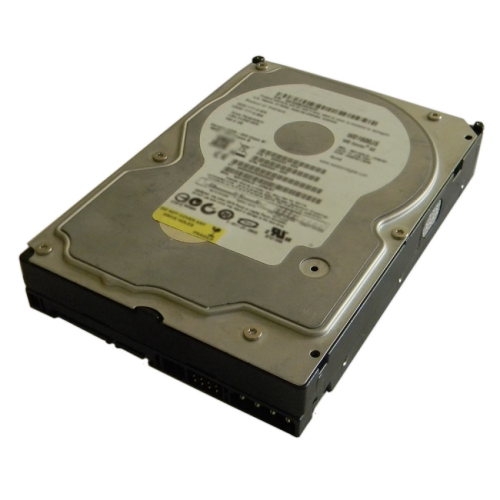
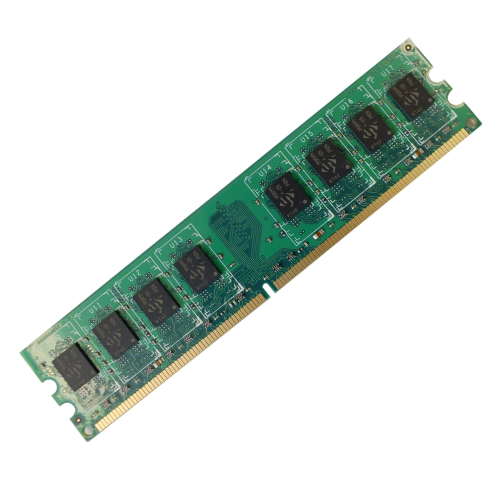
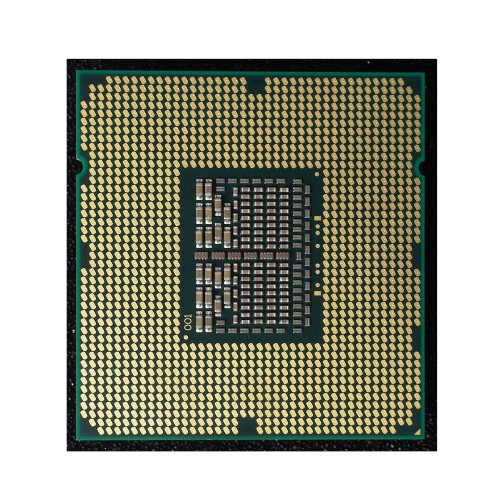
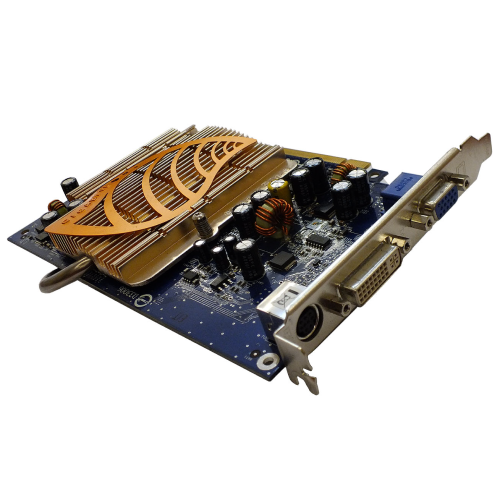
You did your job well, so now have fun! Match the name, photo and description of the computer element.
a central processing unit (CPU)
It uses a magnetic medium for reading and writing data.
random‑access memory (RAM)
It performs all calculations, controls the work of all computer's components.
a hard disk drive (HDD)
It is used as the main memory of the computer.
a graphics card
It generates output images to a computer monitor.
Language Exercises
R1UJeQ2tPjzaN
Exercise 24
Wersja alternatywna ćwiczenia: Match English terms with their Polish equivalents. motherboard Możliwe odpowiedzi: 1. jednostka centralna, 2. urządzenie peryferyjne, 3. płyta główna, 4. obudowa, 5. dysk twardy, 6. karta graficzna hard drive Możliwe odpowiedzi: 1. jednostka centralna, 2. urządzenie peryferyjne, 3. płyta główna, 4. obudowa, 5. dysk twardy, 6. karta graficzna central unit Możliwe odpowiedzi: 1. jednostka centralna, 2. urządzenie peryferyjne, 3. płyta główna, 4. obudowa, 5. dysk twardy, 6. karta graficzna peripheral device Możliwe odpowiedzi: 1. jednostka centralna, 2. urządzenie peryferyjne, 3. płyta główna, 4. obudowa, 5. dysk twardy, 6. karta graficzna graphic card Możliwe odpowiedzi: 1. jednostka centralna, 2. urządzenie peryferyjne, 3. płyta główna, 4. obudowa, 5. dysk twardy, 6. karta graficzna case Możliwe odpowiedzi: 1. jednostka centralna, 2. urządzenie peryferyjne, 3. płyta główna, 4. obudowa, 5. dysk twardy, 6. karta graficzna
Wersja alternatywna ćwiczenia: Match English terms with their Polish equivalents. motherboard Możliwe odpowiedzi: 1. jednostka centralna, 2. urządzenie peryferyjne, 3. płyta główna, 4. obudowa, 5. dysk twardy, 6. karta graficzna hard drive Możliwe odpowiedzi: 1. jednostka centralna, 2. urządzenie peryferyjne, 3. płyta główna, 4. obudowa, 5. dysk twardy, 6. karta graficzna central unit Możliwe odpowiedzi: 1. jednostka centralna, 2. urządzenie peryferyjne, 3. płyta główna, 4. obudowa, 5. dysk twardy, 6. karta graficzna peripheral device Możliwe odpowiedzi: 1. jednostka centralna, 2. urządzenie peryferyjne, 3. płyta główna, 4. obudowa, 5. dysk twardy, 6. karta graficzna graphic card Możliwe odpowiedzi: 1. jednostka centralna, 2. urządzenie peryferyjne, 3. płyta główna, 4. obudowa, 5. dysk twardy, 6. karta graficzna case Możliwe odpowiedzi: 1. jednostka centralna, 2. urządzenie peryferyjne, 3. płyta główna, 4. obudowa, 5. dysk twardy, 6. karta graficzna
Match English terms with their Polish equivalents.
płyta główna, urządzenie peryferyjne, obudowa, dysk twardy, jednostka centralna, karta graficzna
motherboard
hard drive
central unit
peripheral device
graphic card
case
RLWVICumRMfns1
Interaktywna gra, polegająca na łączeniu wyrazów w pary w ciągu jednej minuty. Czas zaczyna upływać wraz z rozpoczęciem gry. Jeden ruch to odkrywanie najpierw jednej potem drugiej karty z wyrazem. Każdy wyraz jest odczytywany. Kolejny ruch to odkrywanie trzeciej i czwartej karty. W ten sposób odsłuchasz wszystkie wyrazy. Nawigacja z poziomu klawiatury za pomocą strzałek, odsłuchiwanie wyrazów enterem lub spacją. Znajdź wszystkie pary wyrazów.
Interaktywna gra, polegająca na łączeniu wyrazów w pary w ciągu jednej minuty. Czas zaczyna upływać wraz z rozpoczęciem gry. Jeden ruch to odkrywanie najpierw jednej potem drugiej karty z wyrazem. Każdy wyraz jest odczytywany. Kolejny ruch to odkrywanie trzeciej i czwartej karty. W ten sposób odsłuchasz wszystkie wyrazy. Nawigacja z poziomu klawiatury za pomocą strzałek, odsłuchiwanie wyrazów enterem lub spacją. Znajdź wszystkie pary wyrazów.
Match Polish terms with their English equivalents.
monitor
device
mysz
klawiatura
central unit
mouse
jednostka centralna
keyboard
urządzenie
monitor
Source: Zespół autorski Politechniki Łódzkiej, licencja: CC BY 3.0.