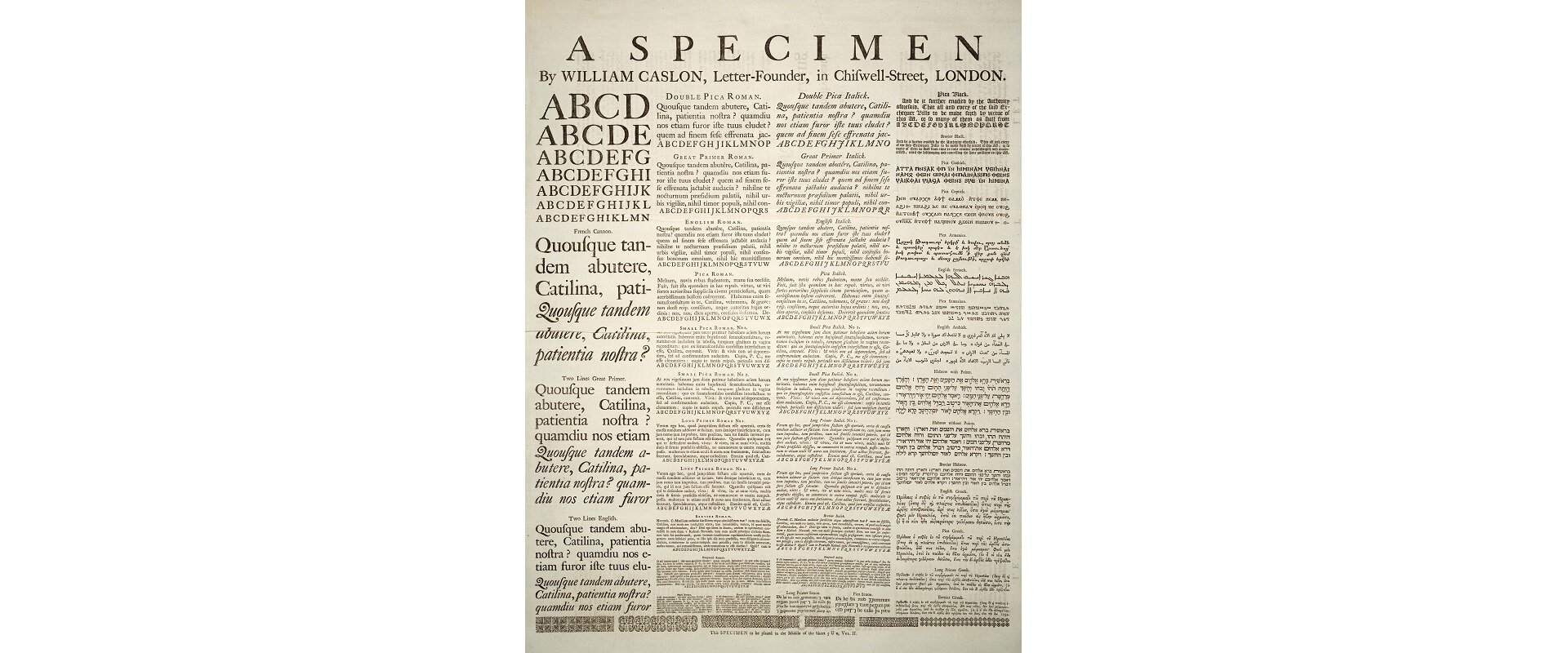
Zdjęcie przedstawia stronę przykładowej gazety podzielonej na cztery kolumny równej szerokości. W kolumnach znajdują się teksty pisane różnymi krojami czcionek.
Most text editors enable formatting text with columns, similar to the column layoutcolumn layoutcolumn layout in newspapers. The text formatted as columns automatically flows from one columncolumncolumn to the other. With such a text formatting you can set the number of columns, their width and add lines between them. This type of layout is used in newspapers, newsletters or advertisements.
R1L5OQiNcTwSc
Ilustracja interaktywna przedstawia okno dialogowe służące do wstawiania kolumn zatytułowane Column. Na górze w jednym rzędzie znajdują się ikony obrazujące predefiniowane kolumny w dokumencie. 1 - kolumna na cała szerokość dokumentu. 2 - dwie kolumny o tej samej szerokości. 3 - trzy kolumny o tych samych szerokościach. 4 - dwie kolumny, lewa węższa. 5 - dwie kolumny, prawa węższa. Poniżej widoczne są opcje pozwalające na dowolne sformatowanie kolumn. Lista - Number of columns, checkbox - Line between. Niżej opcje pozwalające ustawić szerokość (Width) wskazanych wyżej kolumn (Col#) oraz odstępy pomiędzy nimi (Spacing). Niżej zaznaczony checkbox Equal column width oraz po prawej stronie schematyczny podgląd kolumn w dokumencie. Niżej lista pozwalająca na określenie zastosowania kolumn: Apply to: - wybrana opcja Whole document oraz obok nieaktywny checkbox Start new column. Na dole przyciski OK i Cancel. Na ilustracji widoczne są numery, a na nich podpisy. 1. One {audio}, 2. Two {audio}, 3. Three {audio}, 4. Left {audio}, 5. Right {audio}
Ilustracja interaktywna przedstawia okno dialogowe służące do wstawiania kolumn zatytułowane Column. Na górze w jednym rzędzie znajdują się ikony obrazujące predefiniowane kolumny w dokumencie. 1 - kolumna na cała szerokość dokumentu. 2 - dwie kolumny o tej samej szerokości. 3 - trzy kolumny o tych samych szerokościach. 4 - dwie kolumny, lewa węższa. 5 - dwie kolumny, prawa węższa. Poniżej widoczne są opcje pozwalające na dowolne sformatowanie kolumn. Lista - Number of columns, checkbox - Line between. Niżej opcje pozwalające ustawić szerokość (Width) wskazanych wyżej kolumn (Col#) oraz odstępy pomiędzy nimi (Spacing). Niżej zaznaczony checkbox Equal column width oraz po prawej stronie schematyczny podgląd kolumn w dokumencie. Niżej lista pozwalająca na określenie zastosowania kolumn: Apply to: - wybrana opcja Whole document oraz obok nieaktywny checkbox Start new column. Na dole przyciski OK i Cancel. Na ilustracji widoczne są numery, a na nich podpisy. 1. One {audio}, 2. Two {audio}, 3. Three {audio}, 4. Left {audio}, 5. Right {audio}
You can select the text you want to lay out in columns and then format it with columns. An alternative method is to prepare columns first and then to fill them with text. In order to format the selected text or prepare the page layout, click the Columns option on the Layout tab.
When Words converts text into columns, it tries to divide the text into even parts. You can control the length of text in columns by inserting your own column breaks. The appearance and location of columns can be viewed best in a viewviewview called Page Layout. In order to switch to this view, select it on the View tab.
RuAHUqyw9fEyD
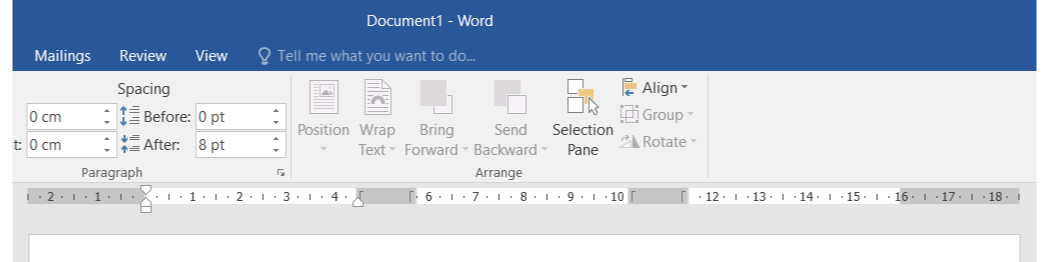
Zrzut ekranu przedstawia wygląd linijki w dokumencie zawierającym trzy kolumny. Od lewej strony zacieniowany jest margines strony (o szerokości 2,5 cm). Następnie pierwsza kolumna, oznaczona na linijce od 0 do 5 cm. Następnie zacieniowany odstęp między pierwszą a drugą kolumną o szerokości 1,5 cm. Następnie druga kolumna, oznaczona na linijce od 5,5 do 10 cm. Następnie zacieniowany kolejny odstęp między drugą a trzecią kolumną o szerokości 1,5 cm. Następnie trzecia kolumna, oznaczona na linijce od 11,5 do 16 cm. Na końcu zacieniowany prawy margines o szerokości 2,5 cm.
The view of the ruler in a document containing columns
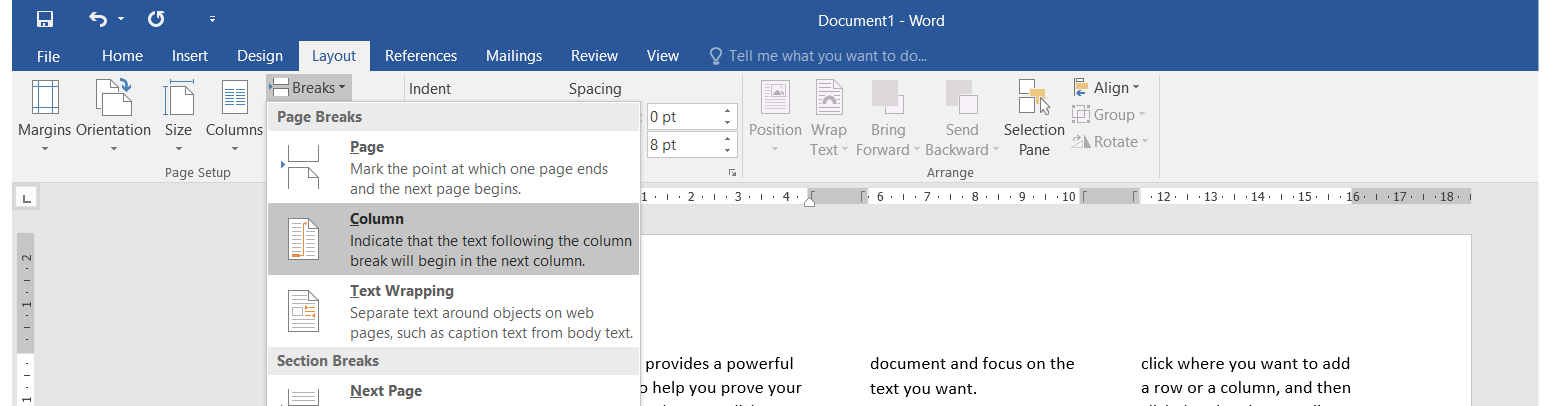
To insert a column break place the cursor where you want the columncolumncolumn to break, select Breaks on the Layout tab and click Column on the drop‑down menu.
R1CfQeJHSlt6G
Zrzut ekranu przedstawia wstawianie znaku podziału kolumny w programie MS Word 2016. Na wstążce należy wybrać zakładkę Layout, a następnie przycisk Breaks. Z listy rozwijanej, która się pojawia został należy wybrać Columns.
WordArt is a feature of Word that enables creating decorative headings.
R1XGU8FHuY3uj
Zrzut ekranu przedstawia przykładowy tekst WordArt zapisany w dwóch liniach, jedna pod drugą. Każda z liter posiada cień. Na górze napis: This is Wordart, na dole text here. Linia bazowa dolnego tekstu jest wybrzuszona do góry i tworzy w wcięcie w linii bazowej (tylko od dołu) górnego tekstu.
In order to insert WordArt into text, select WordArt on the Insert tab. After inserting the object, the placeholder text “Your text here” appears, which you must replace with your own text. You can enter full sentences or even paragraphs as WordArt objects. If the text is long, you may need to change font size. To customize WordArt text, you must use the commands that appear on the Drawing Tools tab. They enable using WordArt Styles or text effects, i.e. creating curved texts. In Word you can also convert the existing text to WordArt.
R1SqWdph1IinP
Zrzut ekranu przedstawia kartę Drawing Tools - Format. Od lewej strony blok Insert Shapes z listą zawierającą możliwe kształty do wstawienia (np. pole tekstowe, linia, strzałka liniowa, prostokąt owal, trójkąt, łamana, strzałka łamana, strzałka w prawo, strzałka w dół, dowolny kształt). Obok listy rozwijane Edit Shape o Draw text Box. Następnie po lewej stronie znajduje się blok Shape Styles z listą zawierającą predefiniowane pola tekstowe mogące różnić się między sobą kolorem i stylem obramowania i wypełnienia oraz formatem czcionki. Obok listy rozwijane Shape Fill, Shape Outline, Shape Effects. Następnie po lewej stronie znajduje się blok WordArt Styles z listą zawierającą predefiniowane teksty ozdobne mogące różnić się między sobą kolorem i stylem obramowania i wypełnienia oraz formatem czcionki. Obok listy rozwijane Text Fill, Text Outline i Text Effects. Następnie po lewej stronie znajduje się blok Text z listami rozwijanymi Text Decoration, Align Text, Create Link. Następnie po lewej stronie znajduje się blok Arrange z listami rozwijanymi Position, Wrap Text, Bring Forward, Send Backward, Selection Pane, Align, Group, Rotate. Na końcu znajduje się blok Size, gdzie w dwóch polach tekstowych można zdefiniować wysokość i szerokość kształtu.
The number of words and pages in a Word document is displayed in the status bar at the bottom of the window.
R1cc8oF07QjCt
Zrzut ekranu przedstawia pasek stanu u dołu okna programu MS Word. Widoczne są podstawowe informacje dotyczące przykładowego dokumentu: Page 4 of 13, 754 words. Obok Ikona w postaci książki z checkboxem, co świadczy o braku błędów ortograficznych w dokumencie (przy wystąpieniu błędu widoczny jest znak iks zamiast checkboxa). jako ostatni naps: Polish.
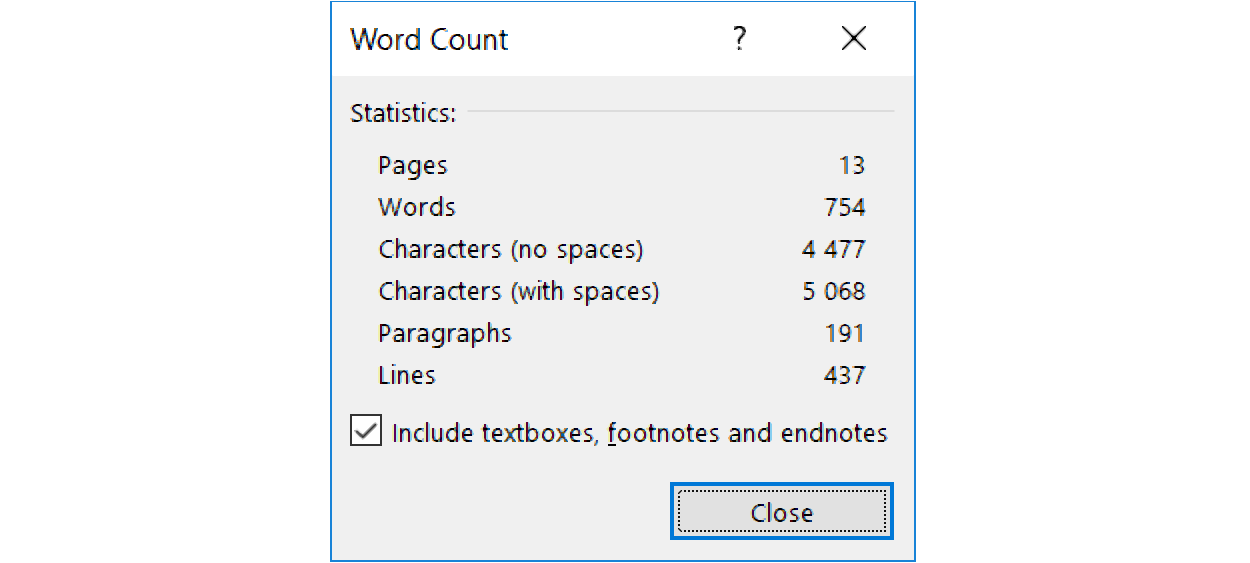
When you click the word countword countword count icon in the status bar, the Word Count box appears, in which you can viewviewview the number of pages, words, characters, paragraphs and lines.
R11Z6fj3P8O21
Zrzut ekranu przedstawia okno statystyki wyrazów w dokumencie zatytułowane Word Count. Na formatce znajdują się Informacje: Statistics: Pages, Words, Characters (no spaces), Characters (with spaces), Paragraphs and Lines. Poniżej zaznaczony checkbox Include textboxes, footnotes and endnotes. Na dole po prawej stronie przycisk Close.
Find on the computer two text documents of different size. Compare their word counts.
Exercises
Exercise 1
R13nl1LLeqH7l
Wersja alternatywna ćwiczenia: When you create columns in a text document, you can set in advance: Możliwe odpowiedzi: 1. the number of the columns, 2. the width of the columns, 3. the width of the space between the columns, 4. a line separating the columns, 5. the height of the columns
Wersja alternatywna ćwiczenia: When you create columns in a text document, you can set in advance: Możliwe odpowiedzi: 1. the number of the columns, 2. the width of the columns, 3. the width of the space between the columns, 4. a line separating the columns, 5. the height of the columns
When you create columns in a text document, you can set in advance:
the number of the columns
the width of the columns
the width of the space between the columns
a line separating the columns
the height of the columns
zadanie
Source: GroMar, licencja: CC BY 3.0.
Exercise 2
Create a brochurebrochurebrochure about blood donation in A4 format, in landscape orientation, formatted as three identical columns. With the copyright in mind, find the appropriate images on the internet. Use WordArt to make the titles stand out.
Exercise 3
Have you come across the use of the word countword countword count available in a text document? On the internet find its possible applications and describe them in English in your notebook.
Exercise 4
R1HAPsgDTJJCm
Wersja alternatywna ćwiczenia: Indicate which pairs of expressions or words are translated correctly. Możliwe odpowiedzi: 1. kolumna - column, 2. podział na kolumny - formatting with columns, 3. układ kolumnowy - column layout, 4. widok - view, 5. broszura - word count, 6. statystyka - view
Wersja alternatywna ćwiczenia: Indicate which pairs of expressions or words are translated correctly. Możliwe odpowiedzi: 1. kolumna - column, 2. podział na kolumny - formatting with columns, 3. układ kolumnowy - column layout, 4. widok - view, 5. broszura - word count, 6. statystyka - view
Indicate which pairs of expressions or words are translated correctly.
kolumna - column
podział na kolumny - formatting with columns
układ kolumnowy - column layout
widok - view
broszura - word count
statystyka - view
zadanie
Source: GroMar, licencja: CC BY 3.0.
R1NvZTKXro0AP1
Interaktywna gra, polegająca na łączeniu wyrazów w pary w ciągu jednej minuty. Czas zaczyna upływać wraz z rozpoczęciem gry. Jeden ruch to odkrywanie najpierw jednej potem drugiej karty z wyrazem. Każdy wyraz jest odczytywany. Kolejny ruch to odkrywanie trzeciej i czwartej karty. W ten sposób odsłuchasz wszystkie wyrazy. Nawigacja z poziomu klawiatury za pomocą strzałek, odsłuchiwanie wyrazów enterem lub spacją. Znajdź wszystkie pary wyrazów.
Interaktywna gra, polegająca na łączeniu wyrazów w pary w ciągu jednej minuty. Czas zaczyna upływać wraz z rozpoczęciem gry. Jeden ruch to odkrywanie najpierw jednej potem drugiej karty z wyrazem. Każdy wyraz jest odczytywany. Kolejny ruch to odkrywanie trzeciej i czwartej karty. W ten sposób odsłuchasz wszystkie wyrazy. Nawigacja z poziomu klawiatury za pomocą strzałek, odsłuchiwanie wyrazów enterem lub spacją. Znajdź wszystkie pary wyrazów.
Match Polish terms with their English equivalents.
column
podział na kolumny
formatting with columns
układ kolumnowy
column layout
kolumna
Source: Zespół autorski Politechniki Łódzkiej, licencja: CC BY 3.0.