Thanks to sharingsharingsharing resources, the users of the same network, while working on different computers, can mutually access their files, folders or printers – provided that they are assigned appropriate permissionspermissionspermissions. You can only share selected files, folders or devices.
User accounts
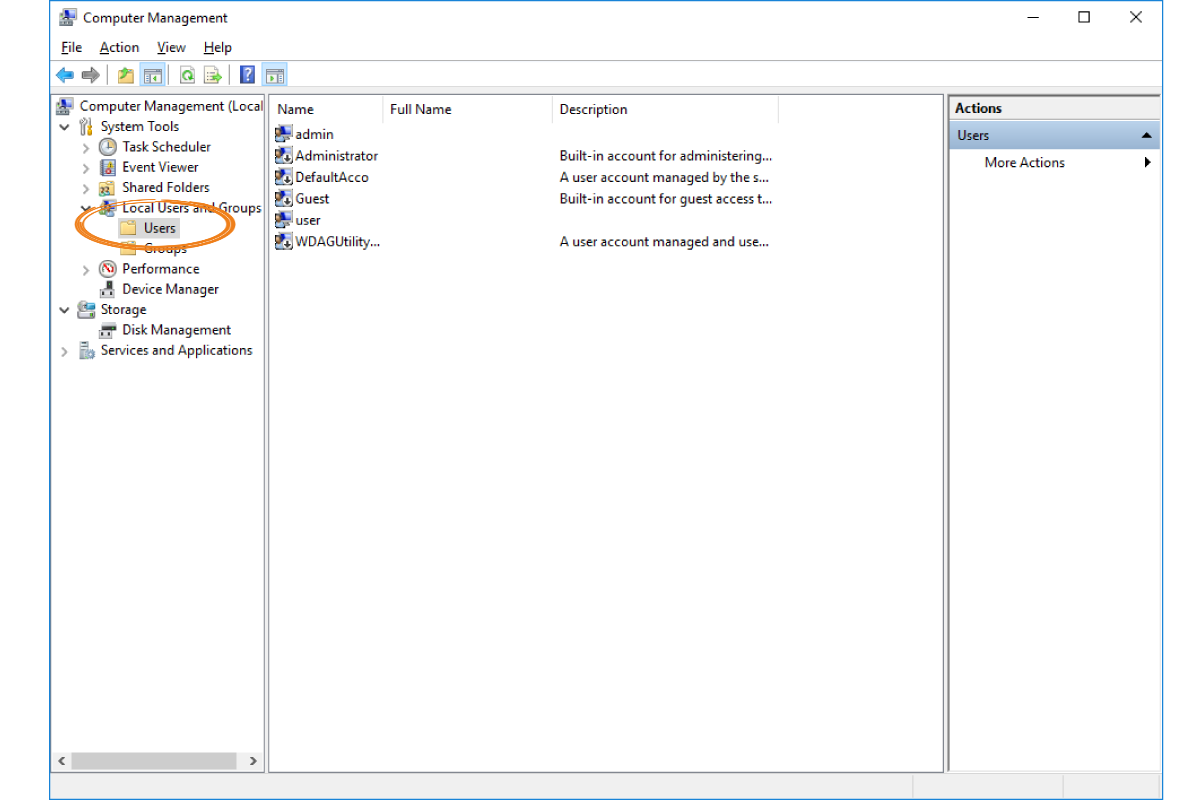
User accountsuser accountsUser accounts are features comprised of a set of resources and permissionspermissionspermissions assigned to a user of a computer system. Each person regularly using computer resources in a network environmentnetwork environmentnetwork environment should have their own user account. It enables personalising work environmentpersonalising work environmentpersonalising work environment and ensuring the safety of user data. User accountsuser accountsUser accounts can be classified into three groups:
Zrzut ekranu z formatki Computer Management. Zaznaczeni są Users (użytkownicy). W środkowej części wyświetleni są użytkownicy komputera: admin, Administrator, DefaultAccount, Guest, user, WDAGUtilty...
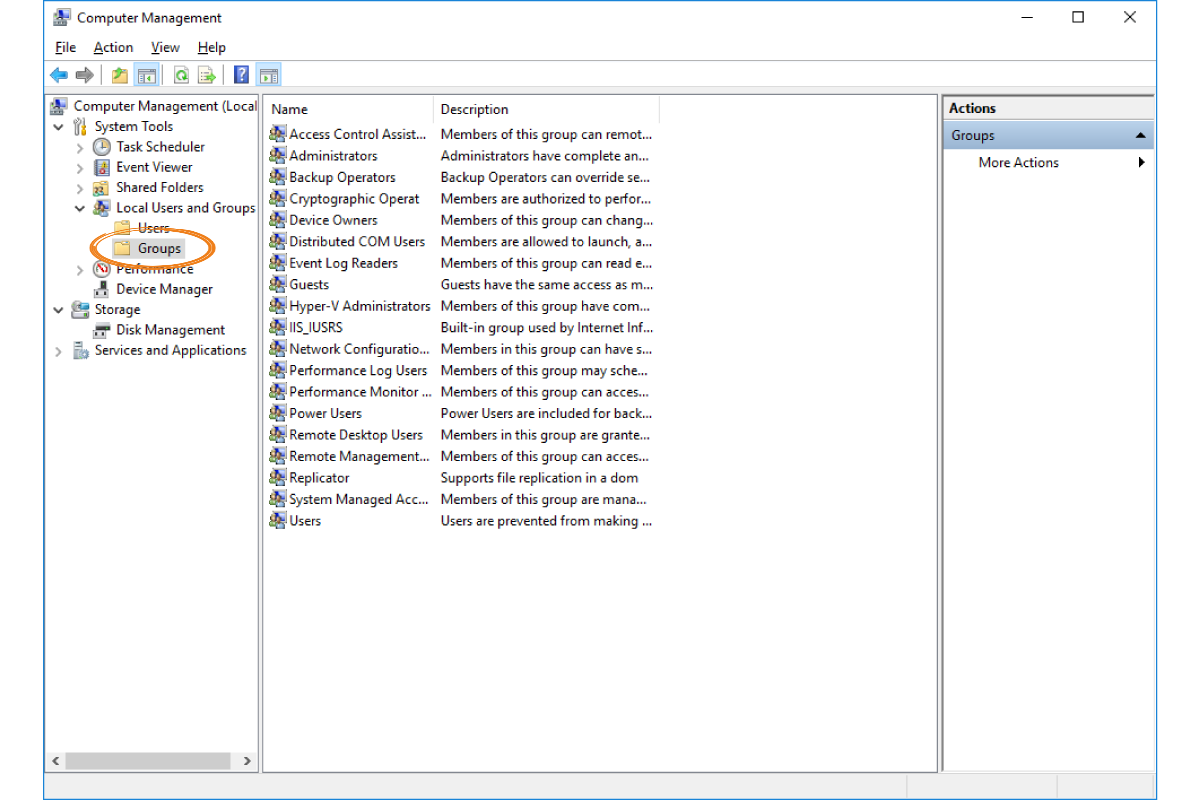
Groups of usersgroups of usersGroups of users are used for grouping them in order to manage their permission more easily. Similar to user accountsuser accountsuser accounts, user groups can be classified into:
local groups,
domain groups,
built‑in special groups.
R1bMFAZAK3fgx
Zrzut ekranu z formatki Computer Management. Zaznaczeni są Groups (grupy). W środkowej części wyświetleni są grupy, np. Administrators, Event Log Readers, Guests, Users.
By using the help menu of the operating system and information found on the Internet, create a new local group and add to it the user created in the previous task.
Access rightsaccess rightsAccess rights are a mechanism used in operating systems for defining the permissionspermissionspermissions to a resource for the particular users of the operating system. Their aim is to ensure security and control the privacy of user data. The basic rights include the permissionspermissionspermissions to:
read,
write,
execute.
RrfFA3HNGw9QV
Ilustracja interaktywna przedstawia zrzut z ekranu, który przedstawia formatkę ustawień sieciowych Net Properties z widoczną zakładką Security. W sekcji Permission for System wyróżnione zostały prawa dostępu: Full Control, Modify, Read and Execute, List Folder Contents, Read, Write. Na ilustracji widoczne są numery, a na nich podpisy. 1. Full Control - User can read and change files, add new ones, change permissions for the folder and its files, and take ownership of the folder and its files. {audio}, 2. Modify - User can read, write, execute, create, and delete files in this folder. {audio}, 3. Read and Execute - User can read the contents of files in this folder and also execute files in this folder. {audio}, 4. List Folder Contents - User can only list the files and subdirectories in this folder. User cannot open any files created in this folder. {audio}, 5. Read - User can read the contents of files in this folder. {audio}, 6. Write - User can read, write, and create files or folders in this folder. {audio}
Ilustracja interaktywna przedstawia zrzut z ekranu, który przedstawia formatkę ustawień sieciowych Net Properties z widoczną zakładką Security. W sekcji Permission for System wyróżnione zostały prawa dostępu: Full Control, Modify, Read and Execute, List Folder Contents, Read, Write. Na ilustracji widoczne są numery, a na nich podpisy. 1. Full Control - User can read and change files, add new ones, change permissions for the folder and its files, and take ownership of the folder and its files. {audio}, 2. Modify - User can read, write, execute, create, and delete files in this folder. {audio}, 3. Read and Execute - User can read the contents of files in this folder and also execute files in this folder. {audio}, 4. List Folder Contents - User can only list the files and subdirectories in this folder. User cannot open any files created in this folder. {audio}, 5. Read - User can read the contents of files in this folder. {audio}, 6. Write - User can read, write, and create files or folders in this folder. {audio}
By using the help menu of the operating system and information found on the Internet, create a new folder and add permissionspermissionspermissions to read and write for all computer users.
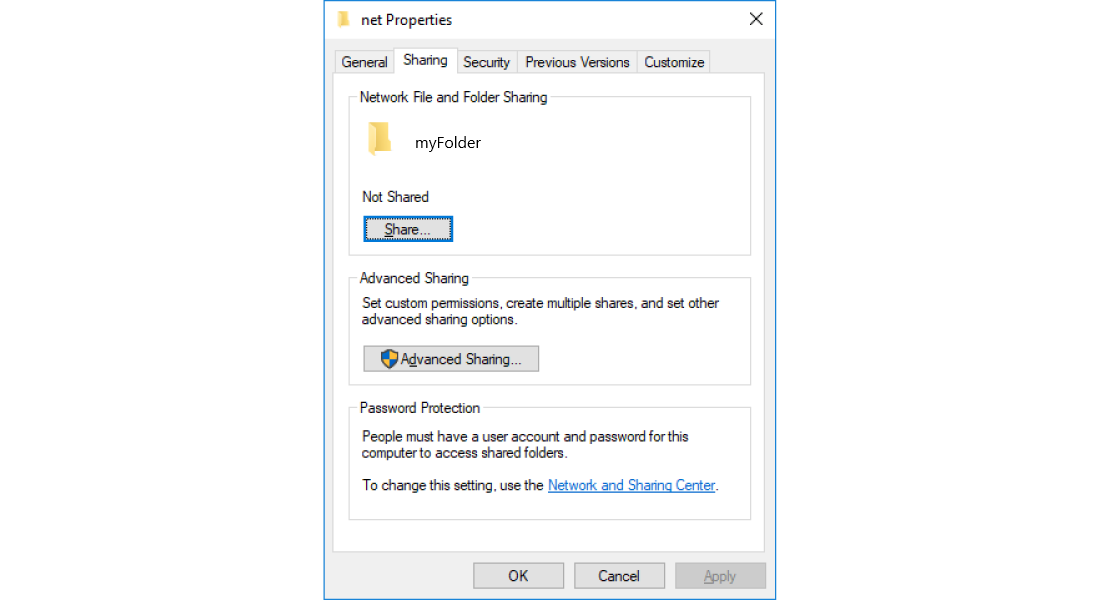
SharingsharingSharingresourcesresourcesresources in a computer network is an operation that enables accessing a resource by computer users. The term ‘network sharenetwork sharenetwork share’ is often used as a synonym for the term ‘a shared resource. The scope of possible operations on a shared resource is enabled with the defined permission levels:
read,
modify,
full control.
R1LmMH5T4sZD0
Zrzut z ekranu przedstawia formatkę netProperties. Widoczna jest zakładka Sharing, gdzie można udostępnić folder. W sekcji Network and Folder Sharing widoczna jest ikona folderu myFolder oraz jego nazwa. Poniżej informacja Not Shared oraz przycisk Share. W sekcji Advanced Sharing znajduje się informacja Ser custom permissions, create multiple shares, and set other sharing options oraz przycisk Advanced Sharing. W sekcji Password Protection znajduje się informacja: People mast have a account and password for this computer to access shared folders. Poniżej link umożliwiający wprowadzenie zmian: To change this setting, use the Network and Sharing Center. Na dole formatki trzy przyciski OK, Cancel oraz Apply.
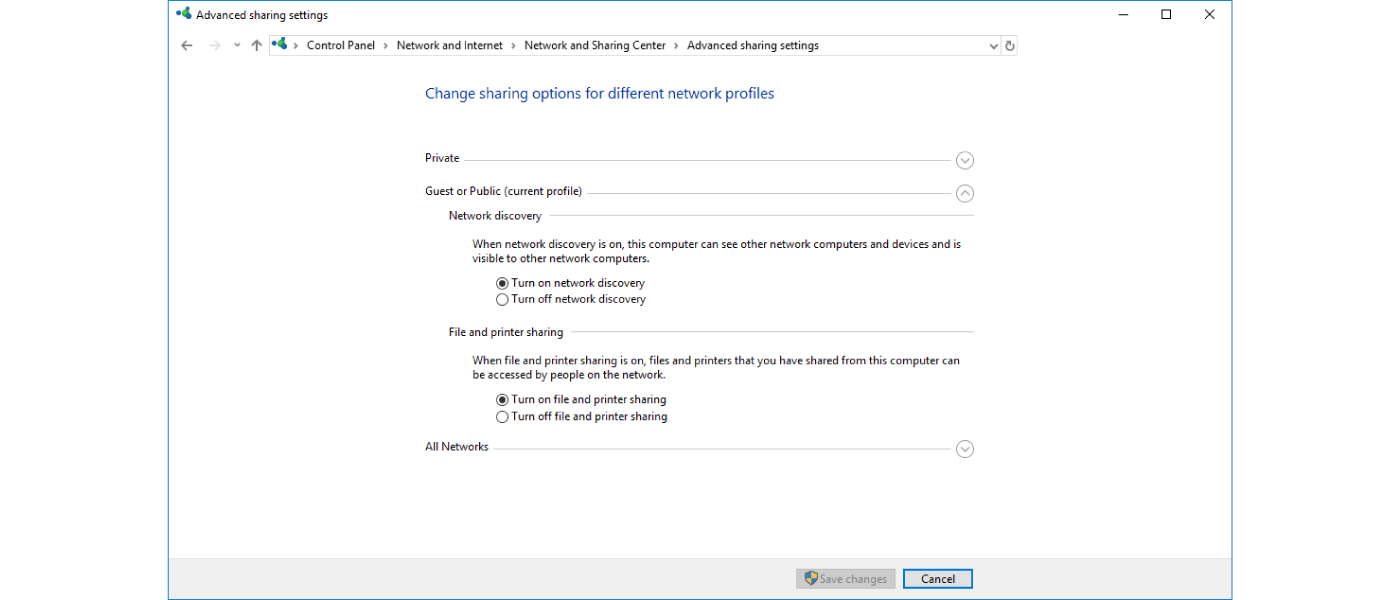
In order to use the sharingsharingsharing option, this feature must be installed in your system and enabled.
R6OqhGiCLUKLe
Zrzut z ekranu przedstawia okno panelu sterowania pokazujące Advanced sharing settings. Na górze informacja Change sharing options for different network profiles. Widoczne są trzy opcje: Private, Guest or Public (current profile) oraz All Network. Opcja Guest or Public jest rozwinięta i pokazane są dwie opcje. Pierwsza - Network discovery wraz z wyjaśnieniem: When network discovery is on, this computer can see other network computers and devices and is visible to other network computers. Są dwie możliwości wyboru Turn on lub Turn off network Discovery. Druga - File and printer sharing wraz z wyjaśnieniem: When file and printer sharing is on, files and printer that you have shared from this computer can be based by people on this network. Są dwie możliwości wyboru Turn on lub Turn off file and printer sharing. Na dole znajdują się dwa przyciski Save changes oraz Cancel.
Apart from data, you can also share devices, e.g. printers.
When you set up access to files and folders appropriately, you will be able to work on documents on various computers. You will not have to copy documents, music or images. You will be able to access shared resources from any computer.
Exercises
Exercise 1
Rw6An2zSAmqSm
Wersja alternatywna ćwiczenia: Determine which sentences are true. Możliwe odpowiedzi: 1. Sharing resources in a computer network enables accessing a resource by computer users., 2. In order to use the sharing option, this feature does not need to be installed in the system not enabled, 3. Access rights ensure security and control over the privacy of user data., 4. In order to use computer resources in a network environment, you do not need to have your own user account.
Wersja alternatywna ćwiczenia: Determine which sentences are true. Możliwe odpowiedzi: 1. Sharing resources in a computer network enables accessing a resource by computer users., 2. In order to use the sharing option, this feature does not need to be installed in the system not enabled, 3. Access rights ensure security and control over the privacy of user data., 4. In order to use computer resources in a network environment, you do not need to have your own user account.
Determine which sentences are true.
Sharing resources in a computer network enables accessing a resource by computer users.
In order to use the sharing option, this feature does not need to be installed in the system not enabled
Access rights ensure security and control over the privacy of user data.
In order to use computer resources in a network environment, you do not need to have your own user account.
zadanie
Source: GroMar, licencja: CC BY 3.0.
Exercise 2
Create a multimedia presentation about access rights in Windows and Linux.
Exercise 3
Consider if you could use the option of sharing resources (files, folders, printers) on your home computer. Why? Explain in English.
Exercise 4
R14bsVH1enFzE
Wersja alternatywna ćwiczenia: Indicate which pairs of expressions or words are translated correctly. Możliwe odpowiedzi: 1. udostępnianie - sharing, 2. środowisko sieciowe - network environment, 3. konta użytkowników - user accounts, 4. grupy użytkowników - groups of users, 5. prawa dostępu - permissions, 6. uprawnienia - access rights
Wersja alternatywna ćwiczenia: Indicate which pairs of expressions or words are translated correctly. Możliwe odpowiedzi: 1. udostępnianie - sharing, 2. środowisko sieciowe - network environment, 3. konta użytkowników - user accounts, 4. grupy użytkowników - groups of users, 5. prawa dostępu - permissions, 6. uprawnienia - access rights
Indicate which pairs of expressions or words are translated correctly.
udostępnianie - sharing
środowisko sieciowe - network environment
konta użytkowników - user accounts
grupy użytkowników - groups of users
prawa dostępu - permissions
uprawnienia - access rights
zadanie
Source: GroMar, licencja: CC BY 3.0.
R1ZhXixUtOMoh1
Interaktywna gra, polegająca na łączeniu wyrazów w pary w ciągu jednej minuty. Czas zaczyna upływać wraz z rozpoczęciem gry. Jeden ruch to odkrywanie najpierw jednej potem drugiej karty z wyrazem. Każdy wyraz jest odczytywany. Kolejny ruch to odkrywanie trzeciej i czwartej karty. W ten sposób odsłuchasz wszystkie wyrazy. Nawigacja z poziomu klawiatury za pomocą strzałek, odsłuchiwanie wyrazów enterem lub spacją. Znajdź wszystkie pary wyrazów.
Interaktywna gra, polegająca na łączeniu wyrazów w pary w ciągu jednej minuty. Czas zaczyna upływać wraz z rozpoczęciem gry. Jeden ruch to odkrywanie najpierw jednej potem drugiej karty z wyrazem. Każdy wyraz jest odczytywany. Kolejny ruch to odkrywanie trzeciej i czwartej karty. W ten sposób odsłuchasz wszystkie wyrazy. Nawigacja z poziomu klawiatury za pomocą strzałek, odsłuchiwanie wyrazów enterem lub spacją. Znajdź wszystkie pary wyrazów.
Match Polish terms with their English equivalents.
network environment
udostępnianie
resource
zasób
środowisko sieciowe
sharing
konta użytkowników
user accounts
grupy użytkowników
groups of users
Source: Zespół autorski Politechniki Łódzkiej, licencja: CC BY 3.0.