An installerinstallerinstaller is a computer programme that is used for installing other software on the computer. It automates the installationinstallationinstallation and uninstallation process in the operating system. Installers can:
installinstallinstall multiple programmes (Linux – PRM and DEB packages),
The installationinstallationinstallation process comprises not only placing the required files in appropriate folders, but also performing necessary configuration in the operating system.
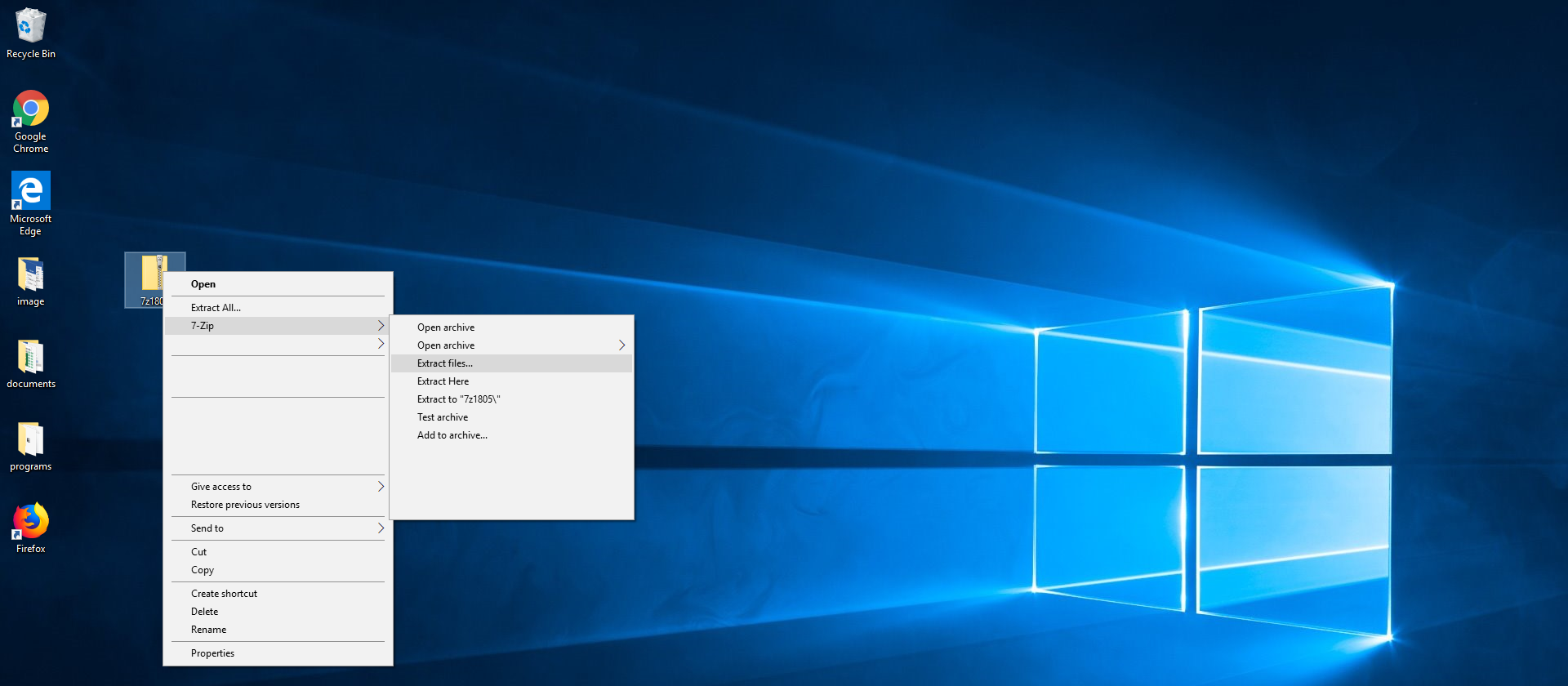
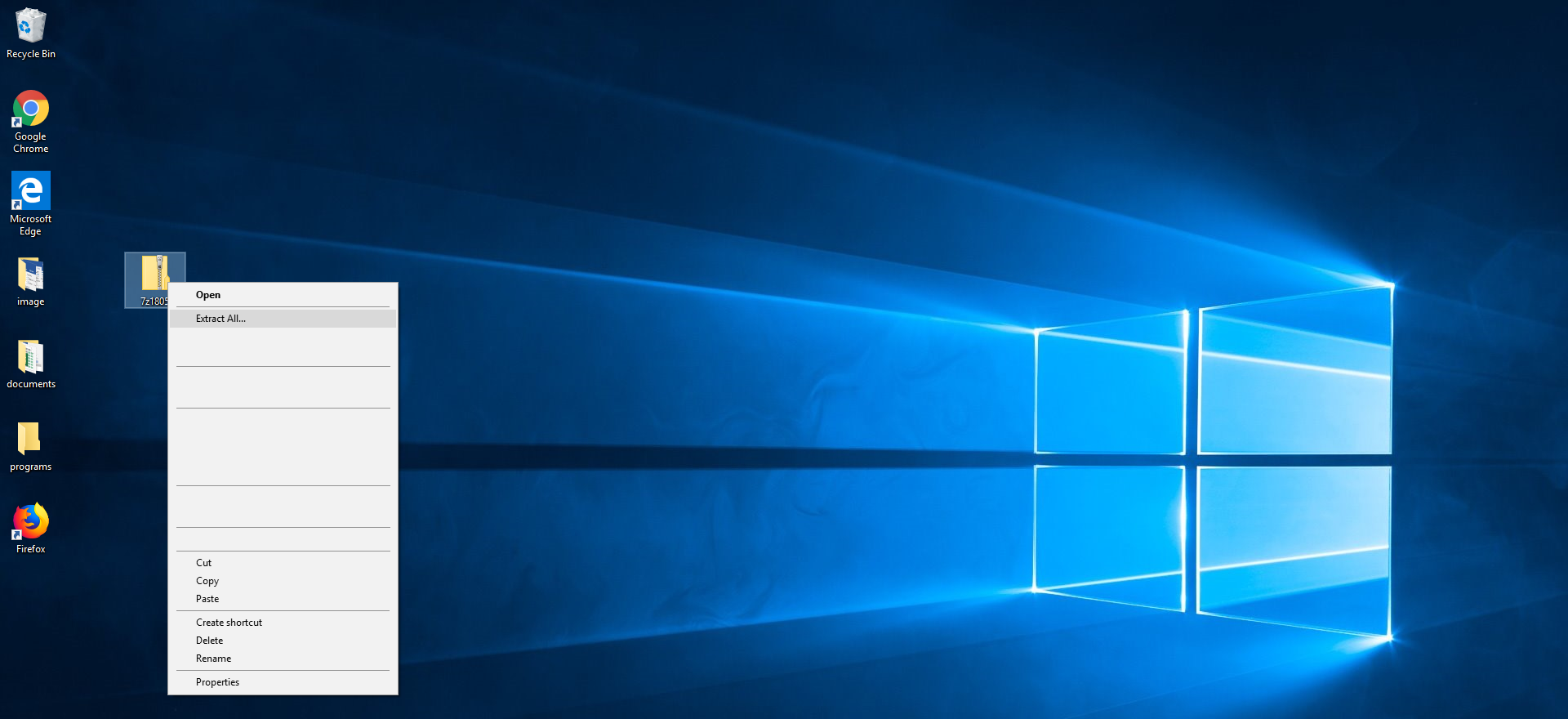
The installationinstallationinstallation of applications may be performed from data media such as a CD/DVD, a pendrive or a HDD. Many installers are distributed as compressed files. The first step will be then to use software for the decompressiondecompressiondecompression of compressed files, e.g. 7zip. You must use the Extract files option and specify the location of the extracted files. If files are compressed as the most popular type of archive (zip files), the decompressiondecompressiondecompression process can be carried out with a Windows function – by selecting Extract All from the pop‑up menu.
RTn84ADNlA5nb1
Zrzut ekranu przedstawia rozpakowywanie archiwum spakowanego za pomocą programu 7zip. Widoczny jest pulpit Windows 10 z kilkoma przypadkowymi ikonami. Zaznaczona jest ikona archiwum zip, obok menu podręczne z opcjami miedzy innymi Open, Extract All... oraz 7-zip. Ostatnia opcja jest podświetlona i aktywowane jest kolejne podmenu. Pokazane są niektóre opcje programu 7-zip: Open archive, Extract files..., Extract Here, Extract to "7z1805\", Test archive, Add to archive.
Source: GroMar, licencja: CC BY 3.0.
R1NrpurX7XPjV1
Zrzut ekranu przedstawia rozpakowywanie archiwum zip. Widoczny jest pulpit Windows 10 z kilkoma przypadkowymi ikonami. Zaznaczona jest ikona archiwum zip, obok menu podręczne z opcjami miedzy innymi Open, Extract All...
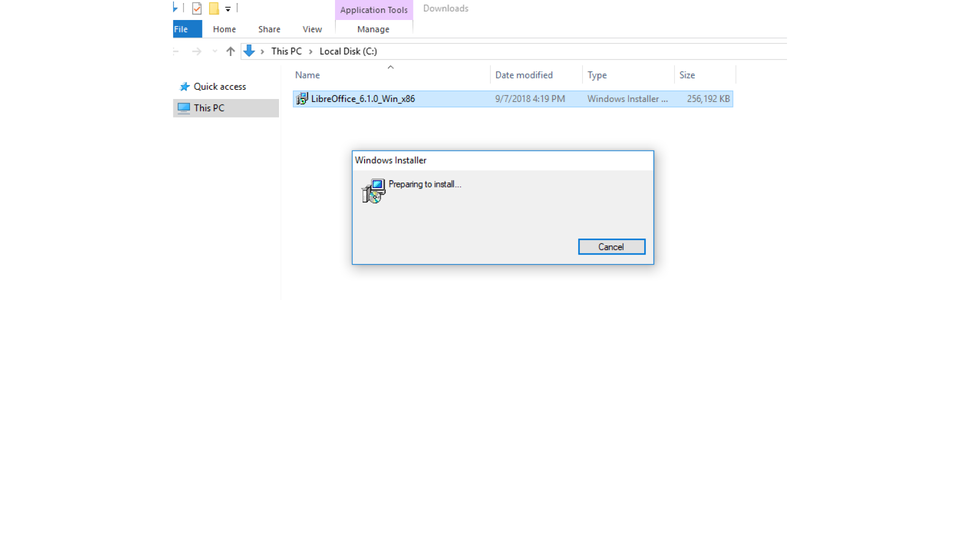
When you installinstallinstall software from external mediaexternal mediaexternal media, installationinstallationinstallation can start automatically. In other cases you must locate in a folder a file that starts installation (usually setup.exe, install.exe or a file with the extension .msi).
During installationinstallationinstallation an installerinstallerinstaller can ask you to perform the following operations:
accepting terms and conditions,
specifying your personal data,
selecting the destination folder for the installationinstallationinstallation,
entering the license keys,
selecting installationinstallationinstallation functions and parameters for more advanced products,
confirming that you want to add a shortcutshortcutshortcut to an applicationapplicationapplication to the desktop or the Quick Launch bar.
RWwv3UFWoZ6Eb1
Pokaz slajdów - Przykład instalacji programu w środowisku Windows. Instrukcja obsługi z poziomu klawiatury: 1. Uruchomienie aplikacji - ENTER, 2. Na każdym ze slajdów czytany jest automatycznie tekst alternatywny po polsku, 3. Przy pierwszym uruchomieniu na pierwszym slajdzie, czytanie tekstu po angielsku - TAB, 4. Przejście między slajdami: do następnego slajdu - TAB, do poprzedniego slajdu - TAB + SHIFT, 5. Przejście do czytania napisu po angielsku - strzałka w górę + strzałka w dół (czyta tekst po angielsku widoczny na slajdzie).
Pokaz slajdów - Przykład instalacji programu w środowisku Windows. Instrukcja obsługi z poziomu klawiatury: 1. Uruchomienie aplikacji - ENTER, 2. Na każdym ze slajdów czytany jest automatycznie tekst alternatywny po polsku, 3. Przy pierwszym uruchomieniu na pierwszym slajdzie, czytanie tekstu po angielsku - TAB, 4. Przejście między slajdami: do następnego slajdu - TAB, do poprzedniego slajdu - TAB + SHIFT, 5. Przejście do czytania napisu po angielsku - strzałka w górę + strzałka w dół (czyta tekst po angielsku widoczny na slajdzie).
InstallinstallInstall on the computer a software under the GPL license (e.g. Gimp, Inkspace). After completing the installationinstallationinstallation view the list of the installed applications in the Control Panel.
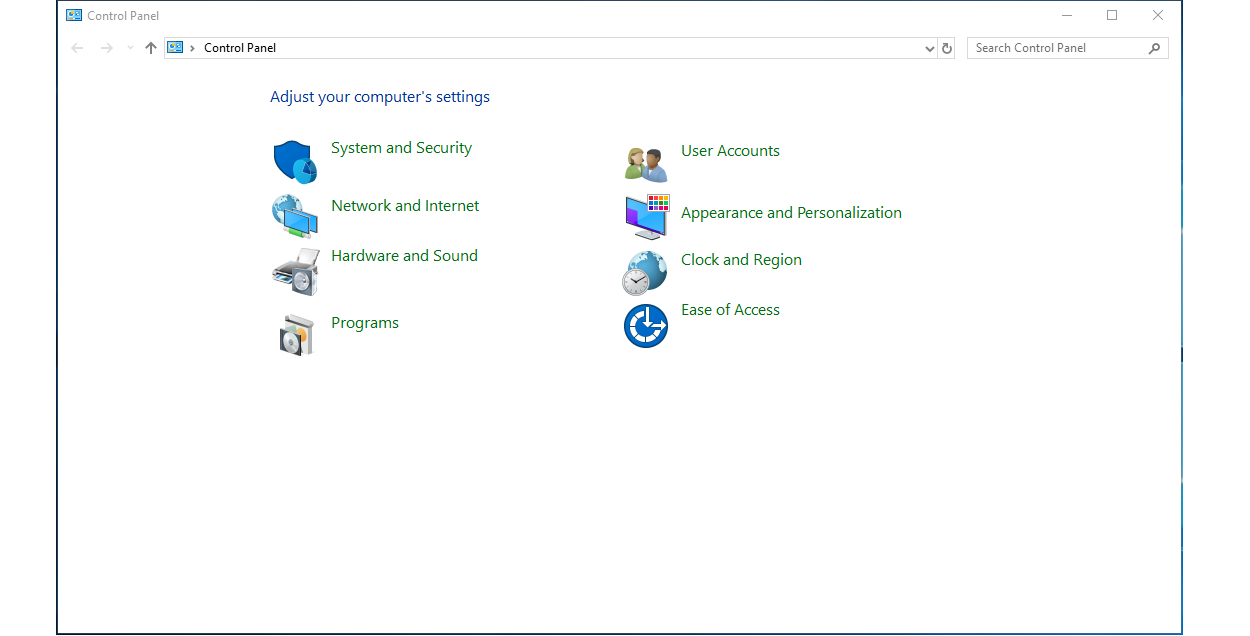
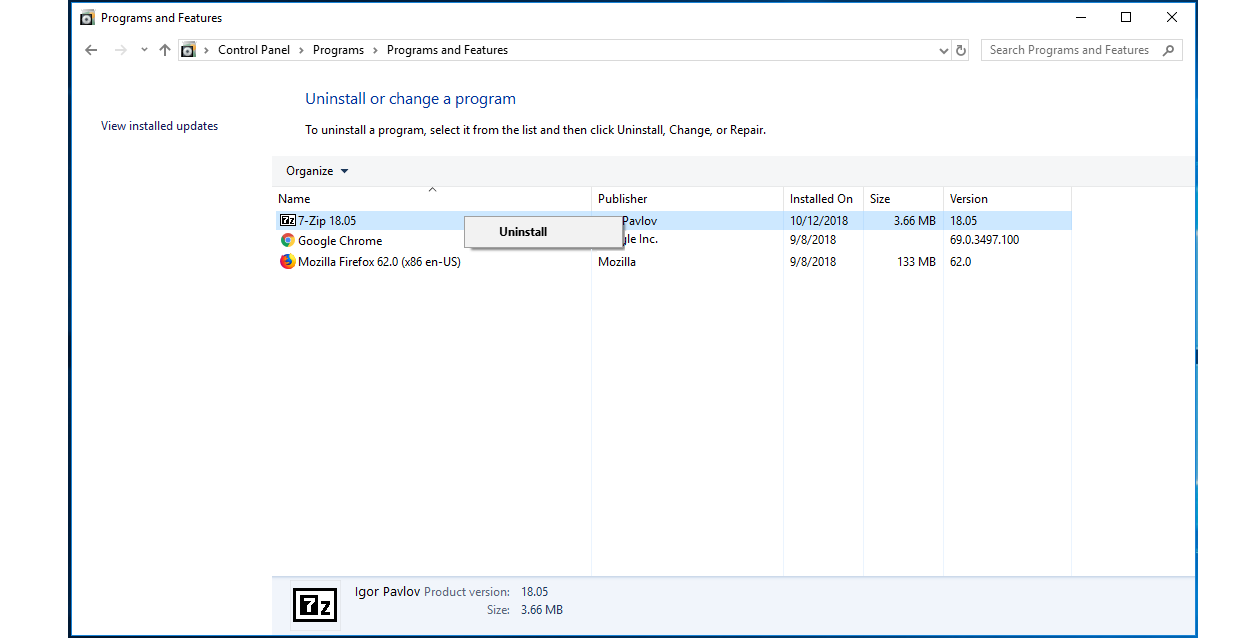
An installed programme can be easily uninstalled with the functions built in the system. They are located in the Control Panel. You can find the option UninstalluninstallUninstall a program under Programs.
RHLI1FzGfNNhR1
Zrzut ekranu przedstawia widok Panelu Sterowaniu. Na belce folderu napis Control Panel. W oknie napis Adjust your computer's settings. Poniżej ikony wraz z opisami w dwóch kolumnach. Pe lewej stronie Tarcza z fragmentem diagramu kołowego, obok napis System and Security. Poniżej kula ziemska z monitorem i napis Network ans Internet. Poniżej drukarka i głośnik komputerowy oraz napis Hardware and Sound. Poniżej pudełko i płyta CD oraz napis Programs. W kolumnie po prawej stronie od góry ikona przedstawia popiersia kobiety i mężczyzny obok napis User Accounts. Poniżej monitor komputerowy i tabela z przykładowymi kolorami oraz napis Appearance and Personalization. Poniżej kula ziemska i zegar oraz napis Clock and Region. Poniżej zegar, krótkiego wskazówki zastąpione są strzałkami oraz napis Ease of Access.
Source: GroMar, licencja: CC BY 3.0.
RP5WOLs6wpNAH1
Zrzut ekranu przedstawia widok Panelu Sterowaniu. Na belce folderu napis Programs and Features. W oknie napis Uninstall or change a program.Okno podzielone na dwie części. Po lewej, węższej napis View installed updates. Po prawej napis: To uninstall a program, select it form the list and then click Uninstall, Change, or Repair. Poniżej tabela z nagłówkiem Organize oraz z kolumnami: Name, Publisher, Installed On, Size, Version. W tabeli przykładowe programy. Jeden z nich jest zaznaczony, do niego została wybrana opcja Uninstall.
UninstalluninstallUninstall the applicationapplicationapplication which you have installed in the previous task. Check if there are any files left after the uninstallation in the Program Files folders.
Due to the safety reasons you should installinstallinstall only software coming from trusted sources.
Exercises
Exercise 1
R1cLH1HE1UTvJ
Wersja alternatywna ćwiczenia: During installation an installer can ask you to perform the following operations: Możliwe odpowiedzi: 1. accepting terms and conditions, 2. specifying your personal data, 3. selecting the destination folder for the installation, 4. entering the license keys, 5. selecting installation functions and parameters for more advanced products, 6. confirming that you want to add a shortcut to an application, 7. inserting your photograph
Wersja alternatywna ćwiczenia: During installation an installer can ask you to perform the following operations: Możliwe odpowiedzi: 1. accepting terms and conditions, 2. specifying your personal data, 3. selecting the destination folder for the installation, 4. entering the license keys, 5. selecting installation functions and parameters for more advanced products, 6. confirming that you want to add a shortcut to an application, 7. inserting your photograph
During installation an installer can ask you to perform the following operations:
accepting terms and conditions
specifying your personal data
selecting the destination folder for the installation
entering the license keys
selecting installation functions and parameters for more advanced products
confirming that you want to add a shortcut to an application
inserting your photograph
zadanie
Source: GroMar, licencja: CC BY 3.0.
Exercise 2
On the internet, find the information and create a multimedia presentation about installing and uninstalling programmes in Linux.
Exercise 3
Why is it important to install on the computer only software coming from trusted sources? Answer in English.
Exercise 4
R1BajeQ38Oo7s
Wersja alternatywna ćwiczenia: Indicate which pairs of expressions or words are translated correctly. Możliwe odpowiedzi: 1. instalator - installer, 2. aplikacja - application, 3. dekompresja - decompression, 4. nośniki zewnętrzne - external media, 5. odinstalować - install, 6. instalować - uninstall
Wersja alternatywna ćwiczenia: Indicate which pairs of expressions or words are translated correctly. Możliwe odpowiedzi: 1. instalator - installer, 2. aplikacja - application, 3. dekompresja - decompression, 4. nośniki zewnętrzne - external media, 5. odinstalować - install, 6. instalować - uninstall
Indicate which pairs of expressions or words are translated correctly.
instalator - installer
aplikacja - application
dekompresja - decompression
nośniki zewnętrzne - external media
odinstalować - install
instalować - uninstall
zadanie
Source: GroMar, licencja: CC BY 3.0.
R15JaKKhY5p9Y1
Interaktywna gra, polegająca na łączeniu wyrazów w pary w ciągu jednej minuty. Czas zaczyna upływać wraz z rozpoczęciem gry. Jeden ruch to odkrywanie najpierw jednej potem drugiej karty z wyrazem. Każdy wyraz jest odczytywany. Kolejny ruch to odkrywanie trzeciej i czwartej karty. W ten sposób odsłuchasz wszystkie wyrazy. Nawigacja z poziomu klawiatury za pomocą strzałek, odsłuchiwanie wyrazów enterem lub spacją. Znajdź wszystkie pary wyrazów.
Interaktywna gra, polegająca na łączeniu wyrazów w pary w ciągu jednej minuty. Czas zaczyna upływać wraz z rozpoczęciem gry. Jeden ruch to odkrywanie najpierw jednej potem drugiej karty z wyrazem. Każdy wyraz jest odczytywany. Kolejny ruch to odkrywanie trzeciej i czwartej karty. W ten sposób odsłuchasz wszystkie wyrazy. Nawigacja z poziomu klawiatury za pomocą strzałek, odsłuchiwanie wyrazów enterem lub spacją. Znajdź wszystkie pary wyrazów.
Match Polish terms with their English equivalents.
application
installer
instalowa�
aplikacja
instalacja
install
instalator
uninstall
installation
odinstalowa�
Source: Zespół autorski Politechniki Łódzkiej, licencja: CC BY 3.0.