The simplest way of visualising the stored data is to organize them into tables. Begin creating a databasedatabasedatabase with designing it. It is important what data you want to store. It is crucial that particular columns (fields) contain data of the same type. Particular rows (records) store data referring to the values of the columns.
Creating a table in Excel facilitates managing and analysing data, and enables accessing the built‑in features of filteringfilteringfiltering, sorting and shading rows. It also enables using various formulas in the so called Total Row at the bottom of the table. You can create a table by using one of the two methods:
RT4HV7WQjDgXh
Ilustracja interaktywna przedstawia dwa okna programu MS Excel ułożone jedno pod drugim. Widoczne są polecenia pozwalające na wstawienie tabel do dokumentu. W pierwszym oknie na zakładce Insert wyróżniony jest przycisk Table. W drugim oknie na zakładce Home wyróżniony jest przycisk Format as a Table. Na ilustracji widoczne są numery, a na nich podpisy. 1. On the Insert tab select Table. {audio}, 2. On the Home tab select Format as Table in the Styles group. {audio}
Ilustracja interaktywna przedstawia dwa okna programu MS Excel ułożone jedno pod drugim. Widoczne są polecenia pozwalające na wstawienie tabel do dokumentu. W pierwszym oknie na zakładce Insert wyróżniony jest przycisk Table. W drugim oknie na zakładce Home wyróżniony jest przycisk Format as a Table. Na ilustracji widoczne są numery, a na nich podpisy. 1. On the Insert tab select Table. {audio}, 2. On the Home tab select Format as Table in the Styles group. {audio}
In both cases Excel displays the Create Table dialogue box, which enables specifying the range of cells in the table. After creating the table, you will see the Table Tools with the Design tab. By using the tools on the Design tab you can adjust or edit the table. You can enter data into the table directly in worksheet cells or by using a special data formdata formdata form.
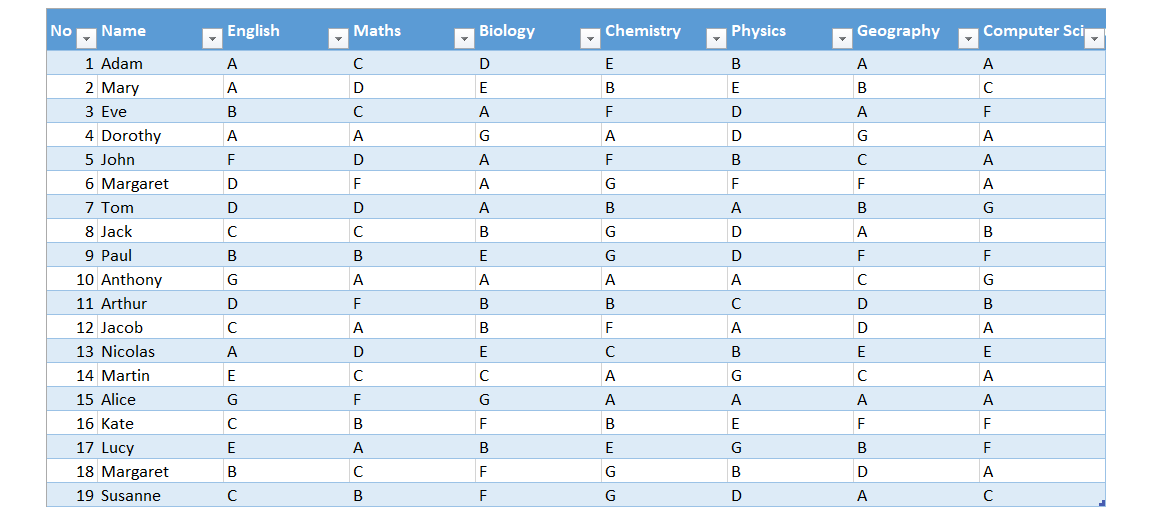
In a spreadsheet, insert the table shown in the illustration by using one of the presented methods. Sort the students alphabetically in an ascending order, and then again by the record numbers.
R1ROK9XXsHXUm
Zrzut z ekranu przedstawia przykładową, sformatowaną tabelę w paragramie MS Excel. W nagłówku pola mają nazwę: No, Name, English, Maths, Biology, Chemistry, Physics, Geography, Computer Science. W pierwszej kolumnie znajdują się liczby od 1 do 19. W drugiej przykładowe imiona. W kolejnych przykładowe oceny według skali angielskiej od F do A.
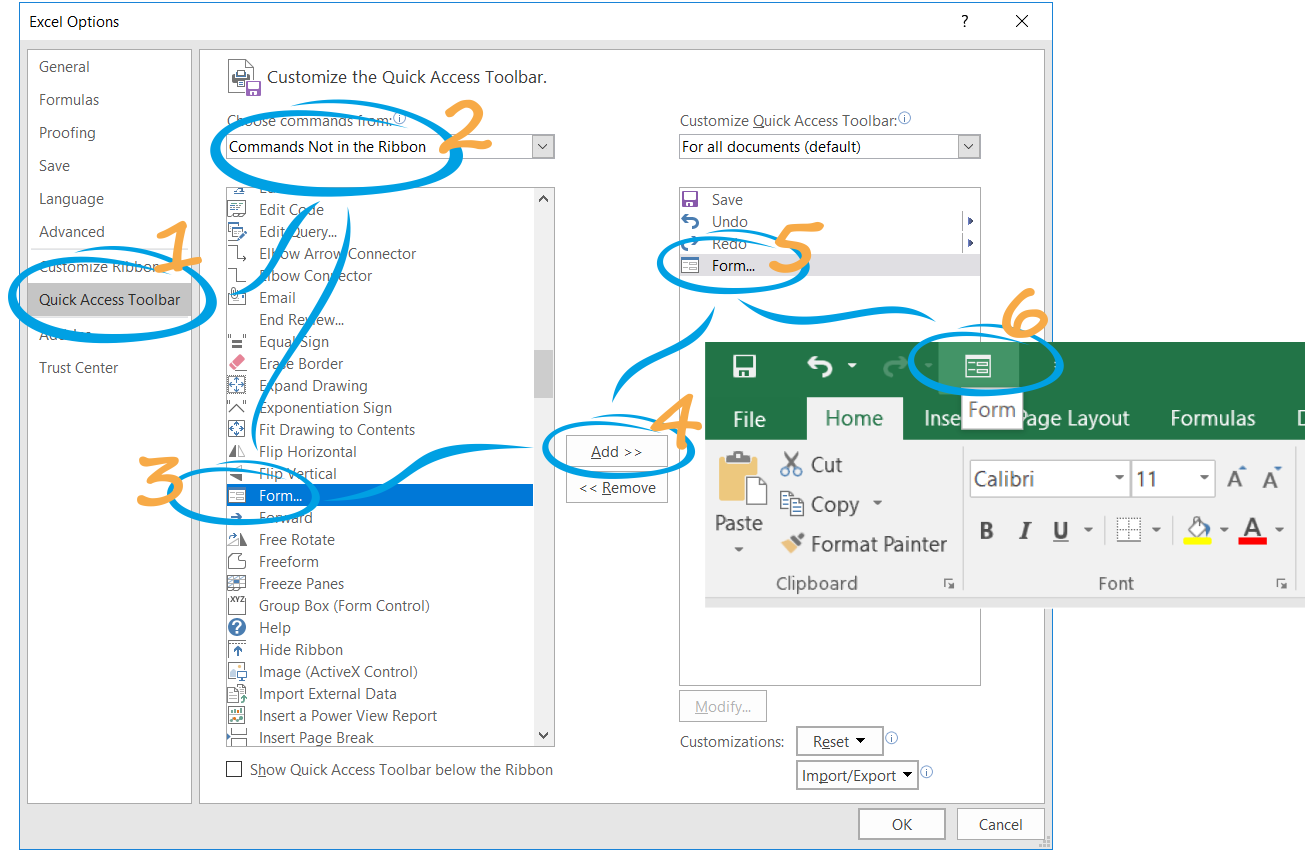
The Form buttonbuttonbutton is not included on the ribbon in Excel and if you want to use it, you must add it to the Quick Access Toolbar.
RgXJ5ckt66U79
Zrzuty z ekranu prezentują poszczególne kroki mające na celu dodanie przycisku Form (formularz) do okna MS Excel. Kroki te zostały oznaczone kolejnymi cyframi. Na formatce Excel Options w menu po lewej stronie należy wybrać Quick Access Toolbar (1). Następnie na liście rozwijane Choose command from należy wybrać opcję Commands Not in the Ribbon (2). Na liście pleceń, która pojawi się poniżej trzeba zaznaczyć polecenie Form (3) oraz wybrać przycisk Add (4). Dodany przycisk Form (5) pojawi się obok przycisków Save, Undo, Redo w grupie For all documents. Obok widoczny jest fragment zrzutu ekranu z okna MS Excel pokazujący przycisk Form (6) umieszczony w lewym, górnym rogu belki programu obok przycisków Save, Undo, Redo.
After placing the cursor in any part of your table, select the Form buttonbuttonbutton. Excel will automatically create a data formdata formdata form for the selected table.
Filtered data include only rows that meet the specified criteria, other rows are hidden. You can copy, find, edit, format and print the filtered data and create charts based on them.
A table in which particular columns (fields) contain data of the same type, while rows (records) store data referring to the values of the columns can be treated as a tabular databasedatabasedatabase. You can perform typical database operations on such a table, like sortingsortingsorting (organizing records in a specified order) or filteringfilteringfiltering (displaying records meeting specified criteria).
Exercises
Exercise 1
R1LxmeYMywSdU
Wersja alternatywna ćwiczenia: Determine which sentences are true. Możliwe odpowiedzi: 1. Columns in a table correspond to fields in a database, and rows correspond to records., 2. The Form button is not included on the ribbon in Excel and if you want to use it, you must add it to the Quick Access Toolbar., 3. Filtered data include only rows that meet the specified criteria, other rows are hidden. , 4. The command for inserting a table is on the Data tab.
Wersja alternatywna ćwiczenia: Determine which sentences are true. Możliwe odpowiedzi: 1. Columns in a table correspond to fields in a database, and rows correspond to records., 2. The Form button is not included on the ribbon in Excel and if you want to use it, you must add it to the Quick Access Toolbar., 3. Filtered data include only rows that meet the specified criteria, other rows are hidden. , 4. The command for inserting a table is on the Data tab.
Determine which sentences are true.
Columns in a table correspond to fields in a database, and rows correspond to records.
The Form button is not included on the ribbon in Excel and if you want to use it, you must add it to the Quick Access Toolbar.
Filtered data include only rows that meet the specified criteria, other rows are hidden.
The command for inserting a table is on the Data tab.
zadanie
Source: GroMar, licencja: CC BY 3.0.
Exercise 2
Create a table in a spreadsheet. Select 10 European cities which you would like to visit. Fill in the following fields:
city,
country,
population of the city.
Then create a data form and add three more cities. Sort the cities in a descending order by population.
By using the filter options, select:
cities with the letter ‘a’ as the second letter of their names,
cities which do not have the letter ‘o’ in their names,
cities with the population exceeding 1 000 000.
Exercise 3
Describe in English the difference between sorting and filtering data.
Exercise 4
RsHgC2EL1fJYh
Wersja alternatywna ćwiczenia: Indicate which pairs of expressions or words are translated correctly. Możliwe odpowiedzi: 1. baza danych - database, 2. przechowywanie - storing, 3. przeglądanie - browsing, 4. wyszukiwanie - searching, 5. wstawienie - filtering, 6. formularz - inserting
Wersja alternatywna ćwiczenia: Indicate which pairs of expressions or words are translated correctly. Możliwe odpowiedzi: 1. baza danych - database, 2. przechowywanie - storing, 3. przeglądanie - browsing, 4. wyszukiwanie - searching, 5. wstawienie - filtering, 6. formularz - inserting
Indicate which pairs of expressions or words are translated correctly.
baza danych - database
przechowywanie - storing
przeglądanie - browsing
wyszukiwanie - searching
wstawienie - filtering
formularz - inserting
zadanie
Source: GroMar, licencja: CC BY 3.0.
R1cxWIIdD8yvR1
Interaktywna gra, polegająca na łączeniu wyrazów w pary w ciągu jednej minuty. Czas zaczyna upływać wraz z rozpoczęciem gry. Jeden ruch to odkrywanie najpierw jednej potem drugiej karty z wyrazem. Każdy wyraz jest odczytywany. Kolejny ruch to odkrywanie trzeciej i czwartej karty. W ten sposób odsłuchasz wszystkie wyrazy. Nawigacja z poziomu klawiatury za pomocą strzałek, odsłuchiwanie wyrazów enterem lub spacją. Znajdź wszystkie pary wyrazów.
Interaktywna gra, polegająca na łączeniu wyrazów w pary w ciągu jednej minuty. Czas zaczyna upływać wraz z rozpoczęciem gry. Jeden ruch to odkrywanie najpierw jednej potem drugiej karty z wyrazem. Każdy wyraz jest odczytywany. Kolejny ruch to odkrywanie trzeciej i czwartej karty. W ten sposób odsłuchasz wszystkie wyrazy. Nawigacja z poziomu klawiatury za pomocą strzałek, odsłuchiwanie wyrazów enterem lub spacją. Znajdź wszystkie pary wyrazów.
Match Polish terms with their English equivalents.
przeglądanie
browsing
sortowanie
sorting
wyszukiwanie
database
przechowywanie
searching
baza danych
storing
Source: Zespół autorski Politechniki Łódzkiej, licencja: CC BY 3.0.