Advanced methods of searching information
Zaawansowane metody wyszukiwania informacji
to use the graphical interface of the search engine,
to search for information using advanced methods.
Discuss with your classmates or ask at home how they use popular browsers to search for information. Consider together whether you can use the potential of search engines to find answers to your questions.
The simplest solution to find the information you need on the Internet is to enter a phrasephrase consisting of one or several words in the search box of the selected browser. The result of this search is a few or a few dozen pages that we laboriously look through to find the best answer to our question.
In order to get the right answer, the question should be properly formulated. Search engines provide their users with options for a more advanced search than just typing keywords. We will focus on the Google search enginesearch engine, which among the Internet users is the most popular. Most of the search options discussed is also used in other browsers.
For this purpose, you can use the graphical interface of the search enginesearch engine. It offers a variety of options that allow us to narrow down the search, for example, by selecting only graphics or movies. We often look for graphic files that are based on free licenses - that is, those that we can freely use or modify (we always have to make sure that their creator did not limit these rights in any way). We may need the latest news published in the last 24 h, and not from years ago - then we narrow down our search accordingly. There are many possibilities.
Watch the slideshow and familiarise yourself with the selected options.
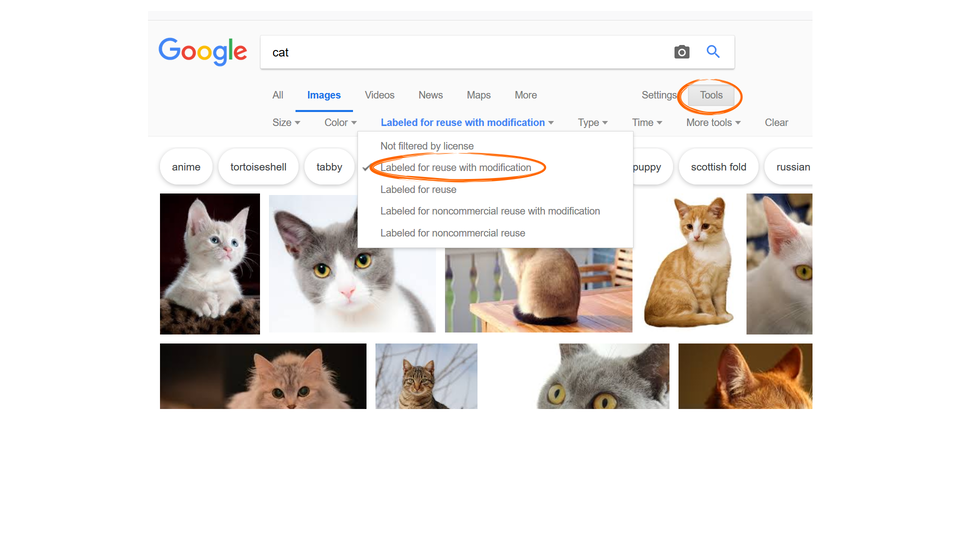
Zasób interaktywny dostępny pod adresem https://zpe.gov.pl/a/DqvCEevlo
The process of searching for information can be improved by using numerous search operatorssearch operators and searching in specific places (website, thematic forum, website description, etc.)
The set of words we use when searching is called a phrasephrase.
Google search does not take into account the case of the phrase you type.
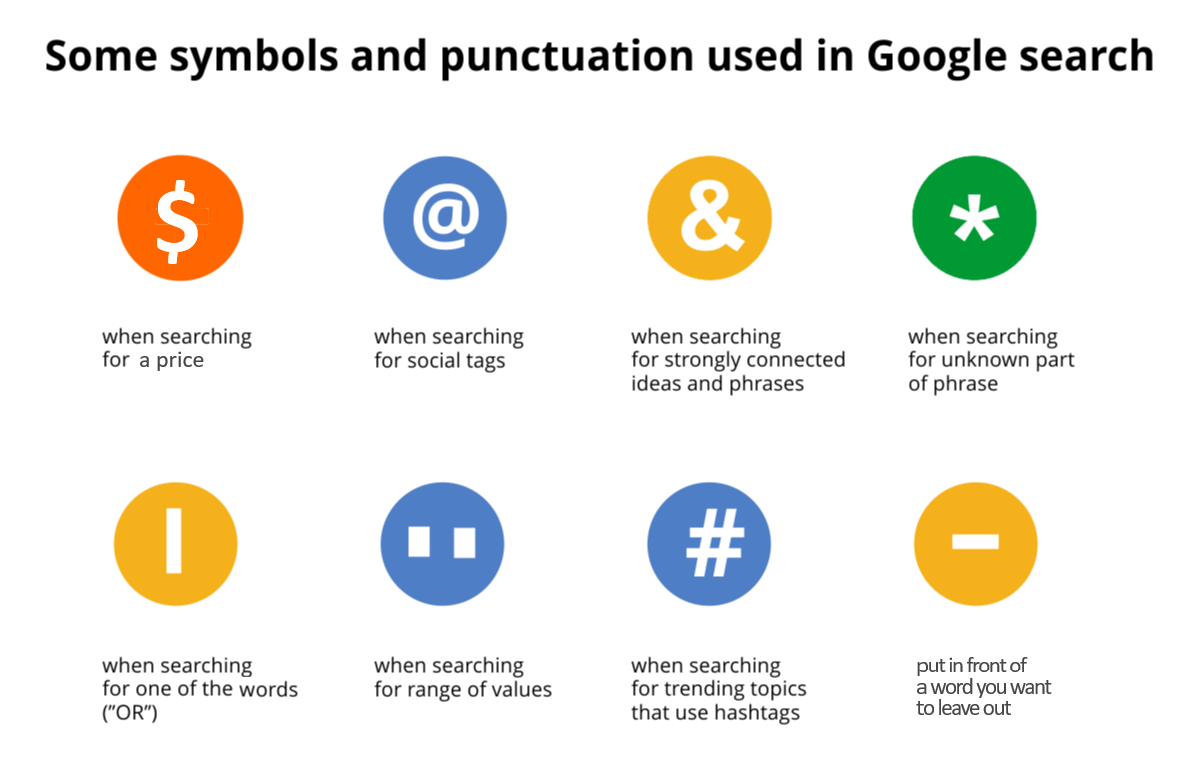
However, it recognizes some punctuation markspunctuation marks and symbols, e.g.
„” (quotation marks) - if we want to get in the search results only those pages that contain exactly entered phrasephrase (in the same order of characters) e.g. „wild cats”.
- (minus) - has two functions:
to remove expressions from the search, e.g. race car -Ferrari,
to look for words that are strongly related to each other, e.g. white‑red flag.
. (dot) - replaces any character, e.g. dark night. - will mean a search for the expression dark night or dark nights for the search
engine.* (asterix) - replaces any or unknown fragment of the query, e.g. a fragment of the poem: stands * locomotive.
| (vertical line) - gives a choice between two expressions, e.g. coffee|tea.
& (ampersand) - means words strongly related to each other, for example beauty & the beast.
(hash) - searches for popular hashtags.
.. (double dot) - allows you to place a range of values, e.g. 10..20m tree.
Search operatorsSearch operators
Searches can also be made using the so‑called operators. This function can be combined with the possibilities discussed earlier. Below is a list of several selected operators (operators end with a colon):
site: narrows the search results to a specific page, for example cat site: animalplanet.com.
related: shows pages related to the given address, e.g. related: google.com.
link: shows pages containing a link to the given address, e.g. link: animalplanet.com.
define: shows the definition of a word, e.g. define:planet.
The search enginesearch engine facilitates the conversionconversion of units, currencies, performs simple mathematical operations, draws functions.
In the browser window, enter the following and then press the Enter key:
Currency conversionconversion: <value currency> to <currency> e.g. 1 euro to zloty.
Unit conversion: 36 m to 3600 cm.
Mathematical operations: we want calculate the product of 2001 and 24 is. Enter 2001 * 24 in the search window.
Mathematical functions: we want to see the graph of the parabola given by the equation y = 2 x 2. Enter 2 * x^2 and you will get the graph.
Internet search engines provide many tools to precisely specify what we are looking for.
Exercises
Determine which sentences are true.
- Advanced search gives the user the possibility to narrow their searches by a series of different filters.
- It is not possible to look only for articles published in the last 24 hours.
- An operator is a specific word that gives Google specific instructions on your search.
- A keyword is a word or group of words used to search the Internet when using web search sites.
Find the examples of advanced search in the lesson and follow them. The Google search engine is constantly developing its capabilities. It tries not only to help and teach, but also to entertain the user.
Check what happens if you enter the following phrases in the search box:
askew,
for a barrel roll.
Explain in English what you should do to convert units using a search engine.
Indicate which pairs of expressions or words are translated correctly.
- wyszukiwarka - search engine
- szukanie zaawansowane - advanced searching
- znaki interpunkcyjne - punctuation marks
- cudzysłów - question marks
- fraza - conversion
- zamiana - phrase
- question marks
- conversion
- phrase
- fraza
- szukanie zaawansowane
- advanced searching
- znaki interpunkcyjne
- cudzysłów
- punctuation marks
- zamiana
Glossary
szukanie zaawansowane
Nagranie dostępne na portalu epodreczniki.pl
wymowa w języku angielskim: advanced searching
zamiana
Nagranie dostępne na portalu epodreczniki.pl
wymowa w języku angielskim: conversion
fraza
Nagranie dostępne na portalu epodreczniki.pl
wymowa w języku angielskim: phrase
znaki interpunkcyjne
Nagranie dostępne na portalu epodreczniki.pl
wymowa w języku angielskim: punctuation marks
cudzysłów
Nagranie dostępne na portalu epodreczniki.pl
wymowa w języku angielskim: question marks
wyszukiwarka
Nagranie dostępne na portalu epodreczniki.pl
wymowa w języku angielskim: search engine
operatory wyszukiwania
Nagranie dostępne na portalu epodreczniki.pl
wymowa w języku angielskim: search operators
Keywords
advanced searchingadvanced searching
phrasephrase
punctuation markspunctuation marks
question marksquestion marks
search enginesearch engine