The IFfunctionfunctionfunction allows you to make logical comparisons between the value of a cell and the expected value. When you use the IF function, you must specify three argumentsargumentsarguments:
RoEhVJ8OCLjIZ
Ilustracja interaktywna przedstawia zapisaną funkcję logiczną =IF(logical_test, value_if_true, value_if_false). Elementy funkcji IF zostały oznaczone numerami od 1 do 3. 1 - logical_test. 2 - value_if_true. 3 - value_if_false. Na ilustracji widoczne są numery, a na nich podpisy. 1. A logical test, i.e. testing if the specified condition is met. {audio}, 2. The value of a cell when the condition is met. {audio}, 3. The value of a cell when the condition is not met. {audio}
Ilustracja interaktywna przedstawia zapisaną funkcję logiczną =IF(logical_test, value_if_true, value_if_false). Elementy funkcji IF zostały oznaczone numerami od 1 do 3. 1 - logical_test. 2 - value_if_true. 3 - value_if_false. Na ilustracji widoczne są numery, a na nich podpisy. 1. A logical test, i.e. testing if the specified condition is met. {audio}, 2. The value of a cell when the condition is met. {audio}, 3. The value of a cell when the condition is not met. {audio}
Colloquially, the operation of the IF function could be described as follows: IF (the expression is true, then perform the specified operation, otherwise perform another operation). The IF function is also called a conditional functionconditional functionconditional function. It can be inserted with the function wizard or by using the keyboard. Conditional functions can be nested, which will be explained later.
R1S72X0s13JQe
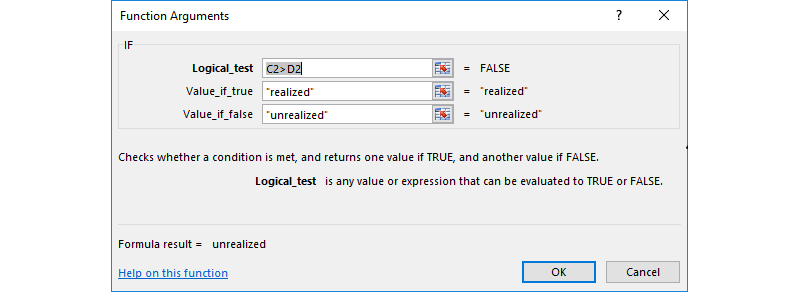
Okno kreatora funkcji IF - Function Arguments. W oknie Logical_test wpisany jest warunek C2 jest większe od D2, obok informacja zwrotna = False. W oknie Value_if_true wpisana jest wartość "realized", obok informacja zwrotna = "realized". W oknie Value_if_false wpisana jest wartość "unrealized", obok informacja zwrotna = "unrealized". Poniżej informacja: Checks whether a condition is met, and returns one value if TRUE, and another value if FALSE. Logical_test is any value or expression that can br evaluated to TRUE or FALSE. Niżej informacja o wyniku: Formula result = unrealized. Na dole formatki link do pomocy Help on this function oraz dwa przyciski OK i Cancel.
The IF function wizard box
Source: GroMar, licencja: CC BY 3.0.
RMxV7COGhRbLS
Zrzut ekranu przedstawia wpisaną funkcję logiczną =IF(C2 jest większe od D2,"realized","unrealized") w pasku formuły.
Download the file fruits.xls. By using the IF functionfunctionfunction, create a conditional statement which will return one of the two valuesvaluesvalues in the column State: “realized” (when a given person has exceeded the limit) or “unrealized” (when a person has not exceeded the limit). In the column Surplus, insert the value of the surplus for people who have exceeded the limit. For people who have not reached the limit, insert 0 (zero) in the column Surplus.
The If function can return the value of mathematical calculations. In the boxes Value_if_true and Value_if_false, you can enter mathematical expressionsmathematical expressionsmathematical expressions calculating valuesvaluesvalues.
Calculate a bonus for the employees by awarding the bonus of 10% of the income for persons whose income is less than 5000 and of 5% of the income for persons whose income is more than 5000.
R1HN0rml453O8
Zrzut ekranu przedstawia tabelę w Excelu. Pierwsza kolumna Person: Tom, Ann, Kate, John, Issabell. Druga kolumna Income: 4300, 5700, 6300, 2800, 7900. Trzecia kolumna tylko z nagłówkiem Bonus.
The COUNTIFfunctionfunctionfunction enables to count the number of cells that meet a specified criterioncriterioncriterion. Practically, the syntax of this instructioninstructioninstruction can be translated as follows:
RTGJDumNRQwKK
Ilustracja interaktywna przedstawia zapisaną funkcję logiczną =COUNTIF(range, criteria). Elementy funkcji IF zostały oznaczone numerami od 1 do 2. 1 - range. 2 - criteria. Na ilustracji widoczne są numery, a na nich podpisy. 1. Where do you want to look? {audio}, 2. What do you want to look for? {audio}
Ilustracja interaktywna przedstawia zapisaną funkcję logiczną =COUNTIF(range, criteria). Elementy funkcji IF zostały oznaczone numerami od 1 do 2. 1 - range. 2 - criteria. Na ilustracji widoczne są numery, a na nich podpisy. 1. Where do you want to look? {audio}, 2. What do you want to look for? {audio}
The text‑based criteria of searching for valuesvaluesvalues counted by the function are not case sensitive. Wildcard characters – the question mark (?) and asterisk (*) – which match any single character or any sequence of characters, respectively – can be used in criteria.
RM8EdN1rSWcR2
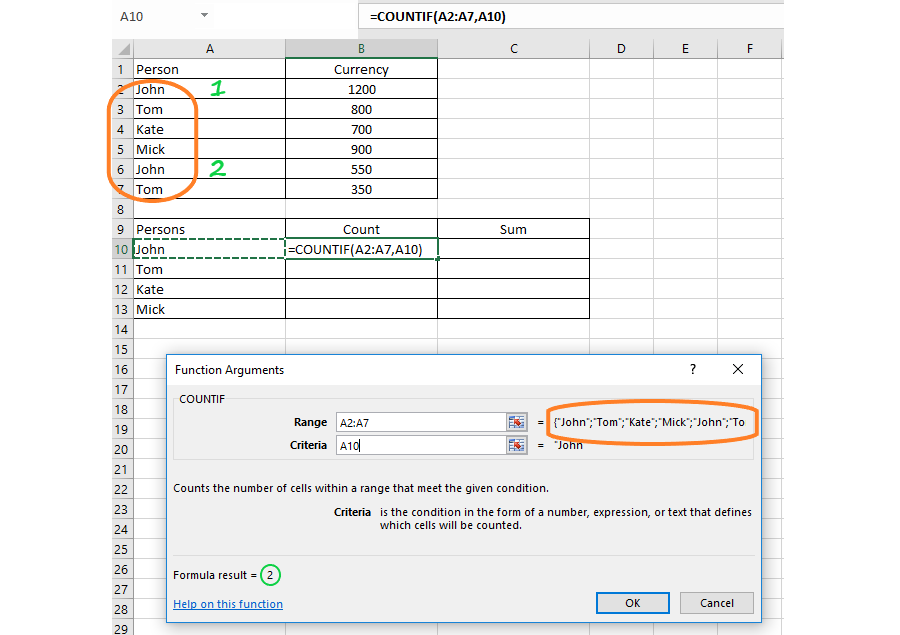
Zrzut ekranu przedstawia fragment arkusza kalkulacyjnego. W komórkach A1:B7 znajduje się tabela składająca się z dwóch kolumn Person i Currency. W kolumnie A2:A7 wpisane są imiona: John, Tom, Kate, Mick, John, Tom - wartości otoczone są dorysowaną elipsą. Wystąpienia imienia John zostały zliczone (obok znajdują się liczby 1, 2). W kolumnie B2:B7 wpisane są wartości: 1200, 800, 700, 900, 550, 350. Poniżej w komórkach A9:C13 znajduje się druga tabela składająca się z trzech kolumn: Persons, Count, Sum. Tylko kolumna Persons w zakresie A10:A13 ma wpisane wartości: John, Tom, Kate, Mick. W komórce B10 jest wpisana funkcja =COUNTIF(A2:A7,A10). Poniżej znajduje się formatka - okno kreatora funkcji COUNTIF - Function Arguments. W oknie RANGE wpisany jest zakres A2:A7, obok informacja zwrotna = {"John";"Tom";"Kate";"Mick";John";"Tom"}. Informacja ta jest otoczona dorysowaną elipsą, taką samą jak zakres A2:A7 w pierwszej tabeli. W oknie Criteria wpisana jest wartość A10, obok informacja zwrotna = "John". Poniżej informacja: Counts the numbers of cells within a range that meet the given condition. Criteria is the number in the form of a number, expression, or text that defines which cells will be counted. Niżej informacja o wyniku: Formula result = 2 (liczba wystąpień imienia John). Na dole formatki link do pomocy Help on this function oraz dwa przyciski OK i Cancel.
The SUMIF functionfunctionfunction is used to sum the valuesvaluesvalues in a range that meet criteria specified by the user. The criteria argument may contain numbers, text, expressions and cell references.
R1NgEGGTna14h
Ilustracja interaktywna przedstawia zapisaną funkcję logiczną =SUMIF(range, criteria, sum_range). Elementy funkcji IF zostały oznaczone numerami od 1 do 3. 1 - range. 2 - criteria. 3 - sum_range. Na ilustracji widoczne są numery, a na nich podpisy. 1. The range of cells that you want to evaluate by criteria. {audio}, 2. The criteria, i.e. a condition to be met. They can be expressed as: 13, "<48", A5, "77", "John", or TODAY (). {audio}, 3. Optional. The actual cells to add, if you want to add cells other than those specified in the range argument (1). If the sum_range argument is omitted, the function adds the cells specified in the range argument. {audio}
Ilustracja interaktywna przedstawia zapisaną funkcję logiczną =SUMIF(range, criteria, sum_range). Elementy funkcji IF zostały oznaczone numerami od 1 do 3. 1 - range. 2 - criteria. 3 - sum_range. Na ilustracji widoczne są numery, a na nich podpisy. 1. The range of cells that you want to evaluate by criteria. {audio}, 2. The criteria, i.e. a condition to be met. They can be expressed as: 13, "<48", A5, "77", "John", or TODAY (). {audio}, 3. Optional. The actual cells to add, if you want to add cells other than those specified in the range argument (1). If the sum_range argument is omitted, the function adds the cells specified in the range argument. {audio}
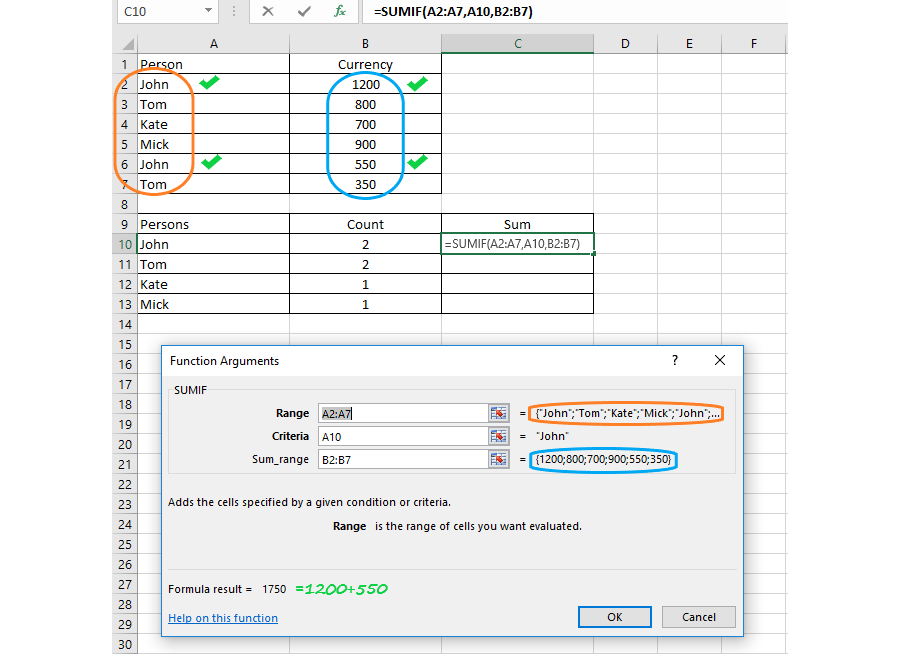
The SUMIF function
Source: GroMar, licencja: CC BY 3.0.
R1dVVy0B48WH1
Zrzut ekranu przedstawia fragment arkusza kalkulacyjnego. W komórkach A1:B7 znajduje się tabela składająca się z dwóch kolumn Person i Currency. W kolumnie A2:A7 wpisane są imiona: John, Tom, Kate, Mick, John, Tom - wartości otoczone są dorysowaną elipsą kolorze pomarańczowym. Wystąpienia imienia John zostały oznaczone. W kolumnie B2:B7 wpisane są wartości: 1200, 800, 700, 900, 550, 350 - wartości otoczone są dorysowaną elipsą kolorze niebieskim. Kwoty obok imienia John (1200 i 550) zostały oznaczone. Poniżej w komórkach A9:C13 znajduje się druga tabela składająca się z trzech kolumn: Persons, Count, Sum. W kolumnie Persons (zakres A10:A13) są wpisane wartości: John, Tom, Kate, Mick. W kolumnie Count (zakres B10:B13) są wpisane wartości: 2, 2, 1, 1. W komórce C10 jest wpisana funkcja =SUMIF(A2:A7,A10,B2:B7). Poniżej znajduje się formatka - okno kreatora funkcji SUMIF - Function Arguments. W oknie RANGE wpisany jest zakres A2:A7, obok informacja zwrotna = {"John";"Tom";"Kate";"Mick";John";"Tom"}. Informacja ta jest otoczona dorysowaną elipsą, taką samą jak zakres A2:A7 w pierwszej tabeli. W oknie Criteria wpisana jest wartość A10, obok informacja zwrotna = "John". W oknie Sum_range wpisany jest zakres B2:B7, obok informacja zwrotna = {1200;800;700;900;550;350}. Informacja ta jest otoczona dorysowaną elipsą, taką samą jak zakres B2:B7 w pierwszej tabeli. Poniżej informacja: Adds the cells specified by a given condition or criteria. Range is the range of cells you want evaluated. Niżej informacja o wyniku: Formula result = 1750 (obok dopisana informacja = 1200+500 - są to wartości B2 i B6 odpowiadające imieniu John w komórka A2 i A6). Na dole formatki link do pomocy Help on this function oraz dwa przyciski OK i Cancel.
The IF functionfunctionfunction is one of the most popular functions in Excel. The logical functions in Excel enable browsing and analysing data. Every expanded formulaformulaformula searching for data in a spreadsheet performs various tests for assumptions or comparisons with required criteria. Therefore you can say that “the spreadsheet is intelligent”.
Exercises
Exercise 1
RgKgjr0wfyNyU
Wersja alternatywna ćwiczenia: Determine which sentences are true. Możliwe odpowiedzi: 1. The IF function can be inserted with the function wizard or by using the keyboard. , 2. The IF function cannot return the value of mathematical calculations., 3. The SUMIF function is used to sum the values in a range that meet criteria specified by the user. , 4. The COUNTIF function enables to count the number of cells that meet a specified criterion.
Wersja alternatywna ćwiczenia: Determine which sentences are true. Możliwe odpowiedzi: 1. The IF function can be inserted with the function wizard or by using the keyboard. , 2. The IF function cannot return the value of mathematical calculations., 3. The SUMIF function is used to sum the values in a range that meet criteria specified by the user. , 4. The COUNTIF function enables to count the number of cells that meet a specified criterion.
Determine which sentences are true.
The IF function can be inserted with the function wizard or by using the keyboard.
The IF function cannot return the value of mathematical calculations.
The SUMIF function is used to sum the values in a range that meet criteria specified by the user.
The COUNTIF function enables to count the number of cells that meet a specified criterion.
zadanie
Source: GroMar, licencja: CC BY 3.0.
Exercise 2
Analyse the syntax of the IF function inserted in cell B3. What will be the value returned by the function in both cases if cell A3 contains the number 1000? Why?
Równa się IF otwarcie nawiasy okrągłego, A3 jest większe od 100 średnik 1 średnik -1, zamknięcie nawiasy okrągłego.
Równa się IF otwarcie nawiasy okrągłego, A3 jest większe od 100 średnik 1 średnik -1, zamknięcie nawiasy okrągłego.
Równa się IF otwarcie nawiasy okrągłego, A3 jest mniejsze od 100 średnik -1 średnik 1, zamknięcie nawiasy okrągłego.
Równa się IF otwarcie nawiasy okrągłego, A3 jest mniejsze od 100 średnik -1 średnik 1, zamknięcie nawiasy okrągłego.
In both cases the value of cell B3 will be -1. Note the differences between the conditions in the syntax of the function.
Exercise 3
Describe in English the differences between the SUMIF and COUNTIF functions.
Exercise 4
R1Rps8UkHmE5t
Wersja alternatywna ćwiczenia: Indicate which pairs of expressions or words are translated correctly. Możliwe odpowiedzi: 1. funkcja - function, 2. argumenty - arguments, 3. wartości - values, 4. kryterium - criterion, 5. formuła - instruction, 6. funkcja warunkowa - mathematical expressions
Wersja alternatywna ćwiczenia: Indicate which pairs of expressions or words are translated correctly. Możliwe odpowiedzi: 1. funkcja - function, 2. argumenty - arguments, 3. wartości - values, 4. kryterium - criterion, 5. formuła - instruction, 6. funkcja warunkowa - mathematical expressions
Indicate which pairs of expressions or words are translated correctly.
funkcja - function
argumenty - arguments
wartości - values
kryterium - criterion
formuła - instruction
funkcja warunkowa - mathematical expressions
zadanie
Source: GroMar, licencja: CC BY 3.0.
RhDoDHx2xuqhR1
Interaktywna gra, polegająca na łączeniu wyrazów w pary w ciągu jednej minuty. Czas zaczyna upływać wraz z rozpoczęciem gry. Jeden ruch to odkrywanie najpierw jednej potem drugiej karty z wyrazem. Każdy wyraz jest odczytywany. Kolejny ruch to odkrywanie trzeciej i czwartej karty. W ten sposób odsłuchasz wszystkie wyrazy. Nawigacja z poziomu klawiatury za pomocą strzałek, odsłuchiwanie wyrazów enterem lub spacją. Znajdź wszystkie pary wyrazów.
Interaktywna gra, polegająca na łączeniu wyrazów w pary w ciągu jednej minuty. Czas zaczyna upływać wraz z rozpoczęciem gry. Jeden ruch to odkrywanie najpierw jednej potem drugiej karty z wyrazem. Każdy wyraz jest odczytywany. Kolejny ruch to odkrywanie trzeciej i czwartej karty. W ten sposób odsłuchasz wszystkie wyrazy. Nawigacja z poziomu klawiatury za pomocą strzałek, odsłuchiwanie wyrazów enterem lub spacją. Znajdź wszystkie pary wyrazów.
Match Polish terms with their English equivalents.
criterion
arguments
values
funkcja
kryterium
argumenty
warto�ci
function
Source: Zespół autorski Politechniki Łódzkiej, licencja: CC BY 3.0.