Electronic mailelectronic mailElectronic mail is one of the oldest and the most popular web service. Its purpose is to send text information and attachments to people who have their own email addressemail addressemail address. The first message was exchanged between computers already in 1971. Currently billions of emails are sent every day.
In order to send or receive emails, you must have you own account of electronic mailelectronic mailelectronic mail. There are many companies offering the service of the maintenance of such an account, both free and commercial. Such a company must have a mail servermail servermail server, using a special software which enables creating and managing email boxes. Then an email box is a part of such a server that is used to support the service of electronic mailelectronic mailelectronic mail for one user. At least one unique email addressemail addressemail address is assigned to every email box.
RO0crNNps56Is1
Znak małpy używany w mailach. Jest to mała, pisana litera a, której laseczka jest przedłużona w okrąg otaczający całą literę.
An email addressemail addressemail address consists of two parts separated by the at sign (@): the identifier of the user and the address of the mail servermail servermail server, and has the following form:
RZmgTOME4oGkD1
zapis przykładowego adresu mailowego: identifier @ address of server
Source: GroMar, licencja: CC BY 3.0.
An identifieridentifieridentifier is a unique name of a user on a given server, for example the address „john.green@example.com” is assigned to the user account „john.green” created on the server “example.com”.
Remember that your email addressemail addressemail address is your showcase. When you create an email accountemail accountemail account, choose an identifieridentifieridentifier which is not depreciative and is easy to remember. This may be difficult on popular platforms as all identifiers within one server must be unique. Therefore it often happens that the identifier which you want to choose is already used by somebody else. Then you can for example add any number to it. The name cannot include Polish diacritics (ą, ś, ć, ł ó ź, ż ń) and space. The administrator of the mail servermail servermail server decides if character other than letters can be included in the identifier, for example numerical digits, the dot or the underscore.
When you use a free email accountemail accountemail account, you must be aware that you agree that advertisements will be sent to your email box. In some cases the advertisement may be attached by the server operator to every email which you will send. Therefore try to avoid such operators. When you use a commercial account (for which you must pay), you will not have to bother about advertisements and moreover you will be offered preferences in the selection of the identifieridentifieridentifier and better technical parameters of your account, i.e. greater capacity, anti‑spam protection (against unwanted mail) and anti‑virus protection.
RkQfleyY51COk
Ilustracja interaktywna przedstawia strukturę wiadomości mailowej. Na górze pasek tak zwany pasek programu, na nim napis New Message. Znajdują się tu również przyciski do zamknięcia, maksymalizacji i minimalizacji programu. Poniżej znajdują się pola tekstowe oznaczone: To, Subject, From, Cc, Bcc. Poniżej pusta przestrzeń na środku, największe pole tekstowe. Pod nim znajduje się szary pasek z napisem document.pdf i znakiem x. Na dole ilustracji znajdują się standardowe elementy wiadomości mailowej oznaczone w następujący sposób: prostokąt z napisem Send, duża litera A, spinacz biurowy, uśmiechnięta buzia, kwadrat z dwoma trójkątami, kosz na śmieci. Na ilustracji widoczne są numery, a na nich podpisy. 1. To – the email address of the recipient. {audio}, 2. Subject – brief and simple information about the content of the email. {audio}, 3. From – the email address of the sender. {audio}, 4. Cc: Carbon copy – the revealed email addresses of people who are to receive the copy of the email. {audio}, 5. Bcc: Blind carbon copy – the concealed email addresses of people who are to receive the copy of the email. {audio}, 6. Content – the body of the email. {audio}, 7. Attachments – optional files or documents forming an appendix to the message. {audio}
Ilustracja interaktywna przedstawia strukturę wiadomości mailowej. Na górze pasek tak zwany pasek programu, na nim napis New Message. Znajdują się tu również przyciski do zamknięcia, maksymalizacji i minimalizacji programu. Poniżej znajdują się pola tekstowe oznaczone: To, Subject, From, Cc, Bcc. Poniżej pusta przestrzeń na środku, największe pole tekstowe. Pod nim znajduje się szary pasek z napisem document.pdf i znakiem x. Na dole ilustracji znajdują się standardowe elementy wiadomości mailowej oznaczone w następujący sposób: prostokąt z napisem Send, duża litera A, spinacz biurowy, uśmiechnięta buzia, kwadrat z dwoma trójkątami, kosz na śmieci. Na ilustracji widoczne są numery, a na nich podpisy. 1. To – the email address of the recipient. {audio}, 2. Subject – brief and simple information about the content of the email. {audio}, 3. From – the email address of the sender. {audio}, 4. Cc: Carbon copy – the revealed email addresses of people who are to receive the copy of the email. {audio}, 5. Bcc: Blind carbon copy – the concealed email addresses of people who are to receive the copy of the email. {audio}, 6. Content – the body of the email. {audio}, 7. Attachments – optional files or documents forming an appendix to the message. {audio}
NetiquettenetiquetteNetiquette is a set of rules that define interactions across the web community.
The principles of writing emails:
every email should have the subject (possibly brief), in which you inform the recipient about the content of the letter,
the content of the email should be concise and substantive and have the appropriate form,
remember to apply the basic principles of editing text,
use titlestitlestitles (salutations) in the content,
write your first name, surname and nickname, so that the recipient could recognise you,
do not write the whole content in capital letters (which is considered to be theequivalentequivalentequivalent of shouting over the internet, and nobody likes to be shouted at),
read the email at least once before sending it,
proofread the email in order to correct spelling and grammatical errors,
do not send unwanted mail (i.e. spam) or chain letters.
If you do not have an email accountemail accountemail account, ask an adult to help you create one or use his or her email box. Try to send an email to your mum or dad. Write in it what you are going to do in the afternoon. Edit the letter according to the above principles. Ask your parents to reply to your message.
Memorise some very important principles of communicating by using electronic mailelectronic mailelectronic mail or other applications for communicating across the internet:
Do not trust the person whom you contact only over the web.
Do not meet the people whom you know only from the internet.
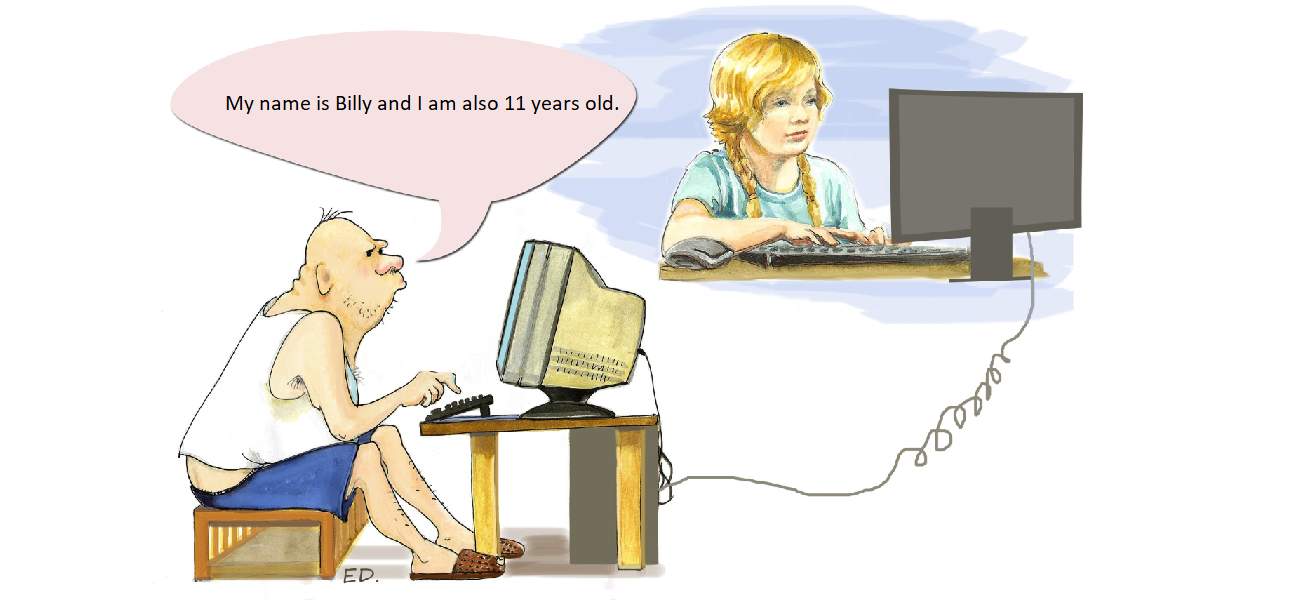
Not all information provided by strangers must be true. Some people whom you contact across the web may claim that they are teenagers, while actually they may be your parents’ or grandparents’ age.
Do not give your first name, surname or telephone number on the internet.
Do not inform which school you go to, how old you are and where you live.
Always tell your parents or teacher when a stranger tries to contact you!
Ri5Dvcxl4qGWm
Ilustracja przedstawia dziewczynkę przy komputerze oraz starszego mężczyznę, który udaje nastolatka w internecie. Widoczny jest również napis: My name is Billy and I am also 11 years old.
By using any graphics software create a poster illustrating the principles of safe communication on the internet.
Exercises
Exercise 1
R1V8sJhIL9CwW
Wersja alternatywna ćwiczenia: Identify the correct principles of writing emails: Możliwe odpowiedzi: 1. The content of the email should be concise and substantive and have the appropriate form., 2. Remember to apply the basic principles of editing text., 3. Use titles (salutations) in the content., 4. Do not sign the letter., 5. You can write the content in capital letters., 6. Read the letter at least once before sending it.
Wersja alternatywna ćwiczenia: Identify the correct principles of writing emails: Możliwe odpowiedzi: 1. The content of the email should be concise and substantive and have the appropriate form., 2. Remember to apply the basic principles of editing text., 3. Use titles (salutations) in the content., 4. Do not sign the letter., 5. You can write the content in capital letters., 6. Read the letter at least once before sending it.
Identify the correct principles of writing emails:
The content of the email should be concise and substantive and have the appropriate form.
Remember to apply the basic principles of editing text.
Use titles (salutations) in the content.
Do not sign the letter.
You can write the content in capital letters.
Read the letter at least once before sending it.
zadanie
Source: GroMar, licencja: CC BY 3.0.
Exercise 2
RaCeQBwfMDyMe
Wersja alternatywna ćwiczenia: Specify the correctly described elements of an electronic message: Możliwe odpowiedzi: 1. From – the email address of the sender, 2. To – the email address of the recipient, 3. Cc: Carbon copy – the concealed email addresses of people who are to receive the copy of the email, 4. Bcc: Blind carbon copy – the revealed email addresses of people who are to receive the copy of the email, 5. Subject – brief and simple information about the content of the email.
Wersja alternatywna ćwiczenia: Specify the correctly described elements of an electronic message: Możliwe odpowiedzi: 1. From – the email address of the sender, 2. To – the email address of the recipient, 3. Cc: Carbon copy – the concealed email addresses of people who are to receive the copy of the email, 4. Bcc: Blind carbon copy – the revealed email addresses of people who are to receive the copy of the email, 5. Subject – brief and simple information about the content of the email.
Specify the correctly described elements of an electronic message:
From – the email address of the sender
To – the email address of the recipient
Cc: Carbon copy – the concealed email addresses of people who are to receive the copy of the email
Bcc: Blind carbon copy – the revealed email addresses of people who are to receive the copy of the email
Subject – brief and simple information about the content of the email.
zadanie
Source: GroMar, licencja: CC BY 3.0.
Exercise 3
Find 5 email addresses of different people (parents, siblings, schoolmates). Specify the identifier and the server address in each of them. Can you find any additional information in these addresses, for example whom they belong to?
Exercise 4
R1erLZ7FBeitm
Wersja alternatywna ćwiczenia: Indicate which pairs of expressions or words are translated correctly. Możliwe odpowiedzi: 1. konto pocztowe - email account, 2. poczta elektroniczna - electronic mail, 3. adres e-mail - email address, 4. załącznik - attachment, 5. identyfikator - identifier, 6. hasło - equivalent
Wersja alternatywna ćwiczenia: Indicate which pairs of expressions or words are translated correctly. Możliwe odpowiedzi: 1. konto pocztowe - email account, 2. poczta elektroniczna - electronic mail, 3. adres e-mail - email address, 4. załącznik - attachment, 5. identyfikator - identifier, 6. hasło - equivalent
Indicate which pairs of expressions or words are translated correctly.
konto pocztowe - email account
poczta elektroniczna - electronic mail
adres e-mail - email address
załącznik - attachment
identyfikator - identifier
hasło - equivalent
zadanie
Source: GroMar, licencja: CC BY 3.0.
RiXpERa1BorV01
Interaktywna gra, polegająca na łączeniu wyrazów w pary w ciągu jednej minuty. Czas zaczyna upływać wraz z rozpoczęciem gry. Jeden ruch to odkrywanie najpierw jednej potem drugiej karty z wyrazem. Każdy wyraz jest odczytywany. Kolejny ruch to odkrywanie trzeciej i czwartej karty. W ten sposób odsłuchasz wszystkie wyrazy. Nawigacja z poziomu klawiatury za pomocą strzałek, odsłuchiwanie wyrazów enterem lub spacją. Znajdź wszystkie pary wyrazów.
Interaktywna gra, polegająca na łączeniu wyrazów w pary w ciągu jednej minuty. Czas zaczyna upływać wraz z rozpoczęciem gry. Jeden ruch to odkrywanie najpierw jednej potem drugiej karty z wyrazem. Każdy wyraz jest odczytywany. Kolejny ruch to odkrywanie trzeciej i czwartej karty. W ten sposób odsłuchasz wszystkie wyrazy. Nawigacja z poziomu klawiatury za pomocą strzałek, odsłuchiwanie wyrazów enterem lub spacją. Znajdź wszystkie pary wyrazów.
Match Polish terms with their English equivalents.
email account
konto pocztowe
email address
załącznik
electronic mail
adres e-mail
poczta elektroniczna
attachment
Source: Zespół autorski Politechniki Łódzkiej, licencja: CC BY 3.0.