FormattingformattingFormatting a spreadsheets aims at improving its readability. Apart from data, tags can also be entered into cells. Tags precisely describe the operations done in the spreadsheet.
A document themethemetheme is a predefined set of colours, fonts and effects (such as line styles and fill‑in effects) which will be available in order to format the data in a spreadsheet or other elements, such as tables, pivot tables and charts. Before formattingformattingformatting data in a spreadsheet, a suitable document themethemetheme can be applied so that colours, fonts and effects defined by this document themethemetheme could be used for formattingformattingformatting data in the spreadsheet. A stylestylestyle is a predefined format, often based on the themethemetheme, which can be applied in order to change the way in which data are displayed. If the predefined styles do not meet the specified requirements, one of them can be adjusted to our own needs. In Excel styles can be applied for cells and tables.
highlighting data with borderborderborder s and colours,
changing data alignment and orientation,
changing the width of the column and the height of the row,
changing data formats or the accuracy of displaying numbers.
R3WtF2jidtYoL1
Pokaz slajdów - formatowanie danych w arkuszu kalkulacyjnym. Instrukcja obsługi z poziomu klawiatury: 1. Uruchomienie aplikacji - ENTER, 2. Na każdym ze slajdów czytany jest automatycznie tekst alternatywny po polsku, 3. Przy pierwszym uruchomieniu na pierwszym slajdzie, czytanie tekstu po angielsku - TAB, 4. Przejście między slajdami: do następnego slajdu - TAB, do poprzedniego slajdu - TAB + SHIFT, 5. Przejście do czytania napisu po angielsku - strzałka w górę + strzałka w dół (czyta tekst po angielsku widoczny na slajdzie).
Pokaz slajdów - formatowanie danych w arkuszu kalkulacyjnym. Instrukcja obsługi z poziomu klawiatury: 1. Uruchomienie aplikacji - ENTER, 2. Na każdym ze slajdów czytany jest automatycznie tekst alternatywny po polsku, 3. Przy pierwszym uruchomieniu na pierwszym slajdzie, czytanie tekstu po angielsku - TAB, 4. Przejście między slajdami: do następnego slajdu - TAB, do poprzedniego slajdu - TAB + SHIFT, 5. Przejście do czytania napisu po angielsku - strzałka w górę + strzałka w dół (czyta tekst po angielsku widoczny na slajdzie).
Create a spreadsheet containing any data (e.g. a timetable, a calendar) in which you will apply manual methods of formattingformattingformatting the data.
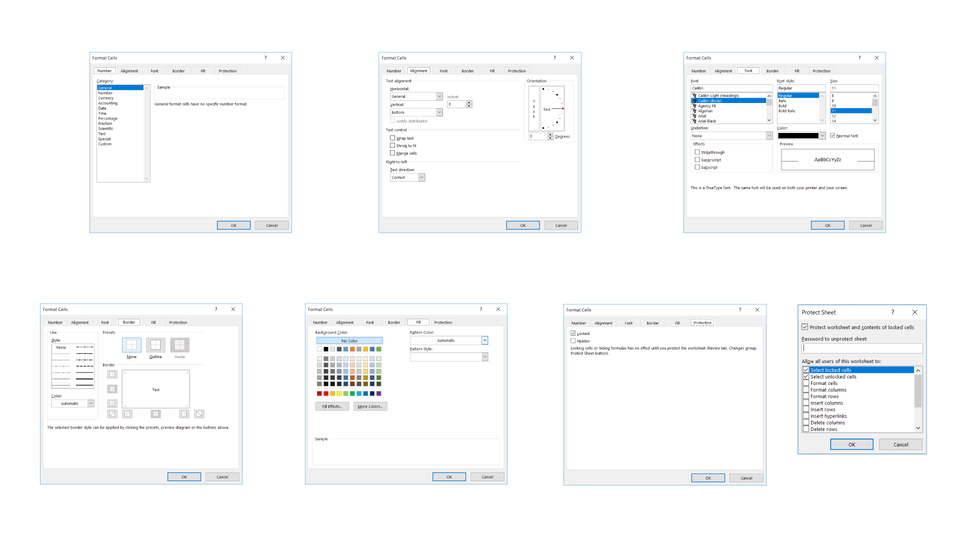
You will find most of the tools in the tool ribbon. All options will be available in the pop‑up menu of the ‘Format Cells’ dialog box. There you will find the following options: Wrap Text, Merge Cells and Orientation.
Copy the formattingformattingformatting to other cells You can use ‘Paste Special’ command to copy formattingformattingformatting from selected cells. This is similar to Format Painter option.
Automatic formattingformattingformatting of adjacent cells The formats of data ranges are automatically applied for new rows and columns entered at the end of the data range which has already been formatted, and the formats are displayed in at least three of the previous five elements. These values can be changed in programme settings.
Exercises
Exercise 1
R17QxTTT1vT2p
Wersja alternatywna ćwiczenia: Decide which sentences are true. Możliwe odpowiedzi: 1. By applying number formats, you can change the way in which a number is displayed without changing the number itself. , 2. Excel enables you to protect worksheets against changes by adding a password. , 3. The number format does not affect the actual cell value that Excel uses to do calculations. , 4. You cannnot change the font size for the selected text. , 5. You can change only the colour for the selected text., 6. You cannnot add a border around a single cell or the range of cells.
Wersja alternatywna ćwiczenia: Decide which sentences are true. Możliwe odpowiedzi: 1. By applying number formats, you can change the way in which a number is displayed without changing the number itself. , 2. Excel enables you to protect worksheets against changes by adding a password. , 3. The number format does not affect the actual cell value that Excel uses to do calculations. , 4. You cannnot change the font size for the selected text. , 5. You can change only the colour for the selected text., 6. You cannnot add a border around a single cell or the range of cells.
Decide which sentences are true.
By applying number formats, you can change the way in which a number is displayed without changing the number itself.
Excel enables you to protect worksheets against changes by adding a password.
The number format does not affect the actual cell value that Excel uses to do calculations.
You cannnot change the font size for the selected text.
You can change only the colour for the selected text.
You cannnot add a border around a single cell or the range of cells.
zadanie
Source: GroMar, licencja: CC BY 3.0.
Exercise 2
Create a table for formatting. Select its area and define it as a table. Define a new fast style for the table.
Exercise 3
Design a new spreadsheet theme. Describe the operations in English.
Exercise 4
RT1bkPEL2baaB
Wersja alternatywna ćwiczenia: Indicate which pairs of expressions or words are translated correctly. Możliwe odpowiedzi: 1. obramowanie - border, 2. styl - style, 3. formatowanie ręczne - manual formatting, 4. scalanie komórek - cell merge, 5. wypełnienie - theme, 6. motyw - fill, 7. zawijanie tekstu - cell merge, 8. scalanie komórek - text wrapping
Wersja alternatywna ćwiczenia: Indicate which pairs of expressions or words are translated correctly. Możliwe odpowiedzi: 1. obramowanie - border, 2. styl - style, 3. formatowanie ręczne - manual formatting, 4. scalanie komórek - cell merge, 5. wypełnienie - theme, 6. motyw - fill, 7. zawijanie tekstu - cell merge, 8. scalanie komórek - text wrapping
Indicate which pairs of expressions or words are translated correctly.
obramowanie - border
styl - style
formatowanie ręczne - manual formatting
scalanie komórek - cell merge
wypełnienie - theme
motyw - fill
zawijanie tekstu - cell merge
scalanie komórek - text wrapping
zadanie
Source: GroMar, licencja: CC BY 3.0.
RUgfvW1rEIADA1
Interaktywna gra, polegająca na łączeniu wyrazów w pary w ciągu jednej minuty. Czas zaczyna upływać wraz z rozpoczęciem gry. Jeden ruch to odkrywanie najpierw jednej potem drugiej karty z wyrazem. Każdy wyraz jest odczytywany. Kolejny ruch to odkrywanie trzeciej i czwartej karty. W ten sposób odsłuchasz wszystkie wyrazy. Nawigacja z poziomu klawiatury za pomocą strzałek, odsłuchiwanie wyrazów enterem lub spacją. Znajdź wszystkie pary wyrazów.
Interaktywna gra, polegająca na łączeniu wyrazów w pary w ciągu jednej minuty. Czas zaczyna upływać wraz z rozpoczęciem gry. Jeden ruch to odkrywanie najpierw jednej potem drugiej karty z wyrazem. Każdy wyraz jest odczytywany. Kolejny ruch to odkrywanie trzeciej i czwartej karty. W ten sposób odsłuchasz wszystkie wyrazy. Nawigacja z poziomu klawiatury za pomocą strzałek, odsłuchiwanie wyrazów enterem lub spacją. Znajdź wszystkie pary wyrazów.
Match Polish terms with their English equivalents.
motyw
styl
style
formatting
formatowanie
theme
Source: Zespół autorski Politechniki Łódzkiej, licencja: CC BY 3.0.
motyw - wstępnie zdefiniowany zestaw kolorów, czcionek i efektów (takich jak style linii i efektów wypełnienia), które będą dostępne w przypadku formatowania danych w arkuszu lub innych elementów, takich jak tabele, tabele przestawne i wykresy