Ilustracja interaktywna
For sure, people who do not know how to use computers are in the minority nowadays. These electronic devices are ubiquitous around us and it’s simply hard to avoid them. However, when it comes to advanced skills, the group of users who can boast having them turns out to be quite small. Knowing how to use a word processor, spreadsheets, various graphic and editing programmes, let alone web designing or coding, immediately makes you stand out from the crowd of people whose only abilities are browsing the internet or using communicators. Starting to acquire these skills early enhances your position on the labour market.
Ludzie, którzy nie potrafią używać komputerów, są bez wątpienia w mniejszości. Wszechobecność tych urządzeń sprawia bowiem, że trudno nie mieć z nimi kontaktu. Umiejętności ich wykorzystania na poziomie zaawansowanym posiada jednak zaskakująco nieduża grupa ludzi. Obsługa edytorów tekstu, arkuszy kalkulacyjnych, programów graficznych, nie wspominając o umiejętności projektowania stron internetowych czy kodowania – to kwalifikacje, które sprawiają, że osoba posiadająca je wyróżnia się z tłumu. Warto zacząć nabywać te kompetencje wcześnie, aby poprawiać swoje szanse na rynku pracy.

Study the interactive illustration below and find out what advanced computer skills are worth acquiring in the modern world.
Zasób interaktywny dostępny pod adresem https://zpe.gov.pl/a/DTaB3vVkn
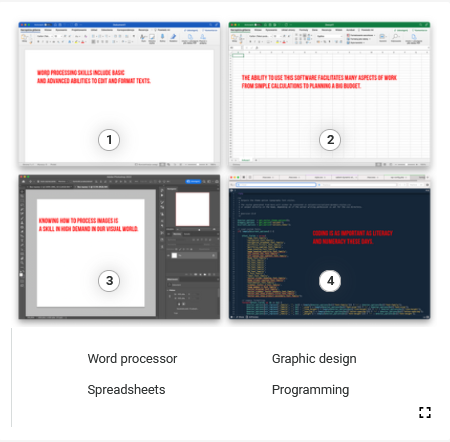
Grafika zawiera cztery zdjęcia różnych programów komputerowych. Grafika posiada cztery punkty interaktywne, po naciśnięciu których pojawia się tekst oraz nagranie. Transkrypcja do nagrań znajduje się poniżej.
WORD PROCESSOR.
Word processing skills include basic and advanced abilities to edit and format texts.
Zdjęcie nr 1 przedstawia stronę aplikacji Word. Widoczny jest napis na ekranie w języku angielskim: WORD PROCESSING SKILLS INCLUDE BASIC AND ADVANCE DABILITIES TO EDIT AND FORMAT TEXTS.
SPREADSHEETS.
The ability to use this software facilitates many apects of work‑from simple calculations to planning a big budget.
Zdjęcie nr 2 przedstawia stronę aplikacji Excel. Widoczny jest napis na ekranie w języku angielskim: THE ABILITY TO USE THIS SOFTWARE FACILITATES MANY ASPECTS OF WORK FROM SIMPLE CALCULATION TO PLANNING A BIG BUDGET.
GRAPHIC DESIGN SOFTWARE.
Knowing how to process images is a skill in high demand in our visual world.
Zdjęcie nr 3 przedstawia stronę służącą do projektowania Adobe Photoshop. Widoczny jest napis w języku angielskim: KNOWING HOW TO PROCESS IMAGES IS A SKILL IN HIGH DEMAND IN OUR VISUAL WORLD.
PROGRAMMING.
Coding is as important as literacy and numeracy these days.
Zdjęcie nr 4 przedstawia czarna stronę w komputerze, na której widoczne są kody, literki i cyfry. Widoczny jest napis na ekranie w języku angielskim: CODING IS AS IMPORTANT AS LITERACY AND NUMERACY THESE DAYS.
- Users can choose among several word processing tools available on the market.
TrueFalse
- Word processing software from different producers offer completely different functions.
TrueFalse
- To be able to publish a text online one has to know how to create hyperlinks.
TrueFalse
- You need to be a proficient user of spreadsheets in a big number of jobs.
TrueFalse
- Well-constructed formulas support the functioning of businesses at many levels.
TrueFalse
- If you add keyboard shortcuts to your to-learn list, you will be everybody’s best friend.
TrueFalse
- The world around us is full of images.
TrueFalse
- It’s a good idea to use some free software to earn money by using it.
TrueFalse
- If you don’t want to make a living from programming, there is no point in learning how to code.
TrueFalse
- You should look into various programming languages and learn more about them before you choose which one is best suited for your purposes.
TrueFalse
a) Word processing starts with typing a text but does not finish there.
b) Inputting a text into a computer is the easiest part of its editing.
2. Many people dread spreadsheets although many jobs nowadays require advanced skills in this area.
a) People don’t accept certain jobs because they lack the skills
to use spreadsheets.
b) A large group of people feel anxious about using spreadsheets
in spite of the fact that it is an essential skill in many positions.
3. If you learn the functions gradually, spreadsheets will soon change from foe to best friend.
a) You will love spreadsheets if you learn how to use them step by step.
b) If you want to know how to use spreadsheets, you need a friend to explain it
to you step by step.
4. We are living in a visual world.
a) People see much more nowadays than they used to in the past.
b) People prefer to consume information in visual form these days.
5. Forecasts clearly show that the situation is not going to change any time soon.
a) The weather is going to be rather stable in the upcoming years.
b) The predictions state that the current trend is likely to prevail.
6. The demand for skilled computer coders far outweighs the supply.
a) We need more highly educated computer coders than there are on
the labour market.
b) Well educated computer coders have demands that the market cannot
keep up with.
A digital native is a person born into the world full of technology. Such a person has no difficulty using computers and mobile devices. The opposite is a digital immigrant – a person who feels uneasy when they have to use technology. Which one are you? Explain your attitude to computers and technology. Answer in 4–5 sentences.