Children often play in guessing. One of the games is guessing the number or objects that the other person has in mind.
Your task is to write a script in which the computer „invents” a number, and you guess it. The rules are simple – determine the range of numbers between which the number is looked for. If the number you choose is too small or too large, you enter the next one. The game lasts so long until you guess the number.
Before writing a script, ask the other person to play the game together. Write down your answers and discuss what would be important for the algorithm of your script.
Before you start writing a script, learn how to communicate with the sprite. Blocks from the Sensing and Operators category are helpful in communication.
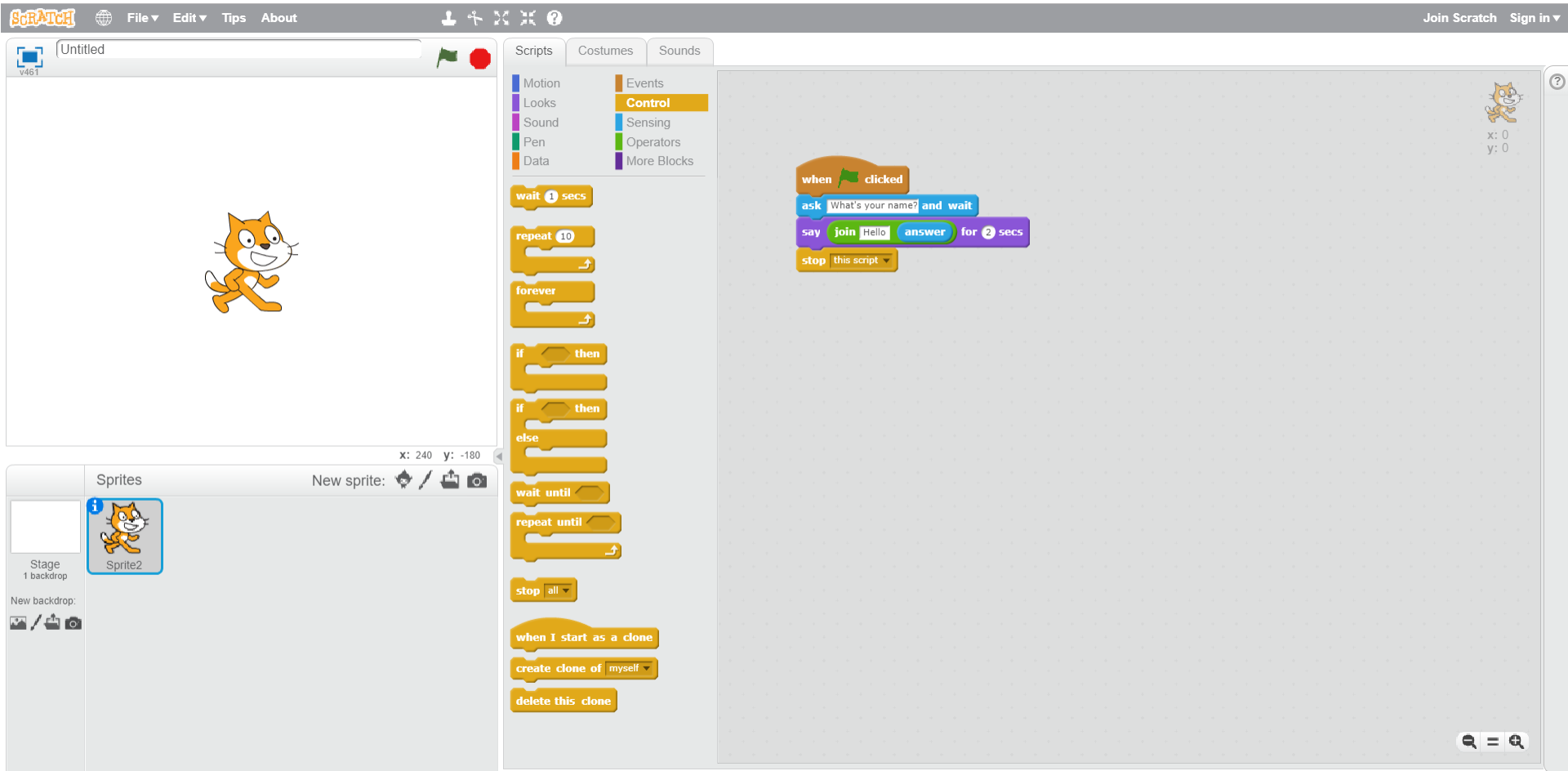
Build a script in which the sprite will ask you for your name and then use it to greet you.
Rzk7d9Bab1Ezf1
Na ilustracji przedstawiony jest zrzut ekranu, na którym widoczne są wszystkie okna programu Scratch. Na górze pasek menu z logo, ikoną umożliwiającą zmianę języka, File, Edit, Tips, About. Na środku paska ikony narzędzi: stempel, nożyce, pomniejszenie, powiększenie, pomoc. Poniżej po lewej okno podglądu. W nim na środku znajduje się duszek (kotek). Na górze okna po lewej ikona sceny, obok podpis Untitled, po prawej stronie ikona flaga oznaczająca play, ikona ośmiokąt oznaczająca stop. Na dole okna po prawej znaczniki położenia duszka na scenie x i y. Pod oknem podglądu znajduje się okno z ustawieniami. Po lewej stronie białe tło z okna podglądu Stage 1 backdrop. Poniżej New backdrop. Poniżej ikony nowe tło, edycja tła, pobranie tła z zewnętrznego pliku, podgląd tła. Na środku okna ustawień od góry napis Sprites, po prawej napis New sprite oraz ikony nowy duszek, edycja, pobranie z zewnętrznego pliku, podgląd. Poniżej zaznaczony obrazek duszka (kotka) opisany Sprite2. Po prawej okno edycji zajmujące ponad połowę ekranu. Po lewej stronie okna edycji znajdują się zakładki Scripts (wyróżniona), Costumes, Sounds. Widoczne są działy w zakładce Scripts: Motion, Looks, Sound, Pen, Data, Events, zaznaczone Control, Sensing, Operators, More Blocks. Każdy dział wyróżniony jest innym kolorem. Poniżej bloczki do układania algorytmów w dziale Control. Po prawej fragment skryptu służącego do przekazywania informacji skryptowi za pomocą klawiatury. Od góry bloczki: when ‘play’ clicked; ask What’s your name and wait; say join Hello answer for 2 secs; stop this script.
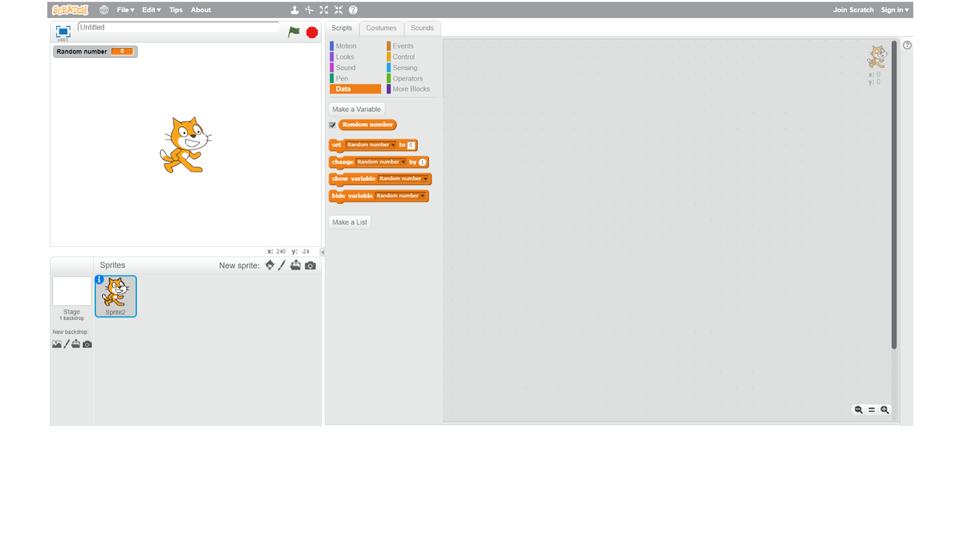
One of the conditions of the game in guessing numbers is choosing any number by the program. For this purpose, it draws numbers in the range given to him. The randomrandomrandom operator pick random ... to ... is useful here. In addition to this, you will need a variablevariablevariable to which you will assign the drawn number.
Build a script in which the program draws a number from 1 to 20. The drawn number has to be shown on the screen. The sprite says if the number is smaller or greater than 10.
Then change the script so that the upper boundupper boundupper bound of the draw numbers depends on your choice.
You can compare your solutionsolutionsolution with the one on the slideshow. It shows how to test the program.
RCpzVyP8uEaDy1
Pokaz zawiera zrzuty ekranu z programu Scratch przestawiające przypisywanie wartości losowych. Instrukcja obsługi z poziomu klawiatury: 1. Uruchomienie aplikacji - ENTER, 2. Na każdym ze slajdów czytany jest automatycznie tekst alternatywny po polsku, 3. Przy pierwszym uruchomieniu na pierwszym slajdzie, czytanie tekstu po angielsku - TAB, 4. Przejście między slajdami: do następnego slajdu - TAB, do poprzedniego slajdu - TAB + SHIFT, 5. Przejście do czytania napisu po angielsku - strzałka w górę + strzałka w dół (czyta tekst po angielsku widoczny na slajdzie).
Pokaz zawiera zrzuty ekranu z programu Scratch przestawiające przypisywanie wartości losowych. Instrukcja obsługi z poziomu klawiatury: 1. Uruchomienie aplikacji - ENTER, 2. Na każdym ze slajdów czytany jest automatycznie tekst alternatywny po polsku, 3. Przy pierwszym uruchomieniu na pierwszym slajdzie, czytanie tekstu po angielsku - TAB, 4. Przejście między slajdami: do następnego slajdu - TAB, do poprzedniego slajdu - TAB + SHIFT, 5. Przejście do czytania napisu po angielsku - strzałka w górę + strzałka w dół (czyta tekst po angielsku widoczny na slajdzie).
Using your previous scripts, build a script to play the game of guessing numbers. Add selected backdrop. You can add a countercountercounter of correct answers or scored pointsscored pointsscored points.
A useful function of the program is to draw numbers from the selected range.
Exercises
R10wHeuZJDVXU
Exercise 1
Wersja alternatywna ćwiczenia: Which sentence is true? Możliwe odpowiedzi: 1. You cannot use more than one variable in one script., 2. Variables can be used to remember the drawn number., 3. Variables are shown by default on the screen, but you can also hide them., 4. The algorithm is the actions that we perform in order to perform a specific task.
Wersja alternatywna ćwiczenia: Which sentence is true? Możliwe odpowiedzi: 1. You cannot use more than one variable in one script., 2. Variables can be used to remember the drawn number., 3. Variables are shown by default on the screen, but you can also hide them., 4. The algorithm is the actions that we perform in order to perform a specific task.
Which sentence is true?
You cannot use more than one variable in one script.
Variables can be used to remember the drawn number.
Variables are shown by default on the screen, but you can also hide them.
The algorithm is the actions that we perform in order to perform a specific task.
Exercise 2
Expand your script for guessing numbers so that the numbers you use appear on the screen.
Create a list in the Data category and fill it in with numbers.
Exercise 3
Describe in English how to build a script that draws a number from the selected range.
Exercise 4
ReLUQ95GXsIyk
Wersja alternatywna ćwiczenia: Indicate which pairs of expressions or words are translated correctly. Możliwe odpowiedzi: 1. zmienna - variable, 2. przypadkowy - random, 3. rozwiązanie - solution, 4. licznik - counter, 5. dolna granica - upper bound, 6. górna granica - lower bound
Wersja alternatywna ćwiczenia: Indicate which pairs of expressions or words are translated correctly. Możliwe odpowiedzi: 1. zmienna - variable, 2. przypadkowy - random, 3. rozwiązanie - solution, 4. licznik - counter, 5. dolna granica - upper bound, 6. górna granica - lower bound
Indicate which pairs of expressions or words are translated correctly.
zmienna - variable
przypadkowy - random
rozwiązanie - solution
licznik - counter
dolna granica - upper bound
górna granica - lower bound
zadanie
Source: GroMar, licencja: CC BY 3.0.
RNqIqwpP4Qa671
Interaktywna gra, polegająca na łączeniu wyrazów w pary w ciągu jednej minuty. Czas zaczyna upływać wraz z rozpoczęciem gry. Jeden ruch to odkrywanie najpierw jednej potem drugiej karty z wyrazem. Każdy wyraz jest odczytywany. Kolejny ruch to odkrywanie trzeciej i czwartej karty. W ten sposób odsłuchasz wszystkie wyrazy. Nawigacja z poziomu klawiatury za pomocą strzałek, odsłuchiwanie wyrazów enterem lub spacją. Znajdź wszystkie pary wyrazów.
Interaktywna gra, polegająca na łączeniu wyrazów w pary w ciągu jednej minuty. Czas zaczyna upływać wraz z rozpoczęciem gry. Jeden ruch to odkrywanie najpierw jednej potem drugiej karty z wyrazem. Każdy wyraz jest odczytywany. Kolejny ruch to odkrywanie trzeciej i czwartej karty. W ten sposób odsłuchasz wszystkie wyrazy. Nawigacja z poziomu klawiatury za pomocą strzałek, odsłuchiwanie wyrazów enterem lub spacją. Znajdź wszystkie pary wyrazów.
Match Polish terms with their English equivalents.
przypadkowy
variable
zmienna
górna granica
upper bound
rozwiązanie
random
solution
dolna granica
lower bound
Source: Zespół autorski Politechniki Łódzkiej, licencja: CC BY 3.0.