Since text editors became advanced programmes as parts of office suites, they have included a range of additional elements apart from text, e.g. tables, images, charts. In order to store such documents, the makers of computer software apply one of the selected saving formats.
An open formatopen formatopen format is a document saving standard developed by independent non‑profit organizations which can be used and implemented by anyone. The users of documents complying with the standard can access them by using the programmes of various providers. The example of such a file format is ODF (OpenDocument).
A proprietary formatproprietary formatproprietary format is a file format that is developed and controlled by a specific company. The exchange of such files between the applications of different providers is very difficult. The example of such a file format is DOC.
An open proprietary formatopen proprietary formatopen proprietary format is an open document saving format which has not been accepted as standard by the majority of software developers. It enables exchanging data between programmes of various providers, but it does not ensure the compatibility of all elements of a document. The example of such a file format is OOXML (Office Open XML).
For instance Word, the most popular text editor, can save its documents as:
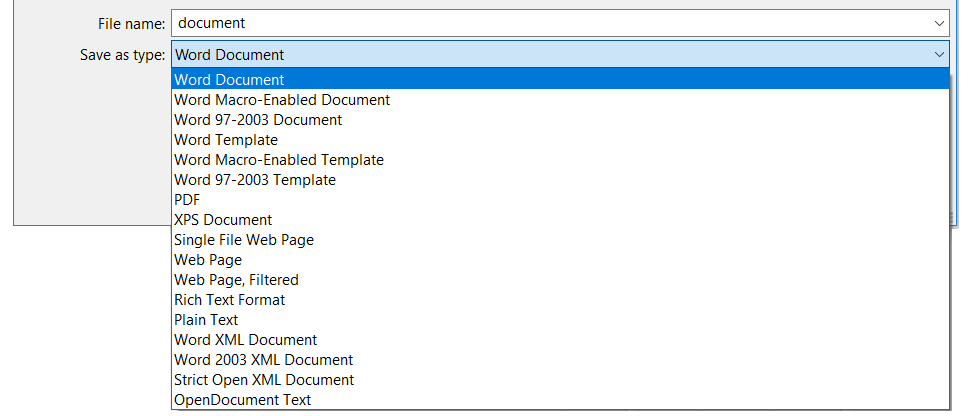
Zrzut ekranu przedstawia fragment formatki zapisywaniu pliku w programie MS Word. Na górze napis File names i obok pole tekstowe z wpisanym słowem document. Poniżej napis Save as type i obok lista rozwijana zawierająca nazwy typów plików: Word Document, Word Macro-Enabled Document, Word 97-2007 Document, Word Template, Word Macro-Enabled Template, Word 97-2003 Template, PDF, XPS Document, Single File Web Page, Web Page, Web Page Filtered, Rich Text Format, Plain Text, Word XML Document, Strick Open XML Document, OpenDocument Text.
Every text editor has its own default file type in which a document is saved. If you want to change this type, you must use the option Save As. Just below the File name dialogue box, a drop‑down list entitled Save as type is displayed, which includes all file saving standardssaving standardssaving standards supported by the text editor.
RZVi61Kf167Rc
Ilustracja interaktywna przedstawia ikony dokumentów tekstowych. 1 - kartka papieru, prawy-górny róg jest zagięty, w na całej kartce linie poziome tej samej długości, z lewej strony wystaje poza kartkę trapez, na którym umieszczona jest wielka litera W, poniżej napis document.docx. 2 - kartka papieru, prawy-górny róg jest zagięty, w na całej kartce cienkie, poziome linie tej samej długości, poniżej napis document.txt. 3 - kartka papieru, prawy-górny róg jest zagięty, w dolnej połowie karki kilka poziomach linii różnej długości, w lewym-górnym rogu 2 znaki, każdy zbudowany z dwóch złączonych łuków, poniżej napis document.odt. 4 - kartka papieru, prawy-górny róg jest zagięty, w na całej kartce linie poziome tej samej długości, z lewej strony wystaje poza kartkę duża litera W otoczona ramką, poniżej napis document.doc. 5 - kartka papieru, prawy-górny róg jest zagięty, w na całej kartce linie poziome tej samej długości, z lewej strony wystaje poza kartkę duża litera W otoczona ramką, poniżej napis document.rtf. 6 - kartka papieru przedstawia pierwszą stronę zapisanego dokumentu, w prawym dolnym rogu logo Adobe Reader: trójkąt, którego wierzchołki tworzą pętelki, poniżej napis document.pdf. Na ilustracji widoczne są numery, a na nich podpisy. 1. Word Document {audio}, 2. Text Document {audio}, 3. OpenDocument {audio}, 4. Word 97-2003 Document {audio}, 5. Rich Text Format RTF {audio}, 6. Adobe Acrobat Document {audio}.
Ilustracja interaktywna przedstawia ikony dokumentów tekstowych. 1 - kartka papieru, prawy-górny róg jest zagięty, w na całej kartce linie poziome tej samej długości, z lewej strony wystaje poza kartkę trapez, na którym umieszczona jest wielka litera W, poniżej napis document.docx. 2 - kartka papieru, prawy-górny róg jest zagięty, w na całej kartce cienkie, poziome linie tej samej długości, poniżej napis document.txt. 3 - kartka papieru, prawy-górny róg jest zagięty, w dolnej połowie karki kilka poziomach linii różnej długości, w lewym-górnym rogu 2 znaki, każdy zbudowany z dwóch złączonych łuków, poniżej napis document.odt. 4 - kartka papieru, prawy-górny róg jest zagięty, w na całej kartce linie poziome tej samej długości, z lewej strony wystaje poza kartkę duża litera W otoczona ramką, poniżej napis document.doc. 5 - kartka papieru, prawy-górny róg jest zagięty, w na całej kartce linie poziome tej samej długości, z lewej strony wystaje poza kartkę duża litera W otoczona ramką, poniżej napis document.rtf. 6 - kartka papieru przedstawia pierwszą stronę zapisanego dokumentu, w prawym dolnym rogu logo Adobe Reader: trójkąt, którego wierzchołki tworzą pętelki, poniżej napis document.pdf. Na ilustracji widoczne są numery, a na nich podpisy. 1. Word Document {audio}, 2. Text Document {audio}, 3. OpenDocument {audio}, 4. Word 97-2003 Document {audio}, 5. Rich Text Format RTF {audio}, 6. Adobe Acrobat Document {audio}.
A document templatetemplatetemplate is a file format that enables saving a document as a template, based on which you can create new documents. It allows to save the document content and settings such as styles, page layout and even customcustomcustomkeyboard shortcutskeyboard shortcutskeyboard shortcuts and menus.
A web page (HTM/HTML) is a file format that enables saving a document for displaying on the internet. The web page created this way usually differs with the original document in the layout of text and images.
When a text document is saved in the HTML format, an additional folder is created on the disc, in which the image files included in the document and other auxiliary files are saved.
RM4mn67U7ryG0
Zrzut ekranu przedstawia ikonę dokumentu HTML (Document.htm) oraz ikonę folderu z plikami umieszczonymi w tym dokumencie (Document_files). Ikona dokumentu html przedstawiona jest jako kartka z zagiętym prawym, górnym rogiem. Środkową część kartki zajmuje ikona Firefox. Jest to kula ziemska, którą obejmuje panda mała, często mylona z lisem. Ikona folderu przedstawiona jest jako papierowa teczka na dokumenty. Teczka jest postawiona i uchylona. Widoczne są kartki ułożone w teczce.
A PDF document is a file format that is used for presenting, moving and printing documents. Some editors enable to copy‑protect such a file with a password.
An XPS document is a file format competing with PDF, used for storing and viewing documents, which is supported by some providers of printing systems.
Text editors enable saving documents in standards used for saving files in the previous versions of the software. Reading the older versions of files is usually troublefree.
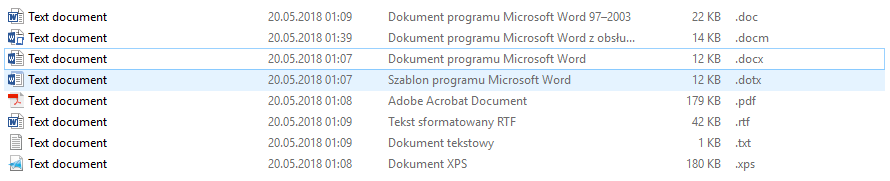
You can identify the file format in which a document is saved by the icon of the document and the extension of the saved file.
RtFOvXWwwtFzW
Ilustracja przedstawia przykładowe formaty zapisu plików tekstowych w postaci zrzutu fragmentu folderu zawierającego przykładowe dokumenty. Można zobaczyć jak nazywa się dokument i jakie ma rozszerzenie. Dokument programu Microsoft Word 97-2003 .doc, Dokument programu Microsoft Word z obsługą makr .docm, Dokument programu Microsoft Word .docx, Szablon programu Microsoft Word .dotx, Adobe Acrobat Document .pdf, Tekst sformatowany RTF .rtf, Dokument tekstowy .txt, Dokument XPS .xps
In the text editor installed on your computer design a school timetable. Insert it into a table. Add a different image to every day of the week. Select the landscape orientation of the document. Save the file in the HTM/HTML file format. What does the web page created this way look like?
The European Commission recommends OpenDocument (known also as ODF or ISO/IEC 26300) as standard to be used in administration and business. It is used by many EU institutions and private companies in Poland and in Europe as a fully functional and free solution replacing commercial office software. Similar solution was adopted by the Polish government.
In Word you can automate frequently performed tasks by creating and running macroinstructions. A macro is a range of commands and instructions grouped in one command to automatically execute a specific task. You can decide if macroinstructions will be automatically run in the target document or not. In the file extensions of Word macro‑enabled documents the letter ‘x’ is replaced by ‘m’.
Memorise: macros, though very useful, may contain computer viruses!
Most of the current file saving standardssaving standardssaving standards, not only text ones, are based on Extensible Markup Language (XML). It is a universal formal language intended to represent various data in a structured way. Its structure is a bit similar to HTML as it also uses markups. Thanks to the XML format it is possible to use new functions, objects and formatting elements. It enables saving e.g. SmartArt 3D or mathematical formulae in a document.
Exercises
Exercise 1
RnGRKPiOKgaKg
Wersja alternatywna ćwiczenia: Determine which sentences are true. Możliwe odpowiedzi: 1. You can create new documents based on a document template. , 2. Styles are saved in a template. , 3. Page layout in not saved in a template. , 4. A template enables saving custom keyboard shortcuts and menus. , 5. The XPS format is a file format competing with ODT. , 6. Some text editors enable saving files in the HTML format., 7. A TXT file contains only alphanumeric characters. , 8. The RTF and TXT formats differ only in name.
Wersja alternatywna ćwiczenia: Determine which sentences are true. Możliwe odpowiedzi: 1. You can create new documents based on a document template. , 2. Styles are saved in a template. , 3. Page layout in not saved in a template. , 4. A template enables saving custom keyboard shortcuts and menus. , 5. The XPS format is a file format competing with ODT. , 6. Some text editors enable saving files in the HTML format., 7. A TXT file contains only alphanumeric characters. , 8. The RTF and TXT formats differ only in name.
Determine which sentences are true.
You can create new documents based on a document template.
Styles are saved in a template.
Page layout in not saved in a template.
A template enables saving custom keyboard shortcuts and menus.
The XPS format is a file format competing with ODT.
Some text editors enable saving files in the HTML format.
A TXT file contains only alphanumeric characters.
The RTF and TXT formats differ only in name.
zadanie
Source: GroMar, licencja: CC BY 3.0.
Exercise 2
In a text editor, create a poster about your favourite film. Find the materials you need on the internet. Remember to conform to copyright. You can create necessary illustrations in an image editor. Save your poster in the PDF and HTM file formats.
Exercise 3
Describe in English the differences between the ODT and DOCX (DOC) file formats.
Exercise 4
RtKNElqWdMKAh
Wersja alternatywna ćwiczenia: Indicate which pairs of expressions or words are translated correctly. Możliwe odpowiedzi: 1. niestandardowe - custom, 2. format otwarty - open format, 3. szablon - template, 4. format zamknięty - open proprietary format, 5. format półotwarty - proprietary format
Wersja alternatywna ćwiczenia: Indicate which pairs of expressions or words are translated correctly. Możliwe odpowiedzi: 1. niestandardowe - custom, 2. format otwarty - open format, 3. szablon - template, 4. format zamknięty - open proprietary format, 5. format półotwarty - proprietary format
Indicate which pairs of expressions or words are translated correctly.
niestandardowe - custom
format otwarty - open format
szablon - template
format zamknięty - open proprietary format
format półotwarty - proprietary format
zadanie
Source: GroMar, licencja: CC BY 3.0.
RzkmiwZ9W4jD01
Interaktywna gra, polegająca na łączeniu wyrazów w pary w ciągu jednej minuty. Czas zaczyna upływać wraz z rozpoczęciem gry. Jeden ruch to odkrywanie najpierw jednej potem drugiej karty z wyrazem. Każdy wyraz jest odczytywany. Kolejny ruch to odkrywanie trzeciej i czwartej karty. W ten sposób odsłuchasz wszystkie wyrazy. Nawigacja z poziomu klawiatury za pomocą strzałek, odsłuchiwanie wyrazów enterem lub spacją. Znajdź wszystkie pary wyrazów.
Interaktywna gra, polegająca na łączeniu wyrazów w pary w ciągu jednej minuty. Czas zaczyna upływać wraz z rozpoczęciem gry. Jeden ruch to odkrywanie najpierw jednej potem drugiej karty z wyrazem. Każdy wyraz jest odczytywany. Kolejny ruch to odkrywanie trzeciej i czwartej karty. W ten sposób odsłuchasz wszystkie wyrazy. Nawigacja z poziomu klawiatury za pomocą strzałek, odsłuchiwanie wyrazów enterem lub spacją. Znajdź wszystkie pary wyrazów.
Match Polish terms with their English equivalents.
niestandardowe
custom
proprietary format
format półotwarty
format otwarty
szablon
format zamknięty
template
open format
open proprietary format
Source: Zespół autorski Politechniki Łódzkiej, licencja: CC BY 3.0.