Drag the words to create phrases related to WCAG. Mouthstick Możliwe odpowiedzi: 1. stylus, 2. transcriptions, 3. reader, 4. accessibility, 5. technology, 6. texts Screen Możliwe odpowiedzi: 1. stylus, 2. transcriptions, 3. reader, 4. accessibility, 5. technology, 6. texts Web Możliwe odpowiedzi: 1. stylus, 2. transcriptions, 3. reader, 4. accessibility, 5. technology, 6. texts Assistive Możliwe odpowiedzi: 1. stylus, 2. transcriptions, 3. reader, 4. accessibility, 5. technology, 6. texts Alternative Możliwe odpowiedzi: 1. stylus, 2. transcriptions, 3. reader, 4. accessibility, 5. technology, 6. texts Text Możliwe odpowiedzi: 1. stylus, 2. transcriptions, 3. reader, 4. accessibility, 5. technology, 6. texts
Drag the words to create phrases related to WCAG. Mouthstick Możliwe odpowiedzi: 1. stylus, 2. transcriptions, 3. reader, 4. accessibility, 5. technology, 6. texts Screen Możliwe odpowiedzi: 1. stylus, 2. transcriptions, 3. reader, 4. accessibility, 5. technology, 6. texts Web Możliwe odpowiedzi: 1. stylus, 2. transcriptions, 3. reader, 4. accessibility, 5. technology, 6. texts Assistive Możliwe odpowiedzi: 1. stylus, 2. transcriptions, 3. reader, 4. accessibility, 5. technology, 6. texts Alternative Możliwe odpowiedzi: 1. stylus, 2. transcriptions, 3. reader, 4. accessibility, 5. technology, 6. texts Text Możliwe odpowiedzi: 1. stylus, 2. transcriptions, 3. reader, 4. accessibility, 5. technology, 6. texts
Źródło: GroMar Sp. z o.o., licencja: CC BY-SA 3.0.
1
Exercise2
RZmeiVjMn1wFz
Health problem/condition: Możliwe odpowiedzi: 1. text alternatives, 2. visual disability, 3. impairments, 4. text box, podcast, 5. descriptions of non-spoken sounds, 6. wheelchair-bound, 7. subtitles, 8. text transcriptions, 9. colour blindness, 10. auditory disorder, 11. sufficient contrast, 12. inability to perceive any colour, 13. cognitive and neurological disability, 14. screen reader, 15. captions, 16. mouthstick stylus, 17. physical and motor disability Device: Możliwe odpowiedzi: 1. text alternatives, 2. visual disability, 3. impairments, 4. text box, podcast, 5. descriptions of non-spoken sounds, 6. wheelchair-bound, 7. subtitles, 8. text transcriptions, 9. colour blindness, 10. auditory disorder, 11. sufficient contrast, 12. inability to perceive any colour, 13. cognitive and neurological disability, 14. screen reader, 15. captions, 16. mouthstick stylus, 17. physical and motor disability Web accessibility: Możliwe odpowiedzi: 1. text alternatives, 2. visual disability, 3. impairments, 4. text box, podcast, 5. descriptions of non-spoken sounds, 6. wheelchair-bound, 7. subtitles, 8. text transcriptions, 9. colour blindness, 10. auditory disorder, 11. sufficient contrast, 12. inability to perceive any colour, 13. cognitive and neurological disability, 14. screen reader, 15. captions, 16. mouthstick stylus, 17. physical and motor disability
Health problem/condition: Możliwe odpowiedzi: 1. text alternatives, 2. visual disability, 3. impairments, 4. text box, podcast, 5. descriptions of non-spoken sounds, 6. wheelchair-bound, 7. subtitles, 8. text transcriptions, 9. colour blindness, 10. auditory disorder, 11. sufficient contrast, 12. inability to perceive any colour, 13. cognitive and neurological disability, 14. screen reader, 15. captions, 16. mouthstick stylus, 17. physical and motor disability Device: Możliwe odpowiedzi: 1. text alternatives, 2. visual disability, 3. impairments, 4. text box, podcast, 5. descriptions of non-spoken sounds, 6. wheelchair-bound, 7. subtitles, 8. text transcriptions, 9. colour blindness, 10. auditory disorder, 11. sufficient contrast, 12. inability to perceive any colour, 13. cognitive and neurological disability, 14. screen reader, 15. captions, 16. mouthstick stylus, 17. physical and motor disability Web accessibility: Możliwe odpowiedzi: 1. text alternatives, 2. visual disability, 3. impairments, 4. text box, podcast, 5. descriptions of non-spoken sounds, 6. wheelchair-bound, 7. subtitles, 8. text transcriptions, 9. colour blindness, 10. auditory disorder, 11. sufficient contrast, 12. inability to perceive any colour, 13. cognitive and neurological disability, 14. screen reader, 15. captions, 16. mouthstick stylus, 17. physical and motor disability
Źródło: GroMar Sp. z o.o., licencja: CC BY-SA 3.0.
2
Exercise3
R1aCk6qRt019j
Complete the sentences with missing words. 1. It is a hTu uzupełnij rTu uzupełnij to have equal access to the Internet. 2. Visually impaired people find it useful when a tTu uzupełnij bTu uzupełnij is present to add content describing the photo. 3. It turns out 1 in 12 men suffer from cTu uzupełnij bTu uzupełnij and most of them have the red-green colour type. 4. WCAG implemented four principles of equal WTu uzupełnij aTu uzupełnij among all people. 5. Sometimes people are wTu uzupełnij bTu uzupełnij and still remain active and independant. 6. Providing aTu uzupełnij tTu uzupełnij for non-text context so that it can be altered into, eg. Braille or simpler language is a good alternative for the disabled.
Complete the sentences with missing words. 1. It is a hTu uzupełnij rTu uzupełnij to have equal access to the Internet. 2. Visually impaired people find it useful when a tTu uzupełnij bTu uzupełnij is present to add content describing the photo. 3. It turns out 1 in 12 men suffer from cTu uzupełnij bTu uzupełnij and most of them have the red-green colour type. 4. WCAG implemented four principles of equal WTu uzupełnij aTu uzupełnij among all people. 5. Sometimes people are wTu uzupełnij bTu uzupełnij and still remain active and independant. 6. Providing aTu uzupełnij tTu uzupełnij for non-text context so that it can be altered into, eg. Braille or simpler language is a good alternative for the disabled.
Źródło: GroMar Sp. z o.o., licencja: CC BY-SA 3.0.
2
Exercise4
Rg1iwsvMvHNxf
Replace the underlined fragments of the sentences with the newly acquired words or expressions. 1. It is a specific language of tags that HTML does to the text inside of them; they mark it as a specific type of text. Tu uzupełnij 2. Physical and motor disabled people often use a special rod they hold in their mouths to type on the keyboard without using their hands. Tu uzupełnij 3. Studies show that seven to eight per cent of the population in the world struggle with not seeing colours correctly. Tu uzupełnij 4. People having problems with hearing find descriptions of non-spoken sounds useful while watching a film. Tu uzupełnij 5. A series of digital audio files can be accessed easily by visually impaired people. Tu uzupełnij 6. WCAG makes an effort not to reject any web visitors. Tu uzupełnij
Replace the underlined fragments of the sentences with the newly acquired words or expressions. 1. It is a specific language of tags that HTML does to the text inside of them; they mark it as a specific type of text. Tu uzupełnij 2. Physical and motor disabled people often use a special rod they hold in their mouths to type on the keyboard without using their hands. Tu uzupełnij 3. Studies show that seven to eight per cent of the population in the world struggle with not seeing colours correctly. Tu uzupełnij 4. People having problems with hearing find descriptions of non-spoken sounds useful while watching a film. Tu uzupełnij 5. A series of digital audio files can be accessed easily by visually impaired people. Tu uzupełnij 6. WCAG makes an effort not to reject any web visitors. Tu uzupełnij
Źródło: GroMar Sp. z o.o., licencja: CC BY-SA 3.0.
2
Exercise5
Drag the words to put them in the correct order to create sentences connected with Web accessibility.
RS01POTHxoYuG
1. 1. out loud, 2. takes, 3. in a, 4. the, 5. reads, 6. reader, 7. and, 8. it, 9. that, 10. document, 11. you see, 12. A screen, 13. text1. out loud, 2. takes, 3. in a, 4. the, 5. reads, 6. reader, 7. and, 8. it, 9. that, 10. document, 11. you see, 12. A screen, 13. text1. out loud, 2. takes, 3. in a, 4. the, 5. reads, 6. reader, 7. and, 8. it, 9. that, 10. document, 11. you see, 12. A screen, 13. text1. out loud, 2. takes, 3. in a, 4. the, 5. reads, 6. reader, 7. and, 8. it, 9. that, 10. document, 11. you see, 12. A screen, 13. text1. out loud, 2. takes, 3. in a, 4. the, 5. reads, 6. reader, 7. and, 8. it, 9. that, 10. document, 11. you see, 12. A screen, 13. text1. out loud, 2. takes, 3. in a, 4. the, 5. reads, 6. reader, 7. and, 8. it, 9. that, 10. document, 11. you see, 12. A screen, 13. text1. out loud, 2. takes, 3. in a, 4. the, 5. reads, 6. reader, 7. and, 8. it, 9. that, 10. document, 11. you see, 12. A screen, 13. text1. out loud, 2. takes, 3. in a, 4. the, 5. reads, 6. reader, 7. and, 8. it, 9. that, 10. document, 11. you see, 12. A screen, 13. text1. out loud, 2. takes, 3. in a, 4. the, 5. reads, 6. reader, 7. and, 8. it, 9. that, 10. document, 11. you see, 12. A screen, 13. text1. out loud, 2. takes, 3. in a, 4. the, 5. reads, 6. reader, 7. and, 8. it, 9. that, 10. document, 11. you see, 12. A screen, 13. text1. out loud, 2. takes, 3. in a, 4. the, 5. reads, 6. reader, 7. and, 8. it, 9. that, 10. document, 11. you see, 12. A screen, 13. text 1. out loud, 2. takes, 3. in a, 4. the, 5. reads, 6. reader, 7. and, 8. it, 9. that, 10. document, 11. you see, 12. A screen, 13. text1. out loud, 2. takes, 3. in a, 4. the, 5. reads, 6. reader, 7. and, 8. it, 9. that, 10. document, 11. you see, 12. A screen, 13. text.
1. 1. out loud, 2. takes, 3. in a, 4. the, 5. reads, 6. reader, 7. and, 8. it, 9. that, 10. document, 11. you see, 12. A screen, 13. text1. out loud, 2. takes, 3. in a, 4. the, 5. reads, 6. reader, 7. and, 8. it, 9. that, 10. document, 11. you see, 12. A screen, 13. text1. out loud, 2. takes, 3. in a, 4. the, 5. reads, 6. reader, 7. and, 8. it, 9. that, 10. document, 11. you see, 12. A screen, 13. text1. out loud, 2. takes, 3. in a, 4. the, 5. reads, 6. reader, 7. and, 8. it, 9. that, 10. document, 11. you see, 12. A screen, 13. text1. out loud, 2. takes, 3. in a, 4. the, 5. reads, 6. reader, 7. and, 8. it, 9. that, 10. document, 11. you see, 12. A screen, 13. text1. out loud, 2. takes, 3. in a, 4. the, 5. reads, 6. reader, 7. and, 8. it, 9. that, 10. document, 11. you see, 12. A screen, 13. text1. out loud, 2. takes, 3. in a, 4. the, 5. reads, 6. reader, 7. and, 8. it, 9. that, 10. document, 11. you see, 12. A screen, 13. text1. out loud, 2. takes, 3. in a, 4. the, 5. reads, 6. reader, 7. and, 8. it, 9. that, 10. document, 11. you see, 12. A screen, 13. text1. out loud, 2. takes, 3. in a, 4. the, 5. reads, 6. reader, 7. and, 8. it, 9. that, 10. document, 11. you see, 12. A screen, 13. text1. out loud, 2. takes, 3. in a, 4. the, 5. reads, 6. reader, 7. and, 8. it, 9. that, 10. document, 11. you see, 12. A screen, 13. text1. out loud, 2. takes, 3. in a, 4. the, 5. reads, 6. reader, 7. and, 8. it, 9. that, 10. document, 11. you see, 12. A screen, 13. text 1. out loud, 2. takes, 3. in a, 4. the, 5. reads, 6. reader, 7. and, 8. it, 9. that, 10. document, 11. you see, 12. A screen, 13. text1. out loud, 2. takes, 3. in a, 4. the, 5. reads, 6. reader, 7. and, 8. it, 9. that, 10. document, 11. you see, 12. A screen, 13. text.
Źródło: GroMar Sp. z o.o., licencja: CC BY-SA 3.0.
RPPdiyXXIyVpj
2. 1. in, 2. provided, 3. many, 4. can, 5. be, 6. languages, 7. Subtitles1. in, 2. provided, 3. many, 4. can, 5. be, 6. languages, 7. Subtitles1. in, 2. provided, 3. many, 4. can, 5. be, 6. languages, 7. Subtitles1. in, 2. provided, 3. many, 4. can, 5. be, 6. languages, 7. Subtitles1. in, 2. provided, 3. many, 4. can, 5. be, 6. languages, 7. Subtitles1. in, 2. provided, 3. many, 4. can, 5. be, 6. languages, 7. Subtitles1. in, 2. provided, 3. many, 4. can, 5. be, 6. languages, 7. Subtitles.
2. 1. in, 2. provided, 3. many, 4. can, 5. be, 6. languages, 7. Subtitles1. in, 2. provided, 3. many, 4. can, 5. be, 6. languages, 7. Subtitles1. in, 2. provided, 3. many, 4. can, 5. be, 6. languages, 7. Subtitles1. in, 2. provided, 3. many, 4. can, 5. be, 6. languages, 7. Subtitles1. in, 2. provided, 3. many, 4. can, 5. be, 6. languages, 7. Subtitles1. in, 2. provided, 3. many, 4. can, 5. be, 6. languages, 7. Subtitles1. in, 2. provided, 3. many, 4. can, 5. be, 6. languages, 7. Subtitles.
Źródło: GroMar Sp. z o.o., licencja: CC BY-SA 3.0.
R1Ap5emSkYCgj
3. 1. There are, 2. on, 3. web pages, 4. that, 5. provide, 6. text transcriptions, 7. to, 8. guidance, 9. audio, 10. transcribing1. There are, 2. on, 3. web pages, 4. that, 5. provide, 6. text transcriptions, 7. to, 8. guidance, 9. audio, 10. transcribing1. There are, 2. on, 3. web pages, 4. that, 5. provide, 6. text transcriptions, 7. to, 8. guidance, 9. audio, 10. transcribing1. There are, 2. on, 3. web pages, 4. that, 5. provide, 6. text transcriptions, 7. to, 8. guidance, 9. audio, 10. transcribing1. There are, 2. on, 3. web pages, 4. that, 5. provide, 6. text transcriptions, 7. to, 8. guidance, 9. audio, 10. transcribing1. There are, 2. on, 3. web pages, 4. that, 5. provide, 6. text transcriptions, 7. to, 8. guidance, 9. audio, 10. transcribing1. There are, 2. on, 3. web pages, 4. that, 5. provide, 6. text transcriptions, 7. to, 8. guidance, 9. audio, 10. transcribing1. There are, 2. on, 3. web pages, 4. that, 5. provide, 6. text transcriptions, 7. to, 8. guidance, 9. audio, 10. transcribing1. There are, 2. on, 3. web pages, 4. that, 5. provide, 6. text transcriptions, 7. to, 8. guidance, 9. audio, 10. transcribing1. There are, 2. on, 3. web pages, 4. that, 5. provide, 6. text transcriptions, 7. to, 8. guidance, 9. audio, 10. transcribing.
3. 1. There are, 2. on, 3. web pages, 4. that, 5. provide, 6. text transcriptions, 7. to, 8. guidance, 9. audio, 10. transcribing1. There are, 2. on, 3. web pages, 4. that, 5. provide, 6. text transcriptions, 7. to, 8. guidance, 9. audio, 10. transcribing1. There are, 2. on, 3. web pages, 4. that, 5. provide, 6. text transcriptions, 7. to, 8. guidance, 9. audio, 10. transcribing1. There are, 2. on, 3. web pages, 4. that, 5. provide, 6. text transcriptions, 7. to, 8. guidance, 9. audio, 10. transcribing1. There are, 2. on, 3. web pages, 4. that, 5. provide, 6. text transcriptions, 7. to, 8. guidance, 9. audio, 10. transcribing1. There are, 2. on, 3. web pages, 4. that, 5. provide, 6. text transcriptions, 7. to, 8. guidance, 9. audio, 10. transcribing1. There are, 2. on, 3. web pages, 4. that, 5. provide, 6. text transcriptions, 7. to, 8. guidance, 9. audio, 10. transcribing1. There are, 2. on, 3. web pages, 4. that, 5. provide, 6. text transcriptions, 7. to, 8. guidance, 9. audio, 10. transcribing1. There are, 2. on, 3. web pages, 4. that, 5. provide, 6. text transcriptions, 7. to, 8. guidance, 9. audio, 10. transcribing1. There are, 2. on, 3. web pages, 4. that, 5. provide, 6. text transcriptions, 7. to, 8. guidance, 9. audio, 10. transcribing.
Źródło: GroMar Sp. z o.o., licencja: CC BY-SA 3.0.
Rz9pIIqSh15PZ
4. 1. many accessibility, 2. HTML, 3. for, 4. provides, 5. support, 6. features1. many accessibility, 2. HTML, 3. for, 4. provides, 5. support, 6. features1. many accessibility, 2. HTML, 3. for, 4. provides, 5. support, 6. features1. many accessibility, 2. HTML, 3. for, 4. provides, 5. support, 6. features1. many accessibility, 2. HTML, 3. for, 4. provides, 5. support, 6. features1. many accessibility, 2. HTML, 3. for, 4. provides, 5. support, 6. features.
4. 1. many accessibility, 2. HTML, 3. for, 4. provides, 5. support, 6. features1. many accessibility, 2. HTML, 3. for, 4. provides, 5. support, 6. features1. many accessibility, 2. HTML, 3. for, 4. provides, 5. support, 6. features1. many accessibility, 2. HTML, 3. for, 4. provides, 5. support, 6. features1. many accessibility, 2. HTML, 3. for, 4. provides, 5. support, 6. features1. many accessibility, 2. HTML, 3. for, 4. provides, 5. support, 6. features.
Źródło: GroMar Sp. z o.o., licencja: CC BY-SA 3.0.
REG7UgxEaP8Eg
5. 1. impaired, 2. visually, 3. better, 4. allow, 5. provided, 6. to, 7. contrast, 8. be, 9. people to, 10. must, 11. see, 12. Sufficient1. impaired, 2. visually, 3. better, 4. allow, 5. provided, 6. to, 7. contrast, 8. be, 9. people to, 10. must, 11. see, 12. Sufficient1. impaired, 2. visually, 3. better, 4. allow, 5. provided, 6. to, 7. contrast, 8. be, 9. people to, 10. must, 11. see, 12. Sufficient1. impaired, 2. visually, 3. better, 4. allow, 5. provided, 6. to, 7. contrast, 8. be, 9. people to, 10. must, 11. see, 12. Sufficient1. impaired, 2. visually, 3. better, 4. allow, 5. provided, 6. to, 7. contrast, 8. be, 9. people to, 10. must, 11. see, 12. Sufficient1. impaired, 2. visually, 3. better, 4. allow, 5. provided, 6. to, 7. contrast, 8. be, 9. people to, 10. must, 11. see, 12. Sufficient1. impaired, 2. visually, 3. better, 4. allow, 5. provided, 6. to, 7. contrast, 8. be, 9. people to, 10. must, 11. see, 12. Sufficient1. impaired, 2. visually, 3. better, 4. allow, 5. provided, 6. to, 7. contrast, 8. be, 9. people to, 10. must, 11. see, 12. Sufficient1. impaired, 2. visually, 3. better, 4. allow, 5. provided, 6. to, 7. contrast, 8. be, 9. people to, 10. must, 11. see, 12. Sufficient1. impaired, 2. visually, 3. better, 4. allow, 5. provided, 6. to, 7. contrast, 8. be, 9. people to, 10. must, 11. see, 12. Sufficient
1. impaired, 2. visually, 3. better, 4. allow, 5. provided, 6. to, 7. contrast, 8. be, 9. people to, 10. must, 11. see, 12. Sufficient1. impaired, 2. visually, 3. better, 4. allow, 5. provided, 6. to, 7. contrast, 8. be, 9. people to, 10. must, 11. see, 12. Sufficient.
5. 1. impaired, 2. visually, 3. better, 4. allow, 5. provided, 6. to, 7. contrast, 8. be, 9. people to, 10. must, 11. see, 12. Sufficient1. impaired, 2. visually, 3. better, 4. allow, 5. provided, 6. to, 7. contrast, 8. be, 9. people to, 10. must, 11. see, 12. Sufficient1. impaired, 2. visually, 3. better, 4. allow, 5. provided, 6. to, 7. contrast, 8. be, 9. people to, 10. must, 11. see, 12. Sufficient1. impaired, 2. visually, 3. better, 4. allow, 5. provided, 6. to, 7. contrast, 8. be, 9. people to, 10. must, 11. see, 12. Sufficient1. impaired, 2. visually, 3. better, 4. allow, 5. provided, 6. to, 7. contrast, 8. be, 9. people to, 10. must, 11. see, 12. Sufficient1. impaired, 2. visually, 3. better, 4. allow, 5. provided, 6. to, 7. contrast, 8. be, 9. people to, 10. must, 11. see, 12. Sufficient1. impaired, 2. visually, 3. better, 4. allow, 5. provided, 6. to, 7. contrast, 8. be, 9. people to, 10. must, 11. see, 12. Sufficient1. impaired, 2. visually, 3. better, 4. allow, 5. provided, 6. to, 7. contrast, 8. be, 9. people to, 10. must, 11. see, 12. Sufficient1. impaired, 2. visually, 3. better, 4. allow, 5. provided, 6. to, 7. contrast, 8. be, 9. people to, 10. must, 11. see, 12. Sufficient1. impaired, 2. visually, 3. better, 4. allow, 5. provided, 6. to, 7. contrast, 8. be, 9. people to, 10. must, 11. see, 12. Sufficient
1. impaired, 2. visually, 3. better, 4. allow, 5. provided, 6. to, 7. contrast, 8. be, 9. people to, 10. must, 11. see, 12. Sufficient1. impaired, 2. visually, 3. better, 4. allow, 5. provided, 6. to, 7. contrast, 8. be, 9. people to, 10. must, 11. see, 12. Sufficient.
Źródło: GroMar Sp. z o.o., licencja: CC BY-SA 3.0.
R1bsOllO3PZlV
6. 1. Assistive, 2. supporting, 3. technologies, 4. the disabled, 5. struggles, 6. everyday, 7. in, 8. aim, 9. at1. Assistive, 2. supporting, 3. technologies, 4. the disabled, 5. struggles, 6. everyday, 7. in, 8. aim, 9. at1. Assistive, 2. supporting, 3. technologies, 4. the disabled, 5. struggles, 6. everyday, 7. in, 8. aim, 9. at1. Assistive, 2. supporting, 3. technologies, 4. the disabled, 5. struggles, 6. everyday, 7. in, 8. aim, 9. at1. Assistive, 2. supporting, 3. technologies, 4. the disabled, 5. struggles, 6. everyday, 7. in, 8. aim, 9. at1. Assistive, 2. supporting, 3. technologies, 4. the disabled, 5. struggles, 6. everyday, 7. in, 8. aim, 9. at1. Assistive, 2. supporting, 3. technologies, 4. the disabled, 5. struggles, 6. everyday, 7. in, 8. aim, 9. at1. Assistive, 2. supporting, 3. technologies, 4. the disabled, 5. struggles, 6. everyday, 7. in, 8. aim, 9. at1. Assistive, 2. supporting, 3. technologies, 4. the disabled, 5. struggles, 6. everyday, 7. in, 8. aim, 9. at.
6. 1. Assistive, 2. supporting, 3. technologies, 4. the disabled, 5. struggles, 6. everyday, 7. in, 8. aim, 9. at1. Assistive, 2. supporting, 3. technologies, 4. the disabled, 5. struggles, 6. everyday, 7. in, 8. aim, 9. at1. Assistive, 2. supporting, 3. technologies, 4. the disabled, 5. struggles, 6. everyday, 7. in, 8. aim, 9. at1. Assistive, 2. supporting, 3. technologies, 4. the disabled, 5. struggles, 6. everyday, 7. in, 8. aim, 9. at1. Assistive, 2. supporting, 3. technologies, 4. the disabled, 5. struggles, 6. everyday, 7. in, 8. aim, 9. at1. Assistive, 2. supporting, 3. technologies, 4. the disabled, 5. struggles, 6. everyday, 7. in, 8. aim, 9. at1. Assistive, 2. supporting, 3. technologies, 4. the disabled, 5. struggles, 6. everyday, 7. in, 8. aim, 9. at1. Assistive, 2. supporting, 3. technologies, 4. the disabled, 5. struggles, 6. everyday, 7. in, 8. aim, 9. at1. Assistive, 2. supporting, 3. technologies, 4. the disabled, 5. struggles, 6. everyday, 7. in, 8. aim, 9. at.
Źródło: GroMar Sp. z o.o., licencja: CC BY-SA 3.0.
3
Exercise6
R8GKlODgo9VMp
Based on the vocabulary from the material, translate the fragments in brackets into English. 1. (Dostępność sieci) Tu uzupełnij is in great demand nowadays as there are a lot of disabled people around the world. 2. People with motor disabilities can type (za pomocą rysika wkładanego w usta)Tu uzupełnij without using their hands. 3. Colour blindness doesn’t allow people to (odróżniać kolorów)Tu uzupełnij. 4. W3C provides standards to make the Web accessible and reduce (ogromną liczbę przeszkód)Tu uzupełnij that disabled people face daily. 5. It is commonly known that a well-developed website should offer barrier free (dostęp do informacji)Tu uzupełnij. 6. Visually imparied Web visitors find it important to have the text with (wystarczającym kontrastem) Tu uzupełnij.
Based on the vocabulary from the material, translate the fragments in brackets into English. 1. (Dostępność sieci) Tu uzupełnij is in great demand nowadays as there are a lot of disabled people around the world. 2. People with motor disabilities can type (za pomocą rysika wkładanego w usta)Tu uzupełnij without using their hands. 3. Colour blindness doesn’t allow people to (odróżniać kolorów)Tu uzupełnij. 4. W3C provides standards to make the Web accessible and reduce (ogromną liczbę przeszkód)Tu uzupełnij that disabled people face daily. 5. It is commonly known that a well-developed website should offer barrier free (dostęp do informacji)Tu uzupełnij. 6. Visually imparied Web visitors find it important to have the text with (wystarczającym kontrastem) Tu uzupełnij.
Źródło: GroMar Sp. z o.o., licencja: CC BY-SA 3.0.
3
Exercise7
In 4‑5 sentences, write what problems related to hearing impairment a person might face while using the internet and what kind of web accessibilities are available for them.
R1EWomia0xd2P
Źródło: GroMar Sp. z o.o., licencja: CC BY-SA 3.0.
People with this kind of disability usually find it confusing/hard/impossible to…, While watching the video,… is in great demand/is very helpful/is necessary. This way… Such a resolution…
People with hearing disabilities usually find it confusing not to be able to catch up with dialogues in videos, as captions do not follow them accurately. While watching a video, the description of non‑spoken sounds is in great demand. This way, a person is able to have a better idea of what is happening there. Such a solution applies to all kinds of content with audio.
3
Exercise7
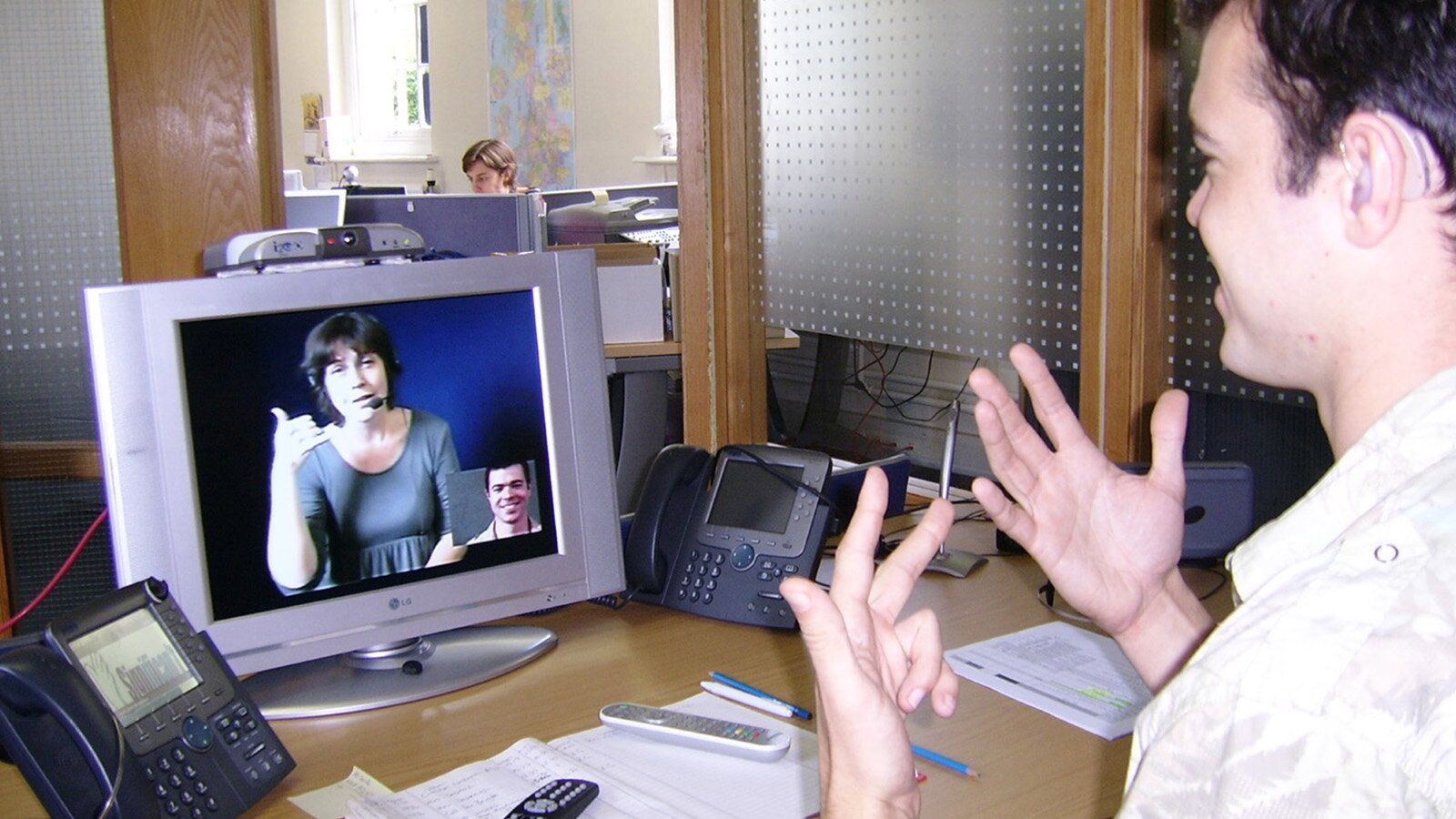
The picture below illustrates a person using a computer. In 4–5 sentences, write what kind of disability this person has, what problems related to it they might face while using the Internet and what kind of Web accessibilities are available for them.
R1KXkvUZSczd6
Zdjęcie przedstawia osobę siedzącą przy biurku, która prowadzi rozmowę z osobą widoczną na komunikatorze w komputerze.
Źródło: dostępny w internecie: commons.wikimedia.org [dostęp 7.04.2022], domena publiczna.
RnNoz8zVmvQBz
(Uzupełnij).
Źródło: GroMar Sp. z o.o., licencja: CC BY-SA 3.0.
The person in the picture seems to have a hearing impairment/auditory disability. People with this kind of disability usually find it confusing/hard/impossible to…, While watching the film,… is in great demand/is very helpful/is necessary. This way…
The person in the picture seems to have a hearing impairment. People with hearing disabilities usually find it confusing not to be able to catch up with dialogues in the films, as captions do not follow them accurately. While watching the film, the description of non‑spoken sounds is in great demand. This way, these people are able to have a better reflection of what is happening in there.
3
Exercise8
During your last lesson you were discussing the topic of the kinds of disorders people have, the problems they face while surfing the net and the solutions provided. You enjoyed the lesson a lot and decided to share your impressions of it with your friend from England. Write an email to your friend and:
enumerate at least two disabilities that Web visitors struggle with;
explain what the goal of Web accessibility is;
choose one disability and describe available accessibilities;
write which piece of information from the lesson surprised you the most and explain why.
Start with:
Hi Tom,
How are you doing? I am writing to you as I have had a very interesting lesson and I want to share my impressions with you.
Finish with:
Have you heard of Web accessibility before? Let me know!
Take care,
XYZ
Exam tipazurewhite
Na ostatnich zajęciach języka angielskiego omawialiście temat trudności, z jakimi spotykają się osoby z różnymi dysfunkcjami podczas korzystania z internetu, oraz opisywaliście udogodnienia stosowane w serwisach internetowych ułatwiające tym osobom korzystanie z ich zasobów. Napisz do kolegi/koleżanki z Anglii e‑mail, w którym:
wymienisz minimum dwie dysfunkcje, które mają niektórzy użytkownicy internetu;
wyjaśnisz założenia dotyczące udogodnień dla osób z różnymi niepełnosprawnościami (Web accessibility);
opiszesz wybrane udogodnienia dla osób z określoną dysfunkcją;
określisz, która informacja związana z tematem lekcji była dla ciebie najbardziej zaskakująca i wyjaśnij dlaczego.
Napisz swoją wypowiedź w języku angielskim. Podpisz się jako XYZ.
Rozwiń swoją wypowiedź w każdym z czterech podpunktów, tak aby osoba nieznająca polecenia w języku polskim uzyskała wszystkie wskazane w nim informacje. Pamiętaj, że długość wypowiedzi powinna wynosić od 100 do 150 wyrazów (nie licząc wyrazów podanych na początku wypowiedzi). Napisz każdy z realizowanych podpunktów w oddzielnym akapicie. W ten sposób będziesz wiedzieć, czy na pewno dany podpunkt został przez ciebie wystarczająco rozwinięty.
Zacznij tak:
Hi Tom,
How are you doing? I am writing to you as I had a very interesting lesson and I want to share my impressions with you.
Zakończ tak:
Have you heard of Web accessibility before? Let me know!
Take care,
XYZ
R1Y2Mad56NH7T
(Uzupełnij).
Źródło: GroMar Sp. z o.o., licencja: CC BY-SA 3.0.
It turned out that… I wasn’t aware of the fact that certain standards were introduced to… Web accessibility aims at… For instance,… …are provided. It gives them the opportunity to…
I was surprised with the fact that… I didn't know that to help them…, …must be provided.
Hi Tom,
How are you doing? I am writing to you as I have had a very interesting lesson and I want to share my impressions with you.
It turned out that people with different disabilities can still enjoy using the Internet including people with visual, auditory, cognitive and neurological disabilities, as well as with physical and motor disorders.
I wasn’t aware of the fact that certain standards were introduced to help especially the disabled use the net. Web accessibility aims at removing the barriers to let people take advantage of using the Internet freely.
For instance, people with auditory disabilities are provided with special captions they can read while watching a film. They read dialogues and, at the same time, follow descriptions of non‑spoken sounds, such as opening or closing the door, floor cracking, etc.
I was surprised with the fact that there is also a solution for people who have colour blindness and can’t distinguish certain shades of colour. I didn't know that to help them see and read clearly, sufficient contrast of words and background must be provided.
Have you heard of Web accessibility before? Let me know!