If you already know how to program the basic movements of the sprite, you can create your first animated story. Your task is to build a scriptscriptscript, in which your sprite will walk back and forth on the pierpierpier located on the lake. So far, the sprite was wandering on an empty stage. However, if we want to create a storystorystory, we need a backdropbackdropbackdrop for it.
Replace white backdrop of the stage with an image of the boardwalk. If you do not know how to do it, read the following instructions and watch the slideshow.
Find the icon for choosing a new backdrop from the gallery in the lower left corner of the screenscreenscreen in the area of stage management. Click on it.
Step 2.
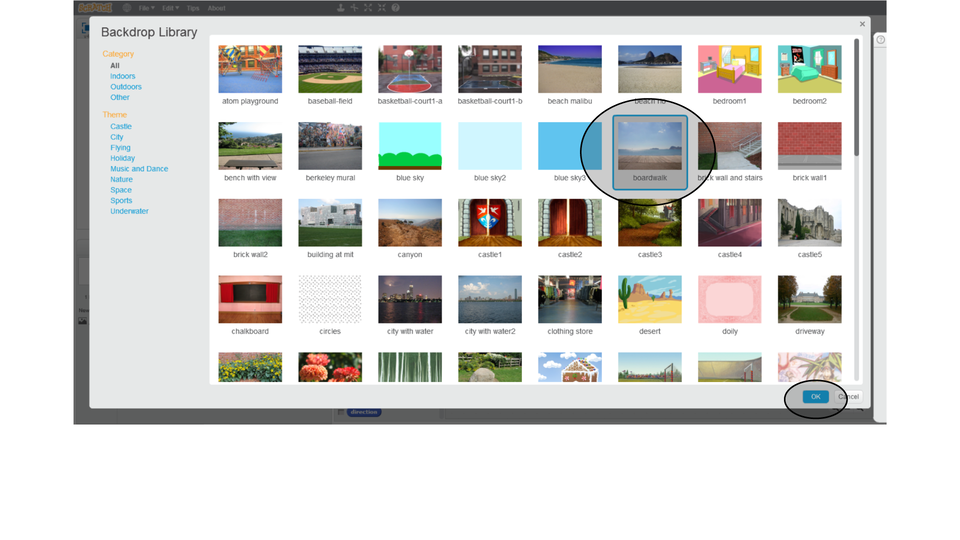
You have the BackdropbackdropBackdropLibrarylibraryLibrary window in front of you. Select the backdrop with the pier on the lakelakelake named boardwalk and confirm your selection with the OK buttonbuttonbutton.
Step 3.
Next to the stage window select a blank backdrop No. 1 and delete it by clicking on the cross.
Step 4.
Click on the sprite in the area of the sprite management, and then on the scripts tab to return to the familiar look of your screen.
Rn1AZSnWYIxZV1
Pokaz slajdów prezentuje w kolejnych krokach, w jaki sposób zmienić tło. Instrukcja obsługi z poziomu klawiatury: 1. Uruchomienie aplikacji - ENTER, 2. Na każdym ze slajdów czytany jest automatycznie tekst alternatywny po polsku, 3. Przy pierwszym uruchomieniu na pierwszym slajdzie, czytanie tekstu po angielsku - TAB, 4. Przejście między slajdami: do następnego slajdu - TAB, do poprzedniego slajdu - TAB + SHIFT, 5. Przejście do czytania napisu po angielsku - strzałka w górę + strzałka w dół (czyta tekst po angielsku widoczny na slajdzie).
Pokaz slajdów prezentuje w kolejnych krokach, w jaki sposób zmienić tło. Instrukcja obsługi z poziomu klawiatury: 1. Uruchomienie aplikacji - ENTER, 2. Na każdym ze slajdów czytany jest automatycznie tekst alternatywny po polsku, 3. Przy pierwszym uruchomieniu na pierwszym slajdzie, czytanie tekstu po angielsku - TAB, 4. Przejście między slajdami: do następnego slajdu - TAB, do poprzedniego slajdu - TAB + SHIFT, 5. Przejście do czytania napisu po angielsku - strzałka w górę + strzałka w dół (czyta tekst po angielsku widoczny na slajdzie).
We want the sprite to walk along the pierpierpier. Not only one way, but back and forth. Because dragging the sprite every time it disappears behind the edge of the stage spoils the whole effect of the story you create.
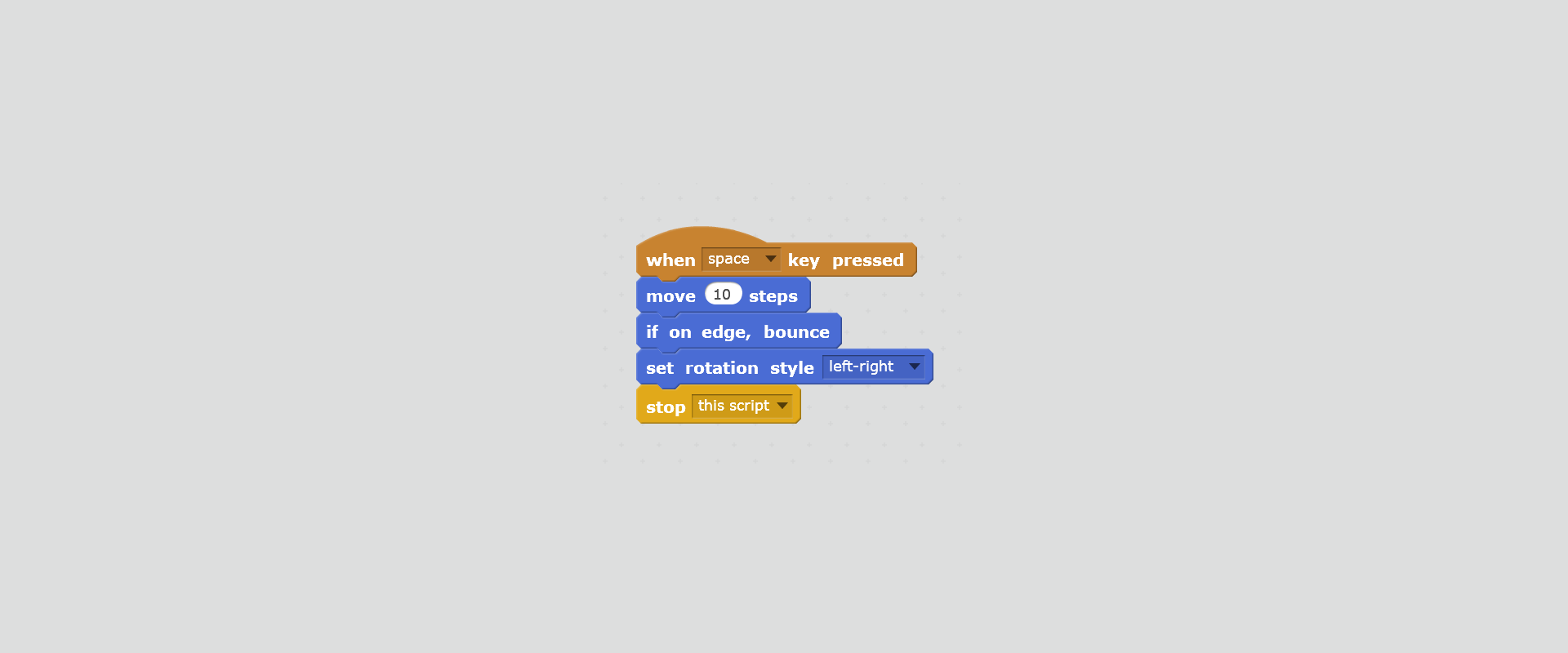
In order for the sprite to turn around and continue walking the other way after reaching the edge of the stage, one should choose from the Motion categorycategorycategory the block if on edge, bounce.
So that the sprite after bouncing from the wall does not walk upside down, it is necessary to choose from the Motion category the block set rotation style ... and the left‑right option from drop‑down menu.
RBlJl9w3rIjwK1
Na ilustracji przedstawiony jest zrzut ekranu przedstawiający skrypt zawierający sekwencję poleceń, które wykonuje duszek dochodzący do ściany, a następnie odbijający się od niej. Od góry bloczki: when space key pressed; move 10 steps; if on edge, bounce; set rotation style left-right; stop this script.
Until now, the sprite walked only when we pressed the key. We can automate his movement: partially or completely.
In the Control categorycategorycategory there are blocks repeat ... and forever.
The first one is used to execute commands contained in it as many times as we enter in its field. The second performs commands indefinitely. Therefore, you cannot attach another block to it (no teeth).
RUyrgYMcOSKte1
Na ilustracji przedstawiony jest zrzut ekranu przedstawiający dwa bloczki: bloczek powtarzający czynność określoną ilość razy opisany repeat 10 oraz bloczek zawierający pętlę nieskończoną opisany forever.
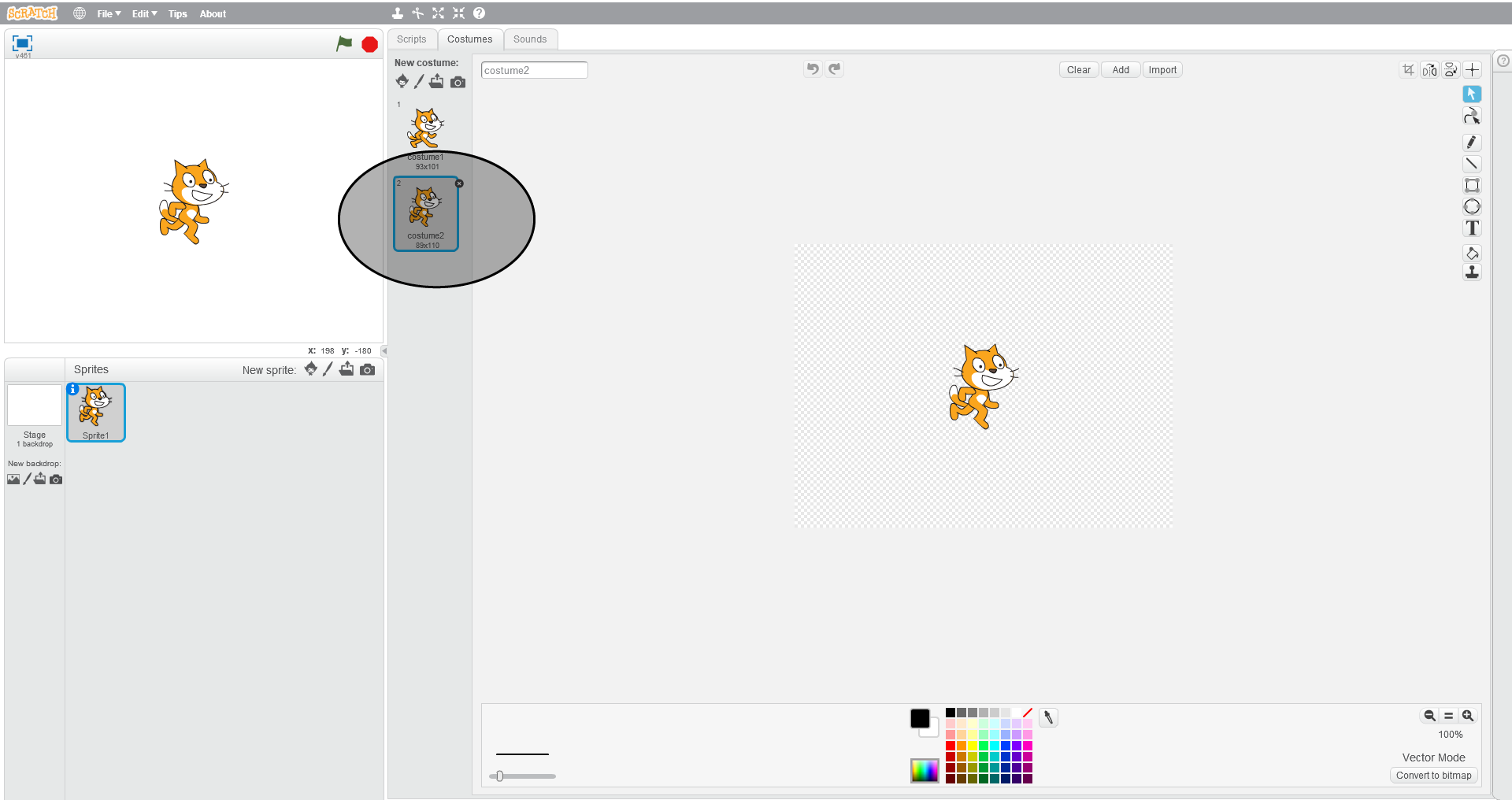
The animation you create will be more convincing if the movement of the sprite is accompanied by the movement of his body. This effect will arise if we use the costume blocks in the Look categorycategorycategory. What kind of costumes your sprite has, you can check by clicking on the Costumes tab.
The sprite body will move when walking, if it has at least two costumes.
R1WW9dFsu77z91
Na ilustracji przedstawiony jest zrzut ekranu, na którym widoczne są wszystkie okna programu Scratch. Na górze pasek menu z logo, ikoną umożliwiającą zmianę języka, File, Edit, Tips, About. Po środku paska ikony narzędzi: stempel, nożyce, pomniejszenie, powiększenie, pomoc. Poniżej po lewej okno podglądu. W nim na środku widoczny jest duszek (kotek). Na górze okna po lewej ikona sceny, po prawej stronie ikona flaga oznaczająca play, ikona ośmiokąt oznaczająca stop. Na dole okna po prawej znaczniki położenia duszka na scenie x i y. Pod oknem podglądu znajduje się okno z ustawieniami. Po lewej stronie białe tło Stage 1 backdrop. Poniżej New backdrop. Poniżej ikony nowe tło, edycja tła, pobranie tła z zewnętrznego pliku, podgląd tła. Na środku okna ustawień od góry napis Sprits, po prawej napis New sprite oraz ikony nowy duszek, edycja, pobranie z zewnętrznego pliku, podgląd. Poniżej wyróżniony obrazek duszka opisany Sprite1. Po prawej okno edycji zajmujące ponad połowę ekranu. Po lewej stronie okna edycji znajdują się zakładki Scripts, Costumes, Sounds. Widoczne są elementy z zakładki Costumes. Poniżej New costume. Poniżej ikony nowy duszek, edycja duszka, pobranie obrazka z zewnętrznego pliku, podgląd obrazka. Poniżej dwa duszki. Drugi duszek wyróżnione. Po prawej widoczna jest scena z duszkiem na środku, na około której znajdują się elementy do edycji. Na górze nazwa duszka, przyciski do cofania i powtarzania, czyszczenia, dodania i importu obrazków oraz do przycięcia i odbicia. Po prawej stronie pasek narzędzi do rysowania, pisania, usuwania i kopiowania. Na dole paleta kolorów.
The computer can perform many commands at the same time, so you can write different tasks in the form of separate scripts. You already have a script that causes the sprite to move on stage. You can add a second script, which will cause that the sprite will be animated due to the change of costumes. Both scripts will run simultaneously if they are started with the same key or green flag. You can also add additional scripts.
Modify your scriptscriptscript or add additional scripts that will do the following tasks:
the movement of the sprite will last for a short time after pressing the selected key,
the sprite will change the costume while walking,
the sprite will greet you before walking.
the sprite will end the walk, saying he is tired.
Example solution
R1Rn9DpdRn4oh1
Na ilustracji przedstawiony jest zrzut ekranu przedstawiający skrypt zawierający symulację ruchu duszka. Od góry bloczki: when space key pressed; say Hello! for 2 secs; repeat 50; move 10 steps; if on edge, bounce; next costume; end of repeat; say I'm tired! for 2 secs; stop this script.
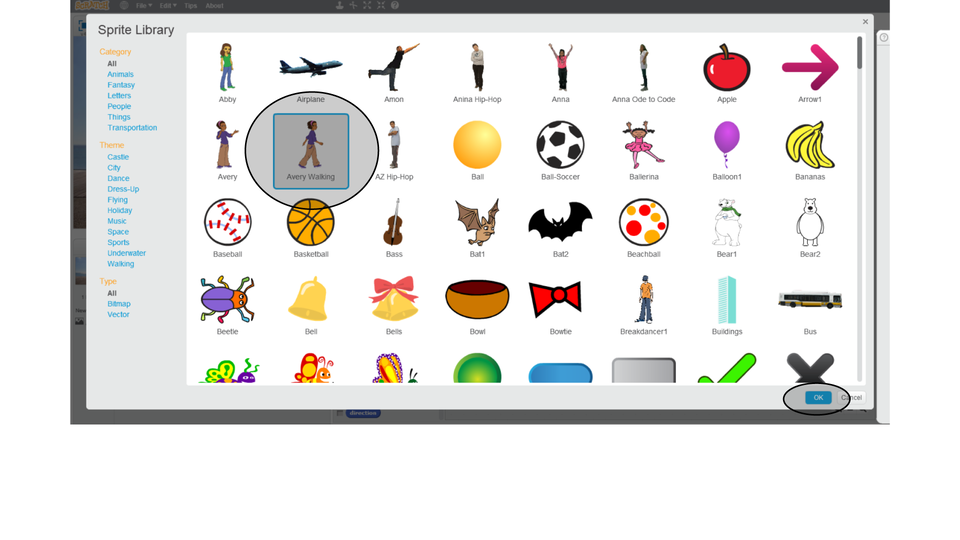
You can change the backdropbackdropbackdrop; it is worth to test other characters than the cat‑sprite. Some sprites have more costumes.
Watch the slideshow to learn how to choose a new sprite.
RH6vcLNI2GD8Z1
Pokaz przedstawia dodawanie nowego duszka. Instrukcja obsługi z poziomu klawiatury: 1. Uruchomienie aplikacji - ENTER, 2. Na każdym ze slajdów czytany jest automatycznie tekst alternatywny po polsku, 3. Przy pierwszym uruchomieniu na pierwszym slajdzie, czytanie tekstu po angielsku - TAB, 4. Przejście między slajdami: do następnego slajdu - TAB, do poprzedniego slajdu - TAB + SHIFT, 5. Przejście do czytania napisu po angielsku - strzałka w górę + strzałka w dół (czyta tekst po angielsku widoczny na slajdzie).
Pokaz przedstawia dodawanie nowego duszka. Instrukcja obsługi z poziomu klawiatury: 1. Uruchomienie aplikacji - ENTER, 2. Na każdym ze slajdów czytany jest automatycznie tekst alternatywny po polsku, 3. Przy pierwszym uruchomieniu na pierwszym slajdzie, czytanie tekstu po angielsku - TAB, 4. Przejście między slajdami: do następnego slajdu - TAB, do poprzedniego slajdu - TAB + SHIFT, 5. Przejście do czytania napisu po angielsku - strzałka w górę + strzałka w dół (czyta tekst po angielsku widoczny na slajdzie).
The sprite can move, bounce off the wall. To get the effect of body movement, you should insert a sprite animation into the script. We use the sprite costumes for that.
Exercises
Exercise 1
RlnYXdY269fVJ
Wersja alternatywna ćwiczenia: Which sentences are true? Możliwe odpowiedzi: 1. Sprites are elements of the program to which we can assign scripts., 2. The appearance of the sprite can be changed using the Costumes tab., 3. Scratch libraries contain a lot of different backdrops., 4. Different scripts cannot be executed simultaneously.
Wersja alternatywna ćwiczenia: Which sentences are true? Możliwe odpowiedzi: 1. Sprites are elements of the program to which we can assign scripts., 2. The appearance of the sprite can be changed using the Costumes tab., 3. Scratch libraries contain a lot of different backdrops., 4. Different scripts cannot be executed simultaneously.
Which sentences are true?
Sprites are elements of the program to which we can assign scripts.
The appearance of the sprite can be changed using the Costumes tab.
Scratch libraries contain a lot of different backdrops.
Different scripts cannot be executed simultaneously.
zadanie
Source: GroMar, licencja: CC BY 3.0.
Exercise 2
Design a script illustrating a short story about a bat flying in the castle. Look for options that allow you to change the backdrop during the flight of the bat. Use in your project ready‑made backdrops of the castle in Scratch program.
Exercise 3
Explain in English how the costumes are used in the animation of the sprites.
Exercise 4
R1HL8e2M7QmXN
Wersja alternatywna ćwiczenia: Indicate which pairs of expressions or words are translated correctly. Możliwe odpowiedzi: 1. tło - backdrop, 2. biblioteka - library, 3. zmiana - modification, 4. skrypt - script, 5. jezioro - pier, 6. pomost - script
Wersja alternatywna ćwiczenia: Indicate which pairs of expressions or words are translated correctly. Możliwe odpowiedzi: 1. tło - backdrop, 2. biblioteka - library, 3. zmiana - modification, 4. skrypt - script, 5. jezioro - pier, 6. pomost - script
Indicate which pairs of expressions or words are translated correctly.
tło - backdrop
biblioteka - library
zmiana - modification
skrypt - script
jezioro - pier
pomost - script
zadanie
Source: GroMar, licencja: CC BY 3.0.
R14TKxORVYrpX1
Interaktywna gra, polegająca na łączeniu wyrazów w pary w ciągu jednej minuty. Czas zaczyna upływać wraz z rozpoczęciem gry. Jeden ruch to odkrywanie najpierw jednej potem drugiej karty z wyrazem. Każdy wyraz jest odczytywany. Kolejny ruch to odkrywanie trzeciej i czwartej karty. W ten sposób odsłuchasz wszystkie wyrazy. Nawigacja z poziomu klawiatury za pomocą strzałek, odsłuchiwanie wyrazów enterem lub spacją. Znajdź wszystkie pary wyrazów.
Interaktywna gra, polegająca na łączeniu wyrazów w pary w ciągu jednej minuty. Czas zaczyna upływać wraz z rozpoczęciem gry. Jeden ruch to odkrywanie najpierw jednej potem drugiej karty z wyrazem. Każdy wyraz jest odczytywany. Kolejny ruch to odkrywanie trzeciej i czwartej karty. W ten sposób odsłuchasz wszystkie wyrazy. Nawigacja z poziomu klawiatury za pomocą strzałek, odsłuchiwanie wyrazów enterem lub spacją. Znajdź wszystkie pary wyrazów.
Match Polish terms with their English equivalents.
pomost
modification
zmiana
skrypt
pier
library
tło
biblioteka
backdrop
script
Source: Zespół autorski Politechniki Łódzkiej, licencja: CC BY 3.0.