The first project in the Scratch environment - we teach the sprite to walk and draw
Pierwszy projekt w środowisku Scratch – uczymy duszka chodzić i rysować
how to move an object on the screen.
Start the Scratch program. You can do it on your computer if you have it installed or open in your browser. Remind which part of the program window is the stage and which part is the script areascript area. Where are the building blocks needed to build scripts? Almost every computer game hero can move around the screen. He cannot do it himself, he must be thoroughly instructed, where and how he should go. In Scratch, you'll build scripts that will allow your cat‑sprite to move around the screen. Remember that in the scripts area, you can place a lot of scripts for every spritesprite. Each of them can be located in any part of the script area. Your sprite can move in different directions by doing steps and making turns.
Build a script that, when launched by clicking on the green flaggreen flag, will cause the cat-spritesprite to go 10 steps forward. You can try to create it yourself or use the instructions below.
Compare the results with a slideshow. Does your script look similar?
Think about what you need to do to make the sprite go backwards.
Instruction
Step 1.
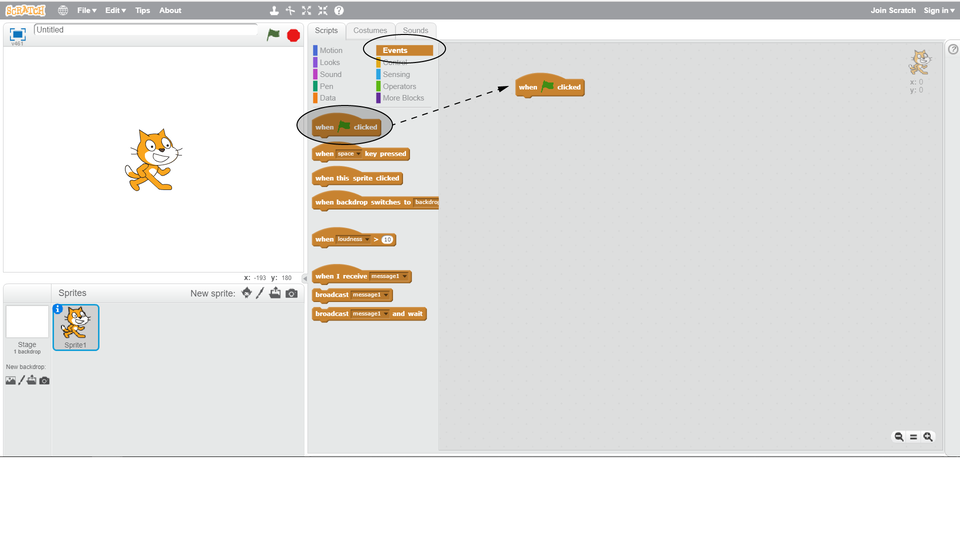
Select the Events category and drag the blockblock when green flag clicked into the script areascript area.
Step 2.
Choose the Motion category and drag the block move … steps to the script area and connect it to the green flaggreen flag block.
Step 3.
Choose the Control category, drag the block, stop ...and connect it to the previous block. Click on the drop down list in this block and select this script option.
Step 4.
Check how the script works. Click on the green flag several times. The cat‑sprite should move 10 steps forward with each click. You can check if the cat‑sprite actually moves by looking at the counter in the upper right corner of the panel.
If the cat‑sprite reaches the edge of the stage, you can grab it with the mouse (e.g. by the tail) and move it to any place in the stage.
Step 5.
If your script works correctly, experiment with the amount of steps performed by the sprite. Increase or decrease the numbernumber of steps in the blockblock window. Check what will happen if you enter a minus sign in front of the number of steps, e.g. -20.
Zasób interaktywny dostępny pod adresem https://zpe.gov.pl/a/DaKi8Wec5
The script would work the same way, if there was no blockblock, stop ....
However, it is worth to learn good habits and finish the scripts so that you cannot attach any blocks to the top or bottom. You can now run the script using the green flaggreen flag. It is often more convenient to run scripts using the keyboard. You can start each script with a separate keykey.
Practice running the script using the keyboard.
In your script, replace the block when green flag clicked with when ... keykey pressed selecting the space barspace bar as the start key. Restart the script by pressing the space bar.
Instruction
Go to the Events category. Detach the blockblock with the green flaggreen flag from the remaining blocks and drag it to the left. Enter a new block when ... keykey pressed and select the space from its drop‑down menudrop‑down menu. Run your script again by pressing the space barspace bar.
Your sprite can move, but only in one direction. You will get more motion possibilities when you apply turns.
Create a new script that will turn the spritesprite when you press a selected key (e.g., right arrow or left arrow). Combine rotationrotation with movement of the sprite. If you have no idea how to do it, follow the instructions.
Turning right
Create a new script:
Enter a blockblock when ... keykey pressed and select from the drop‑down menudrop‑down menu the key with which you want to run the script.
Add a block turn right ... degrees. Enter the numbernumber of degrees you want the sprite to turn by.
Add another block that moves the sprite with the required number of steps.
Add a block ending the script.
Turning left
Create a new script:
Enter a block when ... key pressed and select from the drop‑down menudrop‑down menu the key with which you want to run the script.
Add a block turn left ... degrees. Enter the number of degrees you want the sprite to turn by.
Add another block that moves the sprite with the required number of steps.
Add a block ending the script.
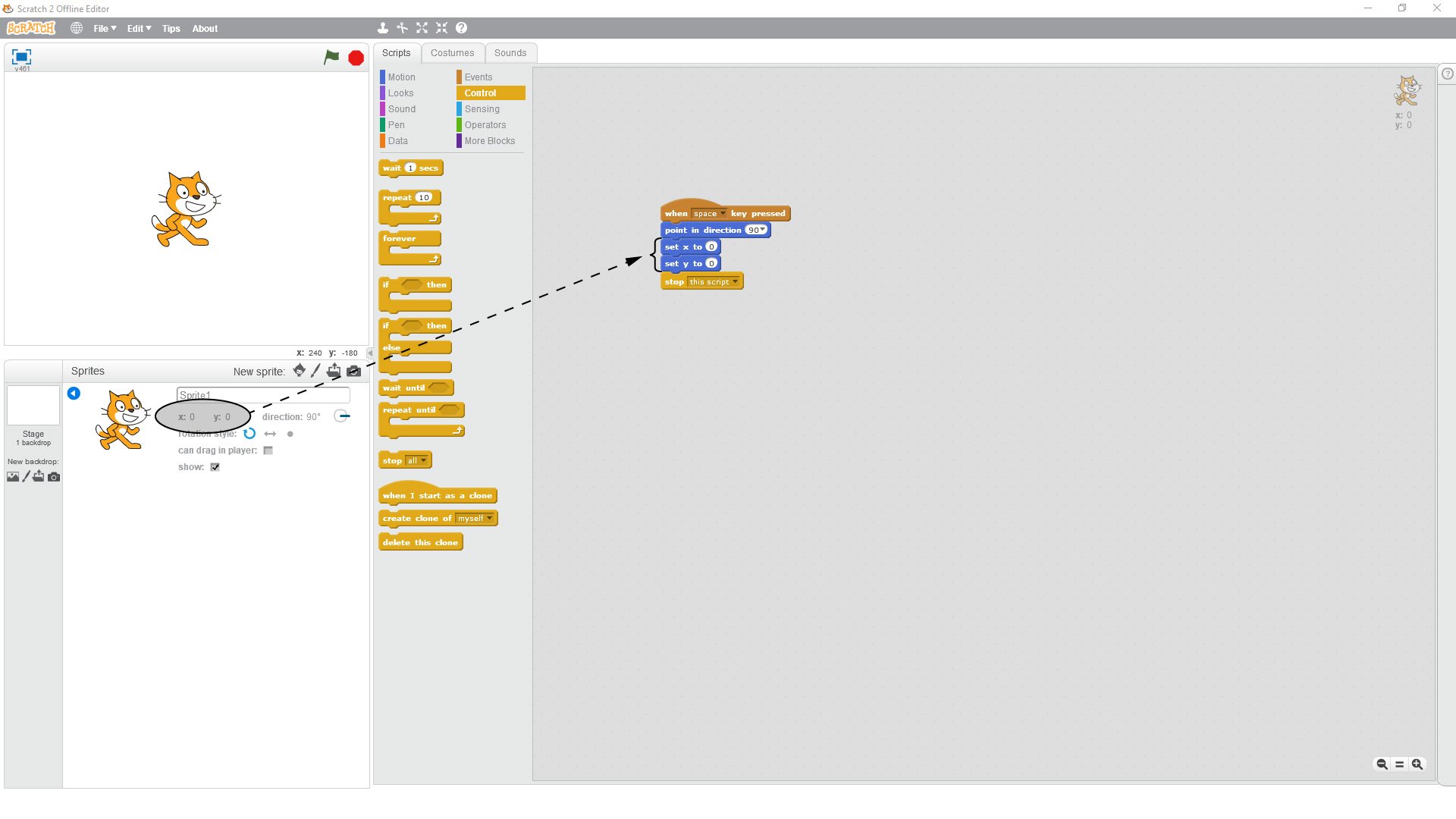
If we want the sprite to start its movement in the selected place, we can create the appropriate script. This script will move the sprite where we want it. You can also choose the direction in which it will look.
Find in the program the blocks shown in the figure and create a script to move the sprite to the desired location. Check what option in the blockblock point in direction ... you have to choose for the sprite to look down. Try out the settings you need to set for the blocks set x to ... and set y to ... for the spritesprite to be in the upper left corner of the stage.
Your sprite can also leave a trailtrail behind itself. Sometimes this function is useful if we want to check if the sprite is moving along the path we want. To create trails, we use blocks in the Pen category.
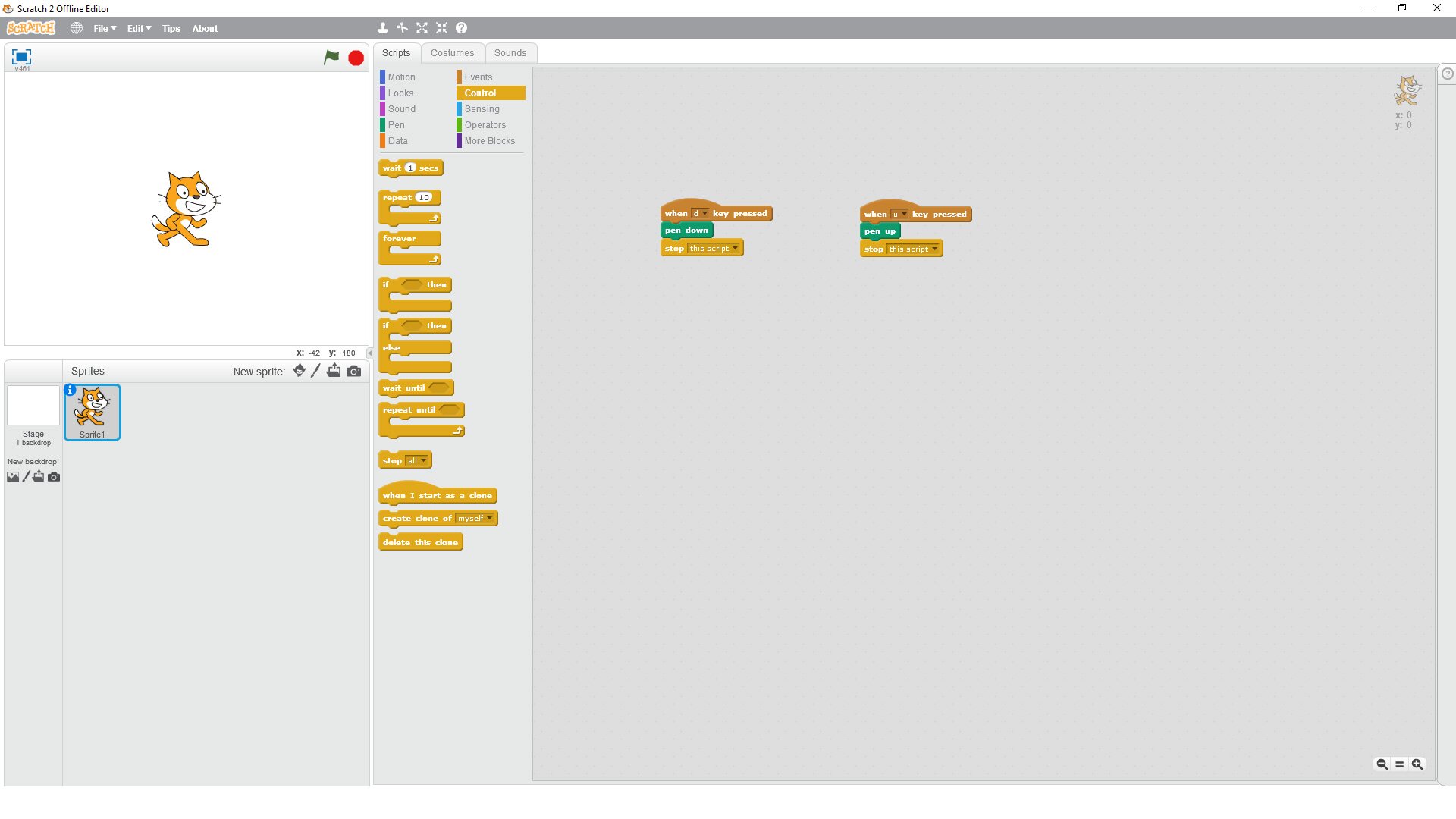
Build two additional scripts:
The first script causes to lower the pen on the stage after pressing the selected key,
The second script causes to raise the pen above the stage after pressing the selected key.
Once the scripts works expand them and add changing colour and thickness.
If you have no idea how to do it, look at the hint.
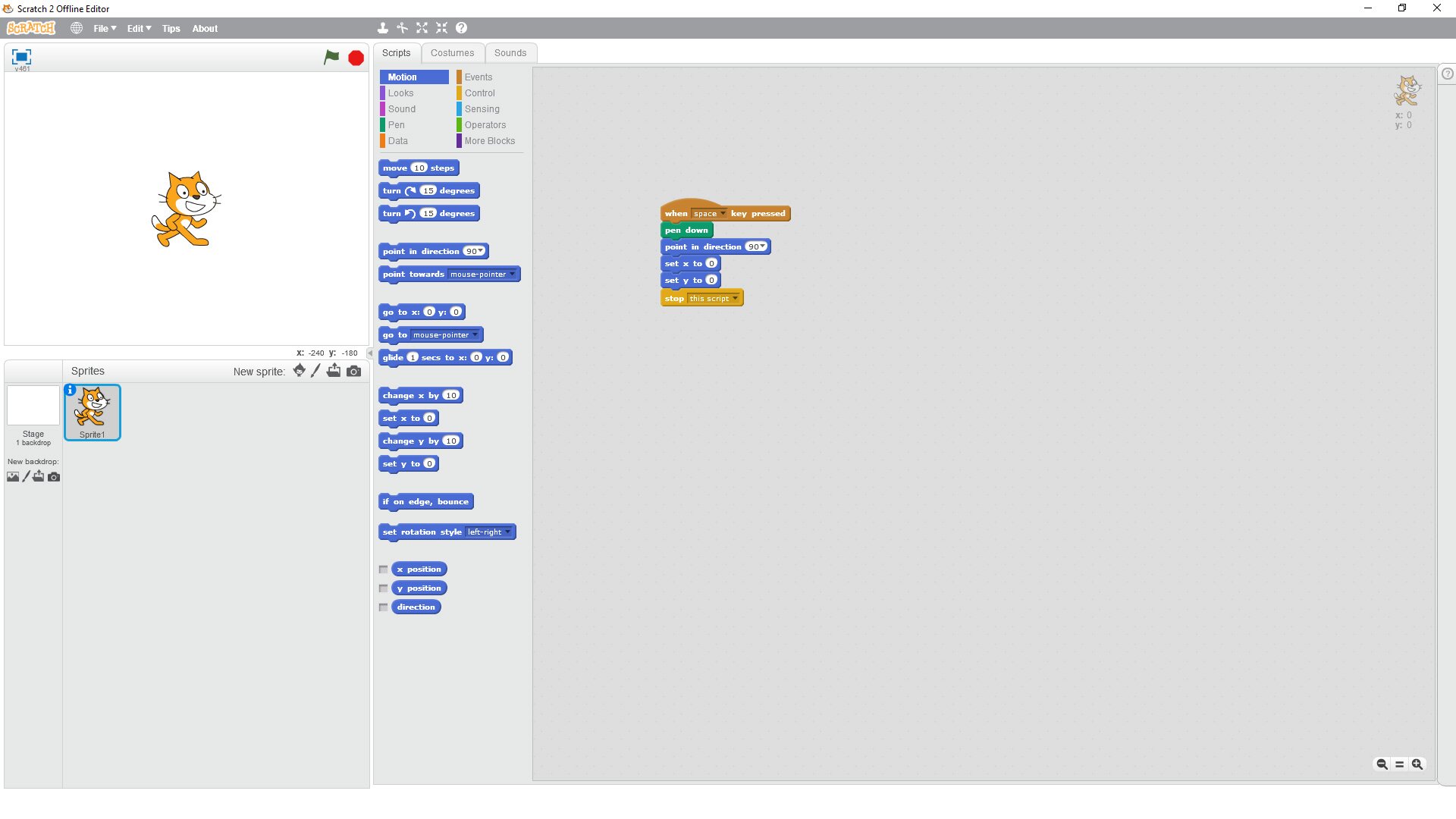
The spritesprite leaves a lot of trails. To get rid of them, you need to clear the stage. You can combine this action with placing the sprite in the starting position after restarting the program, e.g. using the following script.
Saving the script
You can save the scripts you have created on your drive or in the cloud on the Scratch portal. If you want to save it on the portal, you must have an account there.
To save the program on your computer, select File/Save or File/Download to your computer (depending on whether you run Scratch locally or in a web browser). Then enter the filename, e.g. First program and click Save.
Remember:
Using scripts, we can control the sprite movement in any direction; place it in the selected position. The sprite can leave a trailtrail when moving around.
Exercises
Which sentence is true?
- The green flag starts the program, while the red icon stops it.
- Each script is executed step by step, according to the layout of the blocks.
- At the end of each script there should not be a block stop ... .
- If we want the ghost to leave a trail, we have to lower the pen on the stage.
Write a script in which the sprite moves from one corner of the stage to another. Plan your route so that the sprite changes its direction at least three times.
Explain in English how to build a script that causes the sprite to leave trails on the stage.
Indicate which pairs of expressions or words are translated correctly.
- obszar skryptu - script area
- zielona flaga - green flag
- spacja - space
- duszek - sprite
- ślad - rotation
- klocek - key
- sprite
- space bar
- obszar skryptu
- duszek
- green flag
- zielona flaga
- trail
- ślad
- spacja
- script area
Glossary
klocek
Nagranie dostępne na portalu epodreczniki.pl
wymowa w języku angielskim: block
rozwijalne menu
Nagranie dostępne na portalu epodreczniki.pl
wymowa w języku angielskim: drop‑down menu
zielona flaga
Nagranie dostępne na portalu epodreczniki.pl
wymowa w języku angielskim: green flag
klawisz
Nagranie dostępne na portalu epodreczniki.pl
wymowa w języku angielskim: key
liczba
Nagranie dostępne na portalu epodreczniki.pl
wymowa w języku angielskim: number
obrót
Nagranie dostępne na portalu epodreczniki.pl
wymowa w języku angielskim: rotation
obszar skryptu
Nagranie dostępne na portalu epodreczniki.pl
wymowa w języku angielskim: script area
spacja
Nagranie dostępne na portalu epodreczniki.pl
wymowa w języku angielskim: space bar
duszek
Nagranie dostępne na portalu epodreczniki.pl
wymowa w języku angielskim: sprite
ślad
Nagranie dostępne na portalu epodreczniki.pl
wymowa w języku angielskim: trail
Keywords
green flaggreen flag
script areascript area
space barspace bar
spritesprite
trailtrail