What are the benefits of using an online maponline maponline map?
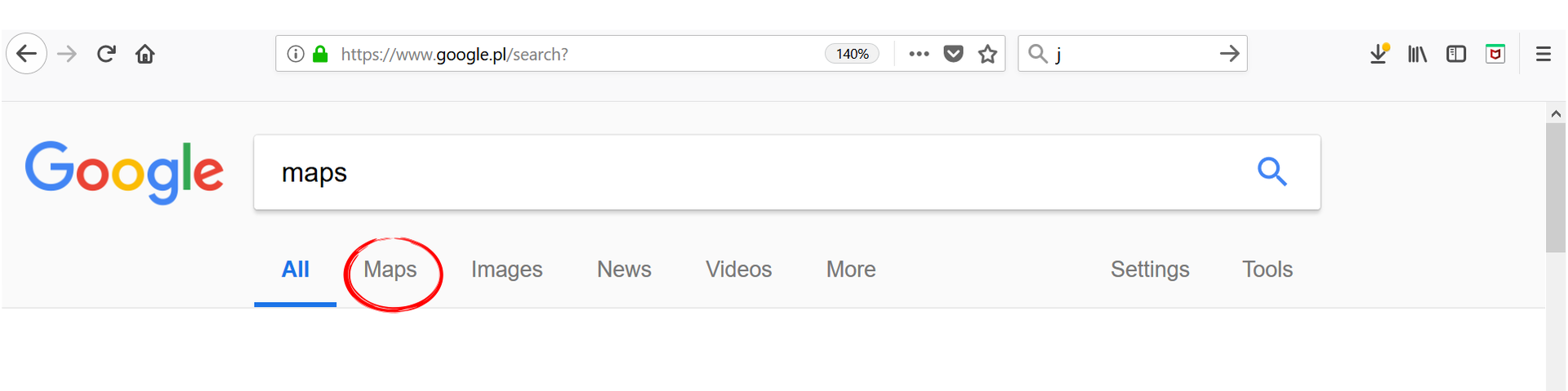
When planning a trip or a journey, we usually use online maps. In this way we can also virtually explore the whole world. Using online maps, we can get a lot of information. Using the Google search engine, you can use the map by selecting the appropriate item in the search menu or by typing directly the address maps.google.com into the browser.
R1CyIu1547eVj
Zrzut z ekranu przedstawia dostępne opcje w wyszukiwarce Google: All (domyślne), Maps (zaznaczone na zrzucie), Images, New, Videos, More. Dodatkowo można wybrać Setting oraz Tools.
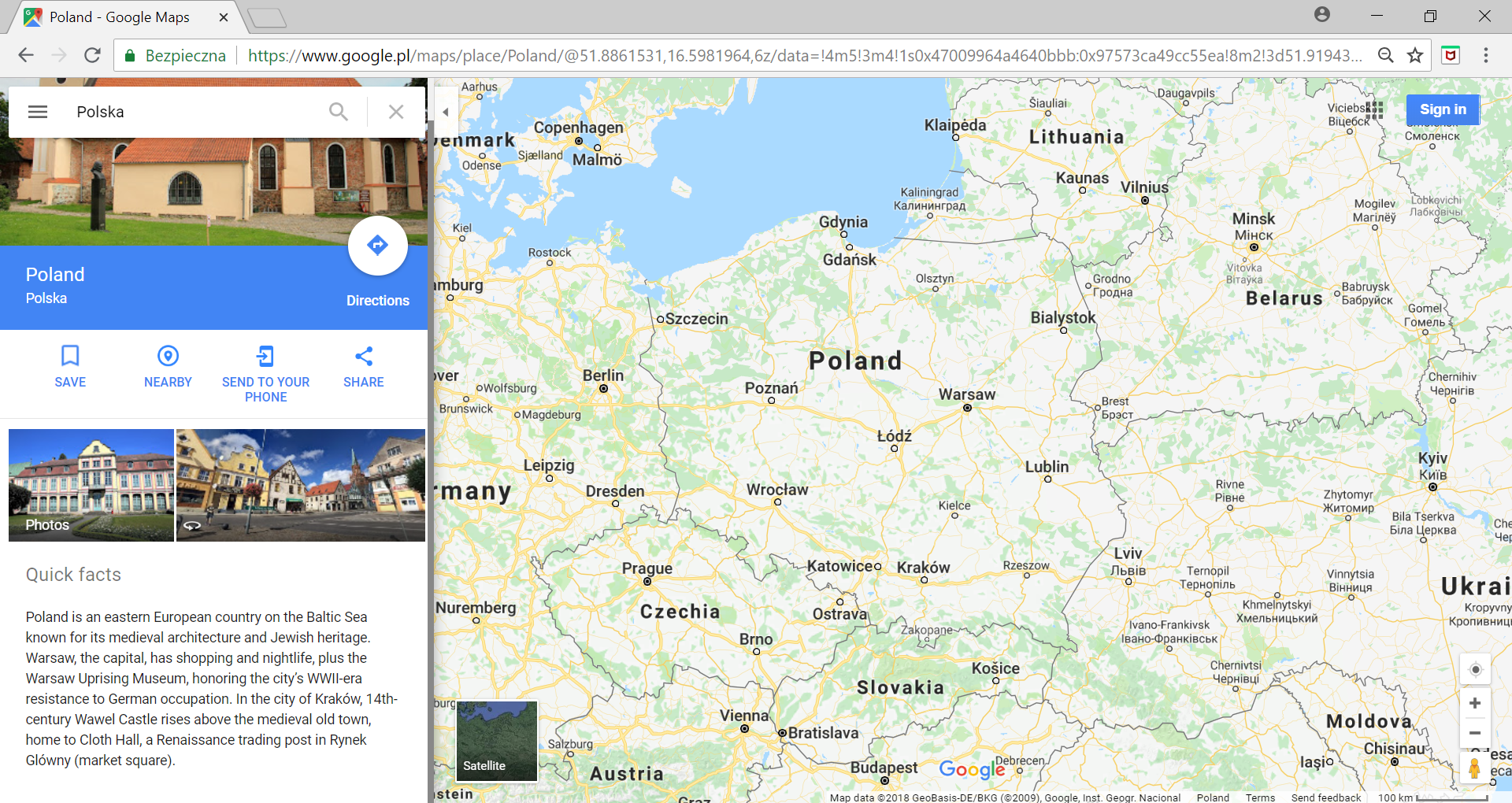
When the phrase „Poland” is entered in the search fieldsearch fieldsearch field in the upper left corner, a map of Poland and neighbouring countries will appear.
R168oupAbTNHg1
Zrzut z ekranu przedstawia mapę Polski (Poland) wyszukaną za pomocą Google. Widoczni są sąsiedzi naszego kraju: Lithuania, Belarus, Ukraine, Slovakia, Czechia, Germany. Po lewej stronie widoczne są najpopularniejsze zdjęcia z Polski wyszukane przez Google oraz krótka informacja w języku angielskim zatytułowana Quick facts.
Imagine that a group of pupils from the Primary School No. 113 in Łódź, plan a trip to Cracow. Using the online maponline maponline map, they want to get as much information as possible about the route and duration of the trip.
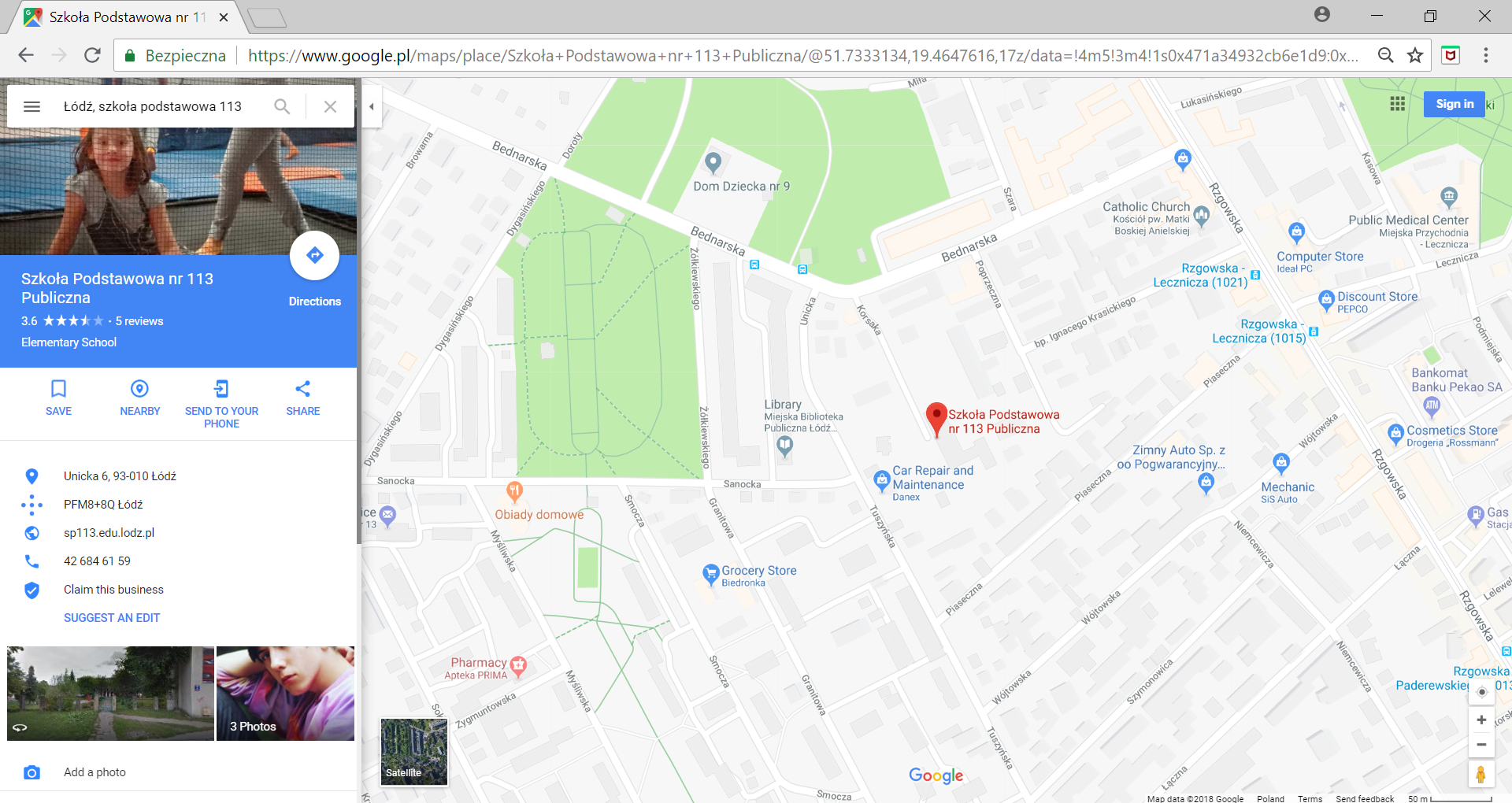
To do this, enter the phrase „Szkoła Podstawowa nr. 113, Łódź” in the search fieldsearch fieldsearch field.
R15EpxZfskCzc1
Na zrzucie ekranu widoczna jest mapa fragmentu Łodzi z zaznaczonym położeniem wyszukanej szkoły podstawowej nr 133. Znaleziony obiekt oznaczony jest czerwonym znacznikiem. Po lewej stronie znajdują się najpopularniejsze zdjęcia powiązane ze szkołą oraz dane teleadresowe dotyczące szkoły. Możemy również zobaczyć ocenę szkoły w postaci zaznaczonych gwiazdek i podpisu 3,6 na 5.
The locationlocationlocation of the school marked with a red marker appeared on the map. On the left side of the map, a side panelside panelside panel has opened, in which there is a lot of information about the school.
Pay attention to the blue arrow in the white circle below the search fieldsearch fieldsearch field. By clicking on it you will be able to enter your destination.
R1AGV7UGAxINU1
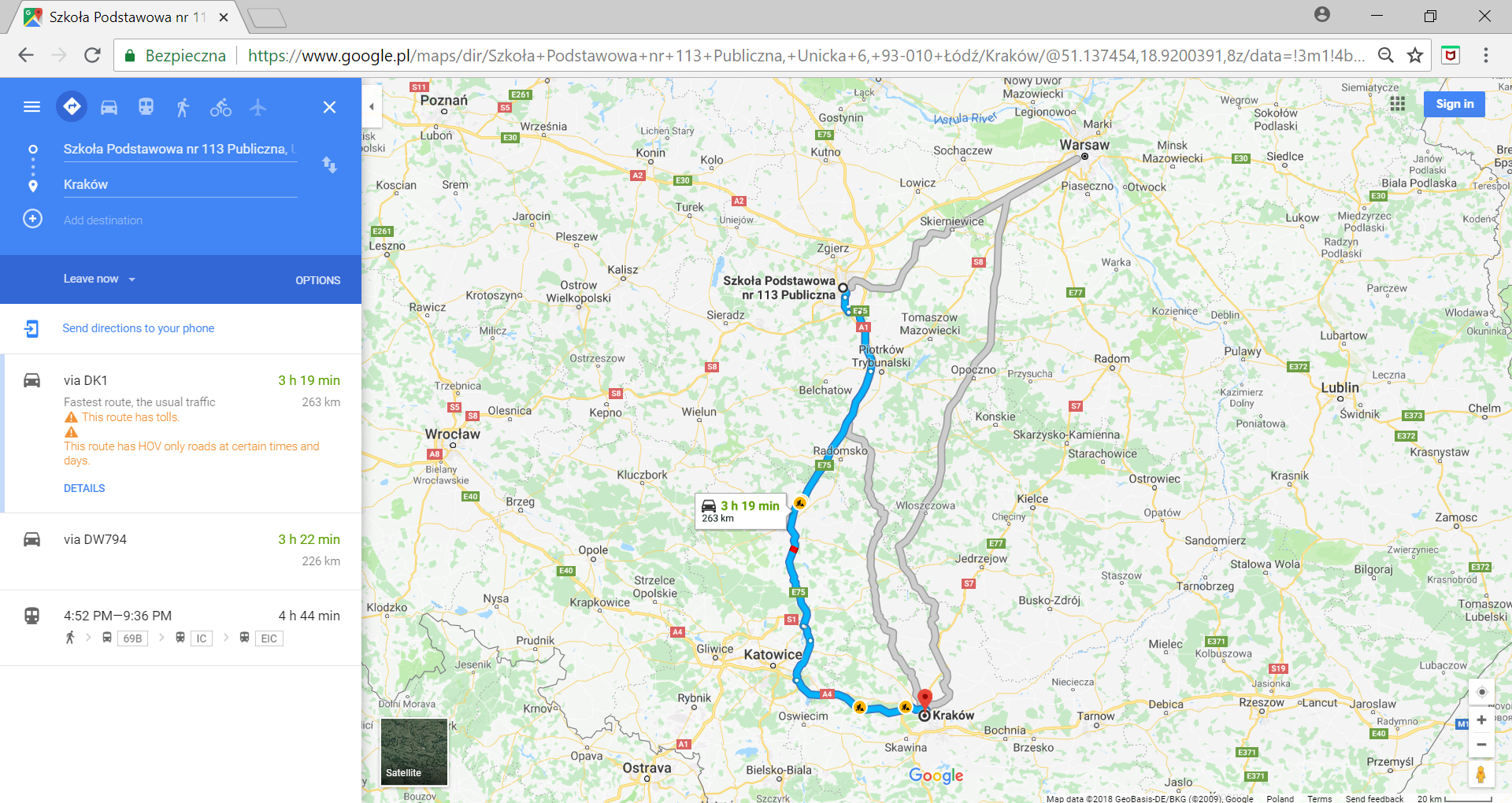
Na zrzucie ekranu widoczna jest mapa, na której zaznaczona jest wybrana trasa samochodowa pomiędzy Łodzią (wyszukaną szkołą) a Krakowem (kolorem niebieskim) oraz alternatywne dwie inne trasy. Pierwsza przez Warszawę, druga bezpośrednia. Na mapie widoczny jest czas wybranej trasy: 3 h 19 min. Zaznaczone są również miejsca, gdzie trwają roboty drogowe. Po lewej stronie opisane są opcje wybranej trasy: nazwy dróg DK1, DW794 oraz utrudnienia spowodowane remontami dróg.
Two routes in different colours appeared on the map. We have not chosen the mode of transportation, so a car route (blue) or a train route (grey) has been proposed. The suggested blue route is faster, which is why it is listed first. When you click on the grey route on the map, it will turn blue and be considered as the preferred route. On the left side, on a white background, their lengths, duration, as well as information on possible delays or transfers are described. Below the selected route (blue) is the „DETAILS” buttonbuttonbutton. By pressing on it we will get further details about the route. Please note that the exact address in Cracow has not been provided, so the search engine selects the city centre by default. The maps also give you the opportunity to see the route from a bird's eye view or in three dimensions, or even to follow the route. The map can be zoomed in and out and moved. We can determine our own locationlocationlocation. To do this, we use the buttons at the bottom of the page.
R1UGVdqF0xcQZ
Ilustracja interaktywna przestawia wycinek mapy z pokazanymi przykładowymi trasami pomiędzy Łodzią a Krakowem. Na dole mapy, po lewej stronie znajduje się kwadratowy przycisk wypełniony zdjęciem satelitarnym i podpisany Satellite. Po prawej znajdują się cztery przyciski rozmieszczone jeden pod drugim. Na górze przycisk oznaczony ikoną przypominającą celownik, pod nim przycisk z plusem oraz przycisk z minusem. Na dole widoczny jest przycisk z ikoną przedstawiającą człowieka. Na ilustracji widoczne są numery, a na nich podpisy. 1. satellite view {audio}, 2. localisation {audio}, 3. maximizing/minimizing {audio}
Ilustracja interaktywna przestawia wycinek mapy z pokazanymi przykładowymi trasami pomiędzy Łodzią a Krakowem. Na dole mapy, po lewej stronie znajduje się kwadratowy przycisk wypełniony zdjęciem satelitarnym i podpisany Satellite. Po prawej znajdują się cztery przyciski rozmieszczone jeden pod drugim. Na górze przycisk oznaczony ikoną przypominającą celownik, pod nim przycisk z plusem oraz przycisk z minusem. Na dole widoczny jest przycisk z ikoną przedstawiającą człowieka. Na ilustracji widoczne są numery, a na nich podpisy. 1. satellite view {audio}, 2. localisation {audio}, 3. maximizing/minimizing {audio}
Online maps also contain information on historic buildings, nature monuments, shops, hospitals, etc.
Plan a trip from your town to the place where Bartek's oak grows. You do not need to enter its address; all you need to do is enter the phrase „Bartek oak” in the map search fieldsearch fieldsearch field.
The use of online maps allows you to quickly determine the parameters of the route, such as its length, duration and many other details.
Exercises
Exercise 1
R1OkOxVaKihxc
Wersja alternatywna ćwiczenia: You can plan a route on Google Maps: Możliwe odpowiedzi: 1. on foot, 2. by car, 3. by bike, 4. by boat, 5. by air, 6. by public transport
Wersja alternatywna ćwiczenia: You can plan a route on Google Maps: Możliwe odpowiedzi: 1. on foot, 2. by car, 3. by bike, 4. by boat, 5. by air, 6. by public transport
You can plan a route on Google Maps:
on foot
by car
by bike
by boat
by air
by public transport
Source: GroMar, licencja: CC BY 3.0.
Exercise 2
Find your locationlocationlocation on the map using the location button. Using the appropriate buttons, zoom in as much as possible and see what happens. Then zoom out to the maximum and seebuttonsee what effects this enlargement gave.
Exercise 3
Explain in English what information you can get using the online maponline maponline map when planning your route.
Exercise 4
R1UbfIChHHEnx
Wersja alternatywna ćwiczenia: Indicate which pairs of expressions or words are translated correctly. Możliwe odpowiedzi: 1. mapa internetowa - online map, 2. przycisk - button, 3. widok satelitarny - satellite view, 4. pole wyszukiwania - search field, 5. panel boczny - location, 6. położenie - side panel
Wersja alternatywna ćwiczenia: Indicate which pairs of expressions or words are translated correctly. Możliwe odpowiedzi: 1. mapa internetowa - online map, 2. przycisk - button, 3. widok satelitarny - satellite view, 4. pole wyszukiwania - search field, 5. panel boczny - location, 6. położenie - side panel
Indicate which pairs of expressions or words are translated correctly.
mapa internetowa - online map
przycisk - button
widok satelitarny - satellite view
pole wyszukiwania - search field
panel boczny - location
położenie - side panel
Source: GroMar, licencja: CC BY 3.0.
RkME8spEGcUDV1
Interaktywna gra, polegająca na łączeniu wyrazów w pary w ciągu jednej minuty. Czas zaczyna upływać wraz z rozpoczęciem gry. Jeden ruch to odkrywanie najpierw jednej potem drugiej karty z wyrazem. Każdy wyraz jest odczytywany. Kolejny ruch to odkrywanie trzeciej i czwartej karty. W ten sposób odsłuchasz wszystkie wyrazy. Nawigacja z poziomu klawiatury za pomocą strzałek, odsłuchiwanie wyrazów enterem lub spacją. Znajdź wszystkie pary wyrazów.
Interaktywna gra, polegająca na łączeniu wyrazów w pary w ciągu jednej minuty. Czas zaczyna upływać wraz z rozpoczęciem gry. Jeden ruch to odkrywanie najpierw jednej potem drugiej karty z wyrazem. Każdy wyraz jest odczytywany. Kolejny ruch to odkrywanie trzeciej i czwartej karty. W ten sposób odsłuchasz wszystkie wyrazy. Nawigacja z poziomu klawiatury za pomocą strzałek, odsłuchiwanie wyrazów enterem lub spacją. Znajdź wszystkie pary wyrazów.
Match Polish terms with their English equivalents.
pole wyszukiwania
satellite view
button
search field
widok satelitarny
side panel
przycisk
panel boczny
online map
mapa internetowa
Source: Zespół autorski Politechniki Łódzkiej, licencja: CC BY 3.0.