If the documents of the Office suite (Word, Excel, PowerPoint, OneNote) are stored on One Drive, you can collaboratecollaboratecollaborate with others on these documents by using the Office Online applications, which open them in a web browser. If you have opened a document, your colleagues can open this document at the same time and also edit it.
If other people edit a document at the same time, Word Online will display an appropriate notification together with the information about the paragraph being edited.
Excel Online shows you where in a document other people are working. When one person changes the sort order or the way of filtering data, the viewviewview changes for all persons editing the worksheet. Therefore use sorting and filtering options carefully when other people also work on the worksheet.
When more than person edit a presentation at the same time, their first names and surnames (names) are displayed at the top of the document in PowerPoint Online, together with the information which slide they are editing.
In order to invite other people to collaboratecollaboratecollaborate, you can shareshareshare a document or send a linksend a linksend a link to this file.
RvKRwlGGu2cJa
Ilustracja interaktywna przedstawia formatkę umożliwiającą udostępniania dokumentów na dysku OneDrive. Tytuł formatki: Link Settings. Widoczne są możliwe opcje do 1 - Anyone, 2 - People in your organization, 3 - People with existing access, 4 - Specific people. Na ilustracji widoczne są numery, a na nich podpisy. 1. Anyone with the link can access the item. No login necessary. {audio}, 2. The link can be shared within your organization. {audio}, 3. Does not change permissions. {audio}, 4. The link will only work for people you specify, inside or outside your organization. {audio}
Ilustracja interaktywna przedstawia formatkę umożliwiającą udostępniania dokumentów na dysku OneDrive. Tytuł formatki: Link Settings. Widoczne są możliwe opcje do 1 - Anyone, 2 - People in your organization, 3 - People with existing access, 4 - Specific people. Na ilustracji widoczne są numery, a na nich podpisy. 1. Anyone with the link can access the item. No login necessary. {audio}, 2. The link can be shared within your organization. {audio}, 3. Does not change permissions. {audio}, 4. The link will only work for people you specify, inside or outside your organization. {audio}
AutoSaveautosaveAutoSave is a feature of Office applications that saves a file automatically every few seconds. AutoSave is enabled when documents are stored on OneDrive. You can disable it.
Create the programme of a few days’ school trip. Share the document with a selected person, so that he or she can make corrections. ViewviewView the proposals entered by him or her.
Microsoft Forms is an application for creating surveys, quizzes and forms. You can collaboratecollaboratecollaborate with colleagues on a survey or a form. You can invite any number of people to fill in the survey. Any invited person can take part by using any web browser, even from a mobile device.
You can enter into your form elements including:
text (a short text box or a longer paragraph),
image,
check boxes (singe choice or multiple choice),
dropdown lists,
date pickers.
The form can also collect incoming files.
You can allow form responders to submit only one response to a form or multiple responses. By clearing the Accept responses option, you can stop collecting responses at any time and customise the optional information which responders will see. By setting the Start date and End date, you can shareshareshare your form for a specific time. You can shuffle quiz questions or enable the quiz only within the closed environment of Windows 10, which disables the access to the Internet and the clipboard during an exam or prevents recording and printing a test. You can add an instruction to your form. Responders may see the correct answers and a points value assigned to each question after they submit their quiz answers. You can viewviewview and mark the submitted answers on an ongoing basis. The incoming data can be collected and exported to Excel.
RHHdg98icgeMW
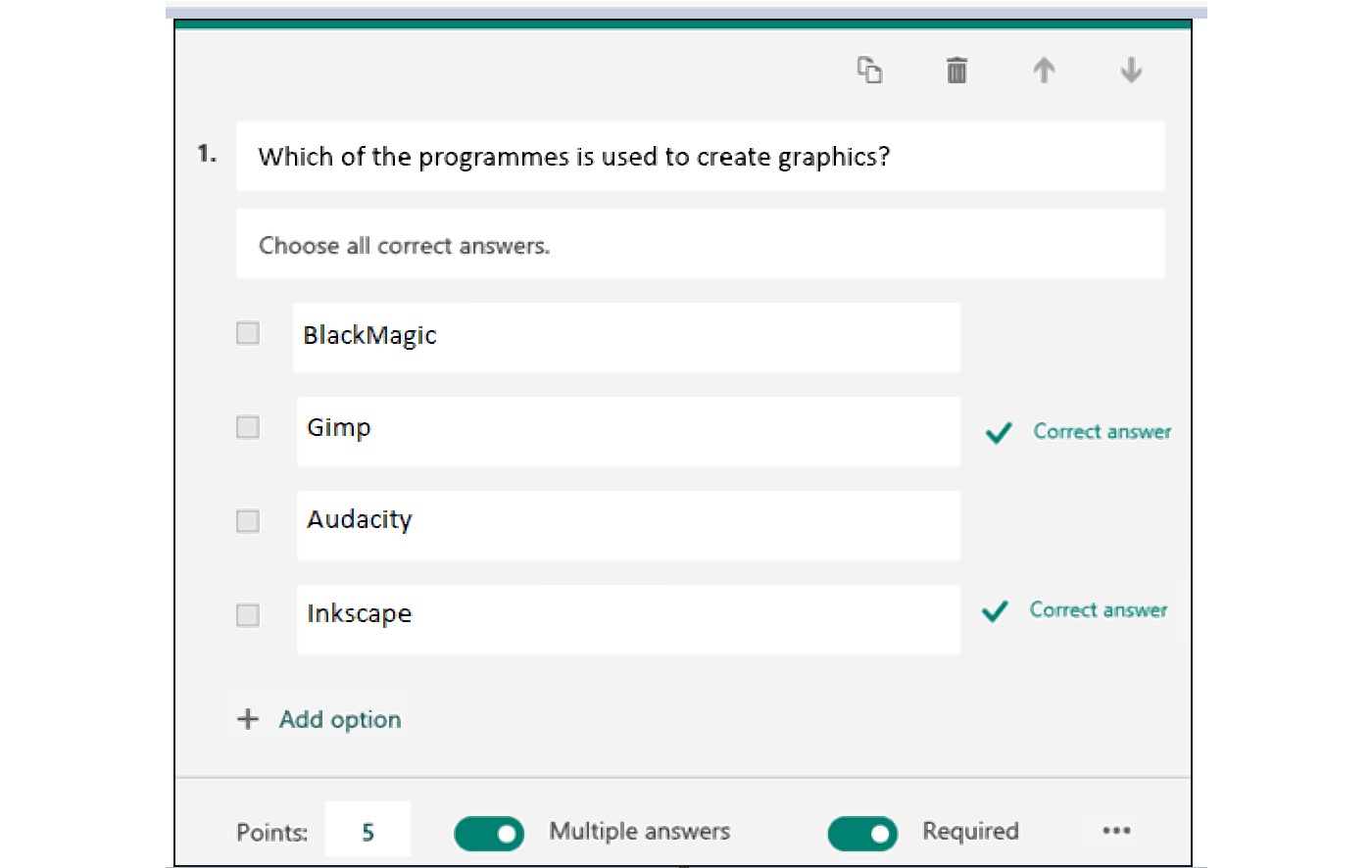
Ilustracja przedstawia formatkę z przykładowym pytaniem utworzonym w formularzu Microsoft Forms.Od góry. 1. W polu tekstowym Which of the programmes is used to create graphics? Poniżej w polu tekstowym tekst: Choose all correct answers. Poniżej checkbox, obok pole tekstowe z napisem BlackMagic. Poniżej checkbox, obok pole tekstowe z napisem Gimp oraz informacja Correct answer. Poniżej checkbox, obok pole tekstowe z napisem Audacity. Poniżej checkbox, obok pole tekstowe z napisem Inscape oraz informacja Correct answer. Poniżej znak plusa oraz napis Add option. Na dole napis Points: obok w polu liczba 5. Obok suwak w pozycji prawda i napis Multiple answers. Obok suwak w pozycji prawda i napis Required.
An exemplary part of a test created with Microsoft Forms
Create a test for a selected subject including 10 questions. Share it with selected people.
Exercises
Exercise 1
RT5Z8mDlDv76W
Wersja alternatywna ćwiczenia: You can enter into a form created with Microsoft Forms elements including: Możliwe odpowiedzi: 1. text, 2. image, 3. check boxes, 4. dropdown lists, 5. date pickers, 6. film, 7. audio file
Wersja alternatywna ćwiczenia: You can enter into a form created with Microsoft Forms elements including: Możliwe odpowiedzi: 1. text, 2. image, 3. check boxes, 4. dropdown lists, 5. date pickers, 6. film, 7. audio file
You can enter into a form created with Microsoft Forms elements including:
text
image
check boxes
dropdown lists
date pickers
film
audio file
zadanie
Source: GroMar, licencja: CC BY 3.0.
Exercise 2
Create a survey on favourite vegetables and fruits. Share it with as many people as possible. Check the results.
Exercise 3
Describe in English how to create a survey in Microsoft Forms and how to interpret its results.
Exercise 4
R1H70fWQzh8WP
Wersja alternatywna ćwiczenia: Indicate which pairs of expressions or words are translated correctly. Możliwe odpowiedzi: 1. udostępnić - share, 2. udostępniony - shared, 3. współpracować - collaborate, 4. wysłać link - send a link, 5. widok - export, 6. eksportować - view
Wersja alternatywna ćwiczenia: Indicate which pairs of expressions or words are translated correctly. Możliwe odpowiedzi: 1. udostępnić - share, 2. udostępniony - shared, 3. współpracować - collaborate, 4. wysłać link - send a link, 5. widok - export, 6. eksportować - view
Indicate which pairs of expressions or words are translated correctly.
udostępnić - share
udostępniony - shared
współpracować - collaborate
wysłać link - send a link
widok - export
eksportować - view
zadanie
Source: GroMar, licencja: CC BY 3.0.
RxMxrneKFR1oe1
Interaktywna gra, polegająca na łączeniu wyrazów w pary w ciągu jednej minuty. Czas zaczyna upływać wraz z rozpoczęciem gry. Jeden ruch to odkrywanie najpierw jednej potem drugiej karty z wyrazem. Każdy wyraz jest odczytywany. Kolejny ruch to odkrywanie trzeciej i czwartej karty. W ten sposób odsłuchasz wszystkie wyrazy. Nawigacja z poziomu klawiatury za pomocą strzałek, odsłuchiwanie wyrazów enterem lub spacją. Znajdź wszystkie pary wyrazów.
Interaktywna gra, polegająca na łączeniu wyrazów w pary w ciągu jednej minuty. Czas zaczyna upływać wraz z rozpoczęciem gry. Jeden ruch to odkrywanie najpierw jednej potem drugiej karty z wyrazem. Każdy wyraz jest odczytywany. Kolejny ruch to odkrywanie trzeciej i czwartej karty. W ten sposób odsłuchasz wszystkie wyrazy. Nawigacja z poziomu klawiatury za pomocą strzałek, odsłuchiwanie wyrazów enterem lub spacją. Znajdź wszystkie pary wyrazów.
Match Polish terms with their English equivalents.
share
collaborate
współpracować
udostępnić
udostępnić
export
udostępniony
widok
eksportować
view
Source: Zespół autorski Politechniki Łódzkiej, licencja: CC BY 3.0.