Some text editors include built‑in equation editors – these are tools for editing mathematical formulas.
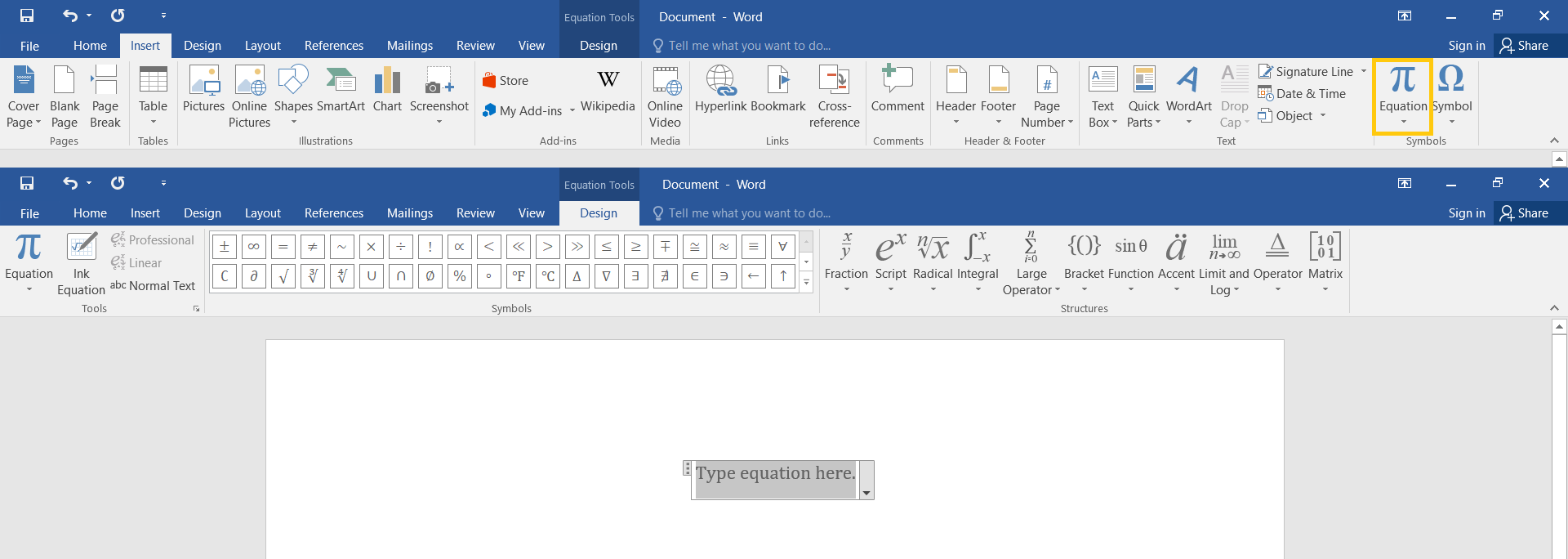
In order to start the equation editorequation editorequation editor in MS Word 2016, find the EquationequationEquation button, marked with the Pi symbolsymbolsymbol (π), on the Insert tab, in the Symbols group. You can also use the keyboard shortcut ALT + =.
Ryl79pgXlzXZJ1
Zrzut ekranu przedstawia wstawianie równań w edytorze MS Word 2016. Na górze widoczna jest karta Insert oraz w sekcji Symbols zaznaczona ikona Equation (która wygląda jak duża litera pi). Poniżej widoczny jest edytor równań matematycznych Equation Tools - Design. Edytor podzielny jest na sekcje, ułożone od lewej strony: Tools (polecenia odpowiedzialne za wstawianie równań), Symbols (wybór symboli) oraz Structures (wybór struktur matematycznych np. ułamki, potęgi, ułamki, całki itp. - szerzej opisany poniżej w aplikacji interaktywnej). Na stronie dokumentu widoczne jest okno do wpisywania równania z tekstem: Type equation here.
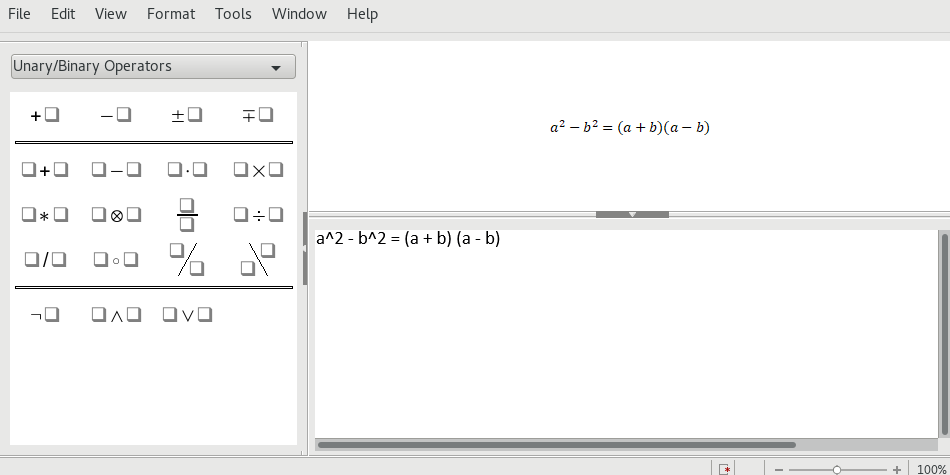
LibreOffice Math is an equation editor in Writer LibreOffice. In order to start it, click Object on the Insert dropdown list, and then select Formula.
RK6dIQLQlQEBz
Zrzut ekranu przedstawia program LibreOffice Math. Na górze menu File, Eit, View, Format, Window, Help. Poniżej okno programu podzielone jest na dwie części. Po lewej, węższej stronie lista rozwijana zawierająca struktury matematyczne z wybraną opcją Unary/Binary Operators. Pod nią przykłady symboli do wstawienia, gdzie widoczne kwadraty symbolizują znak wstawiany z klawiatury. Na przykład + kwadrat, - kwadrat, kwadrat + kwadrat , kwadrat - kwadrat , kwadrat razy kwadrat. Prawa strona podzielona jest w poziomie na dwa okna, w górny widoczny jest wzór matematyczny a do kwadratu odjąć b do kwadratu równa się iloczynowi sumy a i b (w nawiasie) przez różnicę a i b (w nawiasie). Poniżej w oknie tak zwany zapis skryptowy tego równania. a^2 - b^2 = (a+b)(a-b)
In the equation editorequation editorequation editor included in MS Word you can create an equationequationequation by using the following methods:
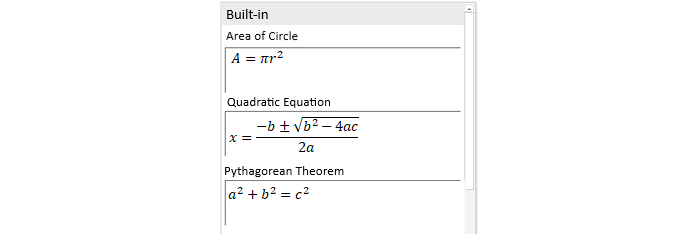
choose the equation you want from the gallery of exemplary or commonly used equations (e.g. the formula for the area of a circle),
insert or write symbols,
insert commonly used mathematical structures (e.g. a fraction, the radical symbolradical symbolradical symbol).
RCC3x8h3aE72g
Zrzut ekranu przedstawia przykłady równań wbudowanych Built-in opisane słownie i wzorem, ułożone jedno pod drugim. Area od Circle, A równa się pi razy r do kwadratu. Quadratic Equation, x równa się ułamkowi, gdzie w liczniku jest zapis: minus b plus minus pierwiastek kwadratowy z b do kwadratu minus 4 razy a razy c. W mianowniku 2 razy a. Pythagorean Theorem, a do kwadratu dodać b do kwadratu równa się c do kwadratu.
In order to insert a mathematical structurestructurestructure, click the appropriate type of a structure (i.a. a fraction, script, radical or bracket) in the Structures group on the Design tab.
R1N0Mumubg8DT
Ilustracja interaktywna przedstawia ikony struktur matematycznych dostępnych w MS Word oznaczone numerami od 1 do 11. 1 - ułamek zwykły x nad y. 2 - potęga e do x. 3 - pierwiastek n-tego stopnia z x. 4 - znak całki od -x do x. 5 - znak sumy od i równego 0 do n. 6 - nawias klamrowym, w jego środku nawias okrągły. 7 - (sinus) sim zera. 8 - mała litera a, nad nią dwie kropki. 9 - granica (limes) lim od n do nieskończoności. 10 - delta pod nią dwa odcinki. 11 - nawias kwadratowy, w nim w dwóch rzędach zapisane cyfry, w górnym: 1, 0 oraz w dolnym: 0, 1. Na ilustracji widoczne są numery, a na nich podpisy. 1. Fraction {audio}, 2. Script {audio}, 3. Radical {audio}, 4. Integral {audio}, 5. Large Operator {audio}, 6. Bracket {audio}, 7. Function {audio}, 8. Accent {audio}, 9. Limit and Log {audio}, 10. Operator {audio}, 11. Matrix {audio}.
Ilustracja interaktywna przedstawia ikony struktur matematycznych dostępnych w MS Word oznaczone numerami od 1 do 11. 1 - ułamek zwykły x nad y. 2 - potęga e do x. 3 - pierwiastek n-tego stopnia z x. 4 - znak całki od -x do x. 5 - znak sumy od i równego 0 do n. 6 - nawias klamrowym, w jego środku nawias okrągły. 7 - (sinus) sim zera. 8 - mała litera a, nad nią dwie kropki. 9 - granica (limes) lim od n do nieskończoności. 10 - delta pod nią dwa odcinki. 11 - nawias kwadratowy, w nim w dwóch rzędach zapisane cyfry, w górnym: 1, 0 oraz w dolnym: 0, 1. Na ilustracji widoczne są numery, a na nich podpisy. 1. Fraction {audio}, 2. Script {audio}, 3. Radical {audio}, 4. Integral {audio}, 5. Large Operator {audio}, 6. Bracket {audio}, 7. Function {audio}, 8. Accent {audio}, 9. Limit and Log {audio}, 10. Operator {audio}, 11. Matrix {audio}.
To change the inserted equationequationequation, place the cursor within it. When you do, the Design tab is displayed on the ribbon. Then you can make the changes you want.
Equations editors are programmes built in text editors that are used to insert equations and formulas into text document. They are useful for editing papers in the field of mathematics as well as chemistry and physics.
Exercises
Exercise 1
R1AzRC8Q7AYCt
Wersja alternatywna ćwiczenia: Determine which sentences are true. Możliwe odpowiedzi: 1. An equation editor is a tool used for editing mathematical and physical formulas., 2. You cannot write a chemical reaction in an equation editor., 3. An equation editor contains the set of symbols, e.g. Greek letters.
Wersja alternatywna ćwiczenia: Determine which sentences are true. Możliwe odpowiedzi: 1. An equation editor is a tool used for editing mathematical and physical formulas., 2. You cannot write a chemical reaction in an equation editor., 3. An equation editor contains the set of symbols, e.g. Greek letters.
Determine which sentences are true.
An equation editor is a tool used for editing mathematical and physical formulas.
You cannot write a chemical reaction in an equation editor.
An equation editor contains the set of symbols, e.g. Greek letters.
zadanie
Source: GroMar, licencja: CC BY 3.0.
Exercise 2
By using an equation editor, write the following operation and calculate it.
1 dodać ułamek zwykły, w liczniku 1, w mianowniku 1 dodać ułamek zwykły, w liczniku 1, w mianowniku 1 dodać ułamek zwykły, w liczniku 1, w mianowniku 1 dodać ułamek zwykły, w liczniku 1, w mianowniku 1 dodać ułamek zwykły, w liczniku 1, w mianowniku 2 równa się.
1 dodać ułamek zwykły, w liczniku 1, w mianowniku 1 dodać ułamek zwykły, w liczniku 1, w mianowniku 1 dodać ułamek zwykły, w liczniku 1, w mianowniku 1 dodać ułamek zwykły, w liczniku 1, w mianowniku 1 dodać ułamek zwykły, w liczniku 1, w mianowniku 2 równa się.
1 dodać ułamek zwykły, w liczniku 1, w mianowniku 1 dodać ułamek zwykły, w liczniku 1, w mianowniku 1 dodać ułamek zwykły, w liczniku 1, w mianowniku 1 dodać ułamek zwykły, w liczniku 1, w mianowniku 1 dodać ułamek zwykły, w liczniku 1, w mianowniku 2 równa się 1 dodać ułamek zwykły, w liczniku 13, w mianowniku 21 równa się ułamek zwykły, w liczniku 34, w mianowniku 21.
1 dodać ułamek zwykły, w liczniku 1, w mianowniku 1 dodać ułamek zwykły, w liczniku 1, w mianowniku 1 dodać ułamek zwykły, w liczniku 1, w mianowniku 1 dodać ułamek zwykły, w liczniku 1, w mianowniku 1 dodać ułamek zwykły, w liczniku 1, w mianowniku 2 równa się 1 dodać ułamek zwykły, w liczniku 13, w mianowniku 21 równa się ułamek zwykły, w liczniku 34, w mianowniku 21.
Exercise 3
Describe in English the methods of inserting equations in MS Word 2016.
Exercise 4
RC6kfVB15hD4F
Wersja alternatywna ćwiczenia: Indicate which pairs of expressions or words are translated correctly. Możliwe odpowiedzi: 1. edytor równań - equation editor, 2. równanie - equation, 3. struktura - structure, 4. pierwiastek - radical symbol, 5. równanie algebraiczne - algebraic equation, 6. reakcje chemiczne - algebraic equation
Wersja alternatywna ćwiczenia: Indicate which pairs of expressions or words are translated correctly. Możliwe odpowiedzi: 1. edytor równań - equation editor, 2. równanie - equation, 3. struktura - structure, 4. pierwiastek - radical symbol, 5. równanie algebraiczne - algebraic equation, 6. reakcje chemiczne - algebraic equation
Indicate which pairs of expressions or words are translated correctly.
edytor równań - equation editor
równanie - equation
struktura - structure
pierwiastek - radical symbol
równanie algebraiczne - algebraic equation
reakcje chemiczne - algebraic equation
zadanie
Source: GroMar, licencja: CC BY 3.0.
RbbX6OA4TNtac1
Interaktywna gra, polegająca na łączeniu wyrazów w pary w ciągu jednej minuty. Czas zaczyna upływać wraz z rozpoczęciem gry. Jeden ruch to odkrywanie najpierw jednej potem drugiej karty z wyrazem. Każdy wyraz jest odczytywany. Kolejny ruch to odkrywanie trzeciej i czwartej karty. W ten sposób odsłuchasz wszystkie wyrazy. Nawigacja z poziomu klawiatury za pomocą strzałek, odsłuchiwanie wyrazów enterem lub spacją. Znajdź wszystkie pary wyrazów.
Interaktywna gra, polegająca na łączeniu wyrazów w pary w ciągu jednej minuty. Czas zaczyna upływać wraz z rozpoczęciem gry. Jeden ruch to odkrywanie najpierw jednej potem drugiej karty z wyrazem. Każdy wyraz jest odczytywany. Kolejny ruch to odkrywanie trzeciej i czwartej karty. W ten sposób odsłuchasz wszystkie wyrazy. Nawigacja z poziomu klawiatury za pomocą strzałek, odsłuchiwanie wyrazów enterem lub spacją. Znajdź wszystkie pary wyrazów.
Match Polish terms with their English equivalents.
equation
symbol
edytor równań
equation editor
symbol
równanie
Source: Zespół autorski Politechniki Łódzkiej, licencja: CC BY 3.0.