Ilustracja interaktywna przedstawia schemat systemu bazodanowego. Elementy schematu zostały oznaczone numerami od 1 do 8. W centrum znajduje się rysunek przypominający walec obrazujący bazę danych (oznaczony numerem 1). Baza danych łączy się z dużym prostokątem (oznaczonym numerem 2), razem otoczone są zaznaczeniem (oznaczonym numerem 3). Od prostokąta poprowadzone są strzałki z grotami w dwóch kierunkach do mniejszych prostokątów (oznaczonymi numerami 4, 5, 6). Wszystkie opisane elementy otoczone są prostokątem (oznaczonym numerem 7). Po zewnętrznej stronie prostokąta znajdują się postacie ludzi (oznaczone numerem 8). Na numerach widoczne są podpisy. 1. a database {audio}, 2. a Database Management System {audio}, 3. a database system {audio}, 4. an application {audio}, 5. an application {audio}, 6. an application {audio}, 7. a computer system {audio}, 8. users {audio}.
Ilustracja interaktywna przedstawia schemat systemu bazodanowego. Elementy schematu zostały oznaczone numerami od 1 do 8. W centrum znajduje się rysunek przypominający walec obrazujący bazę danych (oznaczony numerem 1). Baza danych łączy się z dużym prostokątem (oznaczonym numerem 2), razem otoczone są zaznaczeniem (oznaczonym numerem 3). Od prostokąta poprowadzone są strzałki z grotami w dwóch kierunkach do mniejszych prostokątów (oznaczonymi numerami 4, 5, 6). Wszystkie opisane elementy otoczone są prostokątem (oznaczonym numerem 7). Po zewnętrznej stronie prostokąta znajdują się postacie ludzi (oznaczone numerem 8). Na numerach widoczne są podpisy. 1. a database {audio}, 2. a Database Management System {audio}, 3. a database system {audio}, 4. an application {audio}, 5. an application {audio}, 6. an application {audio}, 7. a computer system {audio}, 8. users {audio}.
A Database Management System (DBMS) is a programme or an entire computer system used for managing a database. Apart from ensuring access to data in the database, it enables performing many operations that are necessary to ensure the correct operation of the database, such as: administrationadministrationadministration, ensuring security, optimisingoptimisingoptimising, reportingreportingreporting or a range of additional mechanisms.
Structured Query Language (SQL) is a language used for creatingcreatingcreating and modifyingmodifyingmodifying databases and for insertinginsertinginserting and retrieving data from databases. It enables performing the following basic operations:
creating and modifying databases,
creating, modifying and deletingdeletingdeleting tables,
inserting, modifying and deleting data in tables,
searchingsearchingsearching for data in tables (queries).
Most database programmes installed on desktop computers include mechanisms that enable performing these operations without knowledge of the SQL syntaxSQL syntaxSQL syntax.
The easiest method of insertinginsertinginserting data into a database is importing the data from the existing data sources directly to tables in the database.
The INSERT statement in SQL is used to insert data into a database table.
Source: Zespół autorski Politechniki Łódzkiej <e-podreczniki@p.lodz.pl>, licencja: CC BY 3.0.
R1XELhsqQLKSO
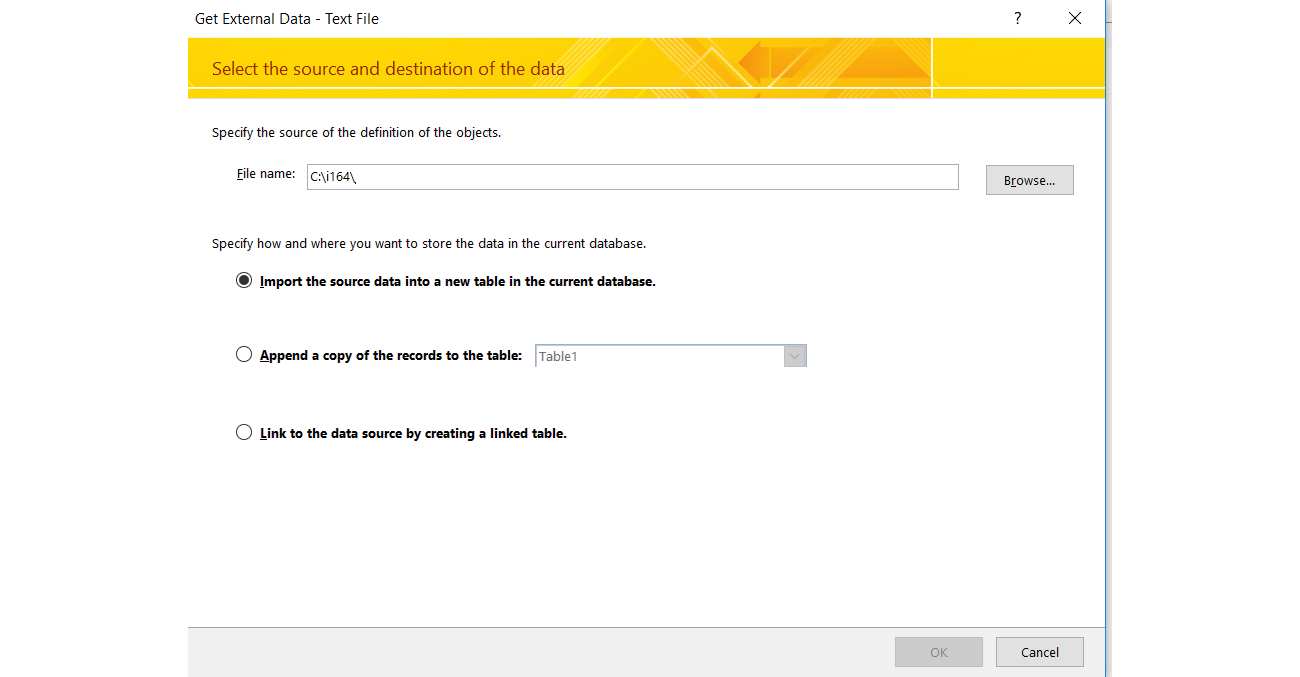
Ilustracja przedstawia formatkę importowania danych w MS Access. Na górze tytuł: Get External Data - Text File. Poniżej tekst: Select the source and destination of the data. Poniżej tekst: Specify the source of the definition of the objects. Poniżej tekst: File name:. Obok pole tekstowe z wpisaną ścieżką dostępu do importowanego pliku. Obok przycisk z napisem Browse... Poniżej tekst: Specify how and where you want to store te data in the current database. Poniżej trzy radiobutony, jeden pod drugim (pierwszy jest zaznaczony) 1 - Import the source data into a new table in the current database. 2 - Append a capy of the records to the table (obok nieaktywna lista rozwijana z pozycją Table1). 3 - Link to the data source by creating a linked table. Na dole po prawej stronie dwa przyciski OK oraz Cancel.
In the resulting table you will find the information about the books: their author, title and the year of their first edition. Add five records with your favourite books.
ModifyingmodifyingModifying data refers to changing the content of fields in existing records. To modify (update) data in SQL you must use the UPDATE statement.
DeletingdeletingDeleting data refers to removing an entire record or a group of records in a table. To delete data in SQL you must use the DELETE statement.
One of the operations performed the most frequently on databases is searchingsearchingsearching for data. A statement in SQL that realises queries to a database is the SELECT statement.
In the table from the previous task, find the books meeting the following criteria:
issued after 2010,
the Author field begins with the letter ‘C’,
in the Title field, the second letter is ‘i’ .
If you have problems with the task, see the solution.
R139aVFj3fxrL1
Ilustracja przedstawia trzy kwerendy w widoku projektu w MS Access. Każda kwerenda posiada następujące opcje: Field, Table, Sort, Show: Criteria, or. W każdej z kwerend są wskazane trzy pola tabeli Books: Author, Title, Publication_date. W żadnej z kwerend nie wybrano sposobu sortowania (pola Sort są puste) W każdej z kwerend wszystkie pola są widoczne (w wierszu Show: wszystkie checkboxy są zaznaczone). W kwerendzie 1 - w polu Criteria dla Publication_date wpisana jest wartość: >2010. W kwerendzie 2 - w polu Criteria dla Author wpisane jest Like "c*". W kwerendzie 3 - w polu Criteria dla Title wpisane jest Like "?i**".
Data in the form of records are entered into the tables of a database in an unorganized way. To order them, we usually sort a selected column of the table in an ascending or descending order. A statement in SQL that realises sortingsortingsorting tables is the SELECT statement together with the ORDER BY statement. It performs sorting data, while its parameters defining the sort order are: ASC – in an ascending orderin an ascending orderin an ascending order (alphabetically) and DESC – in a descending orderin a descending orderin a descending order.
In the table from the previous task, sort the books from the one issued the least recently.
If you have problems with the task, see the solution.
RE8ssgILKuvAd1
Ilustracja przedstawia kwerendę w widoku projektu w MS Access. Kwerenda posiada następujące opcje: Field, Table, Sort, Show: Criteria, or. W kwerendzie są wskazane trzy pola tabeli Books: Author, Title, Publication_date. W polu Sort dla Title z listy rozwijanej wybrana jest opcja Ascending.
Databases are used for storing truly huge amounts of data. Thanks to them you can easily search for needed information and modify it.
Exercises
RJDHv2fzzgOsO
Exercise 1
Wersja alternatywna ćwiczenia: Identify true statements of SQL: Możliwe odpowiedzi: 1. SELECT, 2. ORDER BY, 3. SORT BY , 4. INSERT, 5. UPDATE, 6. MODIFY
Wersja alternatywna ćwiczenia: Identify true statements of SQL: Możliwe odpowiedzi: 1. SELECT, 2. ORDER BY, 3. SORT BY , 4. INSERT, 5. UPDATE, 6. MODIFY
Identify true statements of SQL:
SELECT
ORDER BY
SORT BY
INSERT
UPDATE
MODIFY
zadanie
Source: GroMar, licencja: CC BY 3.0.
Exercise 2
In the database you worked on during the lesson perform the following operations:
find the books issued last year,
find the book titles which contain the word ‘the’,
sort the records in the table in a descending order by the Title field,
sort the records in the table in an ascending order by the Title and Author fields.
Exercise 3
Consider what database would be useful to you on an everyday basis. Why? Design the needed tables.
R1ME5jWFFcAlt
Exercise 4
Wersja alternatywna ćwiczenia: Indicate which pairs of expressions or words are translated correctly. Możliwe odpowiedzi: 1. administrowanie - administration, 2. optymalizacja - optimising, 3. raportowanie - reporting, 4. składnia języka SQL - SQL syntax, 5. wprowadzanie - searching, 6. wyszukiwanie - inserting
Wersja alternatywna ćwiczenia: Indicate which pairs of expressions or words are translated correctly. Możliwe odpowiedzi: 1. administrowanie - administration, 2. optymalizacja - optimising, 3. raportowanie - reporting, 4. składnia języka SQL - SQL syntax, 5. wprowadzanie - searching, 6. wyszukiwanie - inserting
Indicate which pairs of expressions or words are translated correctly.
administrowanie - administration
optymalizacja - optimising
raportowanie - reporting
składnia języka SQL - SQL syntax
wprowadzanie - searching
wyszukiwanie - inserting
zadanie
Source: GroMar, licencja: CC BY 3.0.
R5OcCmikMr4dK1
Interaktywna gra, polegająca na łączeniu wyrazów w pary w ciągu jednej minuty. Czas zaczyna upływać wraz z rozpoczęciem gry. Jeden ruch to odkrywanie najpierw jednej potem drugiej karty z wyrazem. Każdy wyraz jest odczytywany. Kolejny ruch to odkrywanie trzeciej i czwartej karty. W ten sposób odsłuchasz wszystkie wyrazy. Nawigacja z poziomu klawiatury za pomocą strzałek, odsłuchiwanie wyrazów enterem lub spacją. Znajdź wszystkie pary wyrazów.
Interaktywna gra, polegająca na łączeniu wyrazów w pary w ciągu jednej minuty. Czas zaczyna upływać wraz z rozpoczęciem gry. Jeden ruch to odkrywanie najpierw jednej potem drugiej karty z wyrazem. Każdy wyraz jest odczytywany. Kolejny ruch to odkrywanie trzeciej i czwartej karty. W ten sposób odsłuchasz wszystkie wyrazy. Nawigacja z poziomu klawiatury za pomocą strzałek, odsłuchiwanie wyrazów enterem lub spacją. Znajdź wszystkie pary wyrazów.
Match Polish terms with their English equivalents.
Database Management System, DBMS
optimising
System zarządzania bazą danych, SZBD
składnia języka SQL
administrowanie
reporting
administration
raportowanie
SQL syntax
optymalizacja
Source: Zespół autorski Politechniki Łódzkiej, licencja: CC BY 3.0.