A templatetemplatetemplate is a ready‑to‑use pattern of a document of an appropriate structure including specified parametersparametersparameters such as e.g.: page layout. margin settingsmargin settingsmargin settings, paragraph formatparagraph formatparagraph format, fonts used, which enables to efficiently and quickly create correct, professional and attractive documents. Apart from predefined form templates include the content: predefined text boxes and some elements which can be regarded as a starting point for creating a complete document.
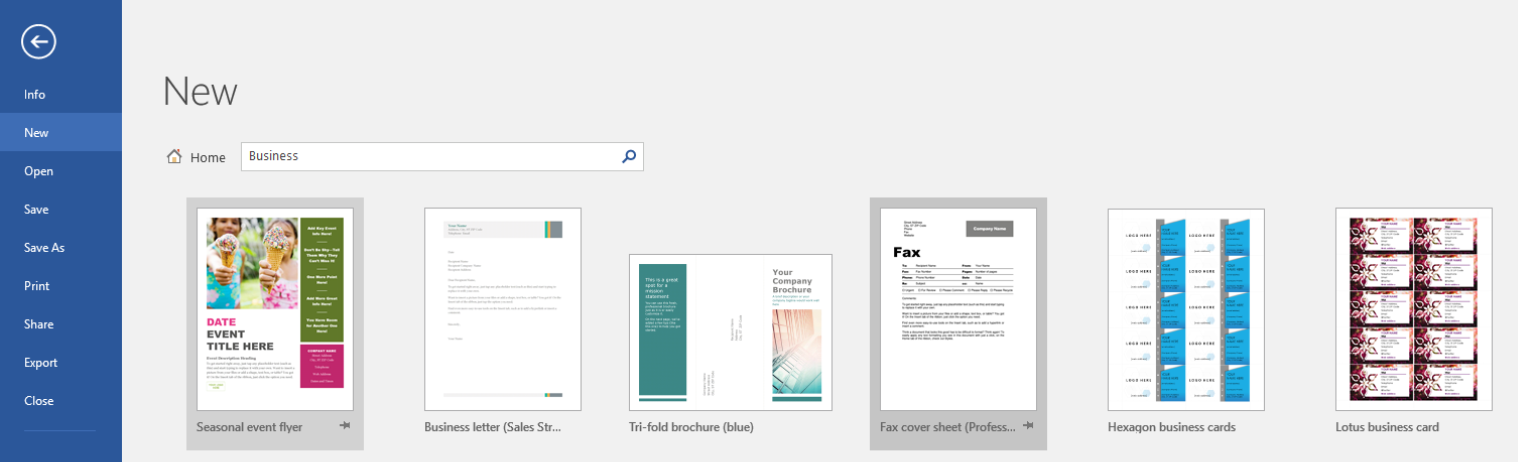
To create a new document by using a built‑in template in Word, click New in the File menu, and then select an appropriate template. The templates are grouped into categories to make searching easier.
R10isuzdDgB7q
Zrzut ekrany przedstawia widok okna programu MS Word po wybraniu zakładki File i polecenia New. Po lewej stronie menu, od góry przycisk powrotu (strzałka skierowana w lewo w okręgu) oraz dostępne polecenia: Info, New (aktywne) Open, Save, Save As, Print, Share, Export, Close. po wybraniu wyszukiwania szablonów w kategorii Business. Prawą stronę zajmują wyszukane szablony. Na górze wybrane polecenie New. Poniżej ikona przedstawiająca dom i napis Home, obok pole wyszukiwania z wpisanym słowem Business (na końcu pola ikona przedstawiająca lupę). Poniżej wyszukane przykłady szablonów powiązanych ze słowem kluczowym Business.
The view of the New window after selecting searching for templates in the Business category
Give the categories of templates that are available in your text editor.
RUjkL9qDFn5x81
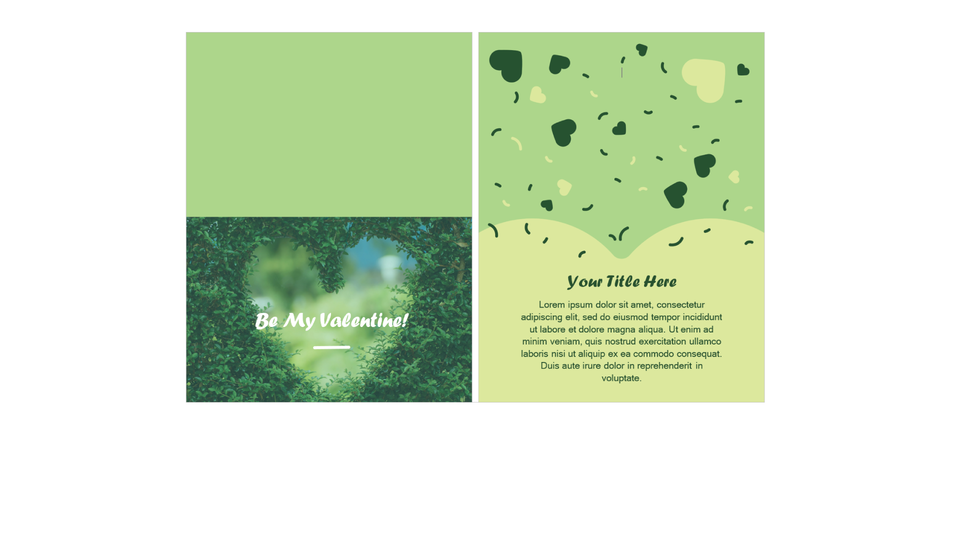
Pokaz slajdów przedstawia wybrane przykłady szablonów w edytorze tekstu. Wszystkie teksty umieszczone w szablonach powinny być zmienione albo usunięte. Instrukcja obsługi z poziomu klawiatury: 1. Uruchomienie aplikacji - ENTER, 2. Na każdym ze slajdów czytany jest automatycznie tekst alternatywny po polsku, 3. Przy pierwszym uruchomieniu na pierwszym slajdzie, czytanie tekstu po angielsku - TAB, 4. Przejście między slajdami: do następnego slajdu - TAB, do poprzedniego slajdu - TAB + SHIFT, 5. Przejście do czytania napisu po angielsku - strzałka w górę + strzałka w dół (czyta tekst po angielsku widoczny na slajdzie).
Pokaz slajdów przedstawia wybrane przykłady szablonów w edytorze tekstu. Wszystkie teksty umieszczone w szablonach powinny być zmienione albo usunięte. Instrukcja obsługi z poziomu klawiatury: 1. Uruchomienie aplikacji - ENTER, 2. Na każdym ze slajdów czytany jest automatycznie tekst alternatywny po polsku, 3. Przy pierwszym uruchomieniu na pierwszym slajdzie, czytanie tekstu po angielsku - TAB, 4. Przejście między slajdami: do następnego slajdu - TAB, do poprzedniego slajdu - TAB + SHIFT, 5. Przejście do czytania napisu po angielsku - strzałka w górę + strzałka w dół (czyta tekst po angielsku widoczny na slajdzie).
A templatetemplatetemplate is a special type of a document. When you open it and then change, the copy of the file is created. The original document (the template) remains unchanged, just as its location on the disc.
Apart from a predefined document format, a template can include additional elements, such as: predefined styles, AutoCorrect entries, tool bars, custom menu settings or shortcut keys.
A professional template includes also content building blocks and content controlscontrolscontrols. The controls that are used most commonly are: text boxes, picture controls, check boxescheck boxescheck boxes, drop‑down listsdrop‑down listsdrop‑down lists or combo boxes. Using these advanced elements of a template goes beyond the curriculum. These tools are available on the Developer tab after the prior customizing the ribbon. To make a template easy to use, you can add explanatory notes to the document.
To save a file as a template, choose the option for saving a document (File > Save As). Select the file location, type its name and in the Save as type list choose one of the following options:
Word Template (*.dotx),
Word Macro‑Enabled Template (*.dotm),
Word 97‑2003 Template (*.dot).
The default location of user templates is
C: \ Users \ user name \ AppData \ Roaming \ Microsoft \ Templates
A new document opened in Word is also created based on a templatetemplatetemplate which specifies the basic format of the document. The template predefines the A4 paper format, portrait orientation, 2.5 cm margins and a default font.
The advantage of a templatetemplatetemplate is that it can be used multiple times.
Exercises
Exercise 1
R1ciUimUqw4TW
Wersja alternatywna ćwiczenia: Determine which sentence is true. Możliwe odpowiedzi: 1. Every new document opened in Word is created based on a template., 2. A template can include predefined styles., 3. A template can include predefined menu settings., 4. A template cannot include AutoCorrect entries.
Wersja alternatywna ćwiczenia: Determine which sentence is true. Możliwe odpowiedzi: 1. Every new document opened in Word is created based on a template., 2. A template can include predefined styles., 3. A template can include predefined menu settings., 4. A template cannot include AutoCorrect entries.
Determine which sentence is true.
Every new document opened in Word is created based on a template.
A template can include predefined styles.
A template can include predefined menu settings.
A template cannot include AutoCorrect entries.
zadanie
Source: GroMar, licencja: CC BY 3.0.
Exercise 2
Using a template, design a diploma for your best friend.
Exercise 3
Describe in English the advantages of using templates during working with a text editor.
Exercise 4
R1URyPj65xrX7
Wersja alternatywna ćwiczenia: Indicate which pairs of expressions or words are translated correctly. Możliwe odpowiedzi: 1. szablon - template, 2. parametry - parameters, 3. ustawienia marginesów - margin settings, 4. format akapitów - paragraph format, 5. kontrolki - drop-down lists, 6. pola wyboru - controls
Wersja alternatywna ćwiczenia: Indicate which pairs of expressions or words are translated correctly. Możliwe odpowiedzi: 1. szablon - template, 2. parametry - parameters, 3. ustawienia marginesów - margin settings, 4. format akapitów - paragraph format, 5. kontrolki - drop-down lists, 6. pola wyboru - controls
Indicate which pairs of expressions or words are translated correctly.
szablon - template
parametry - parameters
ustawienia marginesów - margin settings
format akapitów - paragraph format
kontrolki - drop-down lists
pola wyboru - controls
zadanie
Source: GroMar, licencja: CC BY 3.0.
R1eqpNUt9HtlR1
Interaktywna gra, polegająca na łączeniu wyrazów w pary w ciągu jednej minuty. Czas zaczyna upływać wraz z rozpoczęciem gry. Jeden ruch to odkrywanie najpierw jednej potem drugiej karty z wyrazem. Każdy wyraz jest odczytywany. Kolejny ruch to odkrywanie trzeciej i czwartej karty. W ten sposób odsłuchasz wszystkie wyrazy. Nawigacja z poziomu klawiatury za pomocą strzałek, odsłuchiwanie wyrazów enterem lub spacją. Znajdź wszystkie pary wyrazów.
Interaktywna gra, polegająca na łączeniu wyrazów w pary w ciągu jednej minuty. Czas zaczyna upływać wraz z rozpoczęciem gry. Jeden ruch to odkrywanie najpierw jednej potem drugiej karty z wyrazem. Każdy wyraz jest odczytywany. Kolejny ruch to odkrywanie trzeciej i czwartej karty. W ten sposób odsłuchasz wszystkie wyrazy. Nawigacja z poziomu klawiatury za pomocą strzałek, odsłuchiwanie wyrazów enterem lub spacją. Znajdź wszystkie pary wyrazów.
Match Polish terms with their English equivalents.
margin settings
parameters
template
szablon
parametry
ustawienia marginesów
Source: Zespół autorski Politechniki Łódzkiej, licencja: CC BY 3.0.