You have painted or sketched various images many times during art classes. Now it's time to draw an image using a computer. Each image displayed on the screen of the monitor consists of many single points called pixels and is a digital imagedigital imagedigital image. To display an image, simply take a photo with a digital camera or view one of the millions available on the Internet. However, it is worth to know the possibilities that the computer gives us in the field of creating such images.
There are many free graphic creation programs on the Internet. We will focus on handling the Paint program available to every Windows user. For Windows 10, the Paint 3D program was also created, allowing you to create your own three‑dimensional images. Images made using this graphic editorgraphic editorgraphic editor are examples of raster graphicsraster graphicsraster graphics, because each pixelpixelpixel is assigned a colour. The image consists of many pixels and is stored in the form of a bitmapbitmapbitmap on the computer disk. You can check this by selecting the magnifying glass iconiconicon in the toolbar in Paint. In the future, you'll also learn graphic editors for creating vector graphicsvector graphicsvector graphics.
Using this program, you can draw a lot of graphics needed for school projects or to publish, for example, on social networks.
Open Paint, and then follow the instructions below. If you do not have the program iconiconicon on your desktop, then for Windows users it is available under: Start > All Programs > Accessories > Paint.
Ilustracja interaktywna przedstawia zrzut ekranu z programu Paint. Na górze znajduje się pasek narzędzi programu podzielone na grupy: Tools (narzędzia) , Brushes (pędzle), Shapes (kształty), Outline (krawędź) oraz Fill (wypełnienie), Size (rozmiar), Color 1 (kolor 1), Color 2 (kolor 2), Colors (kolory), Edit colors (edytuj kolor), Edit with Paint 3D (edytuj z Paint 3D), Product alert (alert dotyczący produktu). Na ilustracji widoczne są numery, a na nich podpisy. 1. selection of a pencil, eraser, text, magnifying glass, pipette, filling with colour {audio}, 2. selection of the brush type {audio}, 3. selection of geometrical shapes {audio}, 4. selection of outline and filling {audio}, 5. line thickness {audio}, 6. foreground colour, drawing shapes and writing text {audio}, 7. background colour, filling the interior of shapes and background for text {audio}, 8. colour palette {audio}
Ilustracja interaktywna przedstawia zrzut ekranu z programu Paint. Na górze znajduje się pasek narzędzi programu podzielone na grupy: Tools (narzędzia) , Brushes (pędzle), Shapes (kształty), Outline (krawędź) oraz Fill (wypełnienie), Size (rozmiar), Color 1 (kolor 1), Color 2 (kolor 2), Colors (kolory), Edit colors (edytuj kolor), Edit with Paint 3D (edytuj z Paint 3D), Product alert (alert dotyczący produktu). Na ilustracji widoczne są numery, a na nich podpisy. 1. selection of a pencil, eraser, text, magnifying glass, pipette, filling with colour {audio}, 2. selection of the brush type {audio}, 3. selection of geometrical shapes {audio}, 4. selection of outline and filling {audio}, 5. line thickness {audio}, 6. foreground colour, drawing shapes and writing text {audio}, 7. background colour, filling the interior of shapes and background for text {audio}, 8. colour palette {audio}
By clicking on the letter iconiconicon, you can write your name. Write your personal data using different fonts and colours. Then, try to write about your hobby by selecting a pencil from the Tools menu.
In Paint, you can draw geometrical shapes in three modes:
drawing only the edges.
drawing the edges and filling the backgroundbackgroundbackground with the same colour.
drawing the edges with one colour and filling the background with others.
The above effects can be obtained by selecting the appropriate icons from the Outline or Fill tool menutool menutool menu. You can also choose the line thickness from the Size menu. Another option is to choose the tool that you can use to make an image. This time, check what is under the Brushes iconiconicon.
Do not forget to save your image in the appropriate format (* .jpg, * bmp, * .png, * tiff).
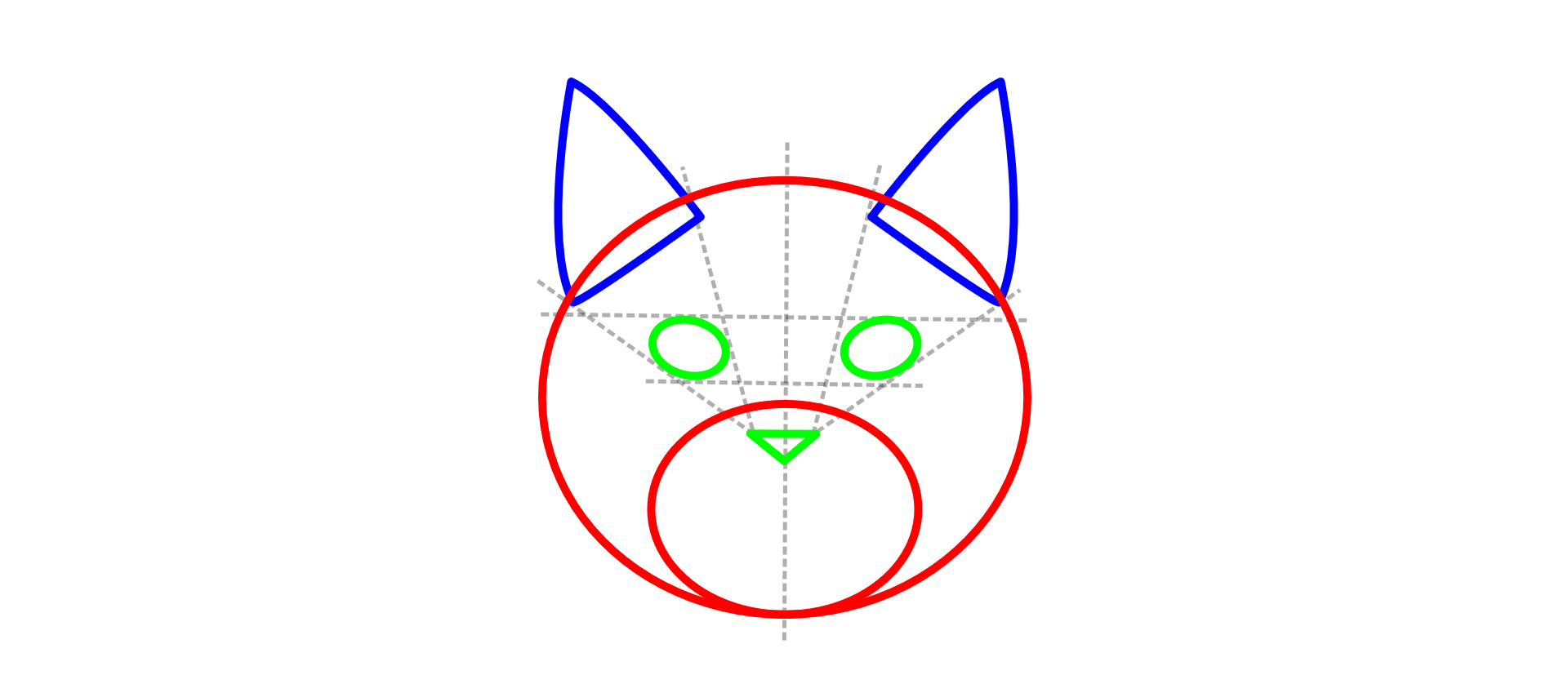
Using the possibilities offered by Paint, draw the image below. You may have to use other program functions, e.g. Rotate. Test different options.
RCBIXvDPyhlYd1
Rysunek przedstawia głowę kota narysowanego z podstawowych figur geometrycznych. Okrąg - głowa. Mniejszy okrąg w środku dużego (oba stykają się na dole) - pyszczek. Mały trójkąt w środku - nos. Dwie elipsy powyżej to oczy. Dwa duże trójkąty - uszy.
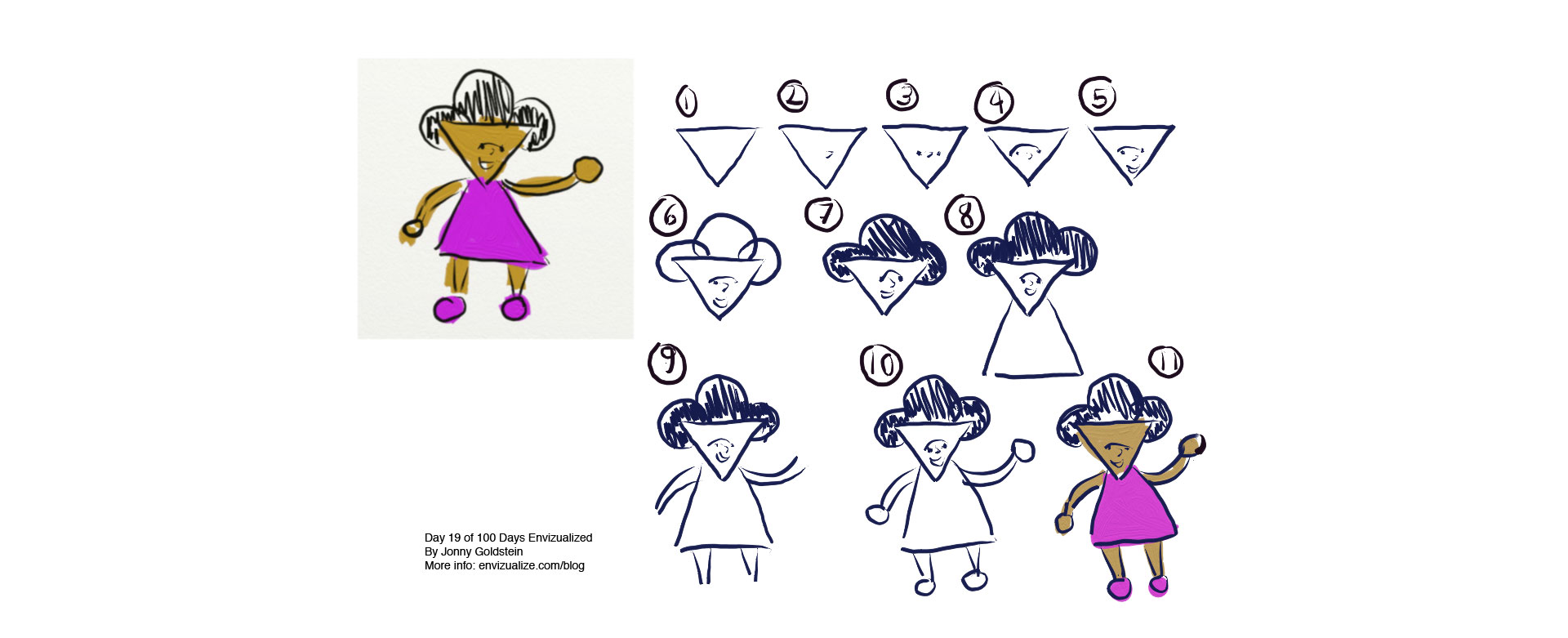
Create your own comic character using the capabilities of the Paint program. An example of the form and steps to draw it are shown in the figure below.
RizWUd38Hp7pH1
Na rysunku pokazane są kolejne kroki rysowania postaci komiksowej. Postacią tą jest dziewczynka. Kolejne etapy oznaczone są cyframi. 1 - trójkąt wierzchołkiem skierowany w dół to twarz. 2 - do trójkąta dorysowany jest nos. 3 - dorysowane są oczy. 4 - dorysowane są brwi. 5 - dorysowana jest uśmiechnięta buzia. 6 - dorysowane są włosy, na górze trójkąta widoczne są trzy kółka przypominające loki. 7 - koła zostały zamalowane. 8 - dorysowana jest sukienka w kształcie trójkąta. 9 - dorysowane dwie ręce i dwie nogi, każda narysowana jest za pomocą podwójnej kreski. 10 - dorysowane są ręce i nogi w kształcie elips. 11 - obrazek został pokolorowany.
By using graphic editors, you can create your own image. Using them you can also modify in the basic scope images obtained from the scanner or taken with a digital camera.
Exercises
Exercise 1
RphwtFqivEFIr
Wersja alternatywna ćwiczenia: Determine which sentence is true. Możliwe odpowiedzi: 1. Creation of a graphic image is possible only with the use of additional graphic devices, e.g. a graphic tablet., 2. A pixel is the smallest part of the image., 3. Pixels are used in raster graphics., 4. Only commercial, paid graphic editors are available on the market., 5. Using graphic editors, you can draw images consisting of only geometrical shapes., 6. By using a graphic editor you can create your own image.
Wersja alternatywna ćwiczenia: Determine which sentence is true. Możliwe odpowiedzi: 1. Creation of a graphic image is possible only with the use of additional graphic devices, e.g. a graphic tablet., 2. A pixel is the smallest part of the image., 3. Pixels are used in raster graphics., 4. Only commercial, paid graphic editors are available on the market., 5. Using graphic editors, you can draw images consisting of only geometrical shapes., 6. By using a graphic editor you can create your own image.
Determine which sentence is true.
Creation of a graphic image is possible only with the use of additional graphic devices, e.g. a graphic tablet.
A pixel is the smallest part of the image.
Pixels are used in raster graphics.
Only commercial, paid graphic editors are available on the market.
Using graphic editors, you can draw images consisting of only geometrical shapes.
By using a graphic editor you can create your own image.
zadanie
Source: GroMar, licencja: CC BY 3.0.
Exercise 2
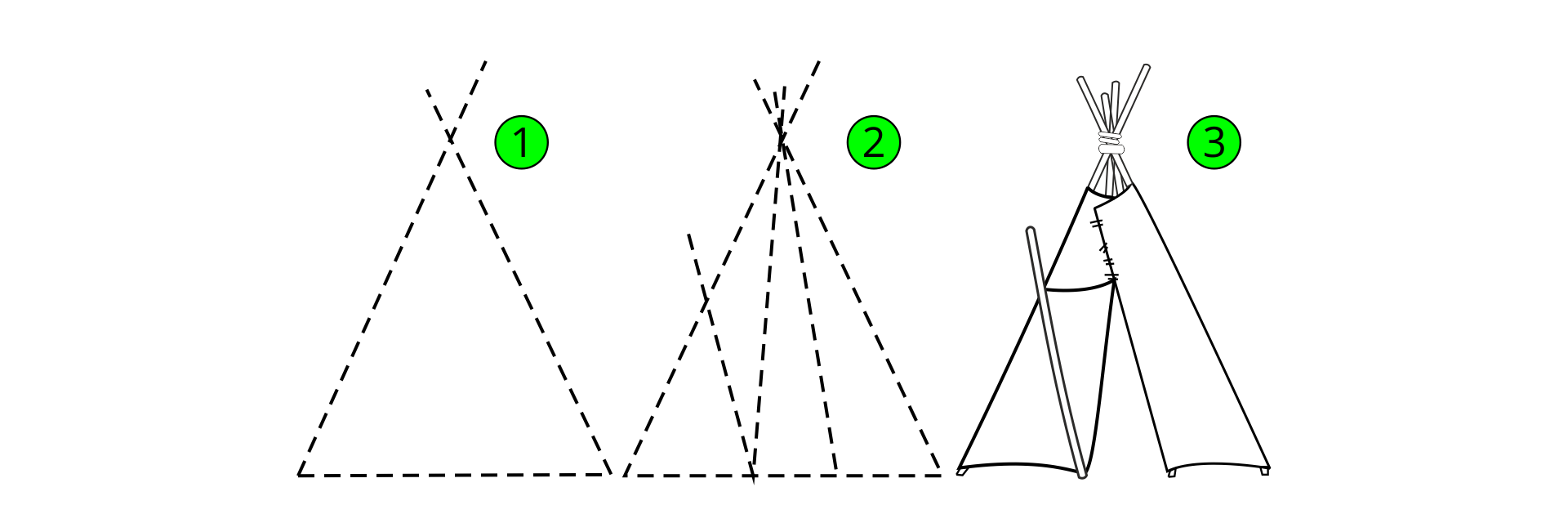
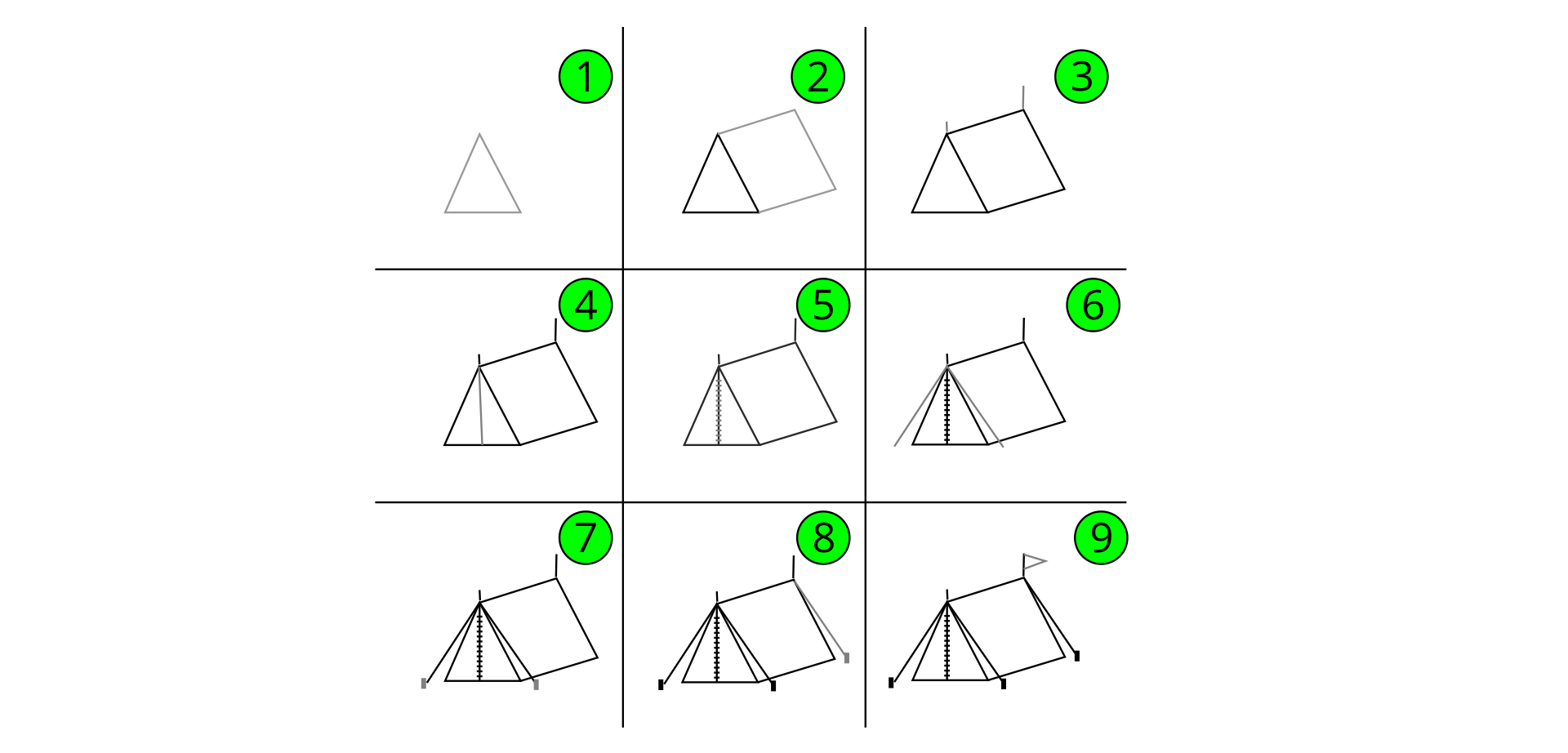
Using the graphic hints below how to draw an Indian tent, draw your own picture.
RIDxHrCnSKabP1
Ilustracja przedstawia trzy etapy rysowania indiańskiego namiotu. Pierwsze dwa etapy narysowane 1 - narysowany trójkąt równoboczny, dorysowane odcinki - przedłużenia boków w górnym wierzchołku. 2 - dodany jest węższy trójkąt równoboczny w środku, dorysowane odcinki - przedłużenia boków w górnym wierzchołku. Od podstawy w miejscu gdzie zaczyna się lewy bok węższego trójkąta dorysowany jest odcinek skierowany w lewy górny róg. 3 - przerywane linie zostały zastąpione ciągłymi liniami w przypadku trójkątów, natomiast dodatkowe odcinki zamienione na podwójne linie.
Source: GroMar, licencja: CC BY 3.0.
R1cOmrYRNlf541
Ilustracja przedstawia dziewięć etapów rysowania namiotu. 1 - narysowany jest trójkąt równoramienny. 2 - dorysowany jest równoległobok, którego jeden z boków pokrywa się z prawym bokiem trójkąta. 3 - dorysowane zostały dwa pionowe, krótkie odcinki na górnych wierzchołkach równoległoboku. 4 - dorysowany został odcinek - wysokość trójkąta. 5 - na wysokości trójkąta pojawiły się krótkie odcinki, gęsto ułożone na całej długości (przypominają zamek błyskawiczny). 6 - dorysowano dwa odcinki tworzące kąt, którego wierzchołek pokrywa się z wierzchołkiem górnym trójkąta, dorysowany kąt jet większy niż kąt wierzchołka trójkąta (odciągi namiotu). 7 - dorysowano dwa odcinki na końcach wcześniej narysowanych odcinków (przypominają śledzie lub szpilki mocujące odciągi). 8 - dorysowano kolejny odcinek zaczynający się w prawym górnym wierzchołku równoległoboku, skierowany w prawo i ku dołowi. na jego końcu znajduje się mały odcinek (całość przypomina odciąg ze śledziem lub szpilką). 9 - na odcinku dodanym do górnego, prawego wierzchołka równoległoboku w etapie trzecim dorysowana trójkąt, który wygląda jak flaga na maszcie.
Source: GroMar, licencja: CC BY 3.0.
Exercise 3
Describe in English what actions to perform in order to draw your own digital imagedigital imagedigital image.
Exercise 4
RIQO8E2PciR4H
Wersja alternatywna ćwiczenia: Indicate which pairs of expressions or words are translated correctly. Możliwe odpowiedzi: 1. obraz cyfrowy - digital image, 2. edytor graficzny - graphic editor, 3. piksel - pixel, 4. mapa bitowa - bitmap, 5. grafika rastrowa - vector graphics, 6. menu narzędziowe - graphic editor
Wersja alternatywna ćwiczenia: Indicate which pairs of expressions or words are translated correctly. Możliwe odpowiedzi: 1. obraz cyfrowy - digital image, 2. edytor graficzny - graphic editor, 3. piksel - pixel, 4. mapa bitowa - bitmap, 5. grafika rastrowa - vector graphics, 6. menu narzędziowe - graphic editor
Indicate which pairs of expressions or words are translated correctly.
obraz cyfrowy - digital image
edytor graficzny - graphic editor
piksel - pixel
mapa bitowa - bitmap
grafika rastrowa - vector graphics
menu narzędziowe - graphic editor
zadanie
Source: GroMar, licencja: CC BY 3.0.
R1cZDjhwGL24O1
Interaktywna gra, polegająca na łączeniu wyrazów w pary w ciągu jednej minuty. Czas zaczyna upływać wraz z rozpoczęciem gry. Jeden ruch to odkrywanie najpierw jednej potem drugiej karty z wyrazem. Każdy wyraz jest odczytywany. Kolejny ruch to odkrywanie trzeciej i czwartej karty. W ten sposób odsłuchasz wszystkie wyrazy. Nawigacja z poziomu klawiatury za pomocą strzałek, odsłuchiwanie wyrazów enterem lub spacją. Znajdź wszystkie pary wyrazów.
Interaktywna gra, polegająca na łączeniu wyrazów w pary w ciągu jednej minuty. Czas zaczyna upływać wraz z rozpoczęciem gry. Jeden ruch to odkrywanie najpierw jednej potem drugiej karty z wyrazem. Każdy wyraz jest odczytywany. Kolejny ruch to odkrywanie trzeciej i czwartej karty. W ten sposób odsłuchasz wszystkie wyrazy. Nawigacja z poziomu klawiatury za pomocą strzałek, odsłuchiwanie wyrazów enterem lub spacją. Znajdź wszystkie pary wyrazów.
Match Polish terms with their English equivalents.
obraz cyfrowy
pixel
graphic editor
grafika rastrowa
digital image
raster graphics
mapa bitowa
bitmap
piksel
edytor graficzny
Source: Zespół autorski Politechniki Łódzkiej, licencja: CC BY 3.0.