In a spreadsheet you can copy and move entire cells or only their value. When you copy or move the content of a cellcellcell, all data are copied or moved, including values, formulas and cell formats. The topic of the lesson is what will happen to formulas when you copy cells. The knowledge of the principles of cell addressing will enable to correctly and quickly perform this operation, and thus speed up the process of creating a worksheet.
The address of a cellcellcell clearly specifies its location in a spreadsheet. When the cell address is used in mathematical formulas, it is also called a cell reference. There are three types of cell references:
relative,
mixed,
absolute.
R1ZgrMBcjCkI5
Ilustracja interaktywna przedstawia fragment arkusza kalkulacyjnego. W wybranych komórkach zostały umieszczone formuły stosujące różne typy adresowania. W komórce B3 równa się B 3. W komórce A4 równa się znak dolara A znak dolara 4. W komórce A1 równa się znak dolara A 1. W komórce C2 równa się C znak dolara 2. Na ilustracji widoczne są numery, a na nich podpisy. 1. relative reference {audio}, 2. absolute reference {audio}, 3. mixed reference {audio}, 4. mixed reference {audio}.
Ilustracja interaktywna przedstawia fragment arkusza kalkulacyjnego. W wybranych komórkach zostały umieszczone formuły stosujące różne typy adresowania. W komórce B3 równa się B 3. W komórce A4 równa się znak dolara A znak dolara 4. W komórce A1 równa się znak dolara A 1. W komórce C2 równa się C znak dolara 2. Na ilustracji widoczne są numery, a na nich podpisy. 1. relative reference {audio}, 2. absolute reference {audio}, 3. mixed reference {audio}, 4. mixed reference {audio}.
A relative referencerelative referencerelative reference is a default cell reference in Excel. It uses the relative location of cells in relation to one another, not their specific addresses. If, for example, you refer to the content of cell A2 from cell C2, Excel „knows” that this is a cell that is located two columns to the left in the same row (row 2). When you copy formulas that contain relative cell references, Excel changes all relative cell references into the same references in relation to the target cell.
If you copy the formulaformulaformula =A2+B2 from cell C2 to C3, the cell references are adjusted to the row below and the formula in C3 becomes =A3+B3. It is very convenient since the data series on which we perform the same operations are usually located in the same rows or columns.
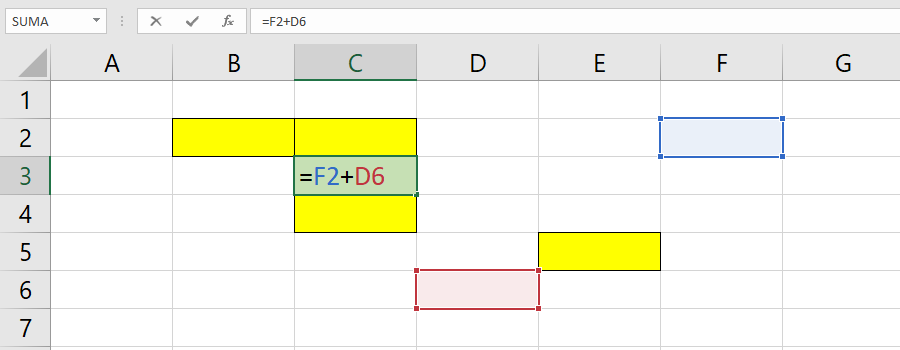
Think about and without using the computer specify how the formula =F2+D6 in cellcellcell C3 will change when you copy it to cells: B2, C2 ,C4 and E5.
R1NJNom8fZtN9
Zrzut ekranu przedstawia fragment arkusza kalkulacyjnego. W komórce C3 (mającej zielone tło) wpisana jest formuła równa się F2 dodać D6. Adresy komórek F2 i D6 w zapisie formuły są w różnych kolorach. F2 jest zapisane niebieskim kolorem, D6 czerwonym. Komórka F2 odpowiada kolorem wypełnienia zapisowi w formule i ma niebieskie tło, natomiast komórka D6 czerwone. Komórki B2, C2, C4 i E5 mają żółte tło.
If you want to maintain the original cell references when cells are copied, you must „fix” these cells. An absolute referenceabsolute referenceabsolute reference is used for this purpose. You make the cell reference absolute by preceding the reference to the column and row with the dollar sign ($).
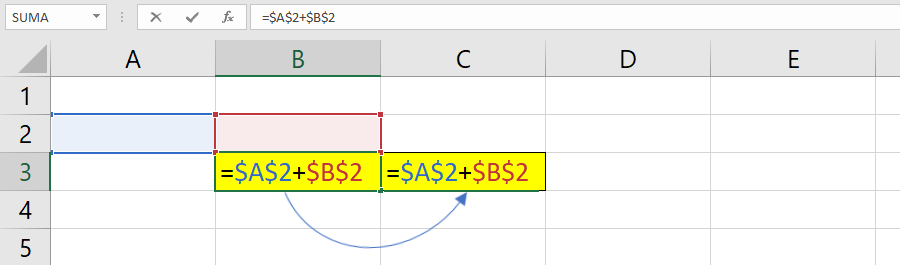
Zrzut ekranu przedstawia fragment arkusza kalkulacyjnego. Komórki B3 i C3 mają żółte tło. W w obu komórkach wpisana jest formuła =$A$2+$B$2. Adresy komórek $A$2 i $B$2 w zapisie formuły są w różnych kolorach. $A$2 jest zapisane niebieskim kolorem, $B$2 czerwonym. Komórka A2 odpowiada kolorem wypełnienia zapisowi w formule i ma niebieskie tło, natomiast komórka B2 czerwone. Pomiędzy komórkami B3 i C3 narysowana jest strzałka skierowana od B3 do C3.
Absolute reference
When you copy the formula =$A$2+$B$2 from cell B3 do C3, you enter exactly the same formula there.
Sometimes a mixed referencemixed referencemixed reference may be useful. You can create it by preceding with the dollar sign ($) either the row (A$2) or the column value ($A2). This way you can fix only the reference to the row or only to the column when you copy the cell. In order to fix both, you must precede with the dollar sign ($) both the row and the column value ($A$2).
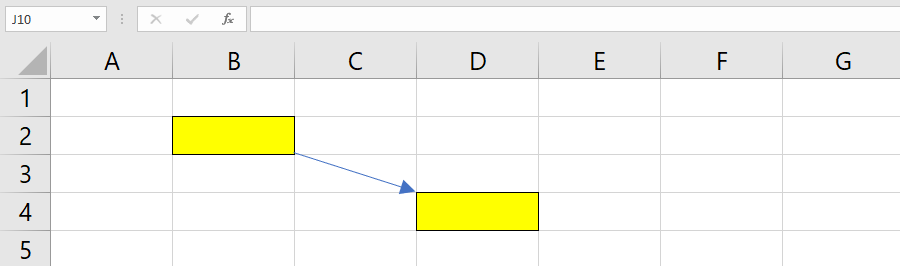
Below you can see an example presenting how the reference to cell A1 changes when you copy the formulaformulaformula containing its address from cellcellcell B2 to D4 using various reference types.
R1CpCHo3Bc7d61
Zrzut ekranu przedstawia fragment arkusza kalkulacyjnego. Komórki B2 i D4 mają żółte tło. Pomiędzy kolorowymi komórkami narysowana jest strzałka skierowana od B2 do D4.
A mixed referencemixed referencemixed reference is used quite rarely since we usually copy a formula both to another row and another column. In other words, a mixed reference is a type of reference which refers to the addresses of cells located in one column or in one row when you copy a function. You do not have to use it if you copy data from a single column and a single row.
The capital placed in a bank account increases by 3% over the year. Calculate the value of the capital after 5 years assuming that the bank will not change the interest rate. Download the worksheet with the task.
The three types of references are used in a spreadsheet: relative, absolute and mixed. When you copy formulas, relative and mixed cellcellcell references change, while absolute cell references stay the same. Using the correct cell references enables the error‑free copyingcopyingcopying of mathematical formulas and consequently speeds up the creation of a worksheet.
Exercises
Exercise 1
ReDZiboZc18uy
Wersja alternatywna ćwiczenia: Determine which sentences are true. Możliwe odpowiedzi: 1. A mixed reference does not change when you copy it., 2. A mixed reference changes when you copy it., 3. A relative reference changes when you copy it., 4. A relative reference does not change when you copy it., 5. An absolute reference changes when you copy it., 6. An absolute reference does not change when you copy it.
Wersja alternatywna ćwiczenia: Determine which sentences are true. Możliwe odpowiedzi: 1. A mixed reference does not change when you copy it., 2. A mixed reference changes when you copy it., 3. A relative reference changes when you copy it., 4. A relative reference does not change when you copy it., 5. An absolute reference changes when you copy it., 6. An absolute reference does not change when you copy it.
Determine which sentences are true.
A mixed reference does not change when you copy it.
A mixed reference changes when you copy it.
A relative reference changes when you copy it.
A relative reference does not change when you copy it.
An absolute reference changes when you copy it.
An absolute reference does not change when you copy it.
zadanie
Source: GroMar, licencja: CC BY 3.0.
Exercise 2
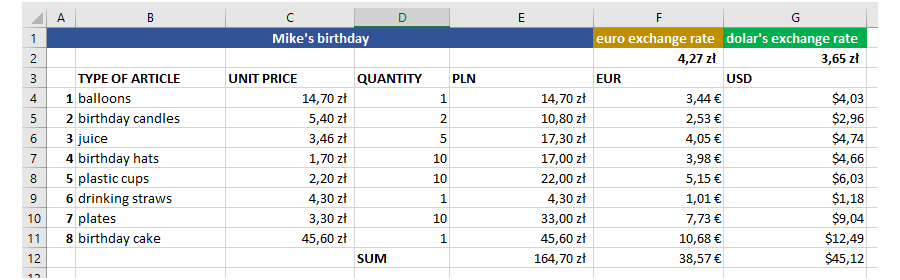
Imagine that you are organizing a birthday party and you want to invite your friends. Make a shopping list including prices in a spreadsheet. Select any two currencies and check how much the particular product will cost in these currencies.
ReAapc57SXLzH
Ilustracja przedstawia przykładowe rozwiązanie. Zrzut ekranu przedstawia fragment arkusza kalkulacyjnego. komórki A1:E1 są scalone i zawierają napis Mike's birthday. W komórce F1 jest napis euro exchange rate, w komórce F2 4,27 zł. W komórce G1 jest napis dolar's exchange rate, w komórce G2 3,65 zł. W komórkach od B3 do G3 znajdują się kolejno napisy: Type of Article; Unit Price; Quantity; PLN; EUR; USD. W komórkach od A4 do G4 znajdują się kolejno wartości: 1; balloons; 14,70 zł; 1; 14,70 zł; 3,44 euro; dolar 4,03. W komórkach od A5 do G5 znajdują się kolejno wartości: 2; birthday candles; 5,40 zł; 2; 10,80 zł; 2,53 euro; dolar 2,96. W komórkach od A6 do G6 znajdują się kolejno wartości: 3; jouice; 3,46 zł; 5; 17,30 zł; 4,05 euro; dolar 4,74. W komórkach od A7 do G7 znajdują się kolejno wartości: 4; birthday hats; 1,70 zł; 10; 17,00 zł; 3,98 euro; dolar 4,66. W komórkach od A8 do G8 znajdują się kolejno wartości: 5; coups; 2,20 zł; 10; 22,00 zł; 5,15 euro; dolar 6,03. W komórkach od A9 do G9 znajdują się kolejno wartości: 6; drinking straws; 4,30 zł; 1; 4,30 zł; 1,01 euro; dolar 1,18. W komórkach od A10 do G10 znajdują się kolejno wartości: 7; plates; 3,30 zł; 10; 33,00 zł; 7,73 euro; dolar 9,04. W komórkach od A11 do G11 znajdują się kolejno wartości: 8; birthday cake; 45,60 zł; 1; 45,60 zł; 10,68 euro; dolar 12,49. W komórkach od D12 do G12 znajdują się kolejno wartości: SUM; 164,70 zł; 38,57 euro; dolar 45,12.
The exemplary solution
Source: GroMar, licencja: CC BY 3.0.
Exercise 3
Describe in English the types of cell references in a spreadsheet.
Exercise 4
RXnWk5Xhda9fq
Wersja alternatywna ćwiczenia: Indicate which pairs of expressions or words are translated correctly. Możliwe odpowiedzi: 1. adresowanie względne - relative reference, 2. adresowanie bezwzględne - absolute reference, 3. adresowanie mieszane - mixed reference, 4. kopiowanie - copying, 5. komórka - formula, 6. formuła - cell
Wersja alternatywna ćwiczenia: Indicate which pairs of expressions or words are translated correctly. Możliwe odpowiedzi: 1. adresowanie względne - relative reference, 2. adresowanie bezwzględne - absolute reference, 3. adresowanie mieszane - mixed reference, 4. kopiowanie - copying, 5. komórka - formula, 6. formuła - cell
Indicate which pairs of expressions or words are translated correctly.
adresowanie względne - relative reference
adresowanie bezwzględne - absolute reference
adresowanie mieszane - mixed reference
kopiowanie - copying
komórka - formula
formuła - cell
zadanie
Source: GroMar, licencja: CC BY 3.0.
RA6CPA78tGOmu1
Interaktywna gra, polegająca na łączeniu wyrazów w pary w ciągu jednej minuty. Czas zaczyna upływać wraz z rozpoczęciem gry. Jeden ruch to odkrywanie najpierw jednej potem drugiej karty z wyrazem. Każdy wyraz jest odczytywany. Kolejny ruch to odkrywanie trzeciej i czwartej karty. W ten sposób odsłuchasz wszystkie wyrazy. Nawigacja z poziomu klawiatury za pomocą strzałek, odsłuchiwanie wyrazów enterem lub spacją. Znajdź wszystkie pary wyrazów.
Interaktywna gra, polegająca na łączeniu wyrazów w pary w ciągu jednej minuty. Czas zaczyna upływać wraz z rozpoczęciem gry. Jeden ruch to odkrywanie najpierw jednej potem drugiej karty z wyrazem. Każdy wyraz jest odczytywany. Kolejny ruch to odkrywanie trzeciej i czwartej karty. W ten sposób odsłuchasz wszystkie wyrazy. Nawigacja z poziomu klawiatury za pomocą strzałek, odsłuchiwanie wyrazów enterem lub spacją. Znajdź wszystkie pary wyrazów.
Match Polish terms with their English equivalents.
adresowanie względne
adresowanie mieszane
absolute reference
relative reference
adresowanie bezwzględne
mixed reference
Source: Zespół autorski Politechniki Łódzkiej, licencja: CC BY 3.0.