These days we spend a lot of time in front of the computer. Therefore, we must not forget to provide the right conditions for work or play, at which we use a computer.
Remember the basic rules:
chair and desk should be adjusted to user's height;
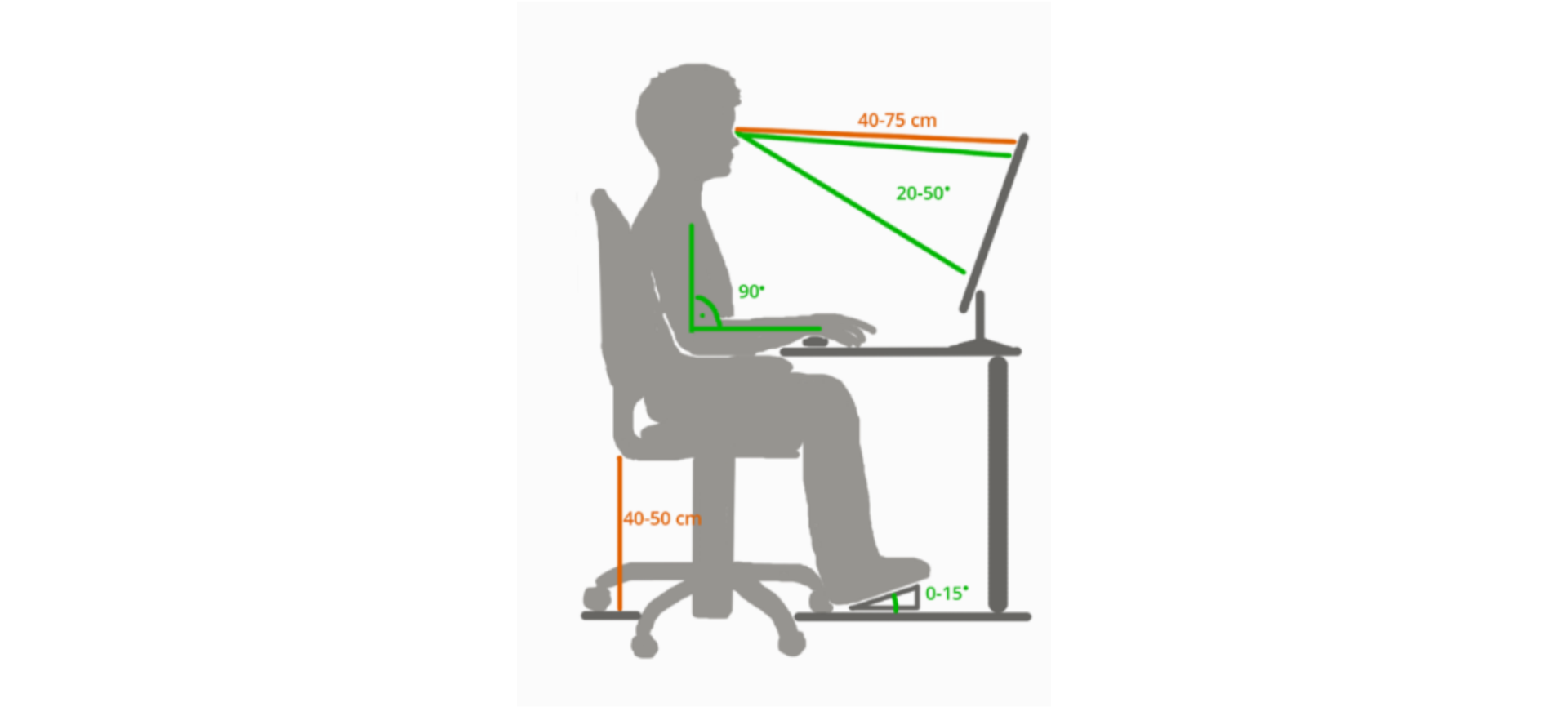
the keyboard and screen of the monitor should be set at an appropriate distance adapted to the user's height and sight;
the workplaceworkplaceworkplace should be adequately lit up;
When we provide the right conditions for working with a computer, we should also use them properly.
Remember to keep your body in the right position during work. This means:
the back should be straight and adhere to the back of the chair;
forearms, bent at an angle close to the right angle, should rest on the edge of the desk;
hands should be properly placed on the keyboard;
the eyes of a computer user should be directed straight ahead, and the distance from the monitor to the face is 40 to 80 cm (depending on the size of the monitor);
the monitor should be slightly tilted backwards.
R1MQESMm9NMGt1
Ilustracja przedstawia w sposób schematyczny osobę siedzącą na krześle przy biurku. Na biurku stoi monitor komputera. Na rysunku oznaczone odcinkami są prawidłowe odległości i kąty nachylenia. Od oczu do monitora odległość powinna wynosić 40-75 cm. tak by wzrok obejmował obraz monitora w zakresie 20-50 stopni. Zgięcie rąk w stawie łokciowym 90 stopni. Wysokość krzesła 40-50 cm od podłoża. Nachylenie stóp na podłodze 0-15 stopni.
To create the right conditions for working with a computer, you must not forget about lighting. The angle of incidence of light must be such that the light does not reflect off the monitor. Bad lightinglightinglighting causes your eyes to get tired quickly.
R3NWFYOQEfvq6
Ilustracja interaktywna przedstawia trzy grafiki oznaczone cyframi od 1 do 3. Na każdej z nich znajduje się osoba siedzącą na krześle przy biurku, na którym znajduje się klawiatura i monitor komputera. Na grafice oznaczonej cyfrą 1 światło pada za plecami osoby siedzącej bezpośrednio na monitor. Na grafice oznaczonej cyfrą 2 światło pada prostopadle na biurko oświetlając klawiaturę i ręce osobo pracującej przy komputerze (grafika otoczona jest zielonym prostokątem). Na grafice oznaczonej cyfrą 3 światło pada od tyłu na monitor oświetlając od przodu osobę. Na ilustracji widoczne są numery, a na nich podpisy. 1. wrong – lighting is placed behind the person {audio}, 2. right – lighting from the top {audio}, 3. wrong – lighting is placed behind the monitor {audio}
Ilustracja interaktywna przedstawia trzy grafiki oznaczone cyframi od 1 do 3. Na każdej z nich znajduje się osoba siedzącą na krześle przy biurku, na którym znajduje się klawiatura i monitor komputera. Na grafice oznaczonej cyfrą 1 światło pada za plecami osoby siedzącej bezpośrednio na monitor. Na grafice oznaczonej cyfrą 2 światło pada prostopadle na biurko oświetlając klawiaturę i ręce osobo pracującej przy komputerze (grafika otoczona jest zielonym prostokątem). Na grafice oznaczonej cyfrą 3 światło pada od tyłu na monitor oświetlając od przodu osobę. Na ilustracji widoczne są numery, a na nich podpisy. 1. wrong – lighting is placed behind the person {audio}, 2. right – lighting from the top {audio}, 3. wrong – lighting is placed behind the monitor {audio}
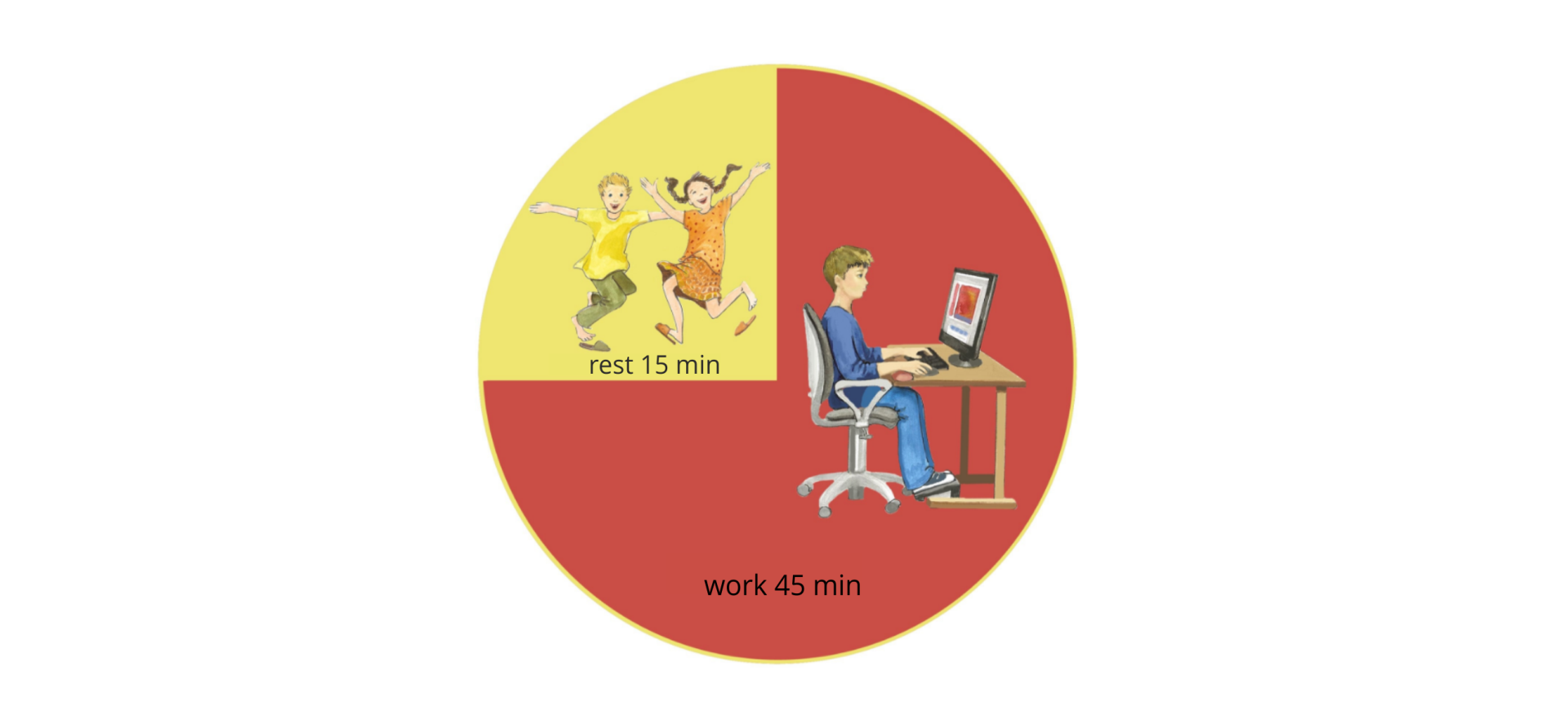
When working with a computer, we must not forget about taking breaks. The breaks allow rest to the eyes, neck, shoulder, hands, and legs muscles which remain still most of the time. The easiest way is to adopt the rule: 45 minutes of work with a computer, 15 minutes to refresh the body and mind.
During the break it is worth doing a few physical exercises, ventilate the room.
R1HSVdnDFR70w1
Ilustracja przedstawia diagram kołowy: chłopca siedzącego przy komputerze - podpis: work 45 min (trzy czwarte diagramu), dzieci skaczące - podpis: rest 15 min (jedna czwarta diagramu).
Source: GroMar, licencja: CC BY 3.0.
The consequences of improperimproper improper computer use:
Failure to follow the rules of properproper proper computer use can cause various ailments and diseases. Most often they do not occur immediately, but sometimes after several years, and their effects are very severe.
Remember that:
looking too long at the monitor may cause you sight deterioration,
improperimproper improper posture while sitting at the computer contributes to muscle fatigue, back, neck, shoulder and hand, especially wrists pain,
The computer workspaceworkspaceworkspace should be prepared in such a way as to ensure safety and comfort. Remember these rules, not only in the school computer lab, but also at home.
Exercises
Exercise 1
R17LPeadnzKm7
Wersja alternatywna ćwiczenia: Which statement is true? Możliwe odpowiedzi: 1. The computer monitor should be slightly tilted forward., 2. The light source should be located behind the computer monitor., 3. The forearms should rest on top of the desk., 4. The chair and desk should be adjusted to the user's gender.
Wersja alternatywna ćwiczenia: Which statement is true? Możliwe odpowiedzi: 1. The computer monitor should be slightly tilted forward., 2. The light source should be located behind the computer monitor., 3. The forearms should rest on top of the desk., 4. The chair and desk should be adjusted to the user's gender.
Which statement is true?
The computer monitor should be slightly tilted forward.
The light source should be located behind the computer monitor.
The forearms should rest on top of the desk.
The chair and desk should be adjusted to the user's gender.
zadanie
Source: GroMar, licencja: CC BY 3.0.
Exercise 2
You already know how high a chair should be when working with a computer.
Use a ruler to measure if your chair is properly set. If not, set it according to the rules of proper computer use.
Exercise 3
Describe in English what lighting is appropriate when working with a computer.
Exercise 4
RtoZPGRFyyGwc
Wersja alternatywna ćwiczenia: Indicate which pairs of expressions or words are translated correctly. Możliwe odpowiedzi: 1. miejsce pracy - workplace, 2. pozycja ciała - body posture, 3. oświetlenie - lighting, 4. właściwy - proper, 5. konsekwencja - improper, 6. niewłaściwy - workspace
Wersja alternatywna ćwiczenia: Indicate which pairs of expressions or words are translated correctly. Możliwe odpowiedzi: 1. miejsce pracy - workplace, 2. pozycja ciała - body posture, 3. oświetlenie - lighting, 4. właściwy - proper, 5. konsekwencja - improper, 6. niewłaściwy - workspace
Indicate which pairs of expressions or words are translated correctly.
miejsce pracy - workplace
pozycja ciała - body posture
oświetlenie - lighting
właściwy - proper
konsekwencja - improper
niewłaściwy - workspace
zadanie
Source: GroMar, licencja: CC BY 3.0.
RfjLBMrFTnWaJ1
Interaktywna gra, polegająca na łączeniu wyrazów w pary w ciągu jednej minuty. Czas zaczyna upływać wraz z rozpoczęciem gry. Jeden ruch to odkrywanie najpierw jednej potem drugiej karty z wyrazem. Każdy wyraz jest odczytywany. Kolejny ruch to odkrywanie trzeciej i czwartej karty. W ten sposób odsłuchasz wszystkie wyrazy. Nawigacja z poziomu klawiatury za pomocą strzałek, odsłuchiwanie wyrazów enterem lub spacją. Znajdź wszystkie pary wyrazów.
Interaktywna gra, polegająca na łączeniu wyrazów w pary w ciągu jednej minuty. Czas zaczyna upływać wraz z rozpoczęciem gry. Jeden ruch to odkrywanie najpierw jednej potem drugiej karty z wyrazem. Każdy wyraz jest odczytywany. Kolejny ruch to odkrywanie trzeciej i czwartej karty. W ten sposób odsłuchasz wszystkie wyrazy. Nawigacja z poziomu klawiatury za pomocą strzałek, odsłuchiwanie wyrazów enterem lub spacją. Znajdź wszystkie pary wyrazów.
Match Polish terms with their English equivalents.
workplace
oświetlenie
lighting
warunek
konsekwencja
condition
pozycja ciała
body posture
miejsce pracy
consequence
Source: Zespół autorski Politechniki Łódzkiej, licencja: CC BY 3.0.