a WWW interface directly in a web browser. All emails are stored on a mail server and are available from any location. You do not need to install and configure an email client. All that is needed is a permanent Internet connection.
a dedicated email software. Emails are downloaded from a mail server to the user’s computer. In order to do that, it is necessary to download, install and configure a programme called an email client. An Internet connection is needed to download emails to the computer, however the correspondence is viewed offline on the user’s computer. The access to mail by using a dedicated application enables its convenient managing (searching, sorting, ordering, archiving). One programme can manage several email boxes. Such email client applications can be found in the operating system (Windows Mail, mail), office applications (Outlook) as well as in many dedicated software of various providers.
Email messages can be sent in one of the two formats:
a text format – it does not enable formatting text and inserting graphics,
a HTML format – it enables creating a visually attractive email thanks to the application of HTML, a language for creating web pages.
Each of these two formats has its advantages and disadvantages. Emails written in the HTML format may not be displayed identically in different applications. They are also often blocked by anti‑spam filters.
Some email applications enable setting the priority of a message. Setting a high priority e‑mail address is a good solution when an immediate contact is needed in emergency. An urgent message can activate the other warning system, e.g. sending a text message or the copy of the email to other people. However the change of priority is sometimes unjustified by the situation. The „trick” of unfounded raising of the message priority demonstrates the disregard for netiquette and the recipient.
RWyQyNJQbRNwV1
Ilustracja przedstawia przykłady emotikon obrazkowych służących do wyrażania nastroju w internecie. Emotikona zwykle przedstawia okrągłą buzię, która najczęściej za pomocą grymasu ust przedstawia emocje, np. radość, zdziwienie, znudzenie, zaskoczenia, smutek. Emocje mogą być również pokazane przy pomocy oczu, np. płacz. Emotikony mogą posiadać dodatkowe atrybuty, np. okulary, aureola.
An emoticon is an image depicting an emotional state. Currently there are more and more emoticons depicting not only emotions but also objects and operations. They can have the form of graphical symbols or be written using characters. Think carefully about inserting them into email messages; in particular they must not be placed in formal correspondence.
R1GwkBwtJNI0t1
ilustracja przedstawia spinacz biurowy. Jest to kawałek odpowiednio wygiętego drutu, służący zwykle do złączenia razem pliku kartek papieru.
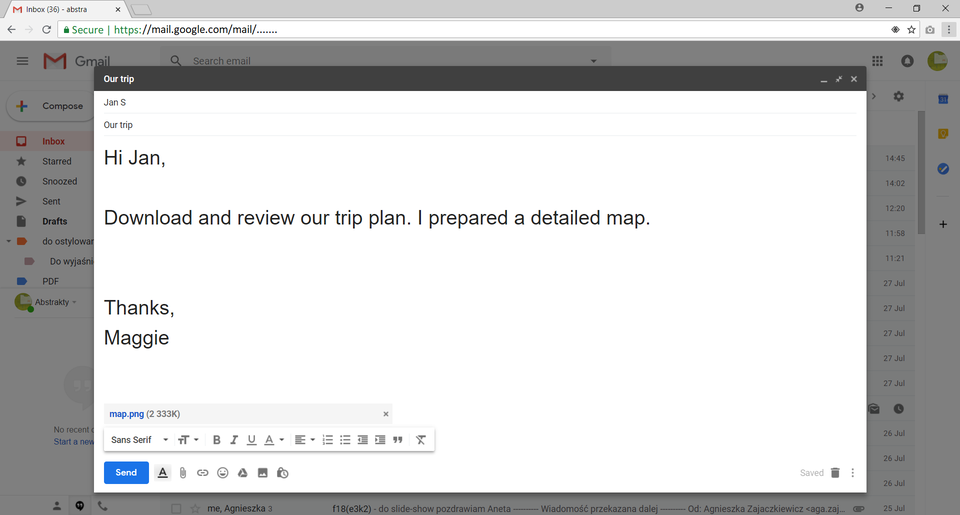
Email messages can be sent along with computer files of various file formats. A paper clip icon informs about the file attached to the email. When you receive an attachmentattachmentattachment you can do the following:
save the attachment to the desired location,
open the attachment.
Rjcs3LsgnvMC5
Pokaz slajdów – wysyłanie załącznika. Instrukcja obsługi z poziomu klawiatury: 1. Uruchomienie aplikacji - ENTER, 2. Na każdym ze slajdów czytany jest automatycznie tekst alternatywny po polsku, 3. Przy pierwszym uruchomieniu na pierwszym slajdzie, czytanie tekstu po angielsku - TAB, 4. Przejście między slajdami: do następnego slajdu - TAB, do poprzedniego slajdu - TAB + SHIFT, 5. Przejście do czytania napisu po angielsku - strzałka w górę + strzałka w dół (czyta tekst po angielsku widoczny na slajdzie).
Pokaz slajdów – wysyłanie załącznika. Instrukcja obsługi z poziomu klawiatury: 1. Uruchomienie aplikacji - ENTER, 2. Na każdym ze slajdów czytany jest automatycznie tekst alternatywny po polsku, 3. Przy pierwszym uruchomieniu na pierwszym slajdzie, czytanie tekstu po angielsku - TAB, 4. Przejście między slajdami: do następnego slajdu - TAB, do poprzedniego slajdu - TAB + SHIFT, 5. Przejście do czytania napisu po angielsku - strzałka w górę + strzałka w dół (czyta tekst po angielsku widoczny na slajdzie).
It is possible to open the attachments you have received only when you have programmes which support a given file format. When you select to save a number of attachments, all of them will be downloaded to a compressed .zip file.
Note: Opening attachments can be dangerous. Use antivirus softwareantivirus softwareantivirus software, which can detect computer viruses in the incoming mail.
Mail servers have their limitations. On the one hand such a limitation is the maximum capacity of the mail box, and on the other hand – the size of an attachment. Due to anti‑virus and anti‑spam protection mail servers usually do not allow to send some files, such as: executable files with the file extensions exe, bat, jar, files including macroinstructions or password‑protected compressed files, which content cannot be checked. The speed of sending an email depends on the size of the attachment and the capacity of your Internet connection.
Exercises
Exercise 1
RcRC1HrSv5d3u
Wersja alternatywna ćwiczenia: Determine which sentence is true. Możliwe odpowiedzi: 1. Electronic mail can be accessed by using a WWW interface or a dedicated email software., 2. Email messages can be sent in one of the two formats: a text format or an audio format., 3. An emoticon is a pictorial representing an emotional state., 4. Email messages can be sent along with computer files of various file formats. , 5. When you select to save a number of attachments, all of them will be downloaded to a compressed .rar file.
Wersja alternatywna ćwiczenia: Determine which sentence is true. Możliwe odpowiedzi: 1. Electronic mail can be accessed by using a WWW interface or a dedicated email software., 2. Email messages can be sent in one of the two formats: a text format or an audio format., 3. An emoticon is a pictorial representing an emotional state., 4. Email messages can be sent along with computer files of various file formats. , 5. When you select to save a number of attachments, all of them will be downloaded to a compressed .rar file.
Determine which sentence is true.
Electronic mail can be accessed by using a WWW interface or a dedicated email software.
Email messages can be sent in one of the two formats: a text format or an audio format.
An emoticon is a pictorial representing an emotional state.
Email messages can be sent along with computer files of various file formats.
When you select to save a number of attachments, all of them will be downloaded to a compressed .rar file.
zadanie
Source: GroMar, licencja: CC BY 3.0.
Exercise 2
R1H9UVf9puoti
Wersja alternatywna ćwiczenia: Which file types are usually blocked by mail servers? Możliwe odpowiedzi: 1. executable files, 2. files including macroinstructions, 3. password-protected compressed files, 4. compressed files, 5. video files, 6. pdf documents, 7. multimedia presentations
Wersja alternatywna ćwiczenia: Which file types are usually blocked by mail servers? Możliwe odpowiedzi: 1. executable files, 2. files including macroinstructions, 3. password-protected compressed files, 4. compressed files, 5. video files, 6. pdf documents, 7. multimedia presentations
Which file types are usually blocked by mail servers?
executable files
files including macroinstructions
password-protected compressed files
compressed files
video files
pdf documents
multimedia presentations
zadanie
Source: GroMar, licencja: CC BY 3.0.
Exercise 3
Describe in English the operations which should be performed in order to send an email along with an attachment.
Exercise 4
R1IkFheH16IpC
Wersja alternatywna ćwiczenia: Indicate which pairs of expressions or words are translated correctly. Możliwe odpowiedzi: 1. emotikon - emoticon, 2. priorytet wiadomości - message priority, 3. załącznik - attachment, 4. wiadomość email - email message, 5. programy antywirusowe - compressed file, 6. plik skompresowany - antivirus software
Wersja alternatywna ćwiczenia: Indicate which pairs of expressions or words are translated correctly. Możliwe odpowiedzi: 1. emotikon - emoticon, 2. priorytet wiadomości - message priority, 3. załącznik - attachment, 4. wiadomość email - email message, 5. programy antywirusowe - compressed file, 6. plik skompresowany - antivirus software
Indicate which pairs of expressions or words are translated correctly.
emotikon - emoticon
priorytet wiadomości - message priority
załącznik - attachment
wiadomość email - email message
programy antywirusowe - compressed file
plik skompresowany - antivirus software
zadanie
Source: GroMar, licencja: CC BY 3.0.
RTAUlifVG2zpX1
Interaktywna gra, polegająca na łączeniu wyrazów w pary w ciągu jednej minuty. Czas zaczyna upływać wraz z rozpoczęciem gry. Jeden ruch to odkrywanie najpierw jednej potem drugiej karty z wyrazem. Każdy wyraz jest odczytywany. Kolejny ruch to odkrywanie trzeciej i czwartej karty. W ten sposób odsłuchasz wszystkie wyrazy. Nawigacja z poziomu klawiatury za pomocą strzałek, odsłuchiwanie wyrazów enterem lub spacją. Znajdź wszystkie pary wyrazów.
Interaktywna gra, polegająca na łączeniu wyrazów w pary w ciągu jednej minuty. Czas zaczyna upływać wraz z rozpoczęciem gry. Jeden ruch to odkrywanie najpierw jednej potem drugiej karty z wyrazem. Każdy wyraz jest odczytywany. Kolejny ruch to odkrywanie trzeciej i czwartej karty. W ten sposób odsłuchasz wszystkie wyrazy. Nawigacja z poziomu klawiatury za pomocą strzałek, odsłuchiwanie wyrazów enterem lub spacją. Znajdź wszystkie pary wyrazów.
Match Polish terms with their English equivalents.
załącznik
attachment
priorytet wiadomości
emotikon
emoticon
message priority
Source: Zespół autorski Politechniki Łódzkiej, licencja: CC BY 3.0.