One of the greatest threats to data collected on the computer are computer users. Their distraction, carelessness, disregard for basic procedures, fatigue, lack of knowledge of computers are often the cause of data lossdata lossdata loss or computer failurefailurefailure. Our overconfidence, being sure that nothing can go wrong, and if it does, that we will be able to fix it ourselves, have indirectly led to many “computer disasters”. You cannot trust the computer and software completely as disaster can happen at the least expected moment. You must be aware of many online threats. Failure will surely occur, but you do not know when. You must be prepared for it.
RlNaIghFrd8U5
Ilustracja interaktywna przedstawia w sposób symboliczny pracę komputera. Z góry na dół spadają ciągi liczb i liter. Na ilustracji widoczne są numery, a na nich podpisy. 1. hardware defects {audio}, 2. incorrect system shutdown {audio}, 3. computer viruses and malicious software {audio}, 4. the defect of the file systems {audio}, 5. the overheating of the components {audio}, 6. software errors {audio}
Ilustracja interaktywna przedstawia w sposób symboliczny pracę komputera. Z góry na dół spadają ciągi liczb i liter. Na ilustracji widoczne są numery, a na nich podpisy. 1. hardware defects {audio}, 2. incorrect system shutdown {audio}, 3. computer viruses and malicious software {audio}, 4. the defect of the file systems {audio}, 5. the overheating of the components {audio}, 6. software errors {audio}
the unstableunstableunstable operation of the system,
problems with starting the computer.
R1JIX9FYjqk48
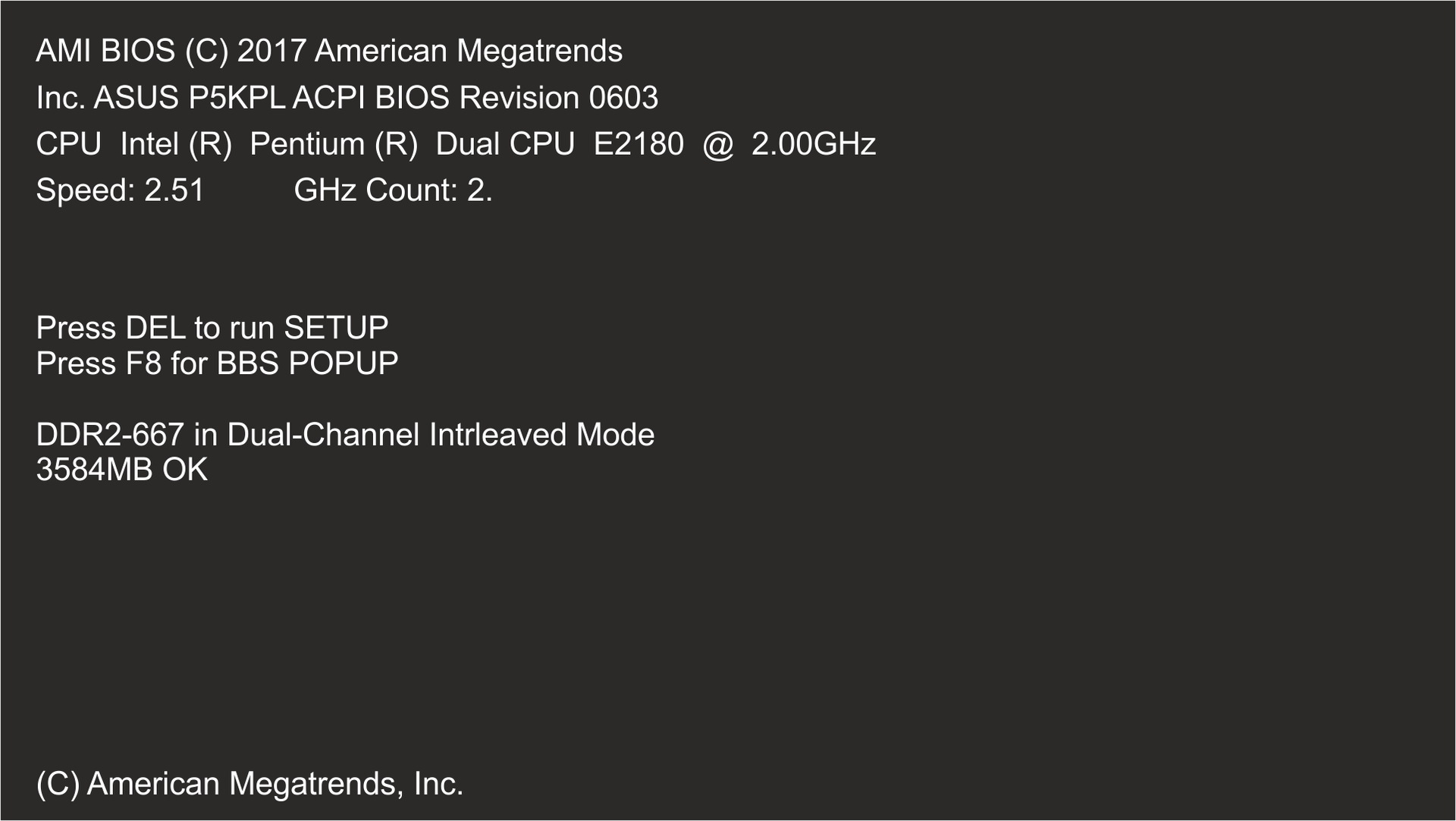
Zrzut ekranu przedstawia procedurę POST, czyli test poprawności działania podstawowych podzespołów: pamięci RAM, grafiki, dysków twardych, procesora wykonywanego przy każdym uruchomieniu lub po restarcie. Na ekranie widoczne są komunikaty dotyczące Biosu: AMI BIOS (C) 20077 American Megatrends, płyty głównej: Inc. ASUS P5KPL ACPI BIOS Revision 0603, procesora: CPU Intel (R) Pentium (R) Dual CPU E2180 @ 2.00GHz Speed: 2.51 GHz Count: 2. Poniżej informacj dotyczące dodatkowych opcji uruchamiania komputera: Press DEL to run SETUP, Press F8 for BBS POPUP. Poniżej informacje o zainstalowane pamięci: DDR2-667 in Dual-Channel Intrleaved Mode, 3584MB OK. Na dole okranu napis (C) American Megatrends, Inc.
A power‑on self‑test (POST) is a process performed by BIOS/UFI immediately after the computer is powered on that verifies the correct operation of the basic componentscomponentscomponents of the computer. The correct completion of the test is signaled with a single beep. If POST is not completed successfully, the sequence of beeps from the PC speaker is generated. These signals, and more precisely their number and duration, are error codes. By referring to the instruction manual, you can determine the cause of the problem. Modern motherboards, instead of using a quite inconvenient beep code, present the results of POST with the use of colour LEDs or the display on the motherboard. During hardware failurefailurefailure BIOS displays the so called BIOS System Messages, which inform about the type of hardware defect.
Hardware defectdefectdefect, though costly, is often not the biggest problem you have to face in the event of failure. The resources which have been collected on the computer can sometimes be more valuable than the defected hardware itself. Therefore it is extremely important to regularly backupbackupbackup the most important files. It is worth to store the files containing valuable data in multiple copies saved on various mediamediamedia (e.g. on CD/DVD, in memories or on removable discs).
What data would you like to recover in the case of computer failure?
R4uL9aeT2Yyzm1
Ilustracja przedstawia napis ERROR. Wypełnienie liter stanowi tak zwany blue screen, czyli informacje o błędzie systemu Windows zapisane białą czcionką na niebieskim tle.
Before starting the diagnostic process, check the power supply of your computer. Inspect all the cables, e.g. those connecting the processor with the monitor. If you suspect hardware defectdefectdefect, it is recommended to start another operating system on the given computer (from a CD/DVD or a pendrive) and observe the operation of hardware. Live operating systems are perfectly suited for this purpose.
An excellent preventive measure to protect your data collected on the computer against failure is to separate data from the operating system by installing them on some other partition of the hard disc.
The computer is a complex device and if you lack sufficient knowledge, you should turn to a specialized service with your computer system failurefailurefailure. Any immediate and misguided actions are not recommended since they may result in data lossdata lossdata loss and even bigger defects.
Exercises
Exercise 1
Rvgy7g3CfTp7d
Wersja alternatywna ćwiczenia: In order to prevent computer system failure: Możliwe odpowiedzi: 1. use the computer in aproppriate conditions, 2. maintain hardware regularly, 3. use antivirus software, 4. backup your data, 5. use the administrator account during regular work, 6. do not perform regular updates of the system and the most important programmes, 7. be cautious and avoid threats
Wersja alternatywna ćwiczenia: In order to prevent computer system failure: Możliwe odpowiedzi: 1. use the computer in aproppriate conditions, 2. maintain hardware regularly, 3. use antivirus software, 4. backup your data, 5. use the administrator account during regular work, 6. do not perform regular updates of the system and the most important programmes, 7. be cautious and avoid threats
In order to prevent computer system failure:
use the computer in aproppriate conditions
maintain hardware regularly
use antivirus software
backup your data
use the administrator account during regular work
do not perform regular updates of the system and the most important programmes
be cautious and avoid threats
zadanie
Source: GroMar, licencja: CC BY 3.0.
Exercise 2
Create a multimedia presentation about the causes of computer system failures. Illustrate it with images that you can find on the internet or created independently.
Exercise 3
Tell in English how you protect your data (e.g. documents, photographs, films) collected on the computer.
Exercise 4
RUDqLaFSLEEiM
Wersja alternatywna ćwiczenia: Indicate which pairs of expressions or words are translated correctly. Możliwe odpowiedzi: 1. awaria - failure, 2. kopie zapasowe - backup, 3. utraty danych - data loss, 4. uszkodzenie - defect, 5. sygnały dźwiękowe - burning smell, 6. podzespoły - procedure
Wersja alternatywna ćwiczenia: Indicate which pairs of expressions or words are translated correctly. Możliwe odpowiedzi: 1. awaria - failure, 2. kopie zapasowe - backup, 3. utraty danych - data loss, 4. uszkodzenie - defect, 5. sygnały dźwiękowe - burning smell, 6. podzespoły - procedure
Indicate which pairs of expressions or words are translated correctly.
awaria - failure
kopie zapasowe - backup
utraty danych - data loss
uszkodzenie - defect
sygnały dźwiękowe - burning smell
podzespoły - procedure
zadanie
Source: GroMar, licencja: CC BY 3.0.
R17GKJt5r4mP51
Interaktywna gra, polegająca na łączeniu wyrazów w pary w ciągu jednej minuty. Czas zaczyna upływać wraz z rozpoczęciem gry. Jeden ruch to odkrywanie najpierw jednej potem drugiej karty z wyrazem. Każdy wyraz jest odczytywany. Kolejny ruch to odkrywanie trzeciej i czwartej karty. W ten sposób odsłuchasz wszystkie wyrazy. Nawigacja z poziomu klawiatury za pomocą strzałek, odsłuchiwanie wyrazów enterem lub spacją. Znajdź wszystkie pary wyrazów.
Interaktywna gra, polegająca na łączeniu wyrazów w pary w ciągu jednej minuty. Czas zaczyna upływać wraz z rozpoczęciem gry. Jeden ruch to odkrywanie najpierw jednej potem drugiej karty z wyrazem. Każdy wyraz jest odczytywany. Kolejny ruch to odkrywanie trzeciej i czwartej karty. W ten sposób odsłuchasz wszystkie wyrazy. Nawigacja z poziomu klawiatury za pomocą strzałek, odsłuchiwanie wyrazów enterem lub spacją. Znajdź wszystkie pary wyrazów.
Match Polish terms with their English equivalents.
kopie zapasowe
data loss
failure
backup
utraty danych
awaria
defect
uszkodzenie
Source: Zespół autorski Politechniki Łódzkiej, licencja: CC BY 3.0.